

模型与 MCP
待识别

rea
morluto
Reverse engineer anything with agents, from app behavior down to native binaries.
PROJECT TOPICS
INSTALL REFERENCE
dsh plugin --profile web add github:nexxxl/windos2026
该命令指向仓库当前默认分支;尚无绑定当前 commit 的完整验证结果。
PROJECT README



English · 简体中文 · 繁體中文 · 日本語 · 한국어 · Español · Français · Deutsch
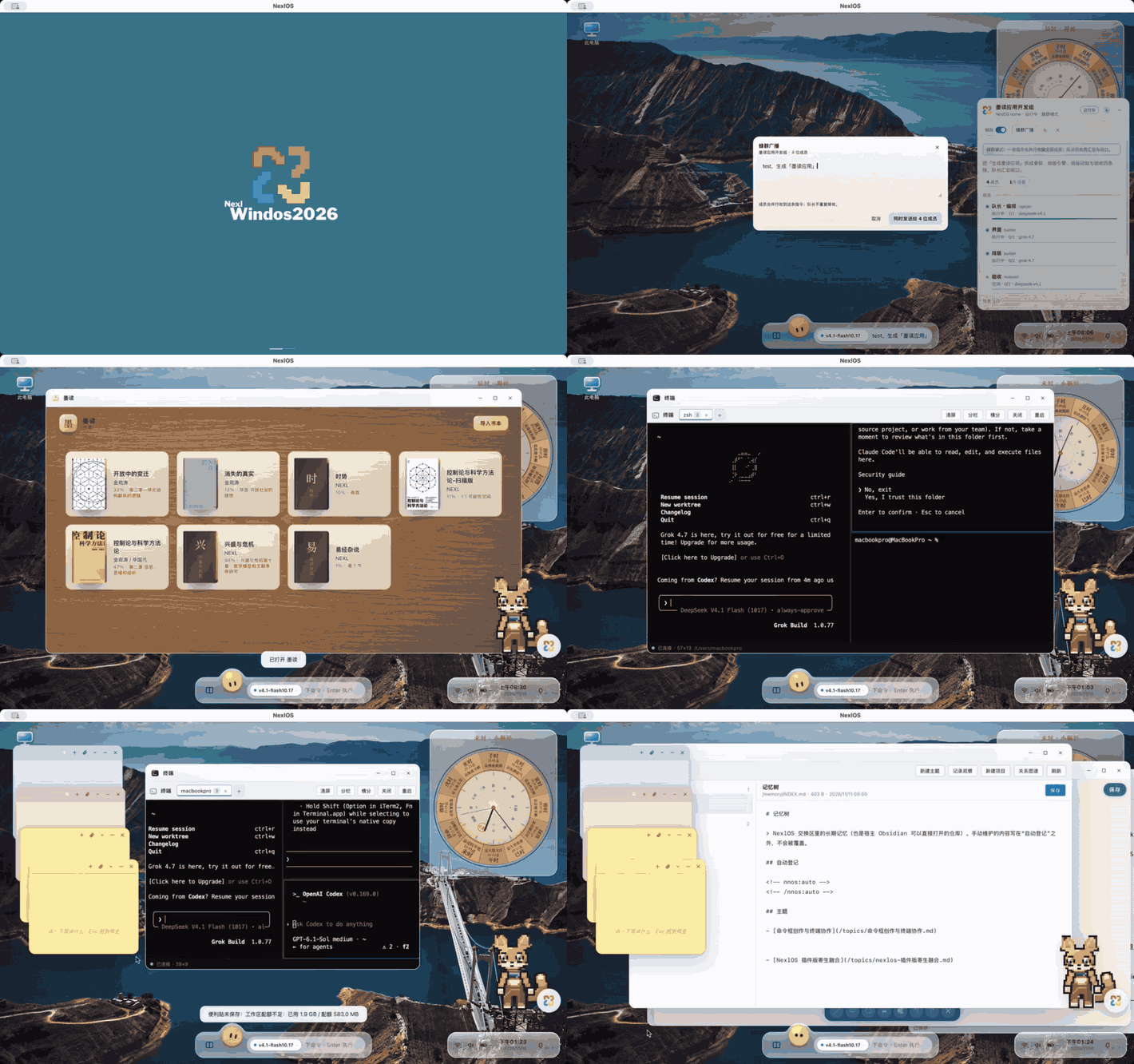
7.94 MiB. A 2026 AI-native, ultra-light operating system: alien technology in the millennium, your private software factory today. Bring anything. Leave with an HTML app.
If a 2026 AI-native operating system had opened on your computer back in the millennium, what would you have used it for?
windos2026 is the DSH plugin edition of NexlOS. It puts a full desktop inside DSH: 17 apps, 25 commands, 8 built-in interface languages, a 7.94 MiB tarball, and one runtime dependency. Generated apps are plain files under apps/<id>/; the 17 built-in apps ship as code under src/webos/.
Everyone remembers their first desktop. This is the one you get to own: you assemble it yourself, one sentence at a time, and every app leaves with you as a file. Linux gave every program a machine; NexlOS gives every agent a computer.
Your model. The plugin ships no key and sets no default provider. It reads whatever your current DSH profile already has, and when it cannot see a model it says so: the capability layer answers 501 with a reason, and the model indicator reports unavailable instead of pretending to be ready.
Your apps. Say one sentence in DSH: the generator writes apps/<id>/index.html plus app.json, opens the page in a browser to verify it, repairs it once if that check fails, then puts the icon on your desktop. Copy that directory to any static server and it still runs; hand it a GitHub URL and importGithubApp clones the repository, finds the built entry point, and mounts it as an app.
Your machine. 7.94 MiB buys 17 apps, 25 commands and 8 interface languages inside the harness you already run: no second control plane to deploy, no account, no telemetry. Install the same bundle into another DSH profile and it uses that profile's model, not ours.
| Edition | What you get | License |
|---|---|---|
| Plugin (source in this repository) | the 7.94 MiB package described below | Apache-2.0 |
| Universal (Releases) | a self-contained binary with its own native window shell | the closed kernel, shell and updater under NexlOS Binary License 1.0; the embedded desktop layer keeps Apache-2.0 |
The authoritative file-by-file map is LICENSING.md.
Plugin — the minimal distribution. One install_bundle into DSH or Octop, 7.94 MiB, no second control plane. It runs inside the harness you already use, and it is the form whose source is published here. Use it to feel what the system is and to build apps from a sentence.
Release — the full build. A self-contained binary with its own native window shell, for Windows and macOS. No Node, no DSH, no harness. It is the complete system: the same desktop layer, plus the closed kernel and shell that turn it into a standalone machine on your own disk.
| Plugin | Release | |
|---|---|---|
| Get it from | this repository, install_bundle |
Releases |
| Size | 7.94 MiB | ~27 MB per platform |
| Needs | DSH or Octop, Node 22+ | nothing else |
| License | Apache-2.0 | NexlOS Binary License 1.0 |
| Updates | pull and reinstall | download and replace the binary |
| Best for | trying it, generating apps, embedding it in your agent | daily desktop use on your own machine |
Both forms read the model configuration you already have. Neither ships a key, an account or telemetry.
Status: the plugin edition is installable today. Universal builds publish unsigned: Apple notarization and Windows code signing are on the roadmap, so install them from a terminal or clear the browser's quarantine attribute. The steps, and the reason the warning appears, are under Install the release build.
This repository and its Releases
page are the only official source. A mirror, a repackaging site or a "download
portal" offering NexlOS binaries is not us; every official asset is listed here
with a SHA256SUMS file.
Send the repository URL to DSH, then say:
https://github.com/nexxxl/windos2026
install windos2026
DSH clones the repository and installs it into the current profile with plugin_manager install_bundle. You can also point it at a local directory:
plugin_manager install_bundle target=/absolute/path/to/windos2026Or install into the local profile without a conversation:
./scripts/install-posix.sh
powershell -ExecutionPolicy Bypass -File scripts\install-windows.ps1
Requires Node.js 22+ and a DSH build that can load local bundles. There is no npm release; install from this repository or the local script above.
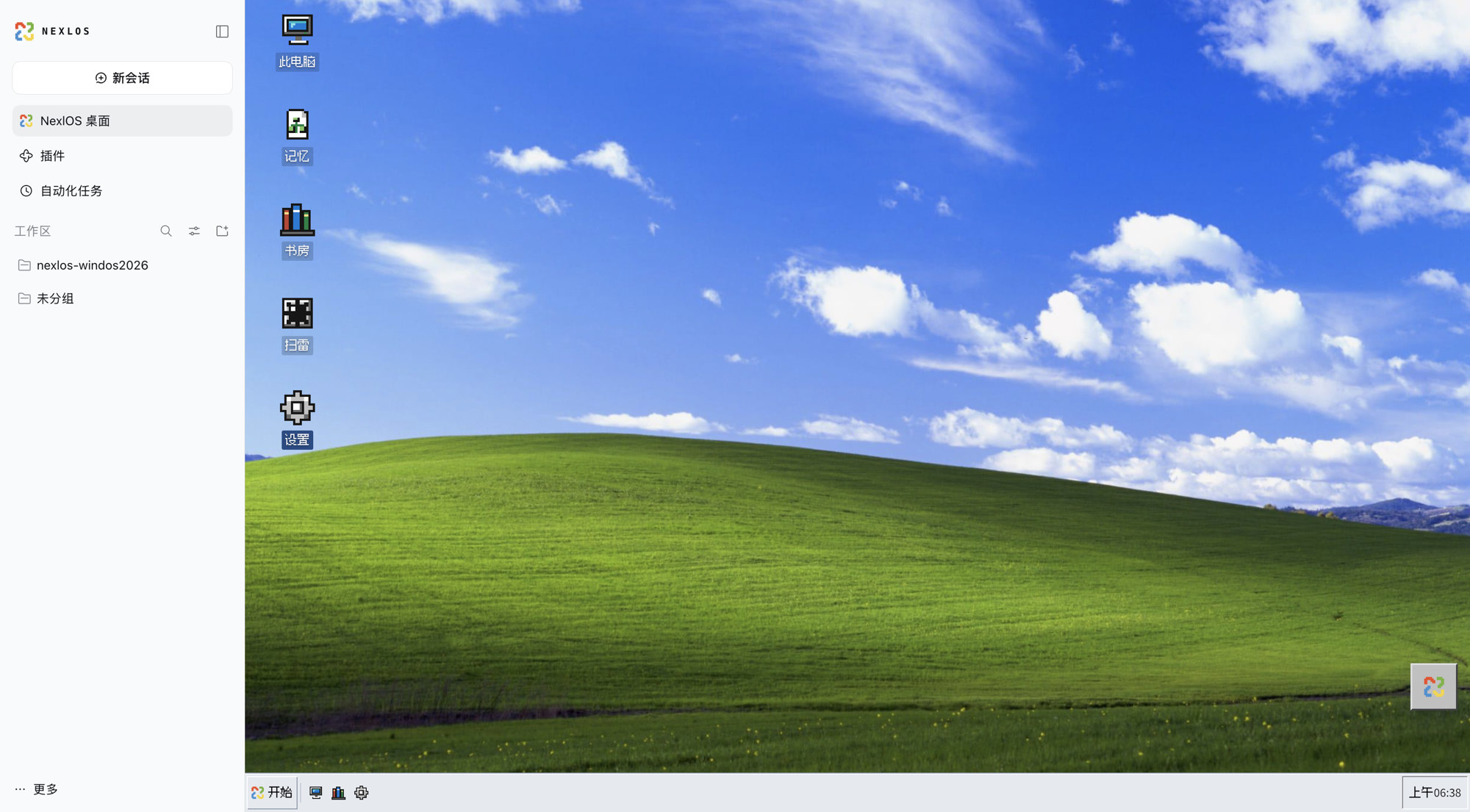
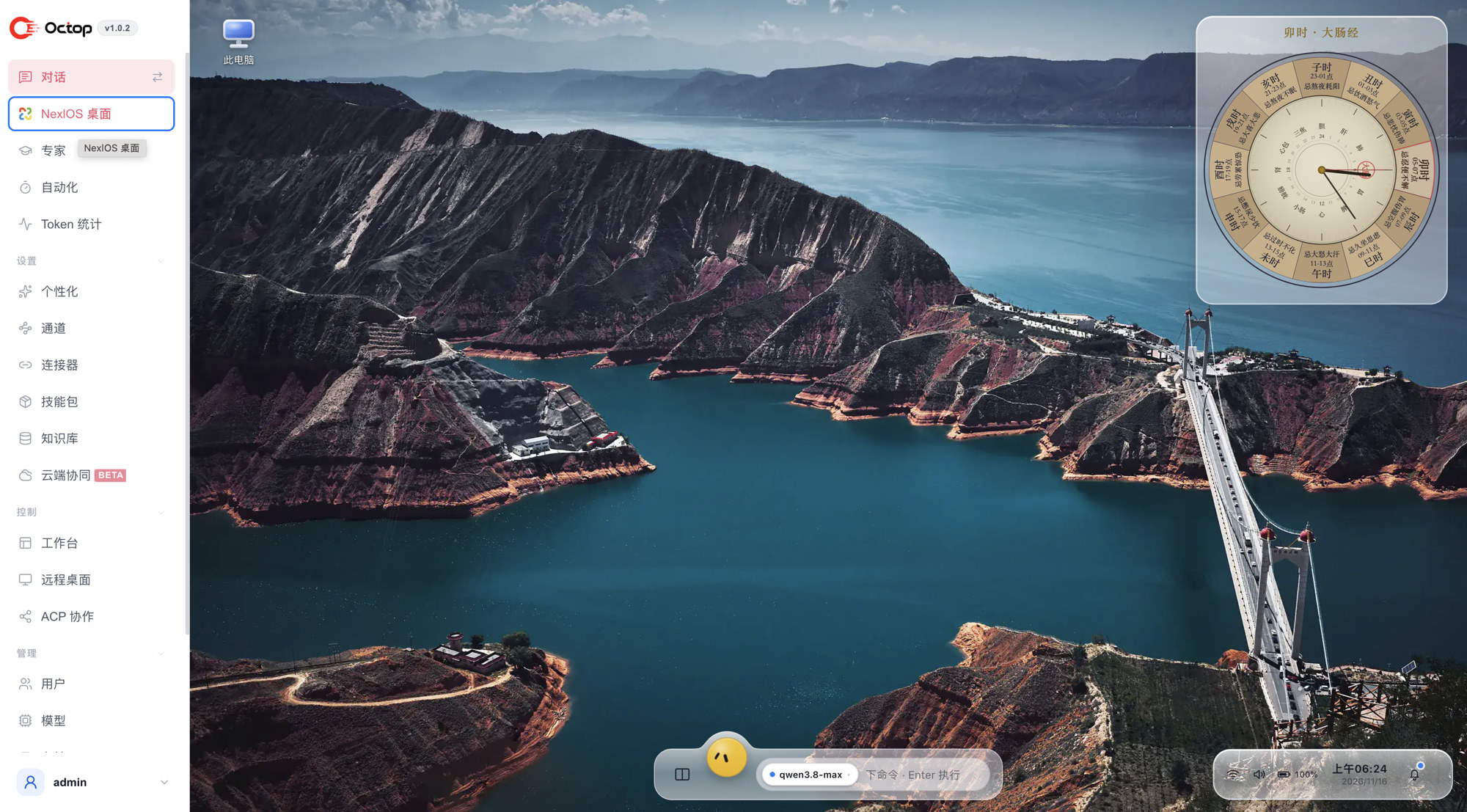
The desktop does not need DSH. The same src/webos/ and index.js run as a standalone host, and one command adds a persistent entry to Octop:
git clone https://github.com/nexxxl/windos2026.git
cd windos2026
./scripts/octop-install install
Octop's sidebar then carries NexlOS desktop; the desktop opens in the main workspace and the command bar answers with your own Octop agent. ./scripts/octop-install status|up|down|uninstall manages it. Requires Node.js 22+ and an Octop install under ~/.octop. Host differences, limits and rollback: docs/octop.md.
| Platform | Requirement | Asset |
|---|---|---|
| macOS 12 Monterey or newer, Apple Silicon | native arm64 build | NexlOS-<version>-darwin-arm64-candidate.zip |
| macOS 12 Monterey or newer, Intel | native x86-64 build | NexlOS-<version>-darwin-amd64-candidate.zip |
| Windows 10 / 11, x64 | WebView2 runtime, present on Windows 11 and most Windows 10 installs | NexlOS-<version>-windows-amd64-candidate.zip |
The download is 27–28 MB and unpacks to 38–39 MB. Windows on ARM is not built yet; the release runs x64 under emulation there, untested.
The repository is public, so the release assets download anonymously. The
official site is https://nexxxl.github.io/windos2026/; it is the same content
as site/ in this repository.
The release binary carries no Developer ID and no Authenticode signature, so a
browser download is flagged by Gatekeeper or SmartScreen. gh and curl write
the file without the browser's quarantine / Mark-of-the-Web attribute, so
installing from a terminal starts cleanly.
macOS. Use darwin-arm64 on Apple Silicon and darwin-amd64 on Intel.
TAG=v0.6.15                      # the release you want
gh release download "$TAG" -R nexxxl/windos2026 -p '*darwin-arm64*.zip'
unzip -q NexlOS-*-darwin-arm64-candidate.zip -d /tmp/nexlos
mv /tmp/nexlos/NexlOS-*/NexlOS.app /Applications/
Without gh:
TAG=v0.6.15
curl -fL -o /tmp/nexlos.zip \
  "https://github.com/nexxxl/windos2026/releases/download/$TAG/NexlOS-${TAG#v}-darwin-arm64-candidate.zip"
unzip -q /tmp/nexlos.zip -d /tmp/nexlos
mv /tmp/nexlos/NexlOS-*/NexlOS.app /Applications/
Windows (x64, PowerShell).
$tag = 'v0.6.15'
gh release download $tag -R nexxxl/windos2026 -p '*windows-amd64*.zip'
Expand-Archive .\NexlOS-*-windows-amd64-candidate.zip -DestinationPath "$env:LOCALAPPDATA\NexlOS" -Force
& "$env:LOCALAPPDATA\NexlOS\NexlOS-*\nexlos.exe"
If the ZIP came from a browser. macOS 15 removed the right-click override, so clear the attribute once on the extracted app:
xattr -dr com.apple.quarantine /Applications/NexlOS.appOn Windows, unblock the file before running it:
Unblock-File -Path .\nexlos.exeWhy the warning appears. The universal build ships without an Apple
Developer ID or a Windows Authenticode certificate; both are paid annual
programs and neither is in place yet. The universal binaries are built from a
private release tree by scripts/release/build.py; this repository carries the
plugin source, the docs and the release audit. Every release publishes
SHA256SUMS and a release-manifest.json with the artifact digests:
shasum -a 256 -c SHA256SUMSUpdates are checked against a manifest signed with an Ed25519 key compiled into
the binary; see docs/UPDATES.md. The check is an anonymous
GET against a public pre-release page. On Apple
Silicon the bundle is signed ad-hoc, which the kernel requires before it will run
the process at all. Ad-hoc signing is not a trust statement.
apps/<id>/ and it still runs on another machine.| Item | Number |
|---|---|
| Tarball | 7.94 MiB (measured with npm pack --dry-run --json) |
| Unpacked | 12.6 MiB / 287 files |
| Apps | 17 |
| Commands | 25 |
| Interface languages | 8 built in, 7 optional packs |
| Themes | 2 (NEXL modern / Windos2026) |
| Runtime dependencies | 1 (jpeg-js) |
| License | Apache-2.0 (trademarks and third-party assets excepted) |
If you arrived from a search for an AI-native operating system, an agent computer, a software factory or a local-first BYOK runtime, this is the honest match: a 7.94 MiB shell with 17 apps and 25 commands that runs inside DSH or Octop, turns one sentence into a portable HTML app, and gives an agent a workspace it can keep.
Each search phrase mapped to what actually exists, plus what this project deliberately does not claim: docs/highlights.md. How the production line records evidence: docs/factory.md. Value page and common searches: docs/faq.md. Use and redistribution boundaries: docs/research-use.md. Machine-readable summary for AI crawlers: llms.txt.
npm ci
npm run check
npm test
npm pack --pack-destination /absolute/path/to/artifacts
Size gate:
./scripts/verify-lite.shThe plugin source in this repository is Apache-2.0. Release binaries of the universal edition follow a separate license; see LICENSING.md for the map and LICENSE-BINARY.md for its terms.
Plugin source and documentation are Apache-2.0. Trademarks are not granted by Apache-2.0; third-party assets keep their own licenses. Provenance, license texts and porting notes are in THIRD_PARTY_NOTICES.md; trademark rules in TRADEMARK.md; warranty and liability terms in DISCLAIMER.md.
ArtCraft for NexlOS (ArtCraft 移植版) is the worked example shipped with the built-in app generator, and the one place where algorithms come from an upstream project. It installs upstream ArtCraft's editor structure and portable algorithms into NexlOS, then rebuilds them against this project's own contract: commands, a single serializable document state, and a mount/destroy panel. The porting approach and the file-by-file mapping are in docs/artcraftport/ATTRIBUTION.md: the upstream is storytold's ArtCraft (github.com/storytold/artcraft, MIT / Apache-2.0), rewritten here as zero-dependency ES modules under the MIT terms. The Rust renderer, Tauri host and AI calls are not included. This port is unofficial and has no affiliation with or endorsement from the upstream team; the name ArtCraft in the app title names the upstream project and is always qualified with "for NexlOS". The app id, route and directory are artcraftport.
Release history: CHANGELOG.md. Release notes per version: docs/release-notes/. Contribution rules and the DCO: CONTRIBUTING.md. Security reports: SECURITY.md. License map: LICENSING.md. Versioning and support window: docs/releasing.md. How release builds detect a newer version: docs/UPDATES.md.
CLASSIFICATION EVIDENCE
系统优先读取 GitHub Topics,再与站内分类词典和词根规则比对。当前命中: deepseek-harness。
morluto
Reverse engineer anything with agents, from app behavior down to native binaries.

deepseek-ai
DeepSeek Harness: Everything is a Plugin.

nexu-io
The 1st Collaborative AI Design Agent Workspace. Local-first and open source. Create motion, prototypes, websites, apps, dashboards, presentations, images, and videos with your team and AI agents. Share work, exchange feedback, and iterate together in one workspace.