
其他
完整应用

deepseek-harness
deepseek-ai
DeepSeek Harness: Everything is a Plugin.
PROJECT TOPICS
PROJECT README
DSH 插件管理器:给「插件」设置里补上一个「我的插件」页面,让每个已安装插件都能看到它是干什么的,并且把你自己装的插件(市场安装 / 本地开发)一键卸载掉。
package.json 读取 description,直接显示「这个插件是干什么的 / 解决什么问题」link: 本地开发、npm / github 市场安装)可以一键卸载,卸载后重启 dsh 生效dependencies 里登记过的插件(市场安装 / 本地开发),随 DSH 提供的内置插件不在这里出现。package.json 的 description、版本号,有 homepage / repository 时给「查看主页」链接。dependencies 里登记过的插件;内置 bundle 会被明确拒绝。卸载 = pnpm remove + 从 bundles 移除,两步都幂等。--dump-config 校验新组合能通过,避免把 harness 带崩。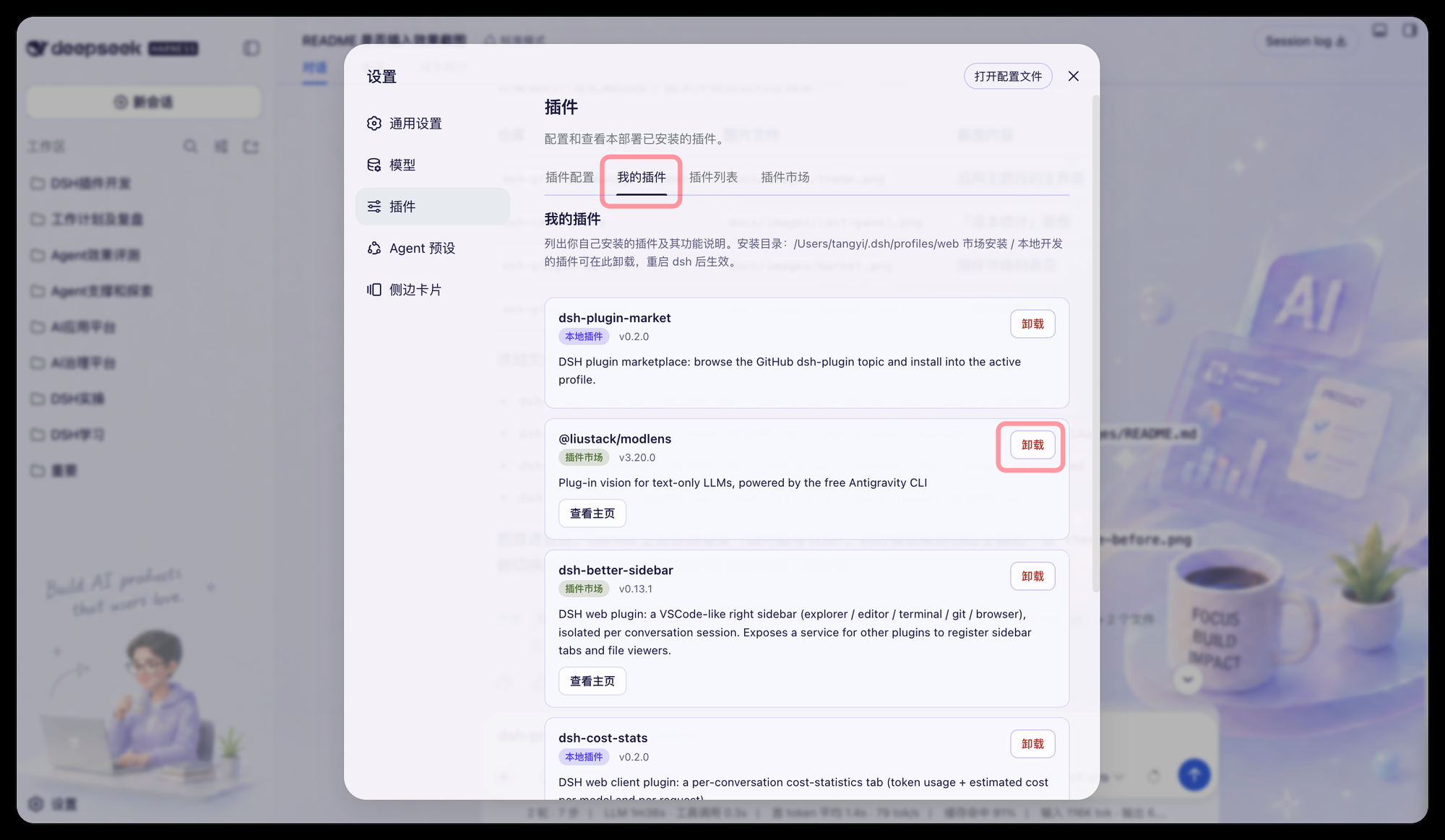
PLUGIN=dsh-plugin-manager
PROFILE="$HOME/.dsh/profiles/web"

dsh plugin --profile web add "link:/绝对路径/到/dsh-plugin-manager" \
&& node -e '
const fs = require("fs");
const file = process.argv[1] + "/package.json";
const name = process.argv[2];
const pkg = JSON.parse(fs.readFileSync(file, "utf8"));
const profile = ((pkg.dsh ??= {}).profile ??= {});
const list = (profile.bundles ??= []);
if (!list.includes(name)) {
  list.push(name);
  fs.writeFileSync(file, JSON.stringify(pkg, null, 2) + "\n");
}
console.log("已登记 bundles:", list.join(", "));
' "$PROFILE" "$PLUGIN" \
|| echo "安装未完成,profile 未被改动。"插件在启动时装载,改完配置必须重启才生效:
# 切到正在运行 dsh web 的终端按 Ctrl+C,然后:
dsh web浏览器打开 DSH Web,进入 设置 → 插件 → 我的插件,应能看到每个插件的功能说明;市场安装 / 本地开发的插件右侧有「卸载」按钮。
在 profile 的 cordis.patch.yml 里可选配置:
- insert:
    - id: plugin-manager
      name: dsh-plugin-manager
      config:
        # 卸载作用的 profile 目录。留空则自动寻找 bundles 中包含本包的 profile,
        # 找不到再回退到 $DSH_HOME/profiles/web。
profileDir: ''lib/index.js —— 宿主侧:读取已安装插件清单(含描述 / 版本 / 来源)、卸载、重启。lib/client.js —— 浏览器侧:我的插件 设置页,ModuleLoader 工厂格式,无需打包器。cordis.patch.yml —— 本包的 bundle patch 行。/plugin-manager/* 路由都挂在每进程随机的 Bearer Token 之后,Token 注入 index.html,本页面才能调用;卸载动作只发生在当前 profile 目录内。dependencies 里的 bundle)会被拒绝卸载,避免拆掉 DSH 底座。CLASSIFICATION EVIDENCE
系统优先读取 GitHub Topics,再与站内分类词典和词根规则比对。当前命中: 无有效分类标签。
deepseek-ai
DeepSeek Harness: Everything is a Plugin.

anywhere-labs
为 DeepSeek Harness (DSH) 插件生态打造的现代化桌面端解决方案。万物皆「插件」,桌面本身也是「插件」。

walkinglabs
Harness engineering beginner tutorial, from 0 to 1