
模型与 MCP
待识别

rea
morluto
Reverse engineer anything with agents, from app behavior down to native binaries.
PROJECT TOPICS
INSTALL REFERENCE
dsh plugin --profile web add github:nTillMeetu/Neko_02
该命令指向仓库当前默认分支;尚无绑定当前 commit 的完整验证结果。
PROJECT README


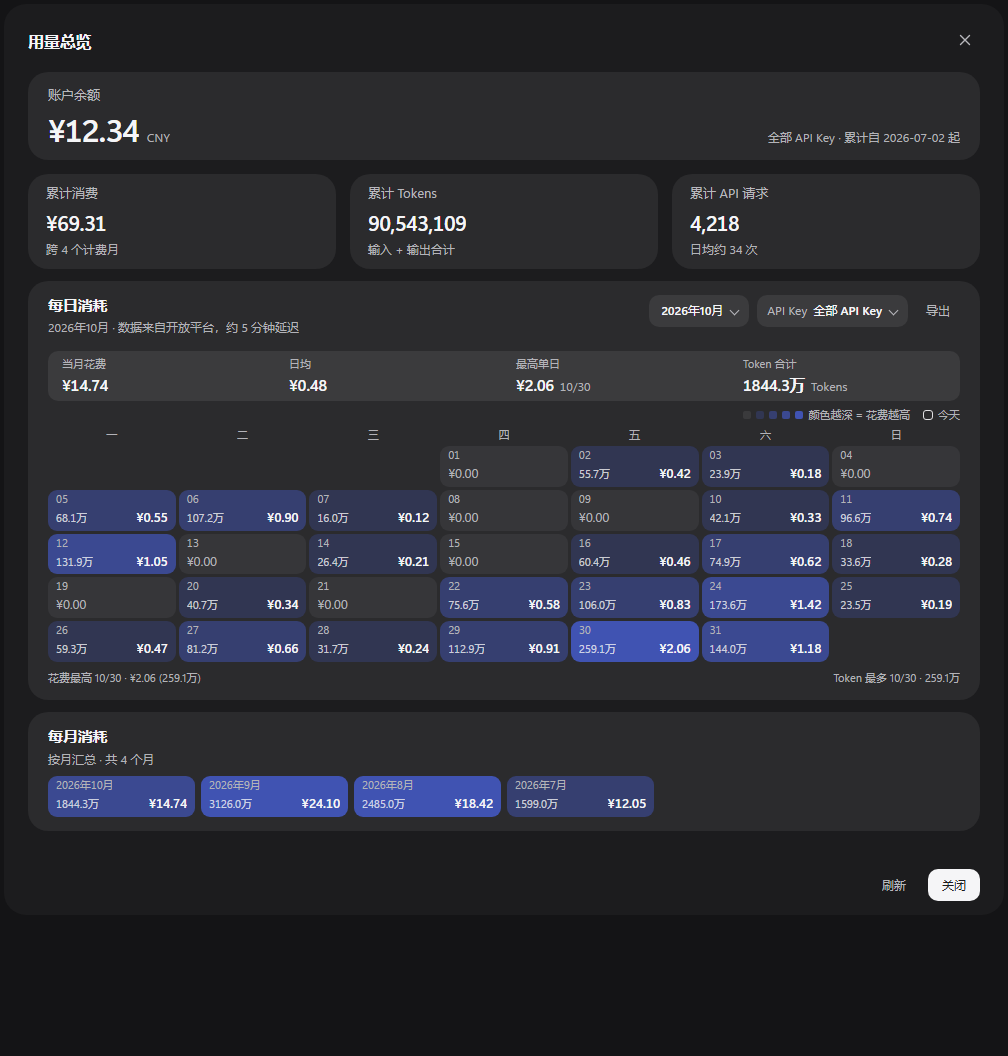
An in-app panel for DeepSeek Harness (DSH) desktop that replaces the embedded
platform.deepseek.com/usage page behind 设置 → 账号与余额 → 查询用量 with a
readable overview of the whole account:
Not an official DeepSeek product. It is a community plugin that lives inside the DSH desktop profile and uses DSH's extension points.
Dark theme
Light theme
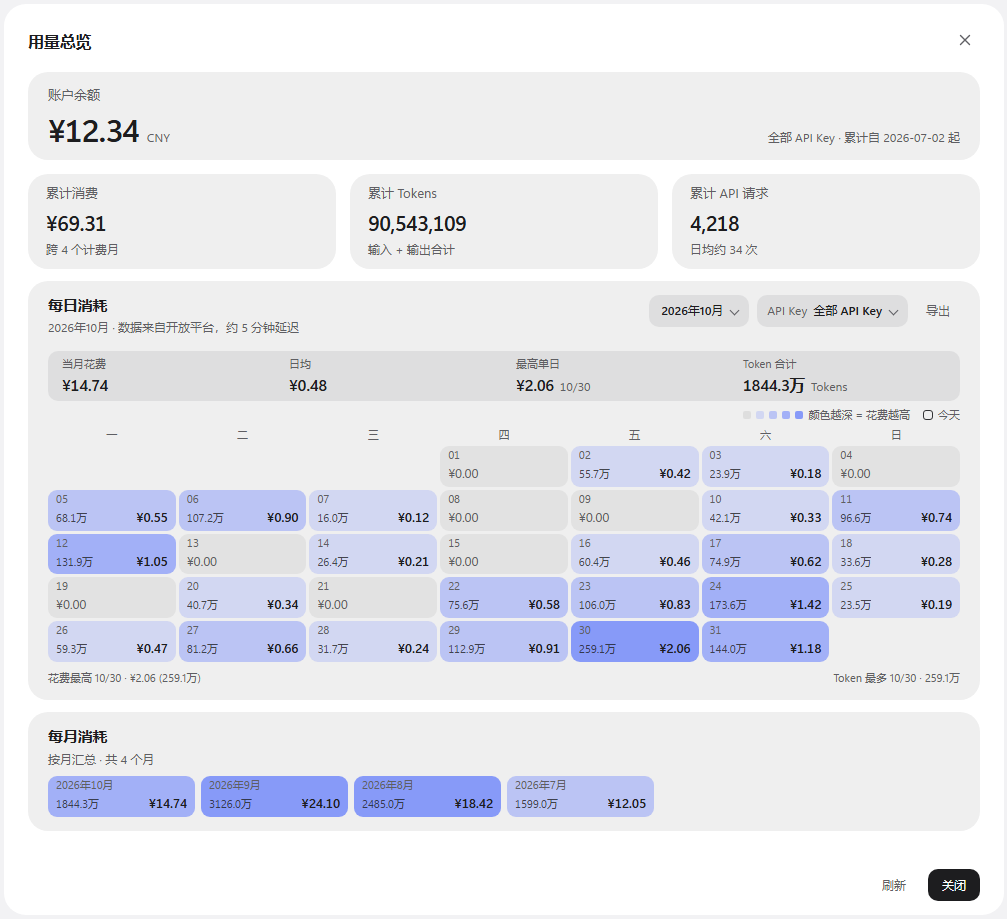
Screenshots use synthetic data.
| App | DeepSeek Harness desktop (tested with 0.2.1-rc.5, Windows x64) |
| Node.js | 20+ for the installer (DSH ships its own runtime as a fallback) |
| Account | A DSH account that is signed in (the panel reads the existing session) |
| OS | Windows currently tested; the installer uses only Node APIs, other platforms untested |
This is not a standalone web app. It is a DSH profile bundle: the Host half adds one route, the Client half adds one panel to the settings dialog.
git clone https://github.com/nTillMeetu/Neko_02.git
cd Neko_02
node install.mjs
The installer:
~/.dsh/profiles/desktop, override with --profile <dir>);package.json and pnpm-lock.yaml;"dsh-usage-overview": "link:<repo path>" to the profile dependencies;dsh-usage-overview to dsh.profile.bundles;pnpm install with the pnpm bundled in your DSH runtime;Then restart DeepSeek Harness and open 设置 → 账号与余额 → 查询用量.
Useful flags:
node install.mjs --dry-run      # show the planned changes only
node install.mjs --profile "C:/Users/you/.dsh/profiles/desktop"
node install.mjs --uninstall # remove it againIf you prefer to edit the profile yourself, add the link dependency and the bundle
entry to ~/.dsh/profiles/desktop/package.json, then run pnpm install from that
directory and restart DSH:
{
  "dependencies": {
    "dsh-usage-overview": "link:D:/path/to/Neko_02"
  },
  "dsh": {
    "profile": {
      "bundles": [
        // ... your existing bundles
        "dsh-usage-overview"
      ]
    }
  }
}lib/index.js) registers /usage-overview/summary. It uses the account
grant that DSH already holds, calls the Platform /api/v0/usage/by_api_key/*
endpoints (31-day aligned windows, cached), and returns numbers only.lib/client.js) renders the panel in a DSH overlay slot and fetches that
route. It never talks to platform.deepseek.com directly.Security: the account token never leaves the Host process and is never sent to the client; the route returns aggregated totals and daily/monthly buckets. The plugin has no telemetry and no third-party dependencies at runtime — React and the DSH UI primitives are provided by DSH itself.
shell.overlay slot, profile web server routes, UI primitives)
are not a stable public contract. A future DSH update can break this plugin; check
the issue tracker before upgrading DSH.node install.mjs --uninstallThen restart DSH. If you installed manually, remove the dependency and the bundle
entry and run pnpm install again.
git clone fails with Failed to connect to github.com:443
Some networks block GitHub's HTTPS edge. Clone over SSH instead (GitHub serves
SSH on port 443): add ~/.ssh/config entries
Host github.com
  HostName ssh.github.com
  Port 443
  User git
and use git clone git@github.com:nTillMeetu/Neko_02.git. After cloning, the
installer works offline.
Panel does not appear after restarting DSH
Check that dsh.profile.bundles in the profile's package.json contains
dsh-usage-overview, then run pnpm install from the profile directory again.
The plugin needs a DSH build that provides the shell.overlay slot.
Monthly totals are missing
The Host half needs a DSH restart to register its route (already part of the install step). If only the client was reloaded, the panel falls back to the current month and the month picker is disabled.
Balance or usage returns an error
The panel uses the signed-in account's session; sign in again in DSH, then reopen the panel and press 刷新.
The panel disappeared after moving the repository
The profile links to the repository path. Move the folder, then run
node install.mjs again to refresh the link.
MIT © 2026 nTillMeetu
这是给 DeepSeek Harness 桌面版用的社区插件,把设置里「账号与余额 → 查询用量」 从内嵌网页换成应用内面板:余额、累计消费/Token/请求、整月日历热力图 (每天显示金额和 Tokens,颜色越深花得越多)、点某天看当天明细、按月份切换、 按 API Key 过滤、导出当月 CSV。
安装:
git clone https://github.com/nTillMeetu/Neko_02.git
cd Neko_02
node install.mjs
脚本会找到你的 DSH profile(默认 ~/.dsh/profiles/desktop),备份后写入
link: 依赖和 dsh.profile.bundles,再用 DSH 自带的 pnpm 安装。
装完重启 DSH,打开「设置 → 账号与余额 → 查询用量」即可。
注意:
node install.mjs --uninstall 可卸载;CLASSIFICATION EVIDENCE
系统优先读取 GitHub Topics,再与站内分类词典和词根规则比对。当前命中: deepseek-harness。
morluto
Reverse engineer anything with agents, from app behavior down to native binaries.

deepseek-ai
DeepSeek Harness: Everything is a Plugin.

nexu-io
The 1st Collaborative AI Design Agent Workspace. Local-first and open source. Create motion, prototypes, websites, apps, dashboards, presentations, images, and videos with your team and AI agents. Share work, exchange feedback, and iterate together in one workspace.