
模型与 MCP
待识别

rea
morluto
Reverse engineer anything with agents, from app behavior down to native binaries.
PROJECT TOPICS
INSTALL REFERENCE
dsh plugin --profile web add github:mwk719/dsh-restart
该命令指向仓库当前默认分支;尚无绑定当前 commit 的完整验证结果。
PROJECT README
给 DeepSeek Harness Desktop(Windows)的标题栏加一个「重启」按钮。点一下弹出确认框,确认后应用关闭并重新打开。
非 DeepSeek 官方插件,社区插件。

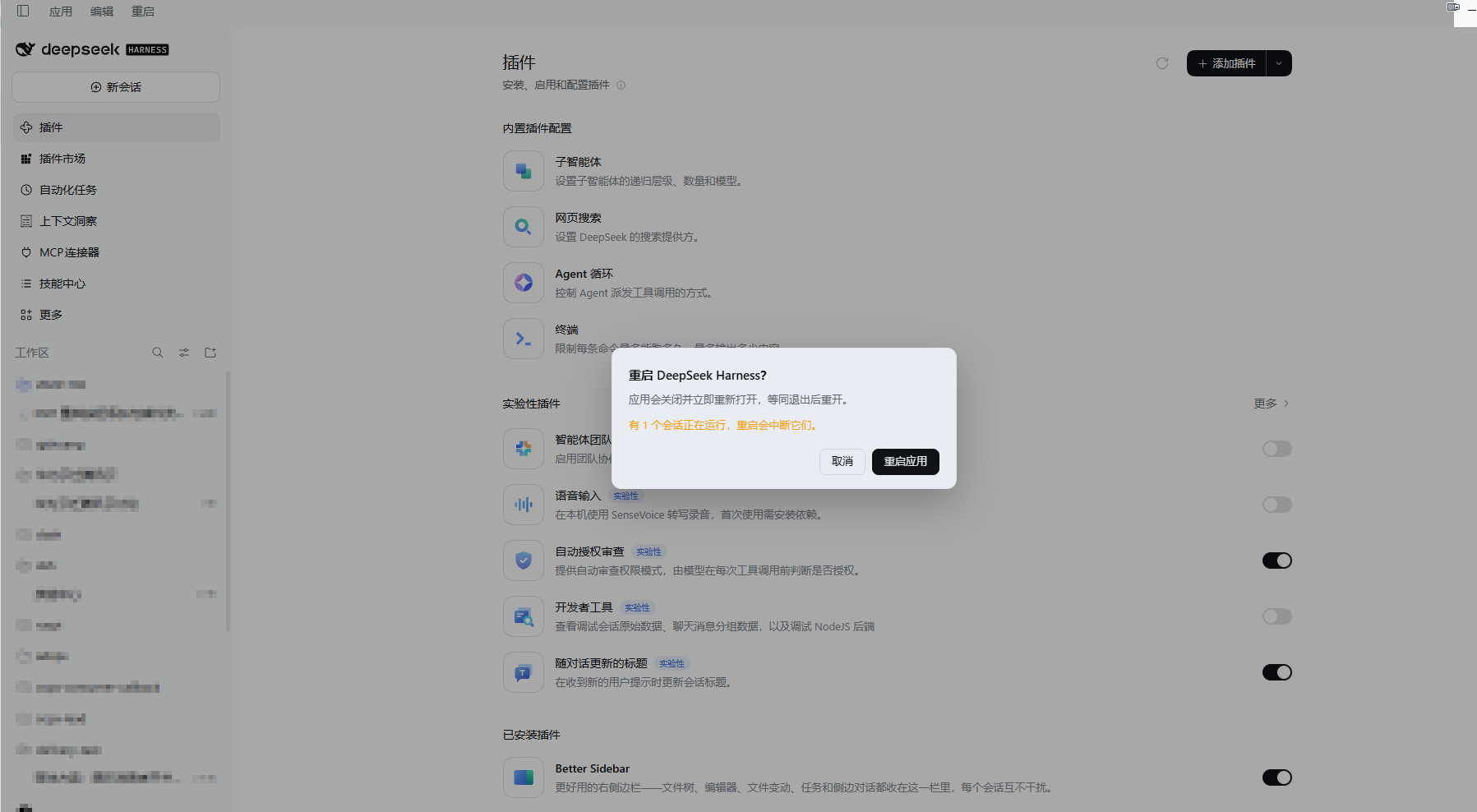
dsh plugin --profile desktop add github:mwk719/dsh-restart也可以从插件市场(dsh-market)安装。装完重启一次应用,标题栏「应用 / 编辑」右边就会出现「重启」。
Restart)。Esc / 点击遮罩 = 关掉,什么都不做;「重启应用」= 立刻重启。「应用」弹出的菜单是 Electron 主进程里的原生菜单,由 app.asar 内 lib/main.js 的 applicationItems() 构造(最后一项是「退出」)。dsh 的插件系统没有给这个菜单留插槽,桌面端也没有把 quit / restart 暴露给网页或插件,所以插件无法往那条菜单里插条目。
本插件改为把按钮追加进同一个标题栏菜单行——桌面端 preload 在页面里建的 [data-windows-menu] 元素,其 shadow root 里那个 [role="menubar"](装「应用 / 编辑」的那一行)。因此按钮紧挨「应用 / 编辑」,沿用该行的布局和按钮样式,并随界面语言显示「重启 / Restart」。
这一处是整个插件唯一依赖桌面端内部结构的地方:它只读这个元素的 shadow root 并往菜单行里 append 一个按钮,不修改既有按钮、不拦截事件。如果将来的桌面端不再提供这个元素,插件在 20 秒内找不到就什么都不渲染(不会报错、不影响其它插件)。
DeepSeek Harness.exe 以 Node 模式运行(ELECTRON_RUN_AS_NODE=1,由 Electron 主进程 spawn 并带 IPC 通道),所以在 Host 里 process.execPath 就是应用可执行文件,process.ppid 就是 Electron 主进程。restart-child.mjs);助手先结束 Electron 主进程,再结束 Host 进程(释放它占的 HTTP 端口),约 2 秒后用同一个可执行文件重新启动应用。日志写在 ~/.dsh/dsh-restart.log(每次弹框、确认、取消、重启都有一行,助手进程的每一步也在里面)。
重启会中断正在跑的回合,所以按下的动作被刻意做成两步:
Esc / 点遮罩都只是关掉。POST /dsh-restart/restart 必须带 ?force=1(即弹框里确认过的那一次)。没有确认的按下一律返回 409,绝不重启——即使页面是旧版本的代码也一样。代价是真实的:正在生成的回答会中断。会话记录、消息、文件都在磁盘上,重开后仍在列表里。
dsh >= 0.2.0-rc.1(dsh.engines.dsh)。index.js(Host)、client.js(浏览器端)、restart-child.mjs(助手)都是手写 ESM,装完即可用,不需要 pnpm install 或构建步骤。Host 提供两个只读/自检路由(同源、需要自定义请求头):
GET /dsh-restart/state → { status, guard, desktop, busy, mounted, log }:busy 是正在运行的会话数,mounted 是按钮挂载时间,guard 是当前保护版本。POST /dsh-restart/restart?dry=1 → 只回答「现在按下去会怎么处理」,不会重启。设置 → 插件 → dsh-restart → 停用或卸载,按钮随之消失。
| 文件 | 作用 |
|---|---|
index.js |
Host 半区:注册 /dsh-restart/restart、/dsh-restart/state,起重启助手 |
client.js |
浏览器端:把按钮追加进标题栏菜单行,渲染确认框 |
restart-child.mjs |
重启助手:结束主进程与 Host,再拉起应用 |
cordis.patch.yml |
bundle patch,插入一行插件 |
locale/*.json |
插件页里的标题与描述(中/英) |
icon.svg / icon.png |
插件图标与市场卡片图标 |
screenshots.json |
市场详情页截图声明 |
A Restart button in the Windows titlebar of DeepSeek Harness Desktop. A click opens a confirmation dialog; confirming closes the app and starts it again.
app.asar (applicationItems(), whose last item is Quit), and it has no plugin extension point. The plugin appends a button into the same caption menubar row the desktop shell renders ([data-windows-menu] → shadow root → [role="menubar"]), so it sits right after Application / Edit.process.execPath is the app executable and process.ppid is the Electron main process. A detached helper terminates both, then relaunches the executable — the same thing quitting and reopening does.Esc and the backdrop just close it. The Host additionally requires ?force=1 on the restart request and answers 409 to anything else, so an unconfirmed press can never restart the app. The dialog names how many sessions would be interrupted.dsh >= 0.2.0-rc.1; no dependencies, no build step; a restart interrupts running turns, while sessions and files stay on disk.~/.dsh/dsh-restart.log.Install:
dsh plugin --profile desktop add github:mwk719/dsh-restartMIT
CLASSIFICATION EVIDENCE
系统优先读取 GitHub Topics,再与站内分类词典和词根规则比对。当前命中: deepseek。
morluto
Reverse engineer anything with agents, from app behavior down to native binaries.

deepseek-ai
DeepSeek Harness: Everything is a Plugin.

nexu-io
The 1st Collaborative AI Design Agent Workspace. Local-first and open source. Create motion, prototypes, websites, apps, dashboards, presentations, images, and videos with your team and AI agents. Share work, exchange feedback, and iterate together in one workspace.