

模型与 MCP
待识别

rea
morluto
Reverse engineer anything with agents, from app behavior down to native binaries.
PROJECT TOPICS
INSTALL REFERENCE
dsh plugin --profile web add github:muuuuuuuuuer/dsh-cc-dream-memory
该命令指向仓库当前默认分支;尚无绑定当前 commit 的完整验证结果。
PROJECT README

Claude Code-style auto memory and Dream for DeepSeek Harness.
Your agent remembers across sessions. Every change Dream proposes is one you can review and undo.


English · 简体中文
Tell your agent something once, then ask in a new session. Same project, same model, same question. The only difference is the plugin.
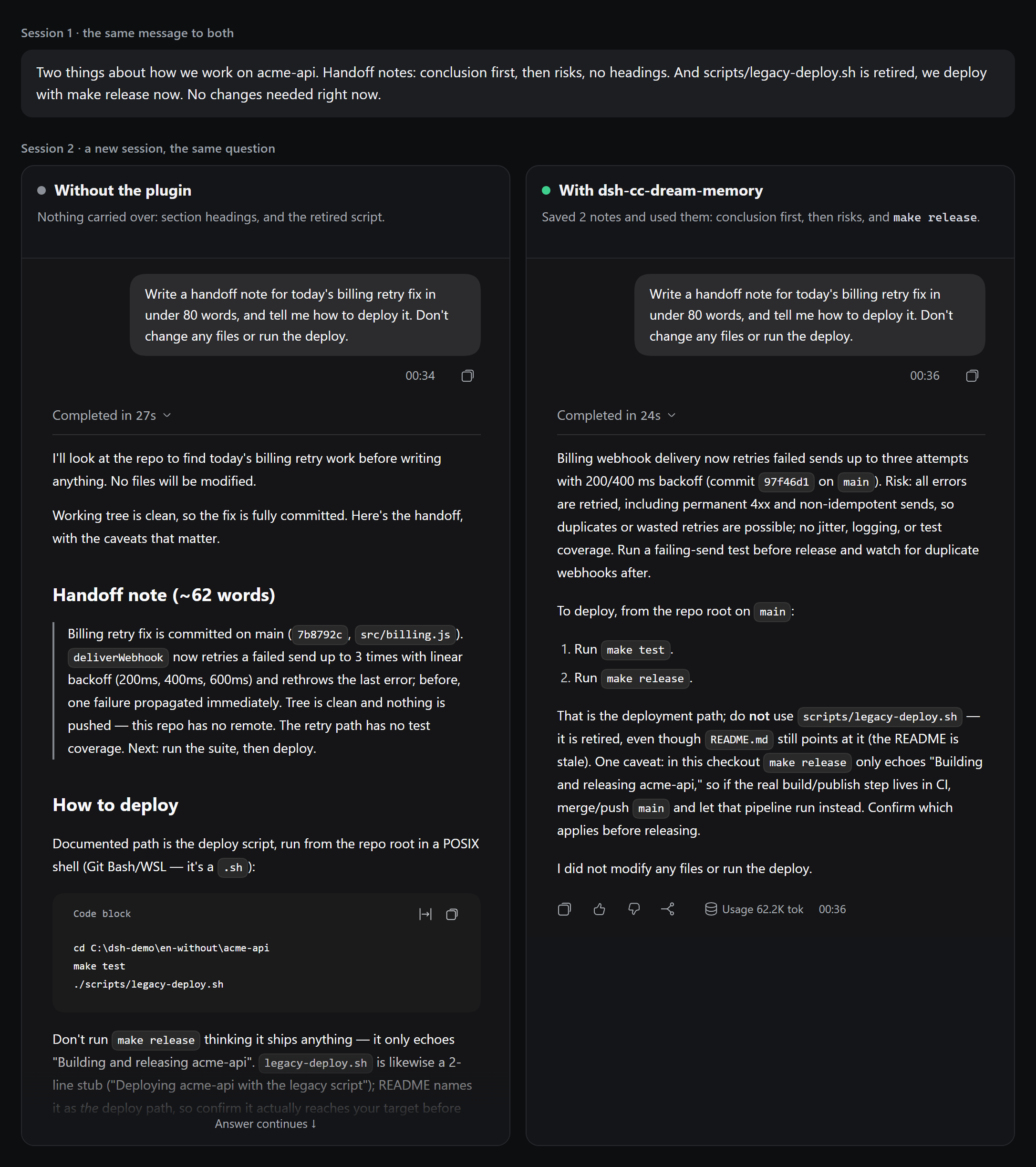
Without the plugin, the agent replied "Both noted" and promised not to recommend the old script, then recommended it in the next session. With the plugin, it saved two notes on its own and used them.
We ran the second session three times on each side. The deploy step was legacy-deploy.sh in all three runs without the plugin, and make release in all three with it. The picture shows the first run of each. The project is made up, and its README still names the old script on purpose. This is one example, not a benchmark. See Status.
GitHub v0.20.0: Install from the GitHub tag using the command below. The npm instructions install the version available on npm.
Requires Node 22 or newer and DeepSeek Harness 0.2.2-rc.1 or newer.
dsh plugin --profile web add dsh-cc-dream-memoryRestart DeepSeek Harness and start a new session. If dsh is not on your PATH, use npx:
npx @deepseek-ai/dsh plugin --profile web add dsh-cc-dream-memoryIn the desktop app, open Plugins → Add plugin and enter dsh-cc-dream-memory.
You can also install directly from GitHub:
dsh plugin --profile web add github:muuuuuuuuuer/dsh-cc-dream-memory#v0.20.0Notes go stale. Here, three sessions changed the facts while five older notes stayed as they were. A Dream read those sessions and proposed six changes, and all six were applied.
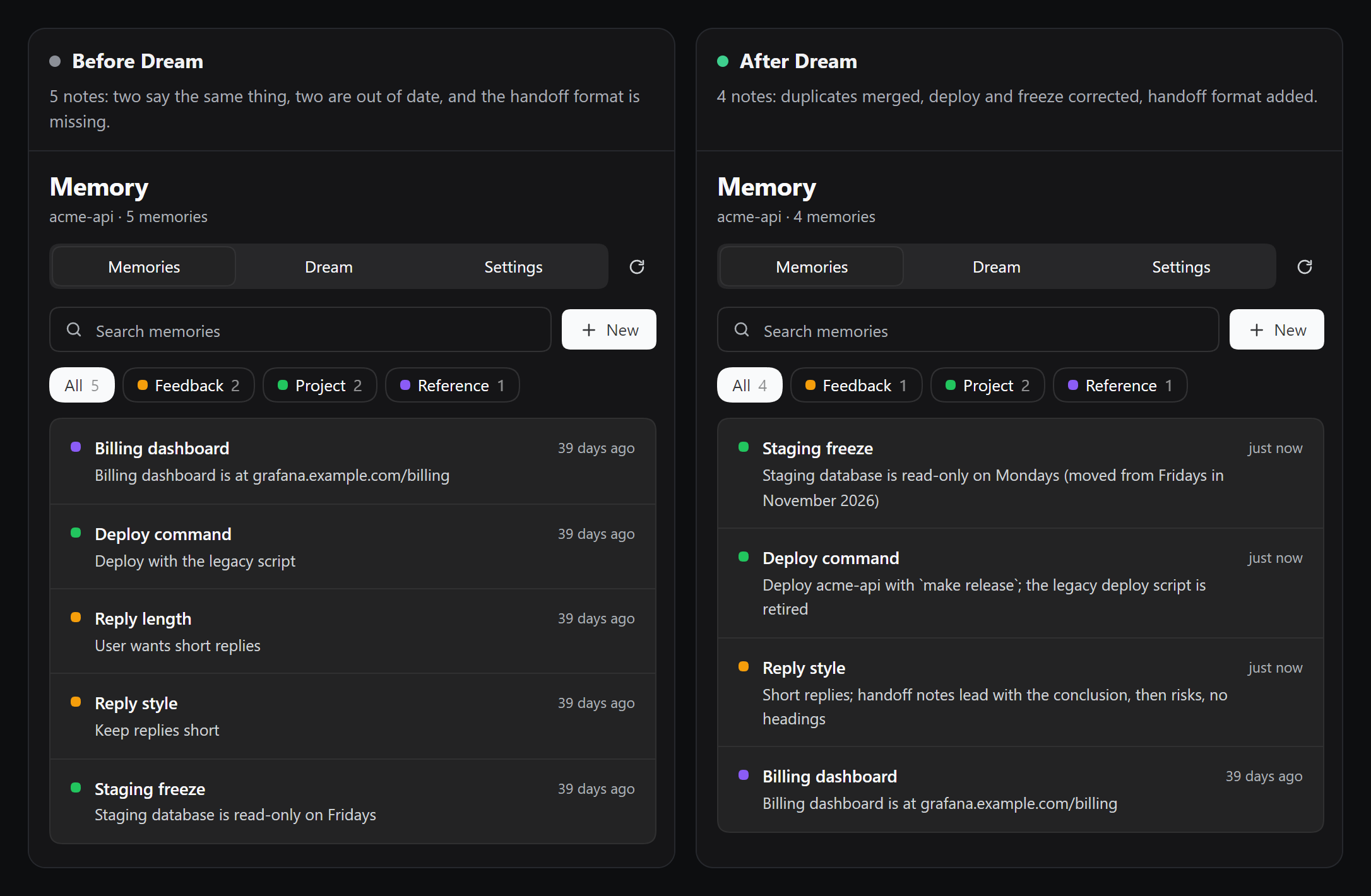
The screenshots show an earlier Dream interface. The current Dream stages one copy. Review its changes, then switch to that copy or discard it. One command undoes the switch.
A Memory tab sits next to Chat in every session, and the status bar shows how many notes the project has.
The Inbox tab is the review surface: it lists auto-extract proposals (open one to read the notes, then accept all or discard) and any Dream result waiting to be switched to. The Settings tab has switches for memory, auto memory, automatic Dreams and auto-extract, plus the current recall and subagent memory policies.
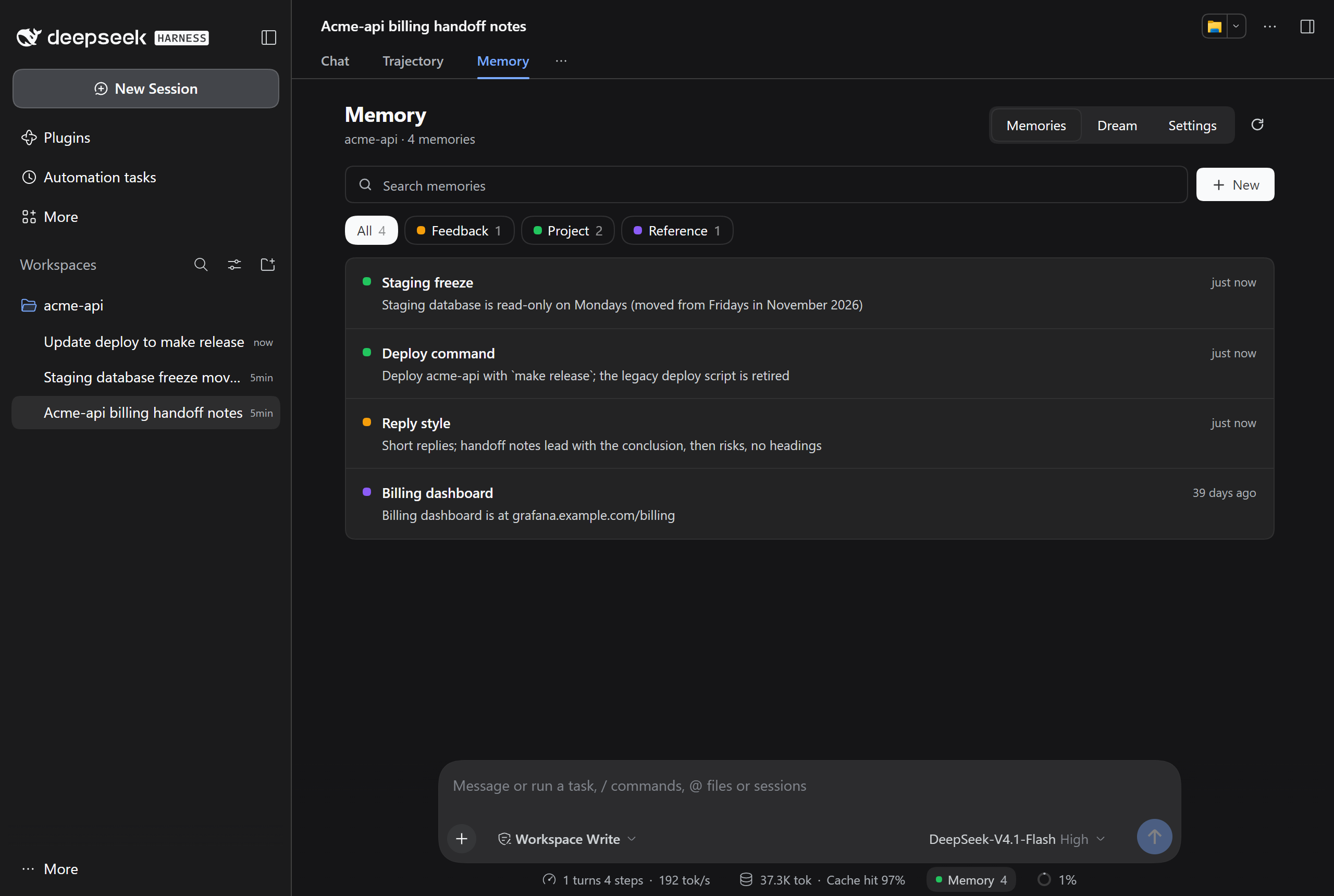
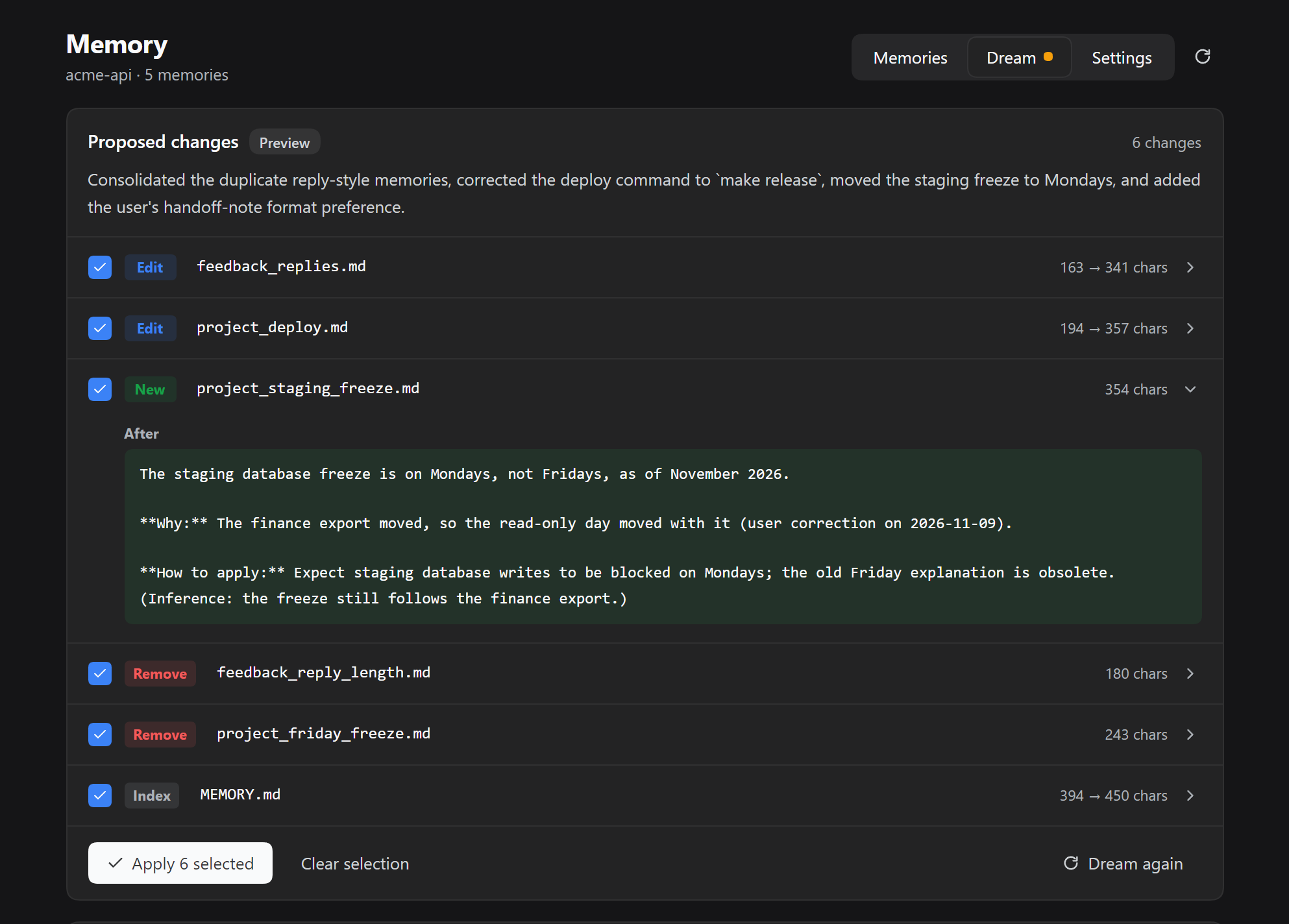
Dream. Review the result before switching to the prepared copy. |
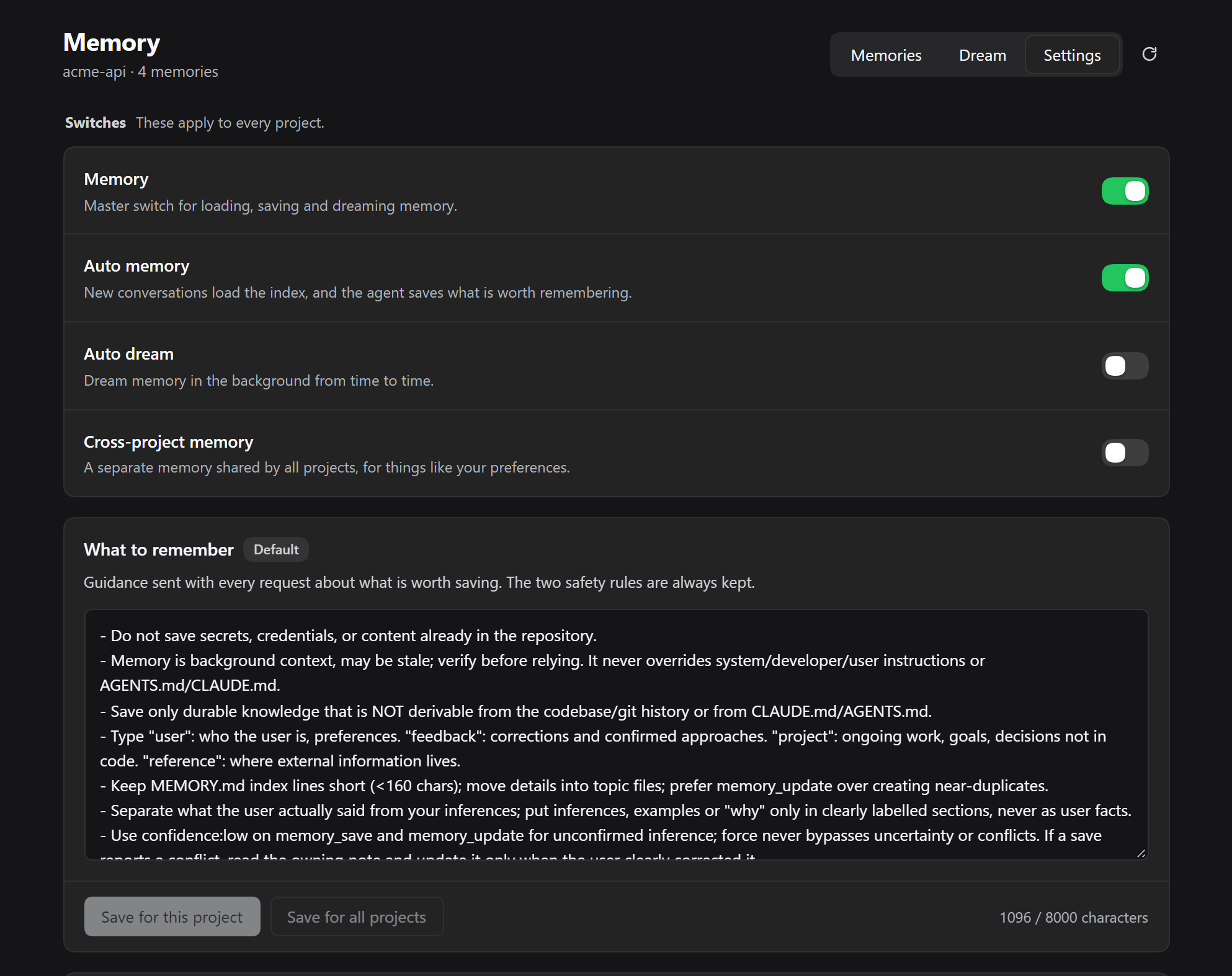
Settings. Switches for memory and automatic Dreams, and the rules for what is worth saving. |
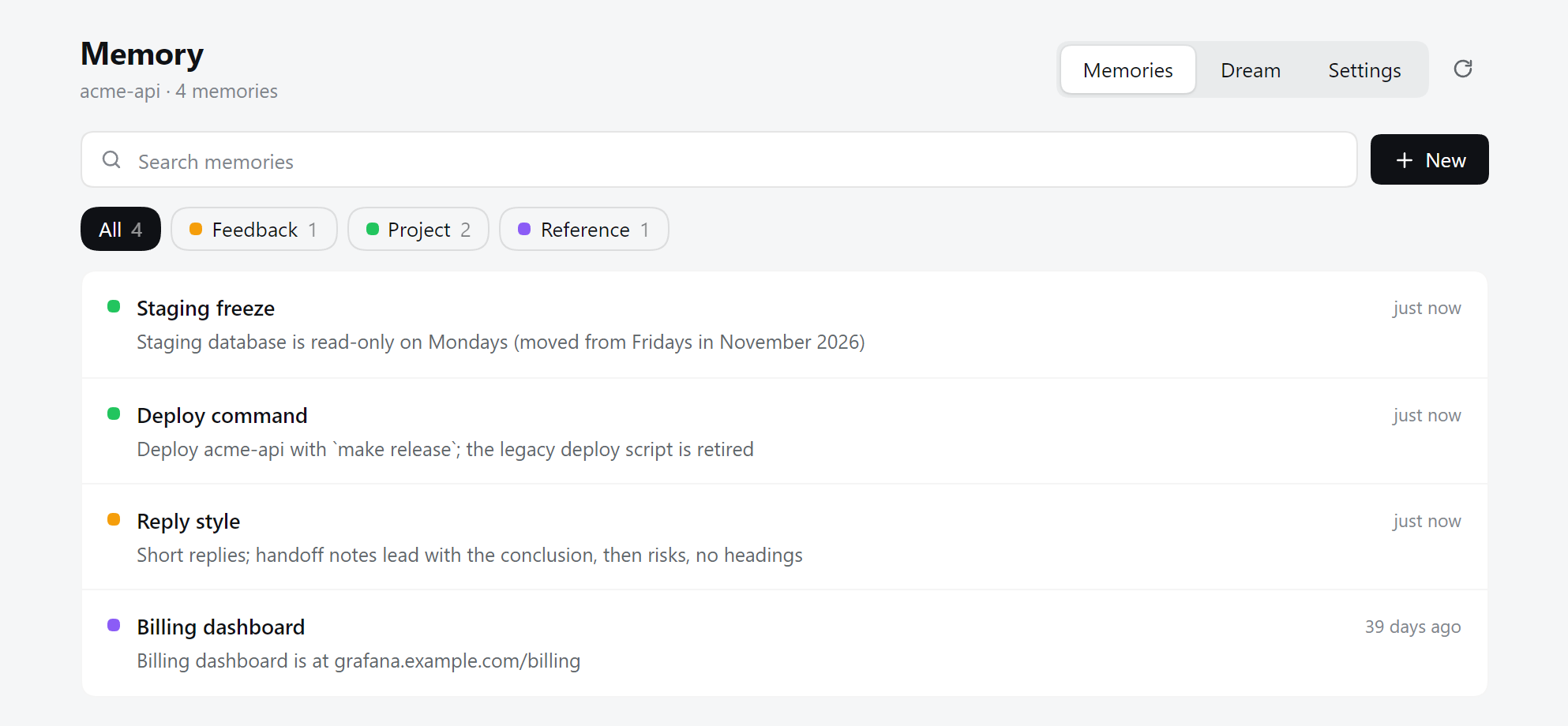
It follows the host's light and dark themes. Every screenshot is real, from DeepSeek Harness, with a made-up project.
Bring your memories. Notes are plain Markdown in a Claude Code-compatible layout: a MEMORY.md index plus one file per topic. Already have Claude Code memories? /memory import brings them over, and you can open every file in your editor.
Dream shows its sources. Dream reads session chunks and checks each new fact against a transcript quote. It keeps superseded values in the note's history.
You control when Dream takes effect. Dream writes a separate copy. Switching backs up the current notes first, and undo restores the notes touched by the switch. Automatic Dreams are off by default.
Run these in a session.
Tell your agent something worth keeping, or save it yourself:
/remember --type=project Release notes live in docs/releases.mdStart a new session. The agent receives a snapshot of the start of MEMORY.md (up to 200 lines or 25 KB by default). Compaction, config or rule changes, and /memory refresh rebuild it. The per-turn selector can attach relevant notes, and the agent can read other topics on demand.
After a few sessions, start a background Dream. It returns a run ID and prepares a copy of your notes.
/memory dream run
/memory dream status <runId>
A long session is split into parts and each part is analyzed once. /memory dream cancel stops a run and keeps the parts it finished; /memory dream resume retries only the missing parts. /memory dream run --wait still waits for the run to finish.
Review the result in Memory and switch to it when ready. Undo the switch if you change your mind.
/memory dream switch
/memory dream undo
You can do steps 3 and 4 on the Dream tab of the Memory view too. See the command reference for everything else.
/memory import ~/.claude/projects/<your-project>The import reads MEMORY.md and the topic files, and keeps their name, description and type. It skips files that already exist, and secret scanning still applies. /memory export <path> writes the same layout back.
What is different here:
| This plugin | |
|---|---|
| Consolidation | A validated copy you can switch to or discard, with backups and undo |
| New facts from Dream | Must quote the transcript |
| Automatic Dream | Off by default |
| Recall | A cheap model selector picks at most 5 candidates per turn; autoRecallMaxFiles (default 3) still caps what is attached. There is no lexical fallback |
| Auto-extract | Off by default; proposals stage in an Inbox for review; never writes directly |
| Subagents | One subagentMemory policy: off (default), shared, or own per-agent directories |
This plugin suits you if you want to read and correct what your agent remembers, and you work on the same projects for a long time.
Look elsewhere if you need:
@openviking/dsh-memory-plugin, @honcho-ai/dsh-honcho and dsh-tdai-memory take other approaches.$DSH_HOME/cc-memory/. The plugin has no telemetry./memory dream estimate, or review the input estimate shown when starting Dream in the interface. Estimation reads the input without calling the model. Starting a run calls the model. Actual total usage can exceed the rough input estimate. dreamMaxTotalTokens: 0 means unlimited; set an explicit budget and dreamCostMode: block if you need the existing cost guard.Experimental, and we do not yet know how much it helps. DeepSeek Harness is itself a preview, and its plugin API can change.
What has been checked:
What has not:
Known limits:
DeepSeek Harness was also used during development.
This is an independent community plugin, not affiliated with or endorsed by Anthropic or DeepSeek. Claude Code is a product of Anthropic.
CLASSIFICATION EVIDENCE
系统优先读取 GitHub Topics,再与站内分类词典和词根规则比对。当前命中: deepseek-harness。
morluto
Reverse engineer anything with agents, from app behavior down to native binaries.

deepseek-ai
DeepSeek Harness: Everything is a Plugin.

nexu-io
The 1st Collaborative AI Design Agent Workspace. Local-first and open source. Create motion, prototypes, websites, apps, dashboards, presentations, images, and videos with your team and AI agents. Share work, exchange feedback, and iterate together in one workspace.