
其他
完整应用

deepseek-harness
deepseek-ai
DeepSeek Harness: Everything is a Plugin.
PROJECT TOPICS
PROJECT README
English | 中文

The Token Anxiety widget tracks the cost of every task in your conversation in real time. It runs in the band under the chat composer and shows DeepSeek pricing status (peak/valley), per-task token usage and cost, and a one-click analysis of where tokens were spent. It is installed as a bundle with no additional dependencies.
Install (from any directory; the path is absolute):
# from npm (published package)
dsh plugin --profile web add dsh-token-anxiety

# or from a local checkout
dsh plugin --profile web add /path/to/dsh-token-anxiety
Then restart dsh web and refresh the page — done.
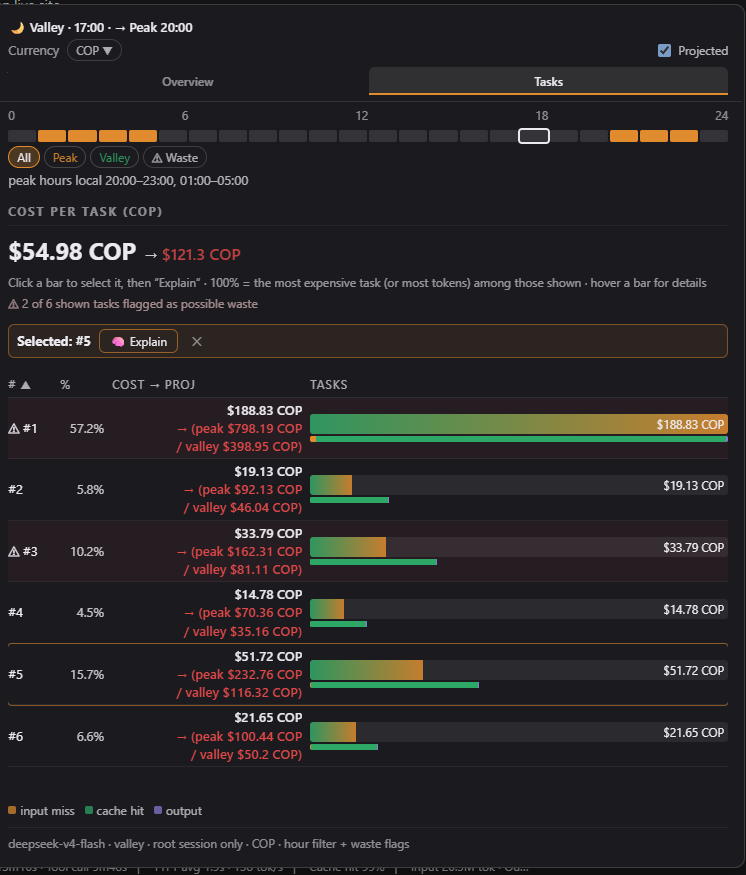
It is packaged as an installable bundle for DeepSeek Harness (composed through your profile, so it survives restarts).
web profile (dsh web) — the bundle is composed
through the profile's dsh.profile.bundles list.Hover or click the widget in the composer band to open the popup.
 |
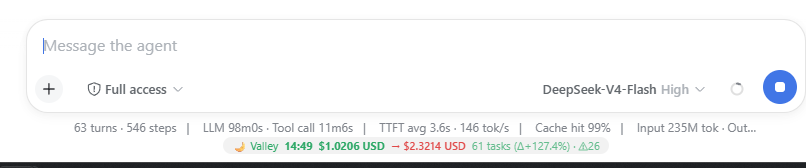 |
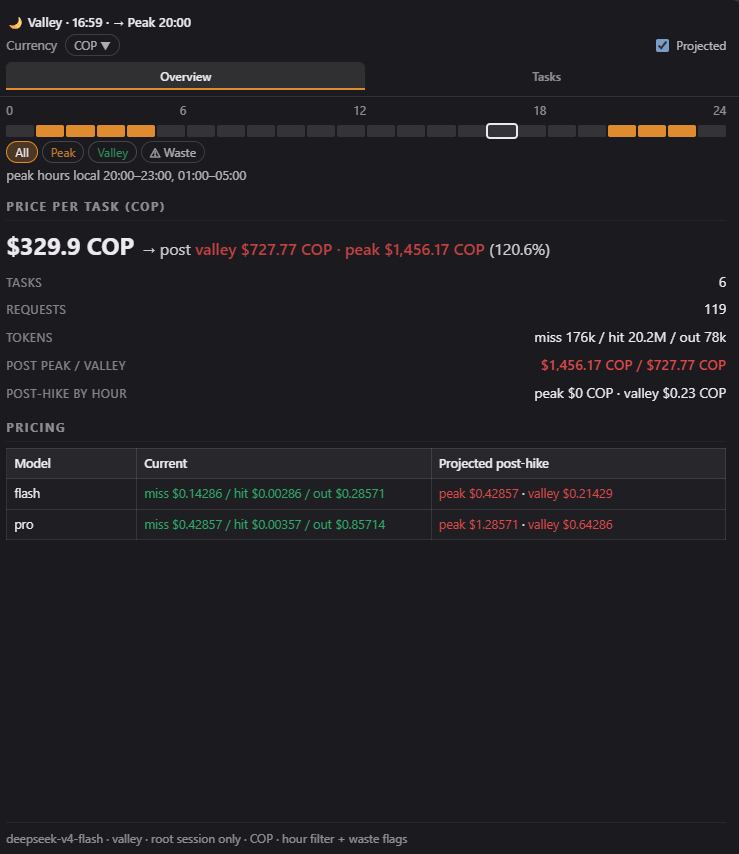
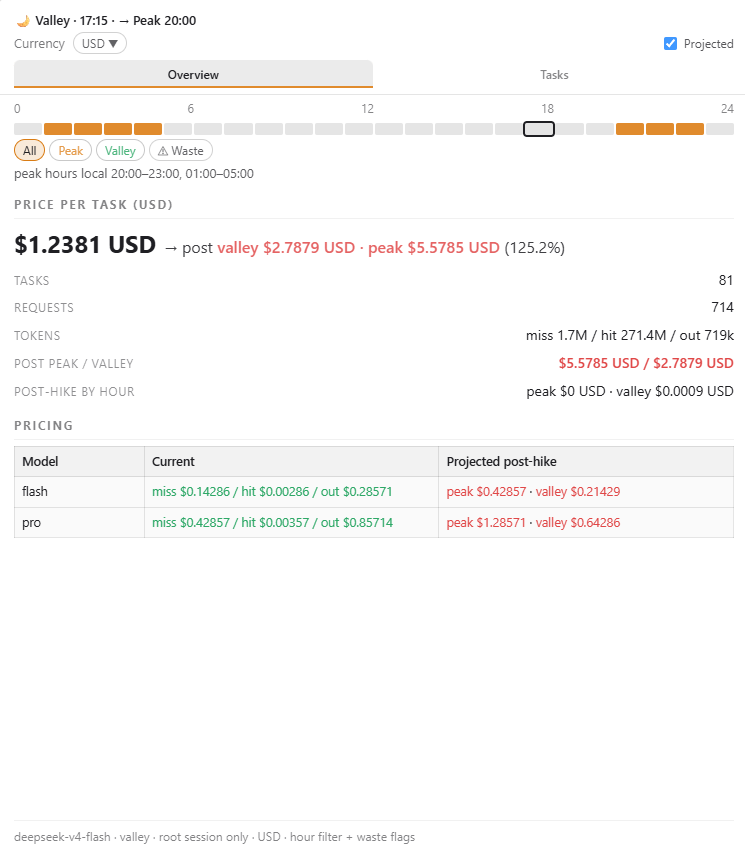
Overview — headline cost in a big hero number (current, plus the projected post-hike figure in red when Projected is on), tasks / requests / tokens, and the pricing table: current vs projected rates per model, with the projected peak/valley values colored green when cheaper than the current rate and red when more expensive.
 |
 |
Tasks — a sortable per-task table (# or share %). Each row shows its
total cost; with Projected on, the cost column adds the projected
peak/valley split on two rows. Hover a row for a details tooltip; click a
bar to select the task and run Explain.
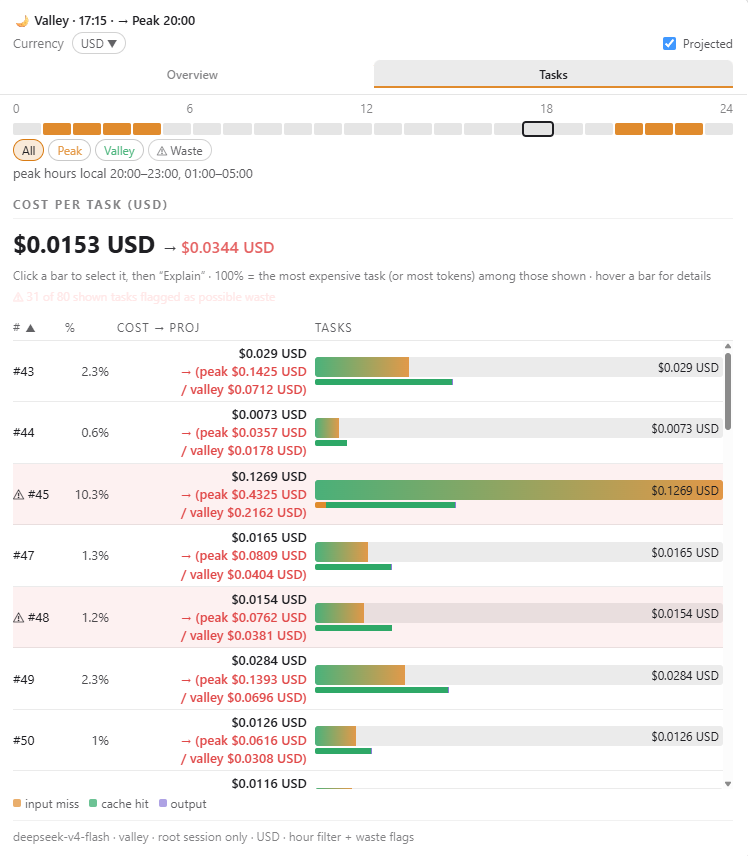
Currency — pick any enabled currency (defaults COP / USD / CNY); open the chooser to see FX rates, add more (flags + search), or remove them.
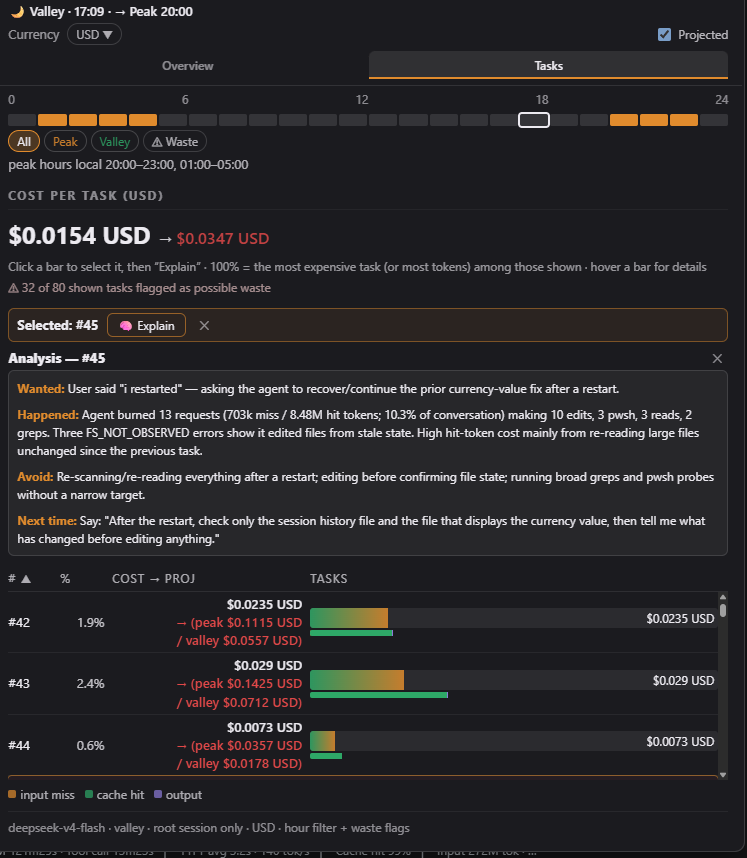
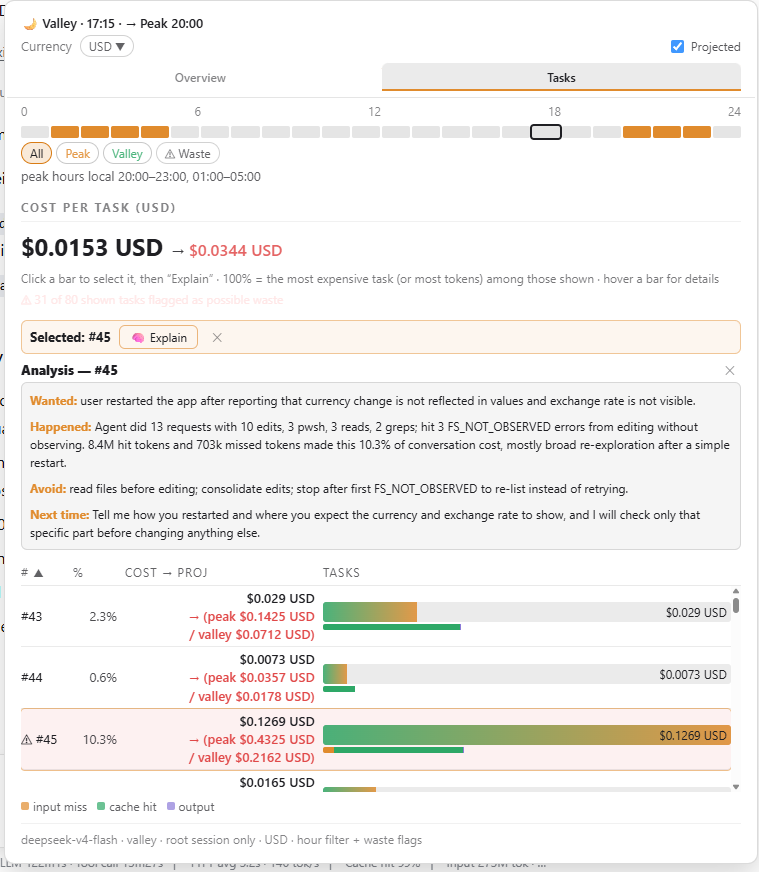
Explain — one small LLM call per task; the analysis streams in as it
is generated and is written in the conversation's language (a tiny LLM
call detects the ISO 639-1 code of the task's user prompt). The result is a
compact ~60-100 word report in four labeled lines — Wanted: / Happened: /
Avoid: / Next time: — rendered as rich text with bold accent labels.
 |
 |
See SECURITY.md for the full review. Summary: the three HTTP
routes are POST-only, cap request bodies, validate all input, and apply the same
browser-trust fence as the harness /api prefix (loopback/trustedHosts Host,
same-origin Origin, sec-fetch-site); the explain route has an anti-abuse
throttle and hard timeouts so a stalled model can never wedge it; nothing is
written to the session log; zero runtime dependencies.
cordis.patch.yml inserts one plugin row (token-anxiety) into the profile.index.js) registers the tokenAnxiety session projection: a
pure fold over the ROOT session log that accumulates per-turn token usage,
cost, tool signals and waste flags. No network, no model calls.POST /token-anxiety/explain on the harness
webserver (ctx.webServer): the widget's Explain button fetch()es it and the
handler runs the LLM analysis. The response streams back as NDJSON
({"delta": …} lines) so the widget renders the answer as it is generated; a
60s host timeout aborts stalled LLM streams (the client aborts at 70s and
shows a visible error). The language is detected with one tiny LLM call
returning an ISO 639-1 code. Nothing is appended to the session log, so
sessions stay loadable.POST /token-anxiety/pricing-sync (same trust fence) fetches the official
DeepSeek pricing page, turns it into readable text, and sends it with a strict
JSON schema to an LLM call — no layout scraping in code. The model returns
CNY-per-1M prices (current, peak, valley), the Beijing peak windows and the
effective date; the host validates, converts CNY→USD at a fixed 7.0 rate, and
writes pricing.override.json next to the bundle with an explicit
schema/currency/unit shape. A restart loads the override over the embedded
defaults (the model list derives from the active pricing, so new models
surface automatically), and the pricing-derived stateVersion discards stale
projection caches.lib/client.js) is a hand-written client bundle registered
through window.__ModuleLoader__.load({ id, factory }) — no bundler, no
minification. It reads the projection with useProjection('tokenAnxiety')
and computes peak/valley status, local time and the hour strip in the browser
from the projection's embedded pricing config.The package is published to the public npm registry:
npm view dsh-token-anxiety # verify: name, version 0.1.x, MITInstall it into a harness profile (this adds it to the profile's
package.json dependencies and its dsh.profile.bundles list):
dsh plugin --profile web add dsh-token-anxietyOr install the package directly in any npm project:
npm install dsh-token-anxiety
# or pin the exact version:
npm install dsh-token-anxiety@0.1.0
Note: for
dsh webto load the widget, the profile must depend on the package and list it indsh.profile.bundles—dsh plugin --profile web add dsh-token-anxietydoes both automatically.
# from any directory; the path is absolute
dsh plugin --profile web add /path/to/dsh-token-anxietyRestart the web server (dsh web / however you launch it). A restart is
required because the bundle row and the client boot graph are composed at boot.
The bundle is pnpm-linked into the profile, so editing files here is enough for a HOST-half change; the client graph only picks up a changed bundle after a restart. After changing files, restart the web server. To remove:
dsh plugin --profile web remove dsh-token-anxietyDefaults are COP / USD / CNY. Add or remove currencies from the chooser
(any code in the ~40-currency catalog); the enabled list persists to
pricing.override.json via POST /token-anxiety/currencies (a restart loads
it). Rates are USD-base, refreshed by the pricing sync and cached for 24 h.
Prices are embedded in PRICING (index.js) as the fallback and can be
refreshed from the official DeepSeek pricing page:
curl -X POST http://127.0.0.1:3080/token-anxiety/pricing-sync -H "Content-Type: application/json" -d '{}'The route fetches the page, asks a model to extract the current and peak/valley
rates (CNY → USD at a fixed 7.0 rate; the Beijing peak windows and the
effective date are parsed too) and writes pricing.override.json. FX rates
(open.er-api.com, keyless) ride along, cached daily. A restart merges the
override over the defaults; the pricing-derived stateVersion discards stale
projection caches.
When the harness locale is zh, the whole UI renders in Chinese and the
currency defaults to CNY. It follows the harness locale.preference setting.
explain_task tool itself aggregates the full subagent tree, so its
conversation context is complete.)/token-anxiety/explain (registered by the host half on the
harness webserver), and the host runs the analysis LLM call inline. The
analysis lives in the widget's component state, so it does not survive a page
reload and it is not part of the session log (deliberately: it never writes a
custom session event, so sessions stay loadable). The explain_task tool is
kept for conversational asks ("why did this cost so much?"). The route sits
outside the harness /api prefix, so it applies the same browser-trust
predicate itself (loopback or trustedHosts Host, same-origin Origin,
sec-fetch-site); the deployment still binds loopback-only.PRICING is the fallback;
refreshing it is a host-side action (POST /token-anxiety/pricing-sync, see
Configuration) that writes pricing.override.json; a
restart merges it over the defaults. Editing PRICING by hand still works;
stateVersion derives from the active pricing, so any change discards
persisted projection-cache rows.dsh-token-anxiety/
├── package.json # dsh.bundle + dsh.client manifests, exports["./client"]
├── cordis.patch.yml # one plugin row
├── index.js # host half: projection fold + explain_task tool + /token-anxiety/explain + /token-anxiety/pricing-sync + /token-anxiety/currencies routes
├── lib/client.js # browser half: the widget (hand-written bundle)
├── test/core.test.js # unit tests (npm test, node --test)
├── README.zh.md # Chinese README (中文说明)
├── SECURITY.md # security review
├── shots/ # UI screenshots (chat area, overview, tasks, explain — dark/light)
└── LICENSE # MIT
pricing.override.jsonis runtime state (gitignored): it stores the synced pricing, FX rates and the enabled-currency list.
MIT © mov-eax-eax
CLASSIFICATION EVIDENCE
系统优先读取 GitHub Topics,再与站内分类词典和词根规则比对。当前命中: 无有效分类标签。
deepseek-ai
DeepSeek Harness: Everything is a Plugin.

walkinglabs
Harness engineering beginner tutorial, from 0 to 1

anywhere-labs
为 DeepSeek Harness (DSH) 插件生态打造的现代化桌面端解决方案。万物皆「插件」,桌面本身也是「插件」。