
Agent 与会话
插件

nuwa-skill
alchaincyf
你想蒸馏的下一个员工,何必是同事。蒸馏任何人的思维方式——心智模型、决策启发式、表达DNA。Distill how anyone thinks.
PROJECT TOPICS
INSTALL REFERENCE
dsh plugin --profile web add github:momasiku/dsh-pilot
该命令指向仓库当前默认分支;尚无绑定当前 commit 的完整验证结果。
PROJECT README

Give DeepSeek Harness hands and eyes on your desktop.




给 DeepSeek Harness 装上眼睛和手——装在整个桌面上。
范围:Windows 桌面操控——模型看到的是真实屏幕,驱动的是真实鼠标与键盘。
DSH 原本只会"说":它能推理、能写代码、能规划,但看不见你的屏幕,也动不了你的鼠标。于是看屏幕的是你、截图的是你、点按钮的是你、出错了汇报的也是你——你成了它的手、它的眼,还兼任它的报错信息。
dsh-pilot 把这个环闭上:模型直接看真实像素,然后自己动手。
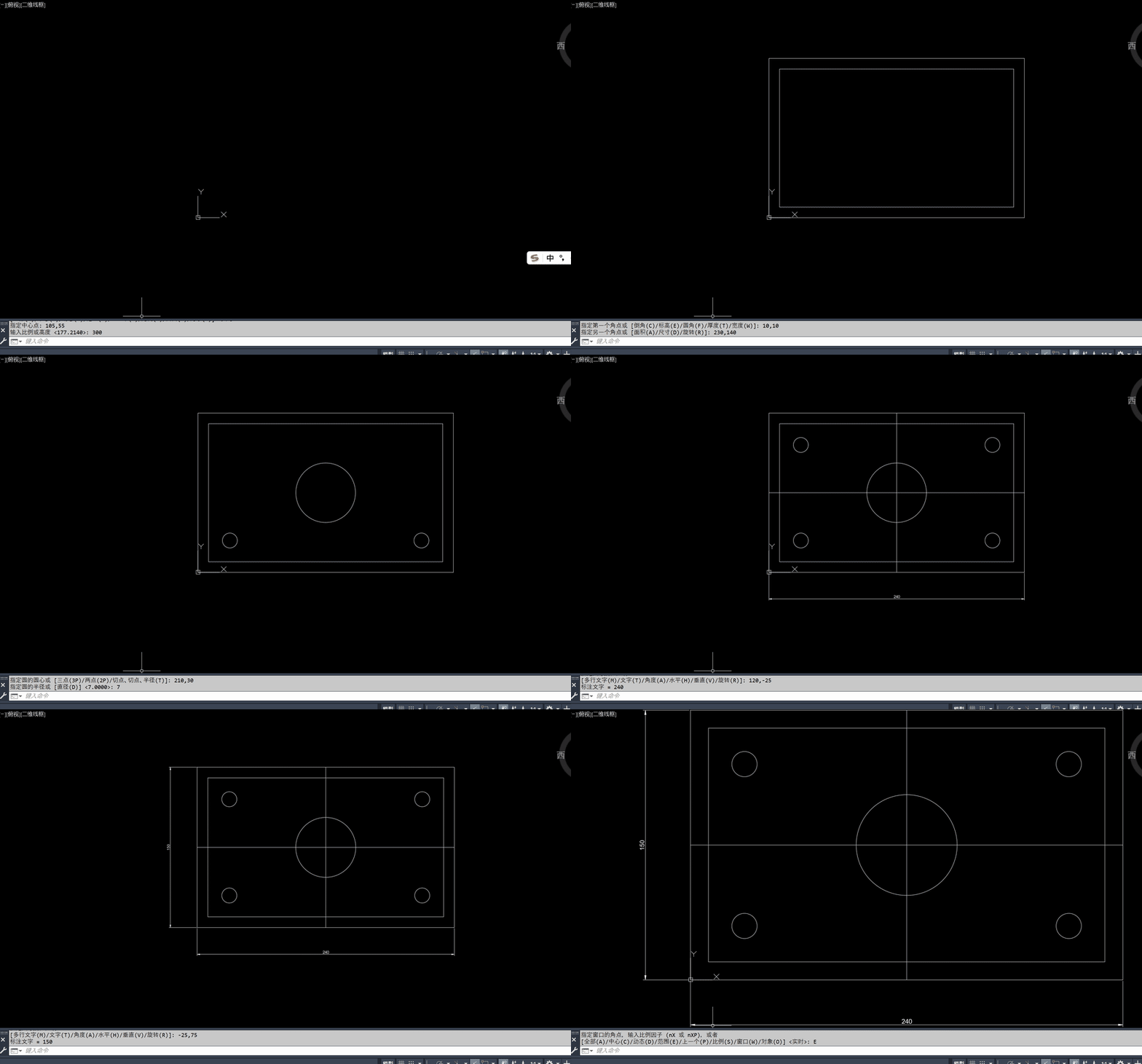
模型自己画出来的 CAD 图。 用的就是 AutoCAD 自己的命令行——REC → 0,0 → 240,150、内轮廓、五个圆孔、中心线、两道尺寸,AutoCAD 里什么都没装。
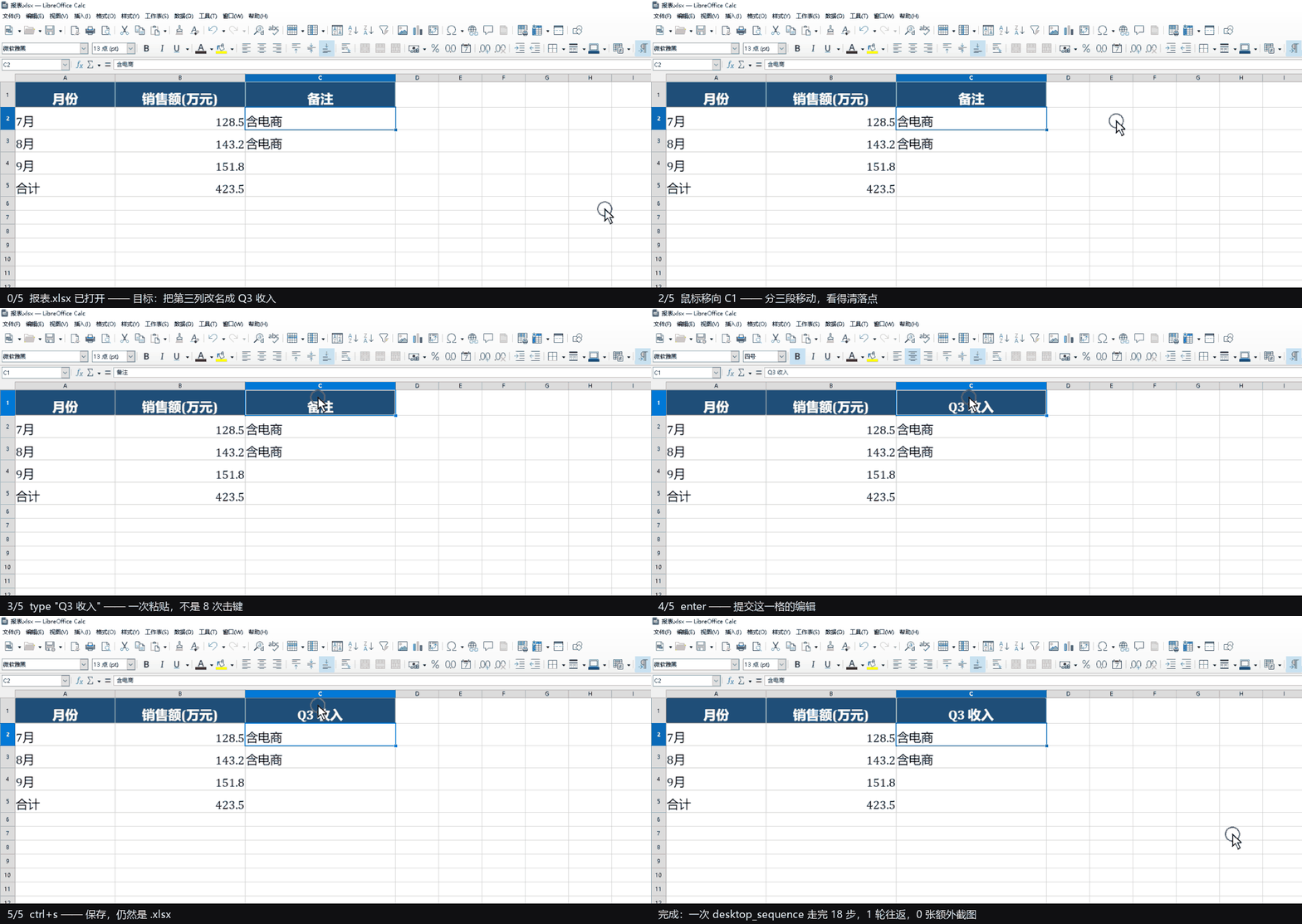
一次调用改完一张表。 desktop_sequence 聚焦工作簿、把鼠标移到 C1、点击、粘贴「Q3 收入」、回车、保存——整串动作只花一次往返。
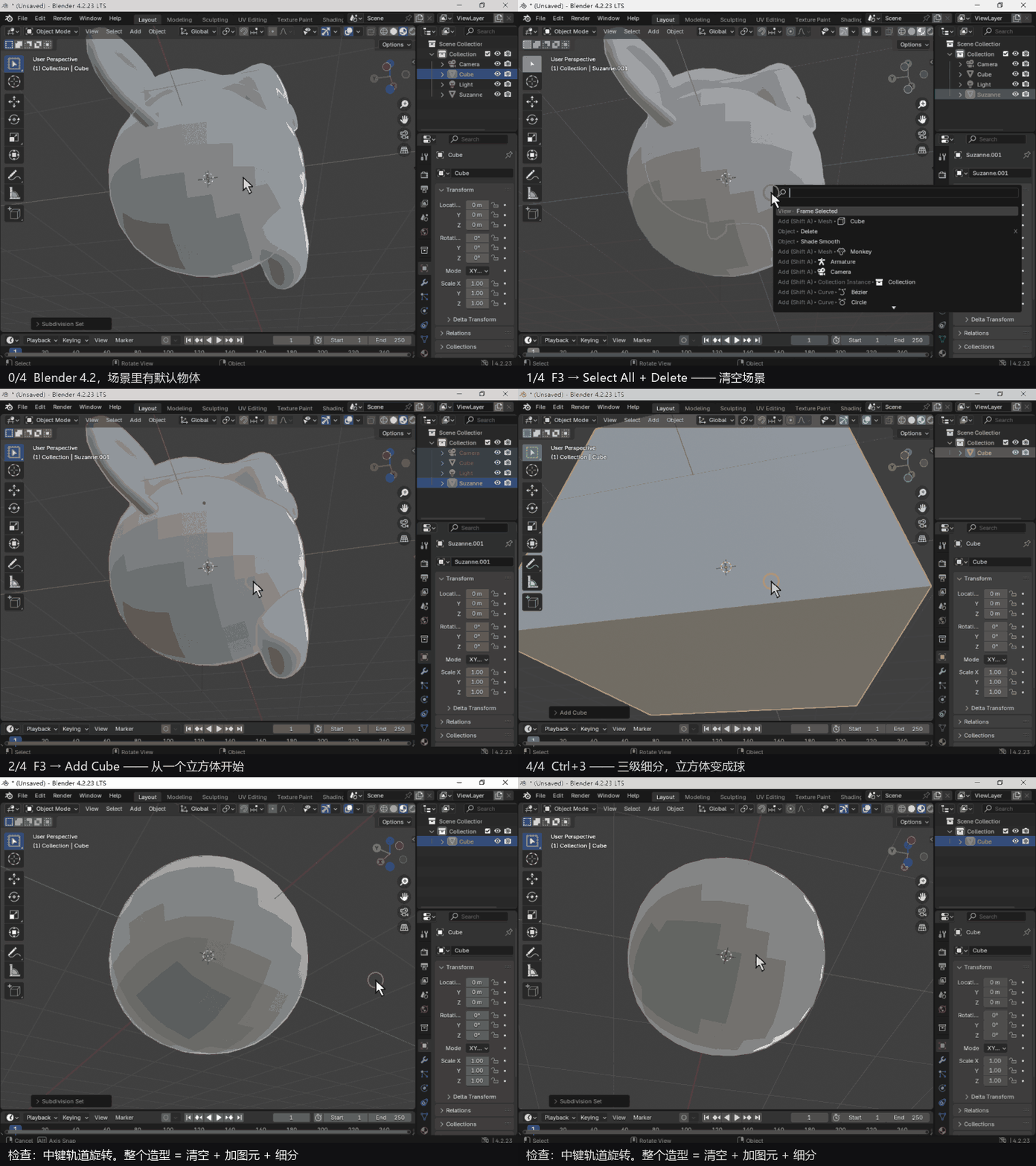
从零建一个 3D 模型。 清空视口 → 加一个立方体 → Ctrl+1、Ctrl+3 两级细分,方盒子被磨成一个球。真机上的 Blender 4.2,跑在一台没有显卡的机器上——靠 Mesa 的软件 OpenGL,而那套环境也是模型自己配好的。
| 工具 | 作用 |
|---|---|
screen_view |
抓取当前屏幕,把 PNG 作为真正的图像块交给模型(不是 OCR、不是文字描述),连光标位置、前台窗口、各显示器范围一起给出 |
desktop_control |
移动鼠标、单击/双击/右键、拖拽、滚轮、打字、按键、聚焦与列出窗口;可以在同一次调用里顺手截一张,让效果立刻可见 |
desktop_sequence |
一次调用跑完一整串动作,最后只看一眼结果 |
桌面自动化的瓶颈从来不是鼠标点得快不快,而是 "模型和电脑要来回说多少次话":
| 一个五步任务(聚焦窗口 → 点输入框 → 打字 → 回车 → 看结果) | 只用 DSH | DSH + dsh-pilot |
|---|---|---|
| 谁在看屏幕 | 你 | 模型,看真实像素 |
| 谁在点击打字 | 你 | 模型 |
| 模型 ↔ 电脑往返次数 | 5 次(每步一次,外加你的) | 1 次 |
| 送给模型的截图 | 4–5 张 | 1 张 |
| 出错时 | 你发现、你描述 | 同一次结果里就写明哪一步、为什么 |
视觉驱动点击最经典的翻车方式是"坐标差一点点",这里堵掉了三个来源:
PER_MONITOR_AWARE_V2,所以一个图像像素就是一个物理屏幕像素。origin x,y step n 说明。模型直接读刻度,不用数像素;刻度是屏幕坐标,所以即使图片被压缩也依然有效。<delivered_scale>delivered 1974x873 = 0.873x capture; multiply image readings by 1.1454 to get screen pixels</delivered_scale>批处理是大头(省的是往返,不是点击);第二个大头是不再每次重启 PowerShell——一个常驻 worker 同时服务动作与截图:
| 请求 | 一次性脚本 | 常驻 worker |
|---|---|---|
| 动作(移动/点击/打字…) | ~0.9–2.0 秒 | 6–12 毫秒 |
| 截图(主屏) | ~1.2–2.3 秒 | ~0.5 秒 |
(2560×1600、150% 缩放、DSH 界面还在动的情况下实测)。worker 在第一次调用时后台预热,它需要的约 1 秒与第一张截图重叠,不会拖慢第一个动作。
没变化的帧不重复发送:每次截图都带 frameHash,与同会话上一帧逐字节相同时就不重复附图(也不重复存储),结果里写 unchanged: true,模型手上那张图的坐标继续有效;想看就传 forceImage: true。
截图是要靠猜的:模型在像素里找到按钮、估个中心、点一下,再截一张图看猜没猜对。 而 Windows 通过 UI Automation 直接把同一个控件交出来——角色、名字、矩形——于是点击 就变成「那个矩形的中心」,什么也不用看。
desktop_control({ action: 'controls', title: '记事本' })
// 4  [Button] '最小化' @ 887,1 45x39
// 14 [Button] '新建会话' @ 12,54 256x24
// 23 [Edit]   '搜索会话名称' @ 204,238 4x20  offscreen

desktop_control({ action: 'click', target: 14, title: '记事本' })
控件树不是更快的截图,是另一种取舍。
| 截图 | 控件树 | |
|---|---|---|
| 读一次 | ~150 ms,~1k token | ~130-300 ms,~850 token(过滤后) |
| 点击位置 | 从像素里估 | 控件的精确矩形 |
| 状态 | 「看着像禁用」 | enabled、offscreen、HasKeyboardFocus、IsSelected、值 |
| 可用性 | 永远有 | 不一定有,见下 |
按单次调用看,树更慢或打平;按单个任务看,树快得多——一次读取能定位好几个目标, 既不用多截一张图,也不用多跑一轮推理。
它不是总存在。 canvas、绘图面、自绘列表、以及什么都不上报的 Electron 窗口, 给出的树要么是空的要么没意义。所以截图这条路还在,而且仍然是兜底:先读树, 树为空、或者你需要看「画出来什么」而不是「声明了什么」时,再截一张图。
三个要知道的点。
the control at index 4 is not the one that was listed: expected [Button] 'OK', found [Button] 'Cancel'。meaningfulOnly(默认 true)只返回人能操作的控件。在一个真实的 673 元素窗口上,
这是 77 个元素、约 850 token,而不是 9k——其余全是没名字、没状态、点了也没反应的
布局面板。要整棵树就传 false。includeValues 默认关闭:结构不是内容。即使打开,密码框也会被打码。当你要找的东西本身没有树——聊天记录、画布、自绘面板——不要去找它。去找围着它的
东西再做减法:输入框是个带矩形的 Edit,窗口有矩形,那么聊天区就是它们之间剩下的那块。
或者干脆不用几何:在树里选中那一条,用 HasKeyboardFocus 确认键盘落点就是你要的地方,
打字,回车。最后这一步是截图做不到的——截图能给你一根光标,给不了保证。
给模型装上手,最该讲究的就是这一块:
low 可自由批量;声明 medium/high 的批次、或含 risk: "high" 步骤的批次,在碰桌面之前就被拒绝,除非调用方带 confirm: true(而它只会在你同意之后带)。dryRun: true 只校验并列出计划,不执行。focus 失败绝不会有"接着往面前那个窗口里打字"的后续。hwnd)时,注入前会再次把该窗口置前,点击不会落进旁边的窗口。finally 里松开按键——中断的回合不会留下按住的鼠标,也不会把剩下的点击跑完。maxSequenceSteps(默认 24)。# 从 npm 装(推荐)
dsh plugin --profile <你的profile> add @momasiku/dsh-pilot
# 或从仓库装
dsh plugin --profile <你的profile> add github:momasiku/dsh-pilot
# 或用本仓库 Release 里的预构建包,免构建授权
dsh plugin --profile <你的profile> add https://github.com/momasiku/dsh-pilot/releases/latest/download/dsh-pilot.tgz
# 或你本地已有的检出
dsh plugin --profile <你的profile> add "file:E:\path\to\dsh-pilot"下载: npm 包 · 预构建 tarball · 源码
✅ 推荐用 npm 上的 scoped 包名 @momasiku/dsh-pilot。 裸名 dsh-pilot 在 npm 上属于另一款无关的浏览器操控插件,而 dsh plugin add 总是先查 npm,所以别用裸名;用仓库地址或 tarball 也照样可以。
包自带 loader 行:plugin add 会把 @momasiku/dsh-pilot 放进 dsh.profile.bundles,行本身来自包内的 cordis.patch.yml(由 dsh.bundle.patch 声明),所以不会像手写补丁行那样被插件管理器重写时弄丢。装完重启一次 DSH Desktop,然后新开一个会话,三个工具就会出现在工具列表里。
要求 DSH 0.1.5-rc.2 至 0.2.x(即 package.json 里的 peer 范围,也是 dsh plugin add 在安装前的门禁)。环境要求:Windows、PowerShell 5.1 或 7、以及声明了图像输入的模型线路(deepseek-flash 可以)。
0.7.2 —— 让兼容性检查跟上宿主的 0.2.2 预发布。
compat 工作流今天变红:它装 @deepseek-ai/dsh-*@next,而 next 现在指向 0.2.2-rc.1;我们的 peer 区间只列了 0.2.0 和 0.2.1 的预发布,npm 的 semver 因此判为不匹配(dsh gate=pass, pnpm=fail)。
原因不是 API 变了,是 semver 的预发布规则:一个带预发布号的版本,只有区间里存在「同一个 major.minor.patch」的预发布比较器时才被接受。所以每出现一个新的 0.2.x 预发布,就必须多写一个 || 分支。
区间补上 >=0.2.2-0 <0.3.0-0;实测 0.2.2-rc.1 / 0.2.2 通过,0.3.0-0 仍然被拒。
check-peers 的失败信息现在直接给出要加的那一句,不再让人自己推 semver 规则。
0.7.1 —— 修掉「空闲十分钟后浮层永久失效」(issue #5)。
症状:放着十来分钟不动,之后每一次动作都不再出圈,Esc 也失效,只有重启 DSH 才恢复。
根因:空闲超时会 Close() 窗口,但这个脚本跑的是 Dispatcher::Run()、没有 Application,关掉最后一个窗口并不会结束消息循环。16 ms 定时器让进程无窗口地继续活着,之后每次 Show() 都抛异常(只记第一条,日志看起来像冻住),而宿主按 exitCode === null 判断健康,于是永远复用这个死实例。
修法:在 Closed 里停掉定时器并关闭 dispatcher,让进程真正退出 —— 下一次动作宿主会拉起一个全新的浮层。
新增两条回归(overlay-smoke):写 quit.txt 后进程必须在 6 秒内退出;随后新副本必须能重新显示。现在这两条和「一轮只显示一次」「只隐藏一次」并列。
首帧和「第二副本」两条检查改成等够时间再断言行为:这台机器的 PowerShell 启动在 1.9–3.7 s 之间浮动,阈值不该被机器负载决定。 0.7.0 —— 浮层重做:一圈淡光、一块读得清的提示牌,以及「截图里不该有它」。
屏幕四边一圈天蓝渐变光(四条带,各自一条 LinearGradientBrush,无描边,峰值 alpha 110)。发光只到边缘、向内 56px 淡出,所以看起来是光渗进来,不是一个画上去的框。
顶部提示变成一块蓝色半透明面板:圆角 20、rgba(18,74,148,140),边框上一段高光绕圈跑(旋转渐变),字体换成 Segoe UI / 微软雅黑 SemiBold,Esc 做成真正的键帽。
去掉光标光晕。它只能靠轮询 GetCursorPos 再移动窗口,无论循环多快都会慢一两帧 —— 一个总是慢半拍的影子光标比没有更糟。
截图前自动让开:宿主写 mute.txt,等浮层回 muted.txt(≤180 ms)再截,拍完立刻恢复。现在 screen_view 出来的图是干净的,没有一个亮边压在画面上。
单实例的洞补上了:互斥名是按 StateDir 字符串算的,C:\Users\Administrator\… 和 C:\Users\ADMINI~1\… 指向同一目录却是两个名字,于是两个浮层会同时画。现在多一个 instance.txt 的 PID 锁,跟路径写法无关。
刷新 33 ms → 16 ms(光晕没了之后额外开销很小),呼吸每 8 帧应用一次,分辨率每秒检查一次:阿里云这类会话中途改分辨率,面板不会再被推出屏幕。
tick 里的异常不再静默:以前抛错会被 dispatcher 吞掉,浮层停在屏幕上但完全不动;现在 catch 住并写进 status.txt。
overlay-smoke 的首帧门槛从 2000 ms 调到 3000 ms:这台负载机光 PowerShell 启动就要 1.8–2.1 s,0.6.5 原版实测 1874 ms。
0.6.5 —— 接管提示终于看得见:像素对了,停留时间也能调。
浮层没声明 DPI 感知,150% 缩放下它以为屏幕是 1707×1067(实际 2560×1600):顶部文字被放大半倍,跟随鼠标的光环画到别处去了。现在在加载 WPF 之前声明 per-monitor v2,按真实像素排版,光环落在指针上。
隐藏延迟从写死的 2 秒变成配置项 takeoverLingerMs,默认 8 秒:单步动作也来得及看清是谁在操作,Esc 仍然随时能取消。
浮层脚本里“宿主两秒后隐藏”的注释同步改成引用这个配置项。
0.6.4 —— 接管提示改成按回合显示。
Show()/Hide() 会和定时器的第一次真实显示撞车,导致首个动作记两次 show。句柄已经由 EnsureHandle() 建好,那两句是多余的。Test-Path 短暂失败不再立即隐藏:宿主每次动作都会截断重写 show.txt,正好撞上读不到就是一次假隐藏。现在连续三次读不到才隐藏。tools/overlay-smoke.ps1:首次出画耗时、回合内不重显、结束只隐藏一次、第二份进程必须退出。0.6.3 —— controls 的两处真问题(issue #1 / #2)。
controlText() 只拼了 action / cursor / foreground,把 controls 和 windows 整个丢了 —— 对纯文本模型来说,README 里说的「便宜路径」事实上不可用,只能退回截图。现在渲染成 <controls> / <windows> 块,并带上窗口名与计数。meaningfulOnly 的 $name 从未赋值:$null.Length -eq 0 恒为真,于是 ListItem / TreeItem / MenuItem / DataItem 四类无论有没有名字都被丢弃。改成读元素自己的名字,与注释里写的意图一致。Pane 不在白名单:原生 Win32 对话框(#32770)的所有子控件经 MSAA 桥接后都报 Pane,于是一个满是按钮的对话框过滤后是空的。命名 Pane 现在算控件,无名 Pane 仍视作布局。controlTotal / filteredOut 并渲染进文本。实测「运行」对话框:10 个元素,保留 6 个(确定 / 取消 / 浏览 / 提示文字),丢掉 4 个无名 Pane。script-smoke 现在会真按一次 Win+R,断言该对话框在 meaningfulOnly:true 下非空且含「确定/取消」,随后 Esc 关闭。0.6.2 —— 兼容性声明落到能验证的地方。
screen_view 抓屏、windows 枚举、controls 控件树、desktop_sequence 三步批次都正常,peer 声明 >=0.2.1-0 <0.3.0-0 本身就覆盖 rc.3。check-peers 新增 --asar:以前它只校验开发副本 node_modules(可能落在旧代),现在可以直接读已安装桌面端的 app.asar,按里面真实携带的 dsh-* 版本判定 —— 也就是用户真正在跑的那一代。--asar 的两个细节:Electron 的 fs 会把 .asar 当压缩包拦截,读取失败时回退到临时副本;asar 头部按 4 字节对齐填充 NUL,要剥掉尾部才能 JSON.parse。0.6.1 —— 简介和 README 都用中文先说。
# English 标题,顶部语言链接同步调换。0.5.14 —— 坐标契约不再猜「你看到的那张图有多大」。
2560x1600 抓取 → 1609x1006 预览,把每个读数乘 1.5911。面积落在预算内的帧会原样送达,所以抓窗口或抓区域能得到真正的 1:1 —— 1365×960 可以,1024×768 可以;4K 和 5K 则分别写 2.2642 倍和 3.0189 倍。0.5.12 —— 冷树,以及一个什么都没说的空列表。
controls 在「worker 还没见过完整树、且结果异常少」时会等 300 ms 重试一次。(no operable controls here; the window has 2 elements - pass meaningfulOnly:false to see them)。0.5.11 —— 控件树,外加两个让批量操作「不说谎」的修复。
controls 读窗口的 UI Automation 树,target 点列表里那个控件的精确矩形,于是有名字的控件不必再去像素里找。它不截图,所以也不付 settle。在 673 个元素的窗口上实测:过滤后 0.65 秒、约 850 token(77 个可操作元素),不过滤约 9k。暖 worker 记着它发出去的那份列表,所以某一行换了身份会报错,而不是点到搬进来的那个。desktop_control 每次调用都付。实测不截图的动作用时 814 ms → 12 ms。focus 被拒绝却报成功(0.5.9)。那一步只记一条备注、仍然说 ok,于是批量剩下的步骤全打进了真正在前台的那个窗口。现在改成在尝试之后检查真实前台——看状态,不看 SetForegroundWindow 的返回值——不符就报错并说出两个窗口。tolerant: true 可以恢复旧行为,给「坐标反正都对」的调用方留口子。0.2.1 这个元组需要它自己的预发布比较符:预发布版本只有在某个比较符与它同属一个 major.minor.patch、且自身带预发布标签时才放行。0.5.8 —— 两个修复,同时包已发布到 npm:@momasiku/dsh-pilot。
System.Windows.Forms.Screen.AllScreens,这是静态缓存,只有进程处理 WM_DISPLAYCHANGE 时才刷新;而暖 worker 是没有消息泵的 -NonInteractive 读取循环,缓存永远不会失效。实测:存活 13 小时的 worker 报 <screens>primary WinDisc 0,0,1600,900</screens>,而同一份结果里的 <image_size> 是 1024x768 —— 同一份结果两个答案,而坐标契约正是从这份帧里读的。现在每次截图都用 EnumDisplayMonitors 重新枚举,虚拟屏改用 GetSystemMetrics,两者都不缓存。Add-Type 编译一次,而且发生在 worker 能回答 ready 之前 —— 正是暖 worker 存在的意义所在的那笔开销。现在按源码哈希编译一次存成 DLL,之后直接加载。一次性抓帧 2638 ms → 813 ms,暖动作仍是 9 ms。改源码会换哈希、换 DLL,缓存绝不会遮蔽后续修复。npm 上的包名带 scope,是因为 dsh-pilot 这个名字在 npm 上属于另一款无关的浏览器操控插件。仓库名仍然是 momasiku/dsh-pilot。
desktop_control { action: "windows" } 看清有哪些窗口、哪个在前台,再动手。desktop_sequence:把"聚焦 → 点击 → 输入 → 回车"写成一次调用。capture: "none" 不附图,或依赖"未变化不重发";想看得更清:rulers: true(默认开)。captureRetention、settleMs、stepSettleMs、maxSequenceSteps、useWorker、rulers)写在配置行里,见上面的 Settings 一节。| 现象 | 原因与处理 |
|---|---|
| 提示找不到匹配窗口 | 窗口缩到托盘了,或标题变了:用 action: "windows" 列出来,或改用 hwnd 指定 |
| 点击总是差一点 | 图片被宿主压小了:看 <delivered_scale> 的乘数并乘上去 |
| 点了没反应 | 目标窗口可能是提权窗口,Windows 不允许跨完整性级别注入输入 |
| 升级后工具不见了 | 重启 DSH Desktop:包的代码在加载时重新导入,profile 的插件行在启动时合成 |
| 批次被拒绝执行 | 声明了 medium/high:经用户同意后带 confirm: true 重发,或先用 dryRun: true 看计划 |
MIT © 2026 momasiku
Windows desktop control. The model sees the real screen and drives the real mouse and keyboard.
Out of the box, a DeepSeek Harness session can reason about your desktop but cannot touch it: you describe what is on screen, you take the screenshots, you do the clicking, and you report what happened. dsh-pilot closes that loop. The model looks at the real pixels and then operates them:
A CAD drawing, drawn by the model. It drives AutoCAD's own command line — REC → 0,0 → 240,150, the inner outline, five holes, centre lines and two dimensions — and installs nothing inside AutoCAD.
A spreadsheet edit, in one call. desktop_sequence focuses the workbook, moves the pointer to C1, clicks, pastes Q3 收入, presses Enter and saves — one round trip for the whole chain.
A 3D model, built from nothing. It clears the viewport, adds a cube, then Ctrl+1 and Ctrl+3 subdivision turn that cube into a sphere. Real Blender 4.2 on a machine with no GPU — driven through Mesa's software OpenGL, which the model set up itself.
| tool | what it does |
|---|---|
screen_view |
captures the live desktop and returns the PNG as a real image block the model can see — not OCR, not a text summary |
desktop_control |
moves the pointer, clicks, drags, scrolls, types, sends keys, focuses and lists windows — and can capture the result in the same call |
desktop_sequence |
runs a whole batch of those actions in one call and looks once at the end |
A model that cannot see the screen has to be told what is on it. A model that cannot touch the screen has to be told what to do next. That turns every desktop task into a conversation about the desktop instead of work on the desktop — and the user becomes the hands, the eyes, and the error message.
The expensive part of desktop automation was never the mouse. It is how many times the model and the computer have to talk:
| a five-step task: focus a window, click a field, type, press Enter, look at the result | DSH alone | DSH + dsh-pilot |
|---|---|---|
| who reads the screen | you | the model, from real pixels |
| who clicks and types | you | the model |
| model ↔ computer round trips | 5 (one per step, plus yours) | 1 |
| screenshots shipped to the model | 4–5 | 1 |
| where the model spends its time | waiting, re-describing, re-asking | thinking about the task |
| when a step fails | you notice | the same result says which step, and why |
sequenceDiagram
    participant U as You
    participant M as Model
    participant P as dsh-pilot
    participant W as Warm worker (PowerShell)
    participant D as Your desktop
    U->>M: 把第三列改名成 Q3 收入并保存
    M->>P: screen_view(window: "报表")
    P->>D: capture (per-monitor DPI aware)
    D-->>M: real PNG + cursor, foreground window, monitor bounds
    M->>P: desktop_sequence([focus, click, type, key, key])
    P->>W: 5 requests over one pipe — 6–12 ms each
    W->>D: SetCursorPos, SendInput, clipboard paste
D-->>M: one end frame (with coordinate rulers) + per-step outcomeThe classic way a vision-driven click goes wrong is a coordinate that is almost right. dsh-pilot removes the three ways that happens:
1. Both halves are per-monitor DPI aware. A DPI-unaware process is lied to by
Windows: it sees a 2560×1600 panel as 1707×1067, so every click computed from such a
screenshot lands in the wrong place. The sensor and the effector each declare
SetProcessDpiAwarenessContext(PER_MONITOR_AWARE_V2) before doing anything, so one
image pixel is one physical screen pixel.
2. Frames carry rulers. Ticks every 200 px along the top and left edge, each
labelled with the screen coordinate it sits at, plus an origin x,y step n note.
The model reads a position off the image instead of counting pixels — and because the
labels are screen coordinates, they survive any downscaling the attachment store does.
3. The envelope says what it actually delivered. If the store re-encodes a frame smaller, the model is told the ratio and the multiplier, and the coordinate contract becomes conditional — it only promises "use x and y as they are" when the delivered frame is the capture:
<image_size delivered="1974x873" captured="2261x1000">1974x873</image_size>
<delivered_scale>delivered 1974x873 = 0.873x capture; multiply image readings by 1.1454 to get screen pixels</delivered_scale>Batching is the big win (round trips, not clicks). The second win is that PowerShell stops being restarted: one warm worker process answers every action and every frame.
| request | one-shot script | warm worker |
|---|---|---|
action (move, click, type, …) |
~0.9–2.0 s | 6–12 ms |
| capture (primary monitor) | ~1.2–2.3 s | ~0.5 s |
Measured on a 2560×1600 panel at 150% scaling with the harness UI animating. The worker is started in the background on the first tool call, so the ~1 s it needs overlaps the first capture instead of delaying the first action.
Identical frames are not resent. Every capture returns a frameHash; when a frame
is byte-identical to the previous one of the same session, the image is not attached
(or stored) again — the result says unchanged: true and the coordinates from the
frame the model already has still apply. forceImage: true overrides it.
A screenshot costs a guess: the model finds a button in pixels, estimates its centre, clicks, and takes another frame to see whether the guess was right. Windows exposes the same control through UI Automation as a role, a name and a rectangle, so the click becomes the centre of that rectangle and nothing has to be looked at.
desktop_control({ action: 'controls', title: 'Notepad' })
// 4  [Button] '最小化' @ 887,1 45x39
// 14 [Button] '新建会话' @ 12,54 256x24
// 23 [Edit]   '搜索会话名称' @ 204,238 4x20  offscreen

desktop_control({ action: 'click', target: 14, title: 'Notepad' })
The tree is not a faster screenshot; it is a different trade.
| screenshot | control tree | |
|---|---|---|
| one read | ~150 ms, ~1k tokens | ~130-300 ms, ~850 tokens (filtered) |
| click target | estimated from pixels | the control's exact rectangle |
| state | "looks disabled" | enabled, offscreen, HasKeyboardFocus, IsSelected, value |
| availability | always | not always - see below |
Per call the tree is slower or level. Per task it is much faster, because one read resolves several targets without another frame and without another round trip.
It does not always exist. A canvas, a drawing surface, a custom-painted list and an Electron window that publishes nothing all give an empty or useless tree. That is why the screenshot path is still there and still the fallback: read the tree first, take a frame when the tree is empty or when you need to see what is drawn rather than what is declared.
Three things worth knowing.
the control at index 4 is not the one that was listed: expected [Button] 'OK', found [Button] 'Cancel'.meaningfulOnly (default true) returns only the roles a person can operate. On a
real 673-element window that is 77 elements and ~850 tokens instead of 9k - the rest
is layout panes with no name, no state and nothing to click. Pass false for the
whole tree.includeValues is off by default: structure is not content. Password fields are
masked even when it is on.When the thing you want has no tree of its own - a chat transcript, a canvas, a
custom-painted panel - do not look for it. Look for what surrounds it and subtract: the
composer is an Edit with a rectangle, the window has a rectangle, so the transcript is
what is left between them. Or skip the geometry: select the item in the tree, confirm
with HasKeyboardFocus that the keyboard is where you want it, type, press Enter. That
last step is something a screenshot cannot do - it can show a caret, not a promise.
Giving a model hands is the part worth getting right:
medium/high, or one carrying a step marked risk: "high", is refused
before anything touches the desktop unless the caller passes confirm: true —
which it does only after you agreed.dryRun: true validates a batch and lists the plan without executing.focus can never be followed by
typing into whatever window happens to be in front.hwnd), the effector re-asserts it
as foreground immediately before injecting, so a click cannot land in a neighbour.finally block, so an aborted turn cannot leave the
mouse latched down or the remaining clicks playing out.desktop_sequence is bounded by maxSequenceSteps (default 24).# from npm (recommended)
dsh plugin --profile <name> add @momasiku/dsh-pilot
# or from the repository
dsh plugin --profile <name> add github:momasiku/dsh-pilot
# or this repository's prebuilt tarball, which skips the build-approval step
dsh plugin --profile <name> add https://github.com/momasiku/dsh-pilot/releases/latest/download/dsh-pilot.tgz
# or a checkout you already have
dsh plugin --profile <name> add "file:E:\path\to\dsh-pilot"Download: npm package · prebuilt tarball · source
Install by the scoped name. dsh plugin add asks the npm registry first, and
the unscoped name dsh-pilot on npm belongs to an unrelated browser-automation
plugin - so install as @momasiku/dsh-pilot, or by repository / tarball as shown above.
The package ships its own loader row, so plugin add places @momasiku/dsh-pilot in
dsh.profile.bundles and the row comes from the package (dsh.bundle.patch →
cordis.patch.yml) rather than being hand-written into your patch layer. Restart
the desktop app once afterwards, then start a new conversation: the three tools
join the tool list.
Requires DSH 0.1.5-rc.2 through 0.2.x — that is the peer range in package.json,
and what dsh plugin add checks before it installs anything. Requirements:
Windows, PowerShell 5.1 or 7, and a model route that declares image input
(deepseek-flash does).
0.6.5 — the takeover prompt is finally visible: right pixels, and a linger you can see.
takeoverLingerMs, default 8 s) instead of a hard-coded two seconds: a single action is long enough to read, and Esc still cancels at any time.0.6.4 — the takeover prompt is held per round, not per action.
Show()/Hide() at the end of the script collided with the timer's first real show, logging two shows for the first action. The handles already exist from EnsureHandle(), so those two lines were redundant.Test-Path failure no longer hides the overlay: the host rewrites show.txt with a truncating write on every action, and a check that lands in that window reads false. It now takes three consecutive misses.tools/overlay-smoke.ps1: first-paint latency, no re-show inside a round, exactly one hide at the end, and a second copy must exit.0.6.3 — two real controls bugs, both reported in issues #1 and #2.
controlText() only wrote action / cursor / foreground, dropping controls and windows entirely — so the "cheap path" the README describes was unusable for a text-only model, which fell back to screenshots. Both now render as <controls> / <windows> blocks, with the window name and counts.meaningfulOnly compared an unassigned $name: $null.Length -eq 0 is always true, so ListItem, TreeItem, MenuItem and DataItem rows were dropped whether they had a name or not. It reads the element's own name now, which is what the comment above it always said.Pane was missing from the whitelist: every child of a native Win32 dialog (#32770) bridges through MSAA and reports as a Pane, so a dialog full of buttons filtered down to nothing. A named Pane now counts as a control; an unnamed one is still layout.controlTotal and filteredOut are new, and they render into the text. Measured on the Run dialog: 10 elements, 6 kept (OK / Cancel / Browse / the prompt), 4 unnamed Panes dropped.script-smoke now raises a real Win+R dialog, asserts it is non-empty under meaningfulOnly: true and contains OK/Cancel, then closes it with Esc.0.6.2 — the compatibility claim now sits where it can be checked.
screen_view, windows, controls and a three-step desktop_sequence all ran there, and the declared peer range >=0.2.1-0 <0.3.0-0 already covered rc.3.check-peers --asar: the check used to judge only the dev copy in node_modules, which can sit on an older generation than the app a user actually runs. It now reads the installed desktop app's app.asar and judges against the dsh-* versions that build really carries..asar path as an archive and refuses the bytes, so a failed read falls back to a temporary copy; and the asar header is NUL-padded to a four-byte boundary, so the padding has to go before JSON.parse.0.6.1 — the description and the README lead with Chinese.
# English heading, and the language links at the top were swapped.0.6.0 — a takeover line, a lit pointer, and titles that stop hiding characters.
The screen says who is driving. While an action runs, one line of large
translucent type names the operator and the way out — DSH 正在操作你的电脑 · 按 Esc 取消 — and a halo follows the cursor. No border: the first version drew one, and at
2560x1600 it was either invisible against a blue wallpaper or heavy enough to feel
like a frame. Sizes come from the virtual desktop, so a 4K wall and a 1080p laptop
get the same visual weight.
Esc cancels the batch, not the step. The overlay stamps the cancel token the
action loop already polled; that token now belongs to the whole desktop_sequence,
so a wait in the middle is interrupted too, and the result says why:
the person pressed Esc; the batch stopped where it was. Measured: a 12 s batch with
Esc at 4.5 s returned after 7.1 s.
Titles are compared after stripping zero-width characters. Edge's own title has
a U+200B inside Microsoft Edge; focus "Microsoft Edge" failed with "no visible
top-level window matches" on a window the person could read perfectly.
focus accepts an hwnd on its own, as the description always promised.
Every helper script must keep its UTF-8 BOM — script-smoke fails if one loses
it, because PowerShell 5.1 reads a BOM-less file as ANSI and the Chinese caption
renders as mojibake. This caught three other scripts that had already lost it.
The pointer halo is drawn, never written: no SetCursorPos and no input hook, which
is why the ring never makes a person's own mouse feel laggy.
A takeover line and a lit pointer. While an action runs, one line of large
translucent type names the operator and the way out — DSH 正在操作你的电脑 · 按 Esc 取消 — and a halo follows the cursor. No border around the screen: the first version
drew one, and at 2560x1600 it was either invisible against a blue wallpaper or heavy
enough to feel like a frame. The type and the halo say the same thing without taking
the desktop hostage. Sizes come from the virtual desktop, so a 4K wall and a 1080p
laptop get the same visual weight.
Esc cancels the batch, not the step. The overlay stamps the same cancel token the
action loop already polled; that token now belongs to the whole desktop_sequence,
so a wait in the middle is interrupted too, and the result says why:
the person pressed Esc; the batch stopped where it was. Measured: a 12 s batch with
Esc at 4.5 s returned after 7.1 s.
The pointer is lit, not taken over. A halo tracks the cursor while the ring is up, so it is obvious the movement is not yours. It is drawing, not the pointer: Windows paints the real cursor above every window, so the halo sits under it and the pointer reads as larger and lit without being replaced — and without the cursor being written, which is what makes other agents' takeovers feel laggy. The halo lives in its own small window rather than as a child of the ring: a child Grid with a runtime margin never painted on this layered surface, while a window that is simply moved does.
Fully permissioned sessions are not asked again — the ring is the statement, not a
prompt. takeover: false turns it off.
0.5.14 — the coordinate contract stops guessing how big the image you see is.
2560x1600 capture -> 1609x1006 preview, multiply every reading by 1.5911. A frame
whose area fits the budget arrives untouched, so framing the window or a region
gives a true 1:1 frame — 1365x960 does, 1024x768 does, 4K and 5K say 2.2642x and
3.0189x instead.0.5.12 — a cold tree, and an empty list that explained nothing.
controls now retries
once, 300 ms later, when the worker has not yet seen a real tree and the answer is
suspiciously small.(no operable controls here; the window has 2 elements - pass meaningfulOnly:false to see them).0.5.11 — the control tree, and two fixes that make a batch honest.
controls reads the window's UI Automation tree, and target clicks a listed
control's exact rectangle, so a named control no longer has to be found in pixels.
It takes no screenshot, so it pays no settle. Measured on a 673-element window:
0.65 s and ~850 tokens filtered (77 operable elements) against ~9k
unfiltered. The worker remembers the listing it handed out, so an index whose row
changed identity fails instead of clicking whatever took its place.desktop_control applied it on every call, capturing or
not. Measured 814 ms -> 12 ms for a non-capturing action.focus was reported as success (0.5.9). The step recorded a note, said
ok, and the rest of the batch went to whichever window was actually in front. It
now checks the foreground window after the attempt — the state, not
SetForegroundWindow's return value — and fails, naming both. tolerant: true
restores the old behaviour for a caller whose coordinates are right either way.major.minor.patch.0.5.8 — two fixes, and the package is now on npm as
@momasiku/dsh-pilot.
System.Windows.Forms.Screen.AllScreens, a static cache that only refreshes
when the process pumps WM_DISPLAYCHANGE. The warm worker is a
-NonInteractive read loop with no message pump, so nothing ever invalidated
it. Measured: a worker alive 13 hours reported
<screens>primary WinDisc 0,0,1600,900</screens> while the same result carried
<image_size>1024x768</image_size> — two answers to one question, inside the
very frame the coordinate contract is read from. Monitors now come from
EnumDisplayMonitors per capture and the virtual screen from
GetSystemMetrics; neither caches.Add-Type on every process start, before the worker could answer
ready — exactly the cost the warm worker exists to stop paying twice. It now
compiles once into a DLL keyed by a hash of its source, then loads that.
One-shot capture 2638 ms → 813 ms; warm actions unchanged at 9 ms. A
source edit changes the hash and therefore the DLL, so a stale cache can never
shadow a later fix.The npm name is scoped because dsh-pilot on npm belongs to an unrelated
browser-automation plugin. The repository is still momasiku/dsh-pilot.
screen_view| parameter | type | meaning |
|---|---|---|
screen |
string | primary (default), all (whole virtual desktop), or a 0-based monitor index |
window |
string | case-insensitive substring of a window title or process name; frames that window |
region |
string | crop as x,y,width,height in physical screen pixels |
includeCursor |
boolean | draw a crosshair at the pointer (default true) |
rulers |
boolean | draw the coordinate rulers (default: the rulers setting) |
forceImage |
boolean | attach the frame even when it repeats the previous frame of the session |
The result carries the image plus a <screen_capture> envelope: delivered size,
capture size when they differ, physical origin, scale, every monitor's bounds, cursor
position, and the foreground window (title, process, class, bounds) — then the
coordinate contract for that frame.
desktop_control| parameter | type | meaning |
|---|---|---|
action |
string, required | click, doubleClick, rightClick, middleClick, move, drag, scroll, type, key, focus, windows, controls |
x, y |
integer | target in physical screen pixels; required by the pointer actions and by scroll-at-a-point |
toX, toY |
integer | drag end point, or a nonzero value to make scroll horizontal |
text |
string | text to insert for type |
key |
string | a character, enter/tab/esc/f5, or a chord like ctrl+s, alt+tab, win |
amount |
integer | wheel notches for scroll (default 3, positive scrolls up) |
button |
string | left (default), right, middle |
title |
string | window title or process substring; required by focus, filters windows |
hwnd |
string | lock input to one window handle (0x1094C or decimal) |
capture |
boolean | capture a fresh frame after acting (default true) |
settleMs |
integer | wait before that capture so the screen can repaint (default 750) |
forceImage |
boolean | attach the frame even when it repeats the previous frame of the session |
target |
integer | pointer actions: click the control at this index from a controls listing instead of x/y |
includeValues |
boolean | controls: also return each control's value (default false; passwords masked) |
meaningfulOnly |
boolean | controls: only operable roles (default true) |
tolerant |
boolean | focus: record a note instead of failing when Windows refuses the foreground |
type delivers text as one paste (clipboard set, Ctrl+V, clipboard restored), so
applications see a single insertion — multi-line text and CJK included — instead of a
burst of per-character keystrokes. windows returns every visible titled top-level
window with its bounds, minimized state, and which is foreground: useful before
clicking anything.
controls returns the window's control tree as one line per control — index [Role] 'Name' @ left,top widthxheight plus disabled/offscreen/value — and takes no
screenshot (pass capture: true if you want one anyway). Feed an index back as
target to click that control's exact centre. See Reading the control tree above
for when a tree exists and when a frame is still the right tool.
desktop_sequence| parameter | type | meaning |
|---|---|---|
steps |
array, required | ordered steps; each is one desktop_control action without its own screenshot, plus optional settleMs, risk, riskNote; action wait takes ms |
risk |
string | low (default) / medium / high — the risk you declare for the whole batch |
confirm |
boolean | required for a medium/high batch; without it the tool refuses before touching the desktop |
dryRun |
boolean | validate the batch and list the plan without executing anything |
capture |
string | end (default) captures one frame after the last step, none skips it |
target |
string | window (default: the window that was foreground during the batch), screen, or all |
window |
string | frame this window instead (title/process substring), overriding target |
region |
string | crop the end frame as x,y,width,height in physical pixels |
forceImage |
boolean | attach the end frame even when it repeats the previous frame |
stopOnError |
boolean | stop at the first failing step (default true) |
settleMs |
integer | delay before the end capture so the screen can repaint |
Every step comes back with its own action, duration in milliseconds, and outcome — so one call still tells the model exactly where a batch went wrong.
- insert:
    - id: pilot
      name: dsh-pilot
      config:
        captureRetention: 30   # frames kept under .dsh-pilot/
        timeoutMs: 20000       # per-call kill deadline for a helper
        settleMs: 750          # default delay before the automatic capture
        stepSettleMs: 120      # per-step delay inside a desktop_sequence
        maxSequenceSteps: 24   # hard cap on the steps of one batch
        alwaysSaveFile: true   # keep the PNG even when no image block is attached
        useWorker: true        # keep one PowerShell process warm (6-12 ms actions)
rulers: true # draw coordinate rulers on every frameflowchart LR
subgraph JS["lib/index.js (the plugin)"]
T1[screen_view] --> C[capture]
T2[desktop_control] --> A[runAction]
T3[desktop_sequence] --> A
C --> R[frame hash + dedup + envelope]
end
C -->|warm request| W[desktop-worker.ps1]
A -->|warm request| W
C -.->|fallback| PB[desktop-probe.ps1]
A -.->|fallback| AB[desktop-action.ps1]
W --> WC["_dsh-win32.ps1 · _dsh-action.ps1 · _dsh-capture.ps1"]
PB --> WC
AB --> WCTwo halves, one coordinate space: the sensor reports the geometry, the effector
consumes the same physical pixels, and GetCursorPos/SetCursorPos report back, so
the loop is self-checking.
The shared code sits in _dsh-win32.ps1 (the Win32 bridge and DPI awareness,
idempotent), _dsh-action.ps1 (Invoke-DshAction) and _dsh-capture.ps1
(Invoke-DshCapture). The one-shot scripts stay as thin bootstraps — they are what
the plugin falls back to when the worker cannot be used. The worker speaks one
base64 JSON request per line, answers with one JSON line per request, and keeps
serving after a failed action, a failed capture, or a cancelled step.
Captured frames land in <session cwd>/.dsh-pilot/ and are pruned to
captureRetention. Pruning never breaks an image the conversation already carries,
because attachments are stored content-addressed.
| symptom | cause and fix |
|---|---|
no visible top-level window matches "..." |
the window is hidden to the tray or the title changed; desktop_control { action: "windows" } lists what is really there, and hwnd targets a window that has no title match |
| clicks land next to the target | the frame was delivered smaller than the capture — check <delivered_scale> and apply the multiplier |
| a click does nothing | the target window may be elevated; Windows refuses input injection across integrity levels |
| the tools are missing after an update | restart the desktop app: a package's code is re-imported on load, and the profile's plugin rows are composed at boot |
| a batch refuses to run | it was declared medium/high (or contains a risk: "high" step): re-send with confirm: true after the user agreed, or dryRun: true to see the plan |
The smoke tests load the plugin against the real @deepseek-ai/dsh-tools from the
desktop checkout, so they exercise every schema and renderer without a harness restart:
# the package resolves @deepseek-ai/* from the desktop app's node_modules
New-Item -ItemType Junction -Path node_modules\@deepseek-ai `
  -Target "D:\AGAENT\DSH Desktop\resources\app\node_modules\@deepseek-ai"

node tools/smoke.mjs          "D:\AGAENT\DSH Desktop\resources\app"  # load, schemas, renderers
node tools/render-smoke.mjs   "D:\AGAENT\DSH Desktop\resources\app"  # coordinates: 1:1 vs shrunk, contract, rulers
node tools/sequence-smoke.mjs "D:\AGAENT\DSH Desktop\resources\app"  # end-to-end batch on a throwaway window
powershell -NoProfile -ExecutionPolicy Bypass -File tools\script-smoke.ps1  # PowerShell half + worker protocol
sequence-smoke.mjs drives a real batch against a throwaway window it creates
itself (never one of your applications) and the window writes back what it received —
so "focus, then type, then Enter" is proven to have happened in that order, not
merely attempted. script-smoke.ps1 drives the PowerShell half directly: the one-shot
paths, the worker handshake, warm latency, a failing action, a cancellation, a failing
capture, and that the worker survives each of them. The last two need a full-access
shell: the plugin reads its helpers through pipes, which a restricted sandbox denies
with EPERM.
The helper scripts can be driven by hand while debugging — they take a UTF-8 JSON params file and print one JSON result:
'{"out":"E:\tmp\shot.png","screen":"primary","rulers":true}' | Set-Content params.json -Encoding utf8
powershell -NoProfile -File lib\scripts\desktop-probe.ps1  -ParamsPath params.json
powershell -NoProfile -File lib\scripts\desktop-action.ps1 -ParamsPath params.json
Keep the .ps1 files saved with a UTF-8 BOM: Windows PowerShell reads BOM-less
files as ANSI, which mangles non-ASCII window titles and paths.
dsh plugin add file:... installs a copy, and a repeat add of an unchanged
file: spec reports "Already up to date" without re-copying even when the files on
disk changed. After editing, copy the changed files into the installed package
yourself and restart the desktop app:
$src = "E:\path\to\dsh-pilot"
$dst = "$env:USERPROFILE\.dsh\profiles\<profile>\node_modules\dsh-pilot"
Copy-Item "$src\lib\index.js" "$dst\lib\index.js" -ForceA tool result carrying a key its closed output schema does not declare is rejected by
the runtime after execute() has already performed the side effect — so the action
happens yet the caller sees an error. A schema-only check cannot see that failure
mode, so smoke.mjs validates a realistic result object against each tool's compiled
output schema, and additionally asserts that the validator itself catches the
undeclared ok/actedAt keys that shipped once.
MIT © 2026 momasiku
CLASSIFICATION EVIDENCE
系统优先读取 GitHub Topics,再与站内分类词典和词根规则比对。当前命中: ai-agent。
alchaincyf
你想蒸馏的下一个员工,何必是同事。蒸馏任何人的思维方式——心智模型、决策启发式、表达DNA。Distill how anyone thinks.

freestylefly
Prompt as Code | GPT Image 2 / 2.5 提示词与案例库,530+ 个案例、20+ 套工业级模板与可复用 Skills,新增 2.5 同提示词对比专区,附完整提示词与生成记录,持续更新。

titanwings
Distilly — Distill how they think into reusable Skills for any Agent or Bot. Formerly Colleague Skill(原同事 Skill).