


模型与 MCP
待识别

rea
morluto
Reverse engineer anything with agents, from app behavior down to native binaries.
PROJECT TOPICS
PROJECT README
Operate connected HarmonyOS, Android and iPhone devices from a DSH conversation, with a multi-device sidebar for viewing and manual input. The same device core also provides a TypeScript SDK and standard MCP tools.
Download the prebuilt bundle from GitHub Releases. In DSH, open Plugins → Add plugin, enter the downloaded .tgz file path, and enable Phone Use. No npm account or source compilation is required.
The official CLI can also install the public Release asset:
dsh plugin --profile desktop add --save-exact --ignore-scripts https://github.com/mig-everything/phone-use-dsh/releases/latest/download/phone-use-dsh.tgzRefresh the plugin list and confirm the component is running. Open Phone Use ▾ in a conversation header, then add a device. Ask the agent to inspect or operate that device; the sidebar is optional for agent tools.
The package is not published to npm. @mig-everything/phone-use-dsh is the bundle's package identity; install the Release URL or downloaded file, not that name alone. Releases include a versioned archive, the stable phone-use-dsh.tgz filename, and SHA-256 checksums. Each release tag keeps its own assets.
Configure the development tools on the computer running DSH and authorize the device's debugging connection. See setup and the example configuration.
| Platform | Device connection | Preview and input |
|---|---|---|
| Native HarmonyOS | HDC and system UiTest | Bundled ARM64/x86_64 UiTest bridge; CLI/screenshot fallback |
| Android | ADB | Bundled scrcpy server for H.264 and touch; optional emulator gRPC |
| iPhone | A running, configured WDA endpoint | WDA screenshots/MJPEG and actions |
| iOS Simulator | macOS, Xcode, runtime and WDA | Optional idb video and bundled native input bridge |
The bundle includes the shared runtime, browser UI, native helpers and local OCR models. Installation downloads production Node dependencies. It does not include platform SDKs, emulator images, WDA runners or signing credentials. DSH Desktop provides its own Node runtime; standalone source development requires Node.js 22+.
Pass PHONE_USE_CONFIG=/absolute/path/phone-use.json in the host environment, or configure the component in the profile's cordis.patch.yml:
- id: phone-use-dsh
  config:
    configPath: /absolute/path/phone-use.json
To try the interface without a device, use demo: true instead of configPath. Demo devices are synthetic; they do not verify hardware compatibility.
Preview frames stay out of model context. Screenshot observations are supplied to models that declare image input; native controls and OCR remain available to text models.
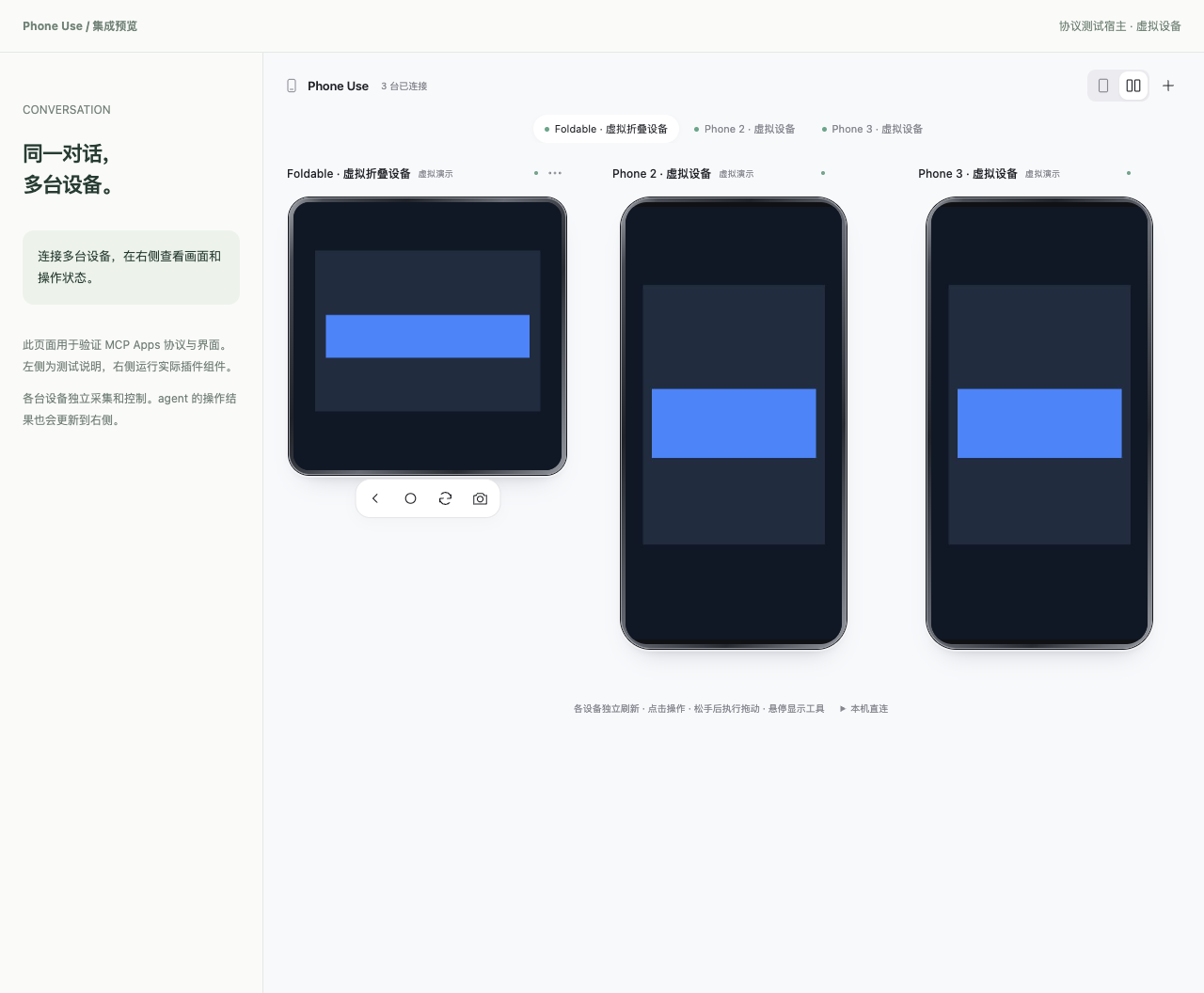
The image runs the real panel in a browser protocol-test host with synthetic demo devices. It is not a physical-phone or DSH desktop screenshot. Dark layout · Narrow layout.
The release checks cover the shared core, three platform protocols, MCP without UI, DSH conversation isolation, browser input, local OCR, native artifacts, and an installation into the official DSH runtime with independently installed production dependencies. See verification for the exact results and Actions for CI.
Device checks have used HarmonyOS 6/6.1, Android and iOS simulators. Physical devices and HarmonyOS 5/7 are not comprehensively validated. iOS native simulator input is limited to verified portrait geometry; other cases use WDA. Android text input currently supports ASCII. Fold/rotation changes invalidate old coordinates; physically folding a phone remains a user action. There is no fixed FPS guarantee or built-in cross-platform business-comparison workflow.
git clone https://github.com/mig-everything/phone-use-dsh.git
cd phone-use-dsh
npm ci
npm test
npm run check:native
npm run package:dsh
Install the resulting releases/mig-everything-phone-use-dsh-0.9.4.tgz. The packages/dsh directory is a build input, not a complete installable source package. The Release bundle already includes its compiled shared core and client entry.
| Directory | Responsibility |
|---|---|
src/core, src/adapters, src/transport |
Shared device sessions, observation validation and platform channels |
src/hosts/dsh, packages/dsh, ui/dsh-client.js |
DSH tools, skills, conversation identity and sidebar transport |
src/mcp.ts, src/tools.ts |
MCP and host-independent tool definitions |
native, assets/ocr |
Native helpers, model assets and upstream notices |
The SDK and MCP operate without DSH. Build this repository, then use the integration guide, MCP setup, or npm run demo. Changes belong in the shared source; the DSH bundle embeds its build output rather than a separately maintained device implementation.
MIT. The tool + screen + skill design was inspired by iPhone-use; this service is an independent implementation. Bundled upstream components retain their licenses: scrcpy, OpenHarmony, HMBot bridge, Meta idb, and OCR models. Device frame artwork is read from locally installed SDKs, not redistributed here.
CLASSIFICATION EVIDENCE
系统优先读取 GitHub Topics,再与站内分类词典和词根规则比对。当前命中: mcp。
morluto
Reverse engineer anything with agents, from app behavior down to native binaries.

deepseek-ai
DeepSeek Harness: Everything is a Plugin.

nexu-io
The 1st Collaborative AI Design Agent Workspace. Local-first and open source. Create motion, prototypes, websites, apps, dashboards, presentations, images, and videos with your team and AI agents. Share work, exchange feedback, and iterate together in one workspace.