
其他
插件

dsh-bili-scroll
c1overzz
DSH 插件:每天替你刷一轮 B站,读字幕挑出值得的、写一份日报,值得的 @ 你
PROJECT TOPICS
INSTALL REFERENCE
dsh plugin --profile web add github:melosic/dsh-dev-workflow
该命令指向仓库当前默认分支;尚无绑定当前 commit 的完整验证结果。
PROJECT README
中文 | English


A conventions gate for DeepSeek Harness (dsh)
check the commit message before it commits · the PR description before it opens · the version before it releases · ask before a command that cannot be undone · 200–250 tokens resident
dsh plugin --profile web add @melosic/dsh-dev-workflow
If your git commit, gh pr create and git tag are run by an agent, these checks are for you. The rest of this file covers only when it speaks up, and why.
Every project writes some conventions down — how a commit message is shaped, which sections a PR carries, how a version is chosen. They usually live in AGENTS.md, CONTRIBUTING.md and a document or two.
Text does not enforce itself. Reading a rule and following it are two different things: the guide says the subject stays under 50 characters and the agent still writes 62. This plugin turns the parts a machine can check into checks that run — at commit, pull request and release time — and stops to ask before anything irreversible.
What it saves is rework:
package.json.It only touches three kinds of action: the ones awkward to change once committed, seen by others once pushed, and gone once run.
Two words recur below:
| You are | It does |
|---|---|
git commit |
Checks the message format, whether a feat added a CHANGELOG entry, and whether docs moved with the code |
gh pr create |
Checks the description for the sections the template asks for, unticked checklist items, and a linked issue |
git tag / npm publish |
Checks the version is semver, that tag and package.json agree, and that the changelog has the section |
git reset --hard, rm -rf, git push --force |
Stops and asks first |
Reading .env, a real secret in the arguments |
Refuses — no per-call approval |
The rest of the time it says nothing.
What it says when it stops you is one line of why, plus the safer alternative:
A force push rewrites remote history and can discard other people's commits. Prefer
--force-with-lease: it refuses to overwrite commits you have not seen.
The plugin hangs off DSH's tool-execution chain. Before the agent runs a command or writes a file, it looks once:
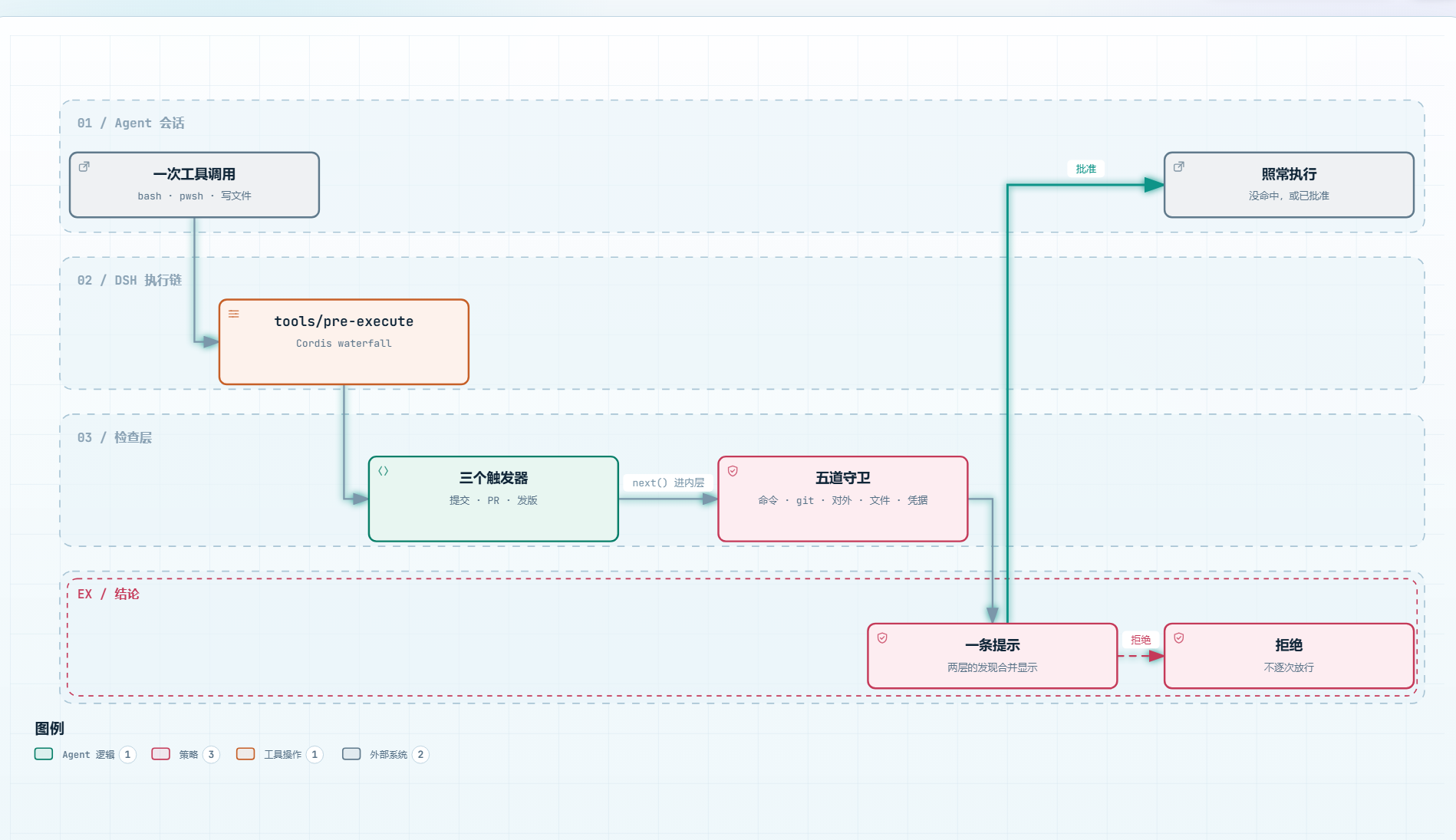
One layer judges "is this within the rules" — commit messages, PR descriptions, version numbers. The other judges "can this be undone" — lost work, rewritten history, things others will see. When both fire, there is one prompt showing both sets of reasons, never two questions in a row.
The full spec is not on this path either: it stays resident as one summary line and is read only when needed, which is why the resident cost is 200–250 tokens.
| Guard | Blocks | Default |
|---|---|---|
| Command | rm -rf /, mkfs, dd of=/dev/sda — irreversible |
ask |
| git | reset --hard, clean -f, push --force, branch deletion, --no-verify, git restore . |
ask |
| Outward | push, tag, gh pr create, gh issue create, npm publish — others will see it |
ask |
| Sensitive files | .env, *.pem, private keys, the credentials file and directory |
deny |
| Credentials | A real secret in the command arguments | deny, unless the line only reads |
The first three ask rather than refuse: most of these actions are legitimate, they are just worth one confirmation. The last two refuse — reading a private key has no "fine once you confirm it" case, and printing the path in an approval dialog is itself a second leak, so there is no per-call approval. The false positives are already excluded: sample files such as .env.example do not count, and neither does grep -rn "credentials" . — the check that tells you whether a secret is in the tree, because a search expression is not a path. To make one file readable, drop it from fileGuard.noRead or turn that guard off.
The credential guard has one exception, and it is a judgement rather than a setting: a command line whose every program only reads — grep, rg, sed -n 's/…/…/p', git log -S — is let through and recorded as a hit. The value is already in the argument the model just wrote, so refusing the search removes nothing and stops nothing; it only hides the leak from whoever is looking for it. One program on the line that could write or send puts the refusal back. The judgement is about what the line will actually run, not what it is named: sed -i writes the file back, sed -f reads a script that is not on the line, the e flag (s/a/b/e) runs the replacement, and $(…) / <(…) can hold a second program inside what looks like one word. None of those counts as reading.
In a session with approvals turned off, "ask" becomes a refusal, and the prompt says how to get past it.
Plugins (top left) → Add plugin (top right of the page) → paste the package name → Install:
@melosic/dsh-dev-workflow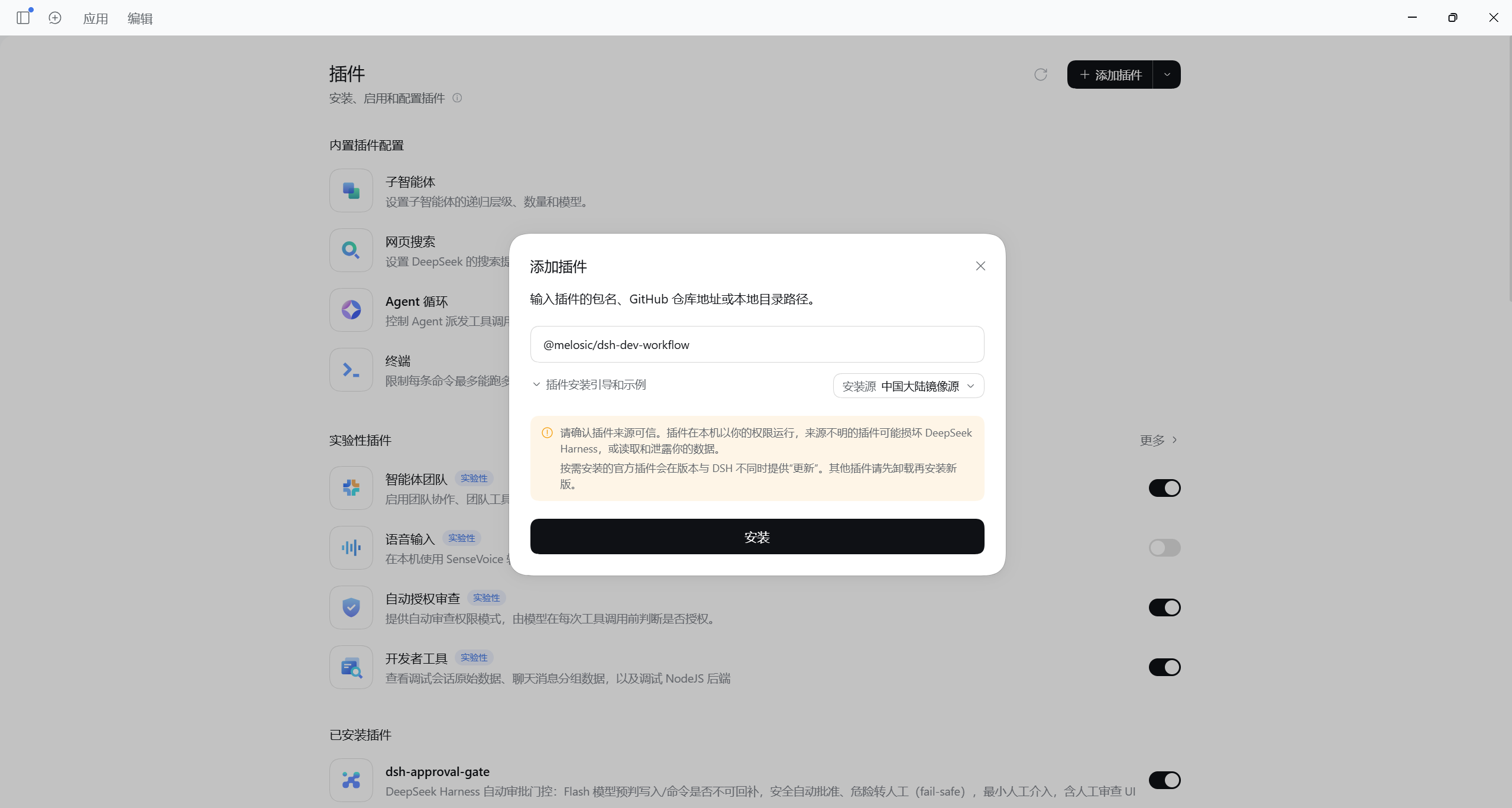
Then check the plugin list to confirm it is enabled.
The dialog's Registry selector defaults to your own pnpm configuration; you can also pick the official npm registry or the mainland-China mirror directly. On a slow connection to npmjs, registry.npmmirror.com is usually much faster.
This is the only path that needs no terminal, and it works in the desktop app too.
Install it into the profile you boot dsh with. If you start with dsh web, that is web:
dsh plugin --profile web add @melosic/dsh-dev-workflowThe templates that ship with dsh are web, headless, acp, sdk and sdk-minimal; a profile of your own takes its own name.
The desktop app is the exception: its profile is desktop, and the plain dsh command refuses to manage it (profile "desktop" is managed exclusively by the Electron application). Use the CLI the app ships:
"<desktop install>/resources/runtime/cli/bin/dsh.cmd" plugin --profile desktop add @melosic/dsh-dev-workflowUse DSH's installer rather than npm install: a profile only loads the bundles named in its own dsh.profile.bundles list, and the installer is what writes both the dependency and that entry.
# update / uninstall — copy the profile prefix from above
dsh plugin --profile web add @melosic/dsh-dev-workflow@latest
dsh plugin --profile web remove @melosic/dsh-dev-workflow
Reload dsh, then run /dev-workflow status to confirm it is working:
$ /dev-workflow status
dev-workflow is on. Conventions stay resident as a short summary; details are read on demand.
Locale: en-US (configuration says "auto").
Scope: every repository. This working directory is checked.
No check has run in this session yet.
Guard hits: none.
Security audit enabled. Guard decisions are appended to .dev-docs/audit-log.jsonl, which stays out of the model's context. Whether git tracks it is up to this repository's .gitignore.
If the first line says "is on", the install worked. If it says "off for this session" or "this one is NOT marked", the plugin is deliberately doing nothing — type /dev-workflow on, or create the marker file described in the next section.
Behaviour is changed in the settings panel; nothing there needs a restart.
The defaults are the common ones (Conventional Commits, Keep a Changelog). Everything a machine can check is adjustable — the type list, whether a scope is required, subject length, which PR sections are expected, the changelog category names, which publishing tools count. Tuned to your guide, it is that project's gate rather than this repository's. The full field list is in docs/CONFIGURATION.md.
scope: 'marked' limits the rules to repositories whose root carries a .dsh/dev-workflow.yml; elsewhere the guards and triggers stay quiet and the skill-catalogue line disappears (the two tool definitions are registered per process, so they ride along).off really turns it off. /dev-workflow off withdraws the tools, skill, triggers and guards, and the resident cost drops to zero. The command stays, so /dev-workflow on brings it back.| Component | Version | Notes |
|---|---|---|
| DeepSeek Harness runtime | 0.2.0-rc.2 or 0.2.1-rc.2 |
dsh --version |
| Node.js | >=20 |
required by dsh itself |
| pnpm | any; not checked | only needed by dsh plugin, and it must be on PATH |
Those are the only two versions, not a range: they are the ones this plugin has actually been loaded on, and a range would also claim every 0.2 prerelease in between and every 0.3 after them. The cost is that a new DSH prerelease needs a new release of this plugin — which is the honest direction, because "not tested" should read as "unsupported". When the version is one of the others, dsh plugin add refuses the install outright (dsh: installation rejected: Plugin … is incompatible with dsh …, nothing is installed) and prints the dsh plugin allow-version escape hatch. An already-installed older copy behaves differently: the plugin is disabled at startup with dsh: disabling profile plugin … on stderr, and the rest of the profile loads normally. Both say why; neither is silent. Check dsh --version against the list above before filing a bug, and paste the output of /dev-workflow status into the issue; how the list is chosen is in docs/PUBLISHING.md.
Contributions are welcome — read CONTRIBUTING.md first.
MIT © 2026 Melosic
CLASSIFICATION EVIDENCE
系统优先读取 GitHub Topics,再与站内分类词典和词根规则比对。当前命中: 无有效分类标签。
c1overzz
DSH 插件:每天替你刷一轮 B站,读字幕挑出值得的、写一份日报,值得的 @ 你

hellowind777
一个自主的高级智能伙伴,不仅分析问题,更持续工作直到完成实现和验证。

xing-shuyin
Just open your browser — get all your work done.