
其他
插件

dsh-bili-scroll
c1overzz
DSH 插件:每天替你刷一轮 B站,读字幕挑出值得的、写一份日报,值得的 @ 你
PROJECT TOPICS
INSTALL REFERENCE
dsh plugin --profile web add github:mdikarev/dsh-filetree
该命令指向仓库当前默认分支;尚无绑定当前 commit 的完整验证结果。
PROJECT README
Workspace file tree panel for the DeepSeek Harness (DSH) Web GUI — an explorer for the session workspace: live refresh, git status, text/markdown/image previews, and confirmed deletion via a tree context menu.

A toggle handle at the sidebar edge opens a 300 px panel showing the directory tree of the current session's workspace. Clicking a file opens a floating dock with its content: text with syntax highlighting, rendered Markdown, formatted JSON, or the image itself. File and folder rows can be dragged into the composer as @-mentions.
Note for maintainers: add PNGs under
assets/screenshots/and they will appear here on GitHub (this README is mirrored there). The npm tarball does not includeassets/, so these images render on the GitHub repo page only.
| Panel + tree | Preview dock (Markdown) |
|---|---|
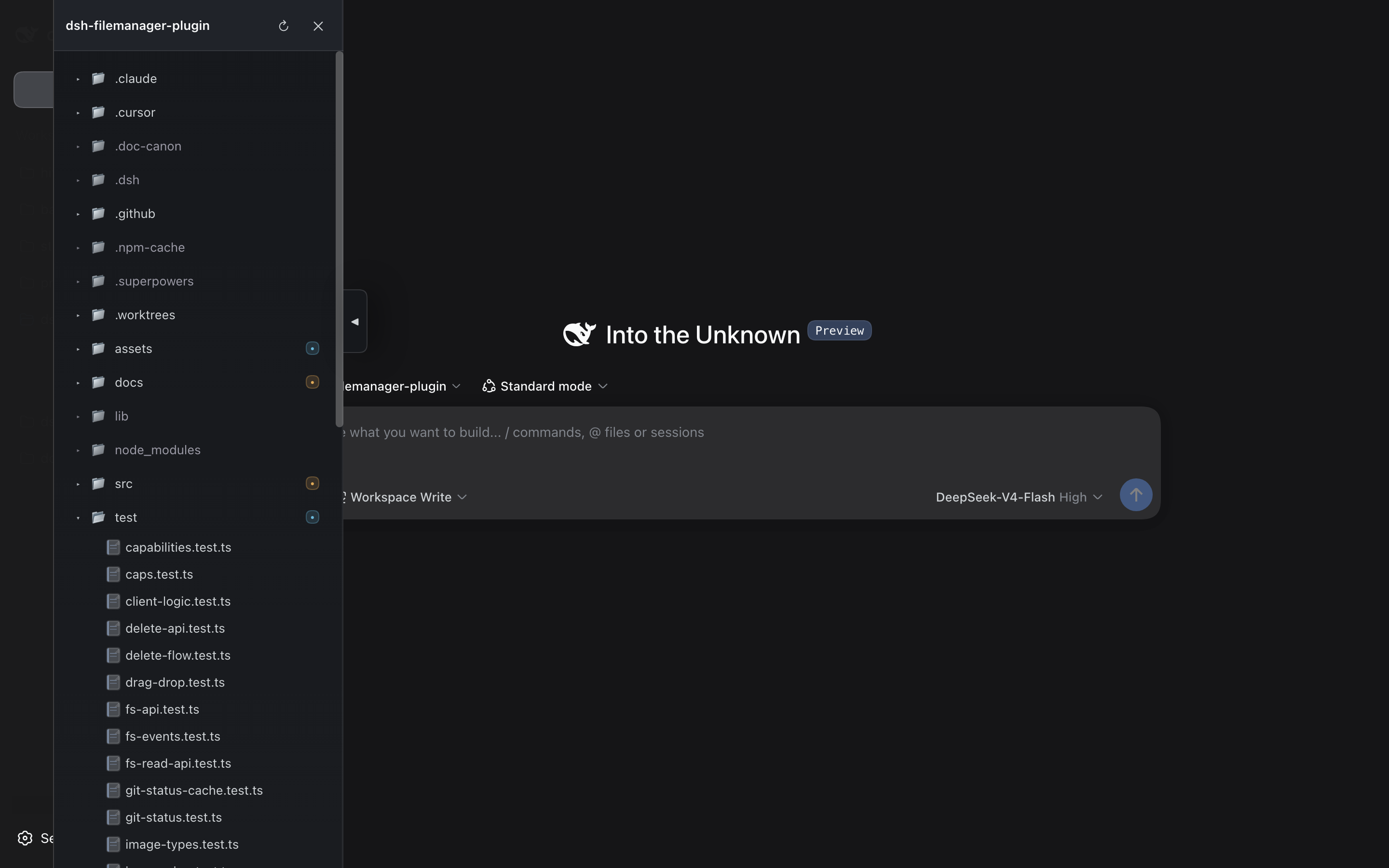 |
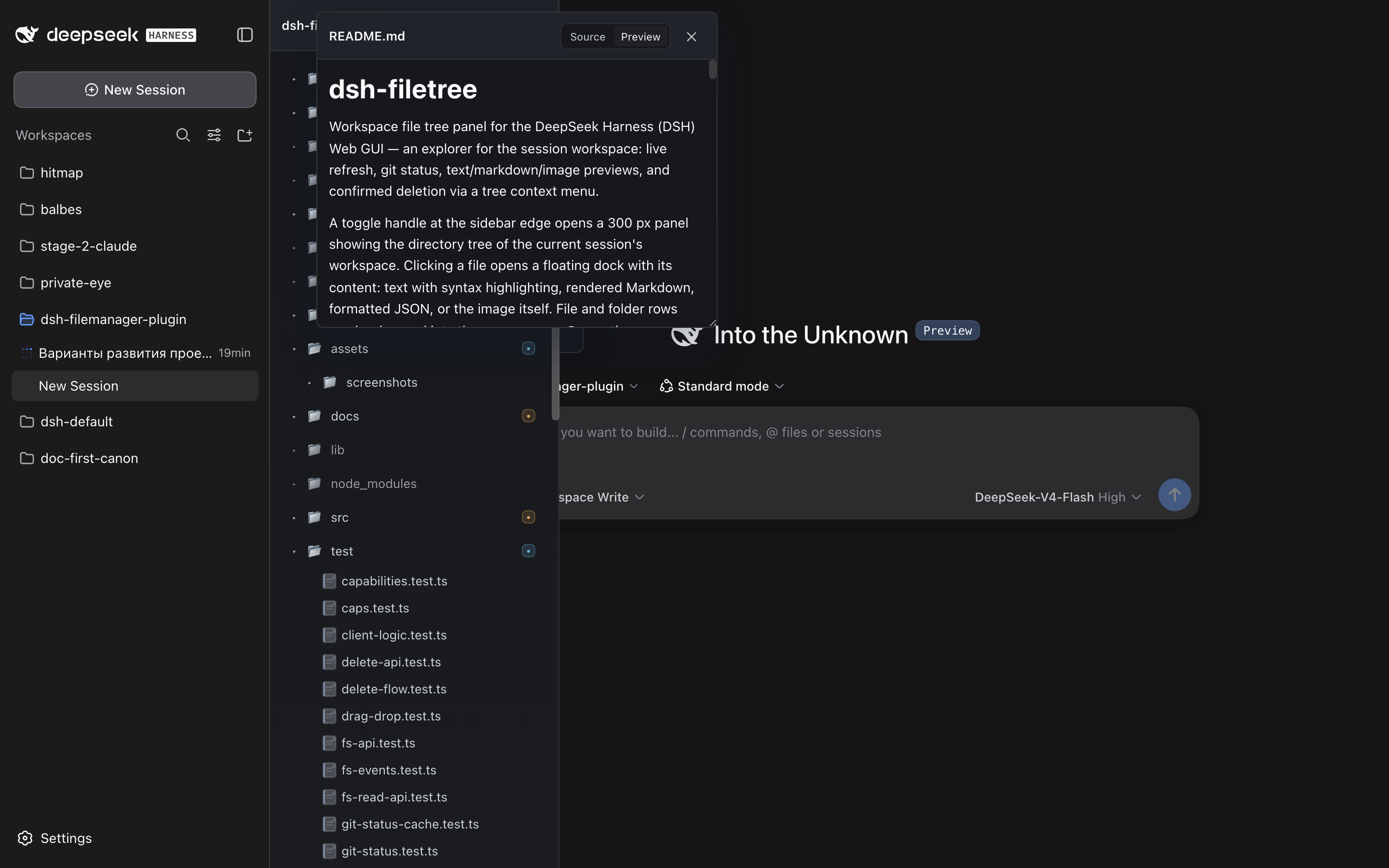 |
| Image preview | Context menu (Delete) |
|---|---|
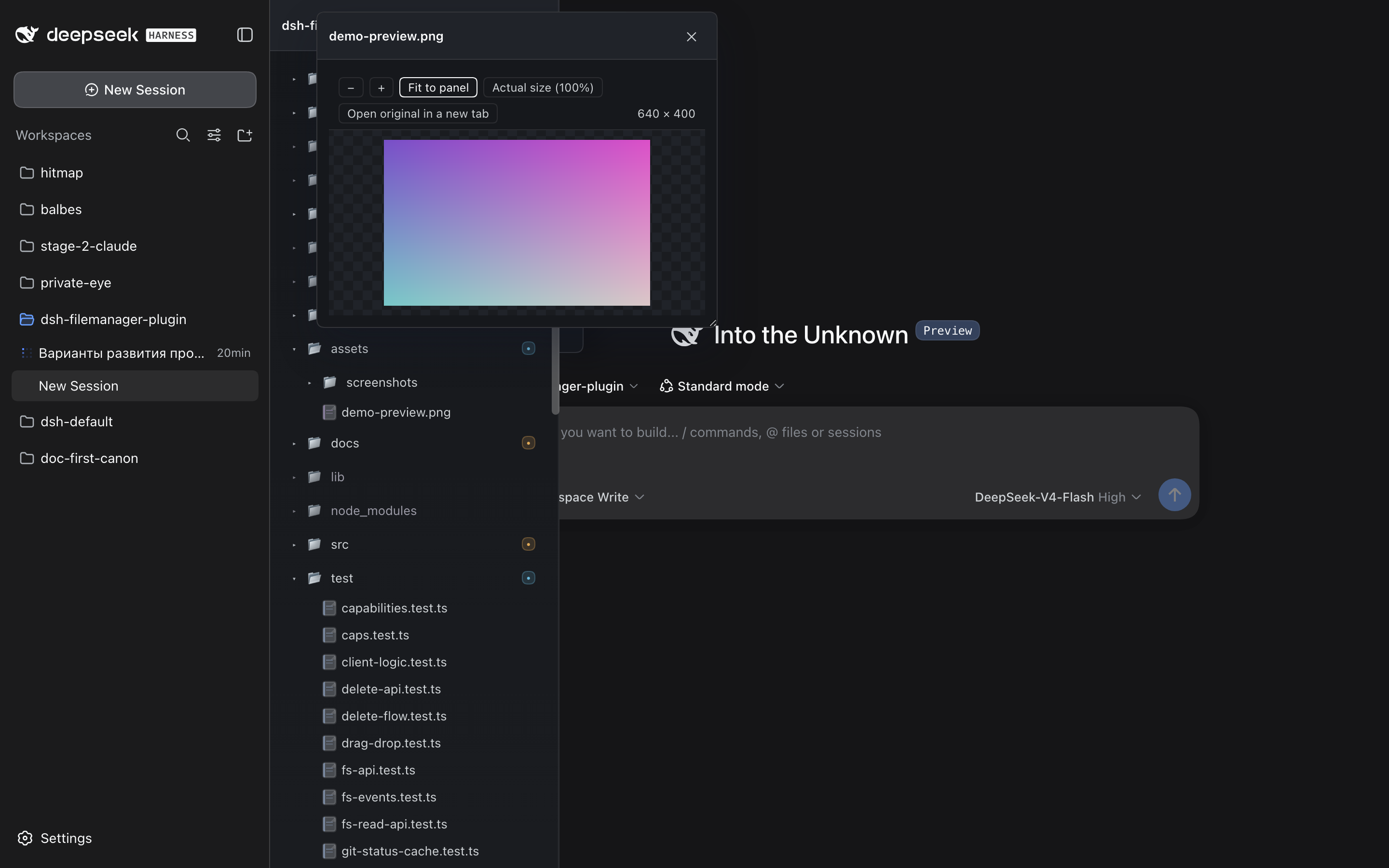 |
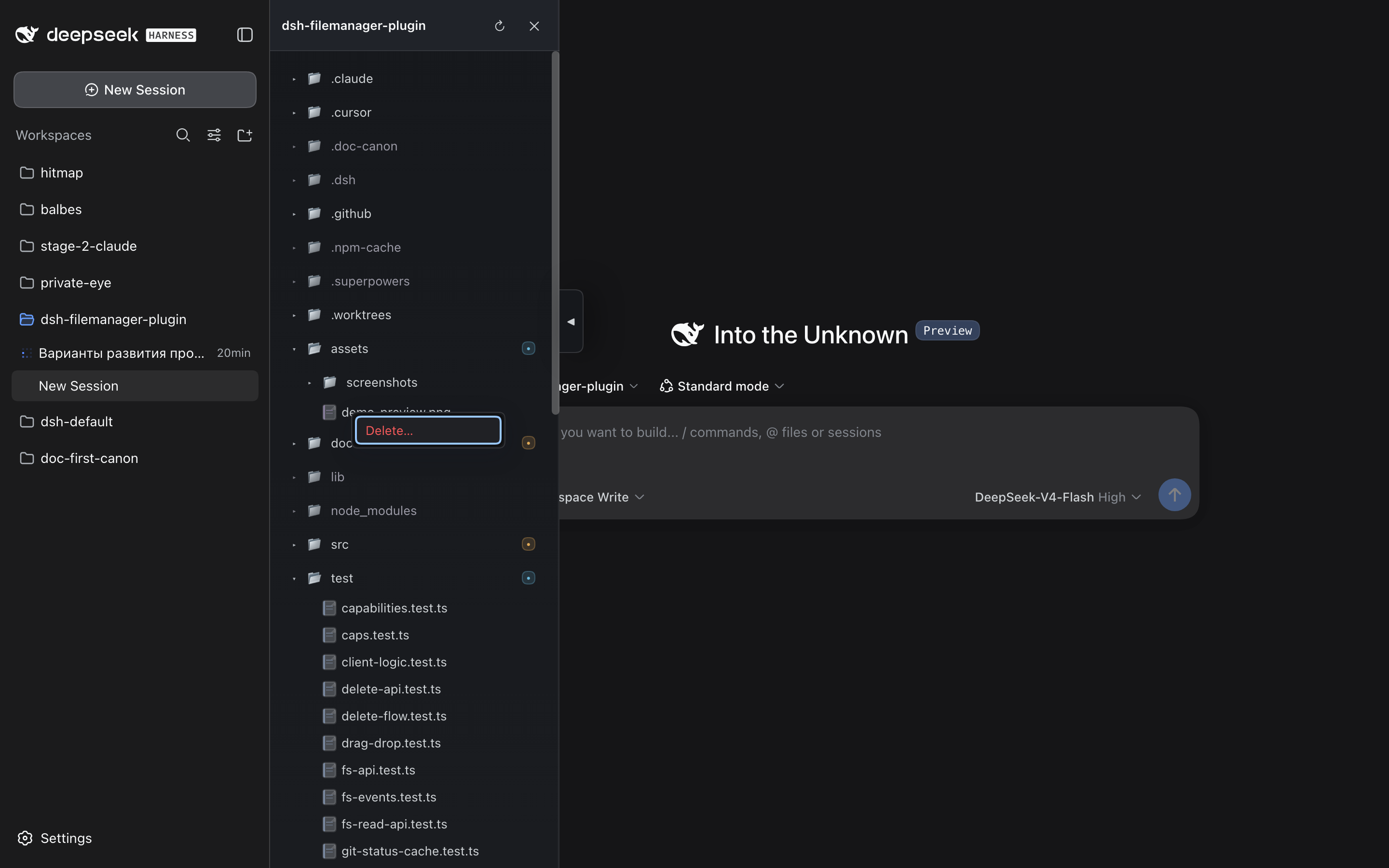 |
Each row above is one suggested capture from the live GUI (dark or light theme — the panel adapts via DSH tokens):
.md file open in the dock in Preview mode.node_modules and .git filtered), theme-aware styling via DSH tokens (auto dark/light).git status run.fm-locale in localStorage).aria-expanded/aria-level), full keyboard navigation (arrows, Home/End, Enter/Space, ArrowLeft/Right on folders), the preview is a dialog and closes on Escape, visible focus styles..git are protected.The panel is read-only, except explicit confirmed deletion of files/folders via the tree's context menu: it browses and previews files and never mutates them otherwise. File operations (create/rename/move) are intentionally out of scope.
The plugin registers a /filemanager-fs prefix on the DSH host:
GET /filemanager-fs/root?hint=<workspace> — workspace rootGET /filemanager-fs/list?hint=<workspace>&path=<rel> — directory listing with git statusGET /filemanager-fs/read?hint=<workspace>&path=<rel> — text file content (up to 5 MB; truncated: true when cut)GET /filemanager-fs/events?hint=<workspace>&paths=<json> — SSE stream of workspace changes (and git-changed events), with a heartbeatGET /filemanager-fs/cap?hint=<workspace> — mints an unguessable, expiring per-workspace capability token used to authorize image URLsGET /filemanager-fs/raw?hint=<workspace>&path=<rel>&cap=<token> — serves image bytes to capability URLs (byte caps: 20 MB raster / 2 MB svg; nosniff/no-store)GET /filemanager-fs/delete-info?hint=<workspace>&path=<rel> — read-only preflight for deletion: entry kind, whether it is the workspace root, and whether the file (or any descendant of a folder) carries uncommitted git changes (403 path escape / 404 not found)POST /filemanager-fs/delete?hint=<workspace>&path=<rel> — permanently deletes the file or folder, recursively (header-gated and POST-only); symlinks are removed as links; the workspace root and .git are rejected (403/404/409)All endpoints except GET /filemanager-fs/raw require the x-dsh-filemanager: 1 header. /raw is the only endpoint reachable without it — capability URLs must work as plain <img> sources and inside the Markdown preview — and authenticates via the token from /cap. Paths are contained to the workspace (realpath + escape checks, symlink-safe), and git is invoked read-only.
engines).^18.2.0; verified against 18.3.1).@deepseek-ai/dsh@0.2.1-rc.2 (web profile). Drag-and-drop into the composer targets the Lexical composer of dsh >= 0.1.2; textarea hosts of earlier dsh versions keep working through the same native text/plain drop. The plugin host and client APIs are pre-1.0 — pin the dsh version you deploy and re-test after dsh upgrades.x-dsh-filemanager header (image bytes additionally require an unguessable, expiring per-workspace capability token) plus the browser's same-origin/CORS behavior — treat the local dsh process as the trust boundary.dsh plugin --profile web add dsh-filetreenpm install
npm run build
dsh plugin --profile web add /path/to/dsh-filemanager-pluginThen register the service in the profile patch (~/.dsh/profiles/web/cordis.patch.yml):
- insert:
    - id: filemanager
      name: 'dsh-filetree'
Restart dsh web and refresh the browser.
npm run build      # esbuild: host (lib/index.js) + client bundle (lib/client.js)
npm test           # node:test + tsx
npm run typecheck  # tsc --noEmit
npm pack           # builds lib/ first (prepack) — inspect the publish tarball
CI (.github/workflows/ci.yml) runs typecheck, tests and the build on every push/PR.
docs/canon/ (doc-canon).docs/superpowers/.CHANGELOG.md follows Keep a Changelog; releases are tagged vX.Y.Z — see RELEASING.md for the release runbook.MIT — see LICENSE.
CLASSIFICATION EVIDENCE
系统优先读取 GitHub Topics,再与站内分类词典和词根规则比对。当前命中: 无有效分类标签。
c1overzz
DSH 插件:每天替你刷一轮 B站,读字幕挑出值得的、写一份日报,值得的 @ 你

hellowind777
一个自主的高级智能伙伴,不仅分析问题,更持续工作直到完成实现和验证。

xing-shuyin
Just open your browser — get all your work done.