模型与 MCP
待识别

rea
morluto
Reverse engineer anything with agents, from app behavior down to native binaries.

matata2017/dsh-codex-hooks
Codex-style hook management for DeepSeek Harness: hooks.json from config, plugins and projects, each hook pinned to a sha256 fingerprint you approve before it runs, a review dialog in the composer, a Hooks settings page, a /hooks command and per-turn run stats.
PROJECT TOPICS
INSTALL REFERENCE
dsh plugin --profile web add github:matata2017/dsh-codex-hooks
该命令指向仓库当前默认分支;尚无绑定当前 commit 的完整验证结果。
PROJECT README
Codex's hook management, ported to DeepSeek Harness (dsh).
Codex gives every hook a review step, a fingerprint you approve once, a settings page, a /hooks browser and a stats panel. dsh ships none of that: it exposes interception seams and nothing around them. This plugin ports that management layer over, so hooks on dsh are reviewed, trusted, switched off and inspected the same way they are in Codex.
The config file is dsh's own (hooks.json with dsh event names) — what is ported is the behaviour around it, not Codex's file format.
中文文档:README.zh.md
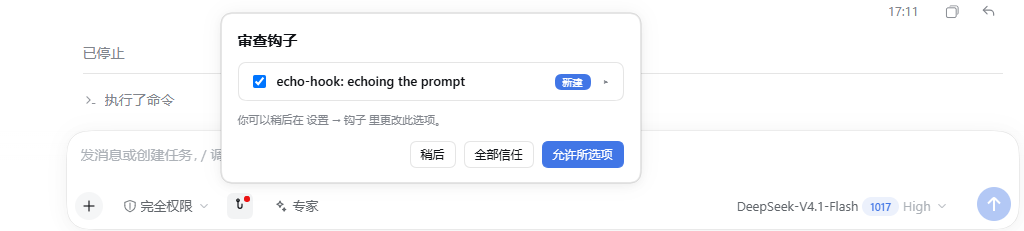
Review happens where the work happens — a hook button in the composer, a red dot while something is unapproved:

Clicking it opens the review dialog: one row per hook, a New badge, a chevron for the details, and Not now / Allow all / Allow selected:
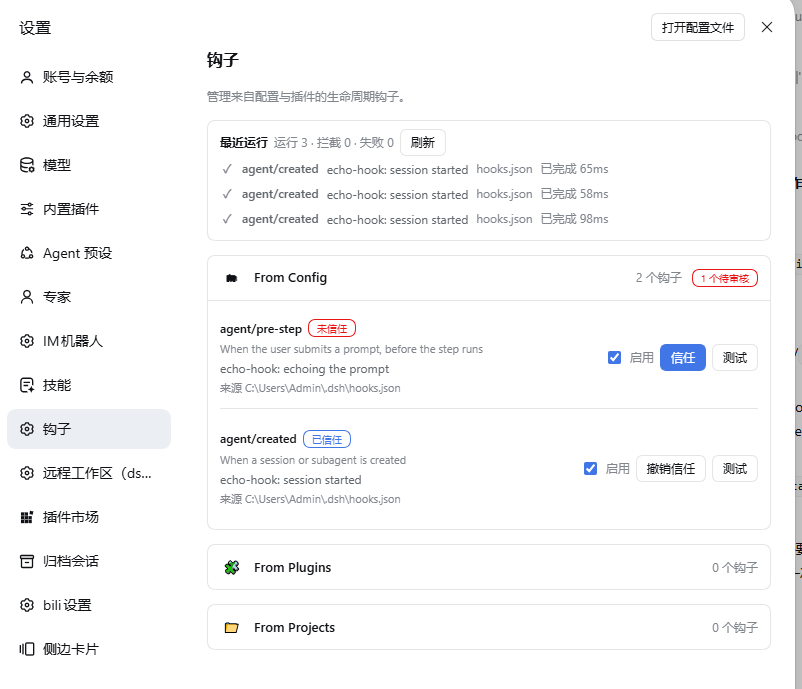
Everything else is managed in Settings → Hooks: hooks grouped by where they came from, each with its trust state, an on/off switch, Trust / Revoke and a dry-run Test:
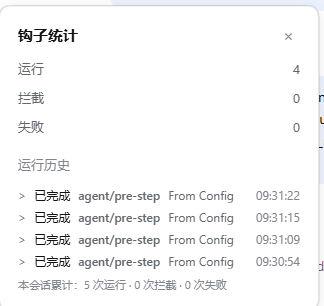
Per-run detail lives behind the message action row. The Hook stats dialog reads one turn, names it, and lists that turn's runs with the session totals underneath — no turn picker, it answers for the message you opened it from. Every run belongs to the turn that triggered it, the way Codex binds a run to its turn id: the match is exact, and a turn the log never saw — including one numbered before a host restart — answers with 0 and a note, never with another turn's numbers. A read always resolves inside the session the user is working in — another session's same-numbered turn never stands in. The turn comes from the message: a message that ends a turn names it exactly, and a message of the turn that is running now answers for that turn:
The screenshots come from a local dsh install running the two echo-hook entries in ~/.dsh/hooks.json — the same config the examples in this repo use.
| Plugin | Verified against |
|---|---|
| 0.5.x | dsh 0.1.0-rc.6 (development and self-test host, web + desktop) |
Newer dsh releases are untested: the plugin reads dsh's slot, command and remote-method contracts, and a host that renames one of those breaks it until it is updated.
The client half binds to four dsh client packages — @deepseek-ai/dsh-client-locale, @deepseek-ai/dsh-client-ui-settings, @deepseek-ai/dsh-client-ui-commands and @deepseek-ai/dsh-client-ui-chat. The first three ship with the profile; dsh-client-ui-chat is what provides the conversation.chat.turnTail slot the "open the stats of the message you clicked" feature needs, and on some installs it only exists inside the app's own node_modules. If the message-level hook button shows no turn, that package was the missing piece.
hooks.json from three places, grouped in the UI:$DSH_HOME/hooks.json (default ~/.dsh/hooks.json).hooks.json.<workspace>/.dsh/hooks.json for the workspaces this session has touched (up to 32 remembered).sha256: over its UTF-8 bytes. The fingerprint is what the trust decision is pinned to, so editing a hook's command invalidates its trust instead of silently running new code.$DSH_HOME/hooks.state.json together with an independent enabled/disabled switch per hook.command handlers only when they are enabled and trusted, with the hook's own timeout, cwd, environment and command/commandWindows split. Synchronous hooks for the same event start concurrently, matching Codex; results and additional context keep configuration order. An approval/request hook may answer {"decision":"allow"} to auto-approve the pending tool call, or deny; a deny from any hook wins over an allow.additionalContext is appended to the model input on agent/pre-step, tools/pre-execute, tools/post-execute and agent/created (2500 characters by default).tools/pre-execute, tools/post-execute, approval/request) with *, exact names, Name|Other or a regular expression.| Event | Fires | Can block |
|---|---|---|
agent/pre-step |
a prompt was submitted, before the step runs | yes |
agent/request |
before the model request is sent | no |
tools/pre-execute |
before a tool call runs | yes |
tools/post-execute |
after a tool call finished | yes |
approval/request |
before a tool call asks for permission | yes |
agent/created |
a session starts | no |
agent/turn-stopping |
right before the turn ends | no |
session/disposed |
the session is disposed | no |
Default timeout is 600s, except session/disposed (1s default, 3s maximum) so shutdown cannot hang.
/hooks$DSH_HOME/hooks.state.json; everything else is handled later in Settings → Hooks, one hook at a time./hooks opens the hooks browser — the first page lists the events with active/installed and a ! marker on the events that need review, the second page lists the handlers of one event with their trust state, an on/off switch and a Trust / Revoke button. It is a normal dsh slash command (registered when the host composes the commands service), so it never reaches the model.Runs / Blocked / Failed, plus Running while a slow hook works) and names that turn, with the session totals underneath. There is no turn picker: the dialog answers for the message you opened it from. The Run history list shows that turn's executions (Completed agent/pre-step User); the dialog refreshes every 1.5s while it is open. Hook output is not printed into the conversation; the model only ever sees a handler's additionalContext. The run log lives in memory for the session and is not written to disk — a reload starts empty, exactly like Codex, whose HookStarted/HookCompleted notifications are transient too. /hooks keeps the session-wide view. Clicking a message opens that message's turn, not whatever turn is current: a companion renderer on conversation.chat.turnTail — which does receive the whole TurnLocation, and renders before the action row of the same turn — records which turn each message ends, and the dialog opens on it, falling back to the current turn for a message it has never seen. One deliberate difference from Codex: agent/pre-step fires before every step of the agent loop ({ turn, step }), not once per submitted prompt, so an agent/pre-step hook runs once per model call inside a turn — that is why a single turn can show several runs.document.body with a fixed position, so it is never clipped by the composer or the message column.An approval/request hook can decide the pending approval itself:
{
  "hooks": {
    "approval/request": [{ "command": "node examples/approval-allow.mjs", "timeout": 10 }]
  }
}
The hook prints {"decision":"allow"} to approve that one call, {"decision":"deny","reason":"…"}
to refuse it, or nothing at all to let the normal prompt ask. A deny from any hook wins over an
allow from another. examples/approval-allow.mjs only allows the tool named in
APPROVAL_ALLOW_TOOL, because a hook that approves everything silently removes the prompt.
Requires dsh 0.1.0-rc.6 or newer and Node 20+.
# from GitHub
dsh plugin --profile desktop add github:matata2017/dsh-codex-hooks

# or from a local checkout, which is how this project is developed
dsh plugin --profile desktop add /path/to/dsh-codex-hooks
Restart the dsh web/desktop host afterwards, then open Settings → Hooks.
~/.dsh/hooks.json:
{
  "version": 1,
  "description": "my hooks",
  "hooks": {
    "agent/created": [
      {
        "command": "node ./examples/echo-hook.mjs agent/created",
        "commandWindows": "node.exe ./examples/echo-hook.mjs agent/created",
        "timeout": 15,
        "statusMessage": "echo-hook: session started"
      }
    ],
    "tools/pre-execute": [
      {
        "matcher": "Bash",
        "command": "node ./examples/echo-hook.mjs"
      }
    ]
  }
}
One object per hook: command (or type: "mcp_tool" with server + tool), optional matcher, timeout, statusMessage, additionalContextLimit, async, firstStepOnly.
firstStepOnly (agent/pre-step only): agent/pre-step fires before every step of a turn. With true, the hook runs on the first step only (the one carrying the user message); later steps never start the command, and the stats dialog counts one run per turn. Use it for hooks that only care about the prompt (memory recall, prompt rewriting). It is part of the trust fingerprint, so adding it asks for review again; leaving it out or false keeps the fingerprint unchanged.
Handler types: command is the only one executed. mcp_tool, prompt and agent are parsed and reviewable but not dispatched — they show up as installed, never as active, because a hook that silently does nothing is worse than one that says so.
node test/run-tests.mjs → 99 passed, 0 failed, 0 skipped.node selftest/host-e2e.mjs → 20 passed, 0 failed against a real profile.agent/pre-step runs in a live dsh session once the hook is trusted: the example hook prints one echo-hook received event=… line per agent step (it fires before every step, so one prompt can produce several lines). A hook stays untrusted until you approve it in the review dialog or in Settings → Hooks; an untrusted hook never runs.These are dsh boundaries, not missing code: they need a seam the harness does not expose. Codex has these; dsh does not, so the port stops here.
agent/pre-step takes UserMessage[], and no public API appends a developer message, so additionalContext cannot arrive with the extra weight a developer message would carry.tools/pre-execute returns allow / deny / ask / cancel; dsh deliberately excludes input rewriting because arguments are already logged and presented.agent/created with source: "compact" is the closest thing to a post-compaction hook.mcp_tool, prompt, agent handlers are reviewable but not executed, so they never show as active.Hooks execute real commands with the permissions of the dsh process. That is why trust is pinned to the sha256 fingerprint of each hook: approving a hook approves exactly that command line, and any edit requires a new approval. Only enable hooks you have read.
Approval sticks. The trust state is written to a temporary file and renamed over the real one, so an interrupted write can never leave a half-file that the next read would reject — and a click that would land on the button that just replaced it is ignored, so granting trust cannot revoke it again a moment later.
MIT
The browser loader concatenates every installed plugin client bundle into a single script, so a top-level const is visible to all plugins. Two plugins that pick the same name is a SyntaxError that stops the whole app from booting, not just one plugin. This client bundle therefore runs inside its own function and declares nothing globally.
CLASSIFICATION EVIDENCE
系统优先读取 GitHub Topics,再与站内分类词典和词根规则比对。当前命中: deepseek。
morluto
Reverse engineer anything with agents, from app behavior down to native binaries.

deepseek-ai
DeepSeek Harness: Everything is a Plugin.

nexu-io
The 1st Collaborative AI Design Agent Workspace. Local-first and open source. Create motion, prototypes, websites, apps, dashboards, presentations, images, and videos with your team and AI agents. Share work, exchange feedback, and iterate together in one workspace.