

模型与 MCP
待识别

rea
morluto
Reverse engineer anything with agents, from app behavior down to native binaries.
PROJECT TOPICS
INSTALL REFERENCE
dsh plugin --profile web add github:mars401/dsh-session-batch-manager
该命令指向仓库当前默认分支;尚无绑定当前 commit 的完整验证结果。
PROJECT README
English | 中文

Batch session management for DeepSeek Harness (DSH): multi-select sessions in the sidebar and batch archive / unarchive / delete, plus a full-screen Session management dashboard that visualizes model, token usage, cache read/write, and context pressure for every local session.
The DSH GUI natively offers per-session archiving only — there is no delete entry at all. This plugin fills the gap:
Verified with DSH 0.2.2-alpha.2 (Web UI, dev sandbox); see 6 Compatibility.
| # | Screenshot | Description |
|---|---|---|
| 1 | 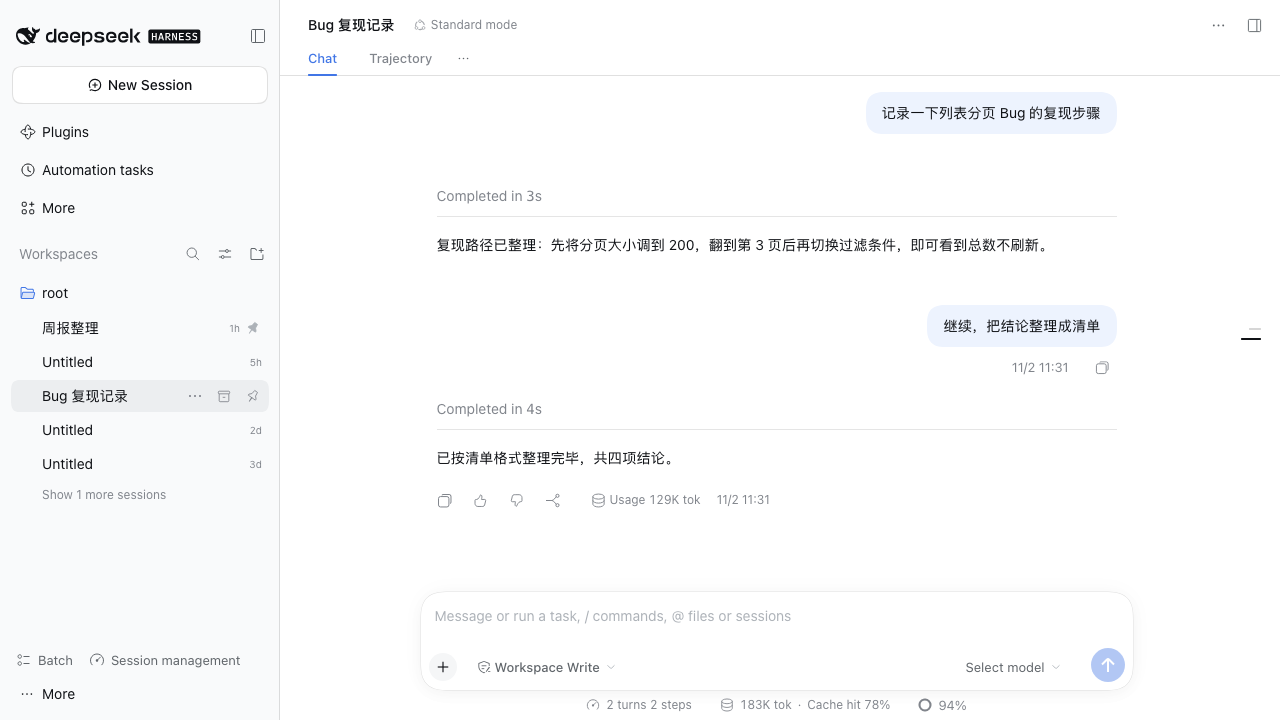 |
Sidebar Batch mode: checkboxes appear, rows can be multi-selected, floating toolbar at the bottom. |
| 2 | 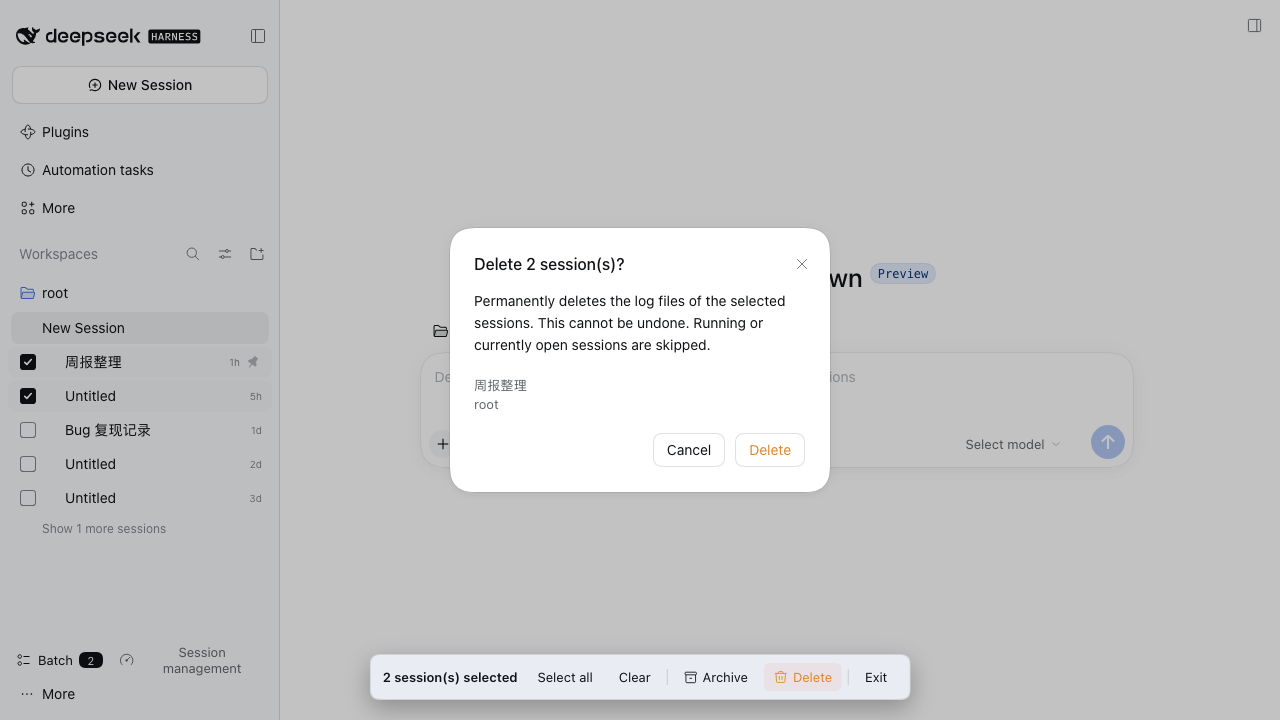 |
Delete confirmation dialog lists the selected sessions before physical deletion. |
| 3 | 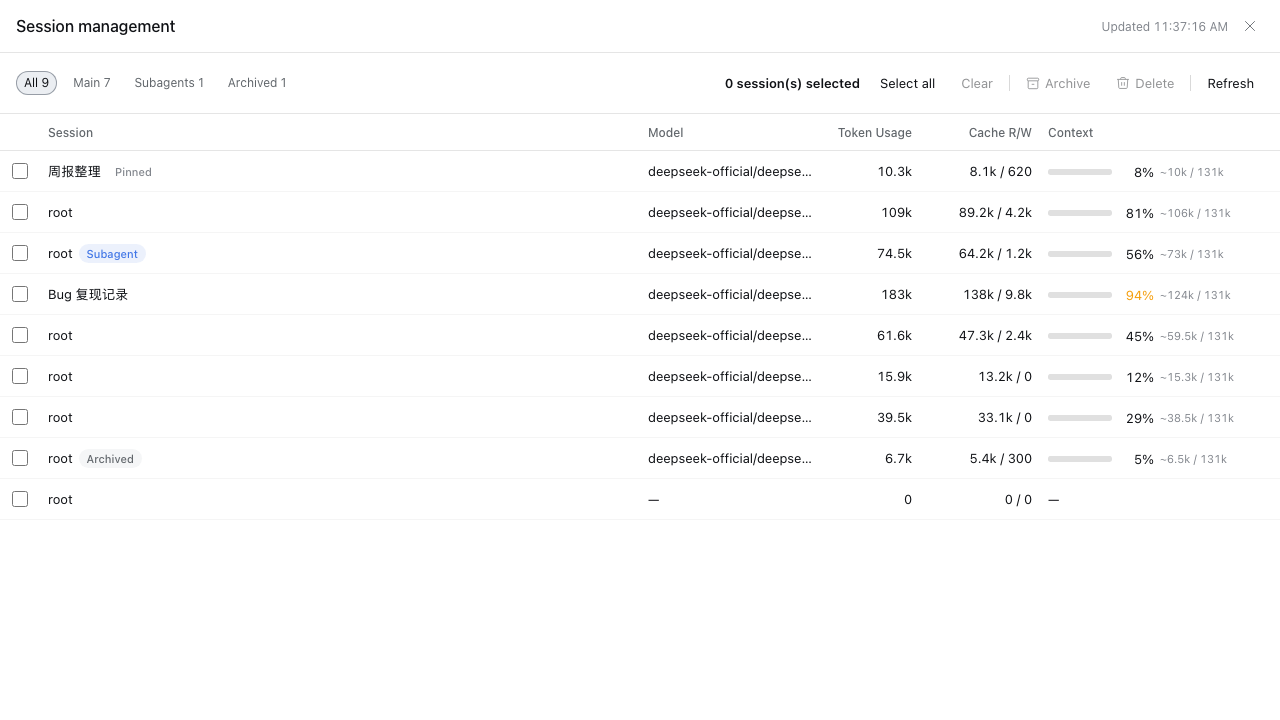 |
Full-screen Session management panel: 6-column table (model, token usage, cache, context pressure), progressive loading, in-panel batch operations. |
| 4 | 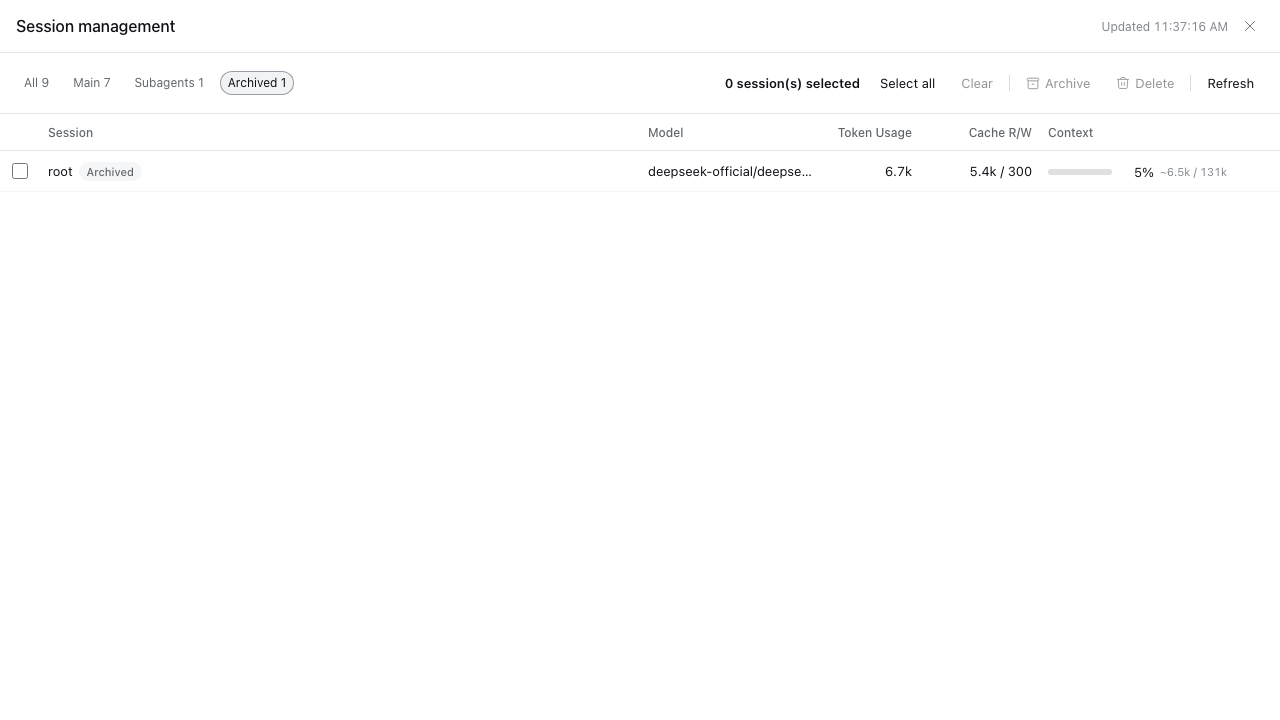 |
Four filter chips (All / Main / Subagents / Archived) with live counts — click to filter the table. |
| 5 | 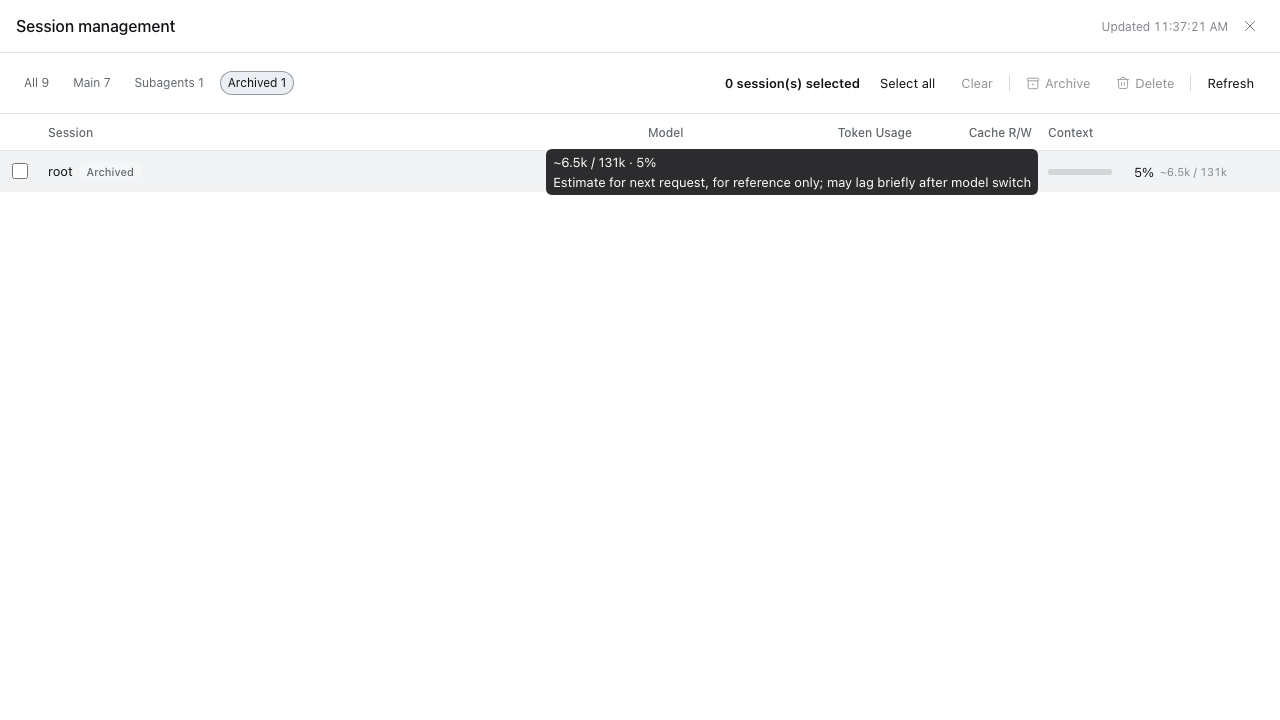 |
Per-bucket tooltip on token usage cells showing uncached input, cache read/write, and output breakdown. |
api-session/removed is broadcast, so every connected GUI drops the rows immediately. Deleted rows are additionally hidden by client-side tombstones (see 5 Safety and behavior).A gauge-icon button at the bottom of the sidebar opens a full-screen, read-only Session management panel that scans every local session:
provider/model) / token usage (4-bucket total, per-bucket tooltip) / cache read · write / context pressure percentage (progress bar, warning color at ≥ 90%).statsPollIntervalMs); zero host overhead while the panel is closed.sessionQuery service is unavailable, the panel degrades gracefully to list + batch operations.Both entries are buttons at the bottom of the DSH sidebar:
While selection mode is on, the floating toolbar appears at the bottom of the sidebar as soon as at least one row is selected.
The repository ships prebuilt bundles under lib/ (committed), so no build step is required to install.
dsh plugin --profile web add github:mars401/dsh-session-batch-managerRestart DSH Web after installation. If the browser still loads an older client bundle, use Ctrl+Shift+R to force-refresh the page.
Verify the installation:
curl -s http://127.0.0.1:<your-dsh-web-port>/dsh-session-batch-manager/v1/status
# {"ok":true,"service":"dsh-session-batch-manager","version":"0.2.0"}
The
desktopprofile is managed by the official Desktop app and is not intended to be modified with the regulardshCLI. Desktop users should install the plugin through Plugins in the app.
pnpm install
pnpm typecheck          # tsc --noEmit
pnpm build              # esbuild → lib/host/index.js + lib/client.js
node --test tests/stats.test.mjs
Then install the local checkout the same way, using the repository path instead of the GitHub spec:
dsh plugin --profile web add <path-to-this-repository>For client-side code, changes reload automatically after saving while HMR is working; otherwise reload the page or restart the client. After changing plugin dependencies, package.json, or bundle configuration, reinstall the plugin or restart the corresponding client.
Optional overrides in the bundle layer (cordis.patch.yml):
| Key | Default | Description |
|---|---|---|
routeBase |
/dsh-session-batch-manager/v1 |
Host route prefix, injected into the page as window.__DSH_SESSION_BATCH_MANAGER__ |
maxBatchSize |
200 |
Max session IDs per delete request |
trustedHosts |
[] |
Additional trusted authorities for the host fence (only needed for non-loopback deployments) |
statsPollIntervalMs |
5000 |
Dashboard polling interval while the panel is open |
statsSweepConcurrency |
4 |
Cold-session observation concurrency |
Delete is evaluated per session, independently — one failure never affects the others. In order:
active): in-progress turns, subagents, background tasks, timers — archive them first (archiving may stop tasks). Sessions that are merely mounted in memory but idle are allowed, matching native archive semantics (otherwise GUI-opened sessions could never be deleted before a restart).localStorage and filtered from all views (including archived) across refreshes, so ghost rows of deleted live sessions cannot reappear before the host restarts.api-session/removed is broadcast so GUIs drop rows instantly; already-deleted or ghost targets are reported as success — the desired end state has been reached.Browser trust fence (mirrors DSH's /api trust model): the delete route only accepts POST requests carrying the plugin-specific x-dsh-session-batch-manager header; the Host must be a loopback spelling, the bound address, or listed in trustedHosts; Sec-Fetch-Site: cross-site is a hard veto; the Origin must match; OPTIONS always answers 403 and no CORS headers are ever sent — a malicious web page cannot trigger a cross-site delete (the custom header forces a preflight, which is rejected). The stats route is read-only, sends cache-control: no-store and no CORS headers, and its payload carries no titles or secrets — only IDs, model names and token counts.
Known boundaries:
contextPressure is not an atomic observation) and may lag briefly after a model switch; the tooltip states this.| DeepSeek Harness (DSH) | dsh-session-batch-manager | Verified environment |
|---|---|---|
| >=0.2.1 | 0.2.0 |
Web UI (dev sandbox 0.2.2-alpha.2 — tree view E2E verified; recall GUI verification in progress); Desktop App 0.2.1-rc.5 — coupling points statically verified, runtime TBD |
The plugin declares dsh: ">=0.2.1" in engines. 0.2.2-alpha.2 (dev sandbox, Web UI) has been fully verified end-to-end. Desktop App 0.2.1-rc.5: all seven coupling points (slots, services, events, sessionQuery) are present in the app bundle — static grep confirmation, runtime verification pending. Core features (batch archive/delete, sidebar checkboxes) use stable APIs available since 0.2.1. The session management dashboard stats use sessionQuery; on builds where this service is unavailable the panel degrades gracefully to list + batch operations (see degraded flag).
On DSH builds without a context-menu service, the context-menu entry is silently absent — see 2.1.
This is a Cordis plugin with zero runtime dependencies: the host half is a plain ESM bundle, the client half is loaded through the DSH module loader.
lib/host/index.js is the host-side ESM plugin (delete route, stats route, index-inject config publication); lib/client.js is the client UI bundle. Both are committed so the repository installs without a build step; rebuild with pnpm build after source changes.pnpm typecheck, pnpm build, node --test tests/stats.test.mjs.src/host/ (host half: routes, stats aggregator, trust fence, structured types), src/client/ (browser half: batch ops, stores, dashboard panel and components), tests/ (host unit tests), docs/ (design / UI spec / review / test documents).div[data-row-key^="session:"]; slots sidebar.workspaces.session.row.action, sidebar.footer.action, shell.overlay; client services sessions / workspaces / locale plus optional contextMenus; host services sessions / sessionPersistence / workspaceRegistry / webServer; events webserver/index-inject, workspace/session-activity, api-session/removed; archive-refusal detection via error.name === 'WorkspaceArchiveError' and rpcError.code === 'workspace/session-active'. The full reasoning lives in docs/..dsh-batch-bar is the stable class name for the floating batch toolbar. Coexisting plugins may reference it (e.g. for z-index or visibility rules). This class is preserved across upgrades. .dsh-batch-footer (sidebar entry buttons) is also stable.CLASSIFICATION EVIDENCE
系统优先读取 GitHub Topics,再与站内分类词典和词根规则比对。当前命中: deepseek-harness。
morluto
Reverse engineer anything with agents, from app behavior down to native binaries.

deepseek-ai
DeepSeek Harness: Everything is a Plugin.

nexu-io
The 1st Collaborative AI Design Agent Workspace. Local-first and open source. Create motion, prototypes, websites, apps, dashboards, presentations, images, and videos with your team and AI agents. Share work, exchange feedback, and iterate together in one workspace.