
其他
插件

dsh-bili-scroll
c1overzz
DSH 插件:每天替你刷一轮 B站,读字幕挑出值得的、写一份日报,值得的 @ 你
PROJECT TOPICS
INSTALL REFERENCE
dsh plugin --profile web add github:maomaobishop/dsh-skill-panel
该命令指向仓库当前默认分支;尚无绑定当前 commit 的完整验证结果。
PROJECT README


A Skills button for the DeepSeek Harness sidebar: one click lists every skill the current session can use — with a Chinese one-liner, where it comes from, and what it does. Click a row to copy its /name invocation.
给 DeepSeek Harness 侧边栏加一枚「技能」按钮:点开就是当前会话可用的全部 skill,带中文说明、来源和最近使用,点一行把
/名字复制到剪贴板。
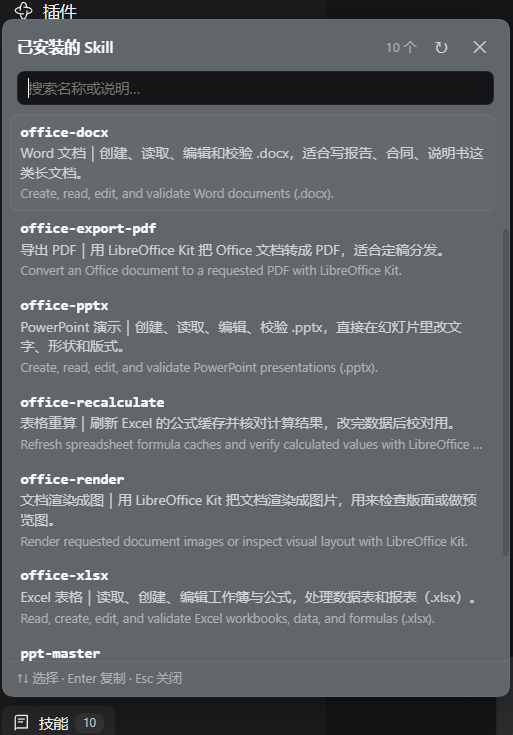
| 中文说明 | 每个 skill 配一句中文解释(lib/zh.json),界面显示为「中文名|一句话说明」,英文原文降为次要行 |
| 中文搜索 | 搜索框同时匹配 名称 / 中文标题 / 中文说明 / 英文描述,敲「表格」也能找到 office-xlsx |
| 键盘操作 | ↑ ↓ 选择、Enter 复制、Esc 关闭;鼠标悬停同步高亮 |
| 最近使用 | 复制过的 skill 自动置顶(最多 3 个,存 localStorage),带「最近」标记 |
| 来源可见 | 每条标注来自 .dsh/skills、.agents/skills 还是插件自带,完整路径在 hover 提示里 |
| 翻译进度 | 底部显示「已翻译/总数」,提醒你还有哪几个没写中文 |
| 跟随主题 | 颜色全部走 --dsw-alias-* 主题 token,深浅色自动切换 |
数据走官方 skills/list Remote,所以看到的目录与输入框里敲 / 得到的候选完全一致。
需要 DeepSeek Harness(桌面端或 dsh web)+ Windows PowerShell。
git clone https://github.com/maomaobishop/dsh-skill-panel.git
cd dsh-skill-panel
.\install.ps1                 # 装进 desktop profile
.\install.ps1 -Profile web    # 或 web profile
脚本只做三件事:把包复制到 <profile>\plugins\、在 <profile>\node_modules\ 建 junction、在 profile 的 package.json 里登记 dependencies 与 dsh.profile.bundles。
然后重启 DeepSeek Harness。 bundles 是启动期的组合,热加载只对已在运行的 entry 生效。
卸载:.\uninstall.ps1。
$p = "$env:USERPROFILE\.dsh\profiles\desktop"
Copy-Item . "$p\plugins\dsh-skill-panel" -Recurse
cmd /c mklink /J "$p\node_modules\dsh-skill-panel" "$p\plugins\dsh-skill-panel"
# 然后在 $p\package.json 里:
#   dependencies 加  "dsh-skill-panel": "file:./plugins/dsh-skill-panel"
# dsh.profile.bundles 末尾加 "dsh-skill-panel"打开 lib/zh.json,按 skill 名加一条:
{
  "skills": {
    "my-skill": { "title": "中文名", "summary": "一句话说清它干什么、什么时候该用。" }
  }
}改完点面板右上角的「↻」即可生效,不用重启——词典由宿主路由 GET /skill-panel/dictionary 每次现读文件。没写中文的 skill 会退回英文描述,不会报错。
| 半 | 文件 | 职责 |
|---|---|---|
| Host | lib/index.js |
占一条 Loader row,并提供 GET /skill-panel/dictionary 把 lib/zh.json 发给面板 |
| Client | lib/client.js |
在 sidebar.footer.action 插槽里画按钮,向上弹出浮层 |
客户端是手写的 lazy-CJS 工厂(window.__ModuleLoader__.load({ id, factory })),格式与官方发布的 client bundle 相同:外层只注册工厂,模块体在首次物化时才执行,不需要构建步骤,改完重启即生效。
open / sessionId,用 requestedRef 保证每次打开最多自动请求一次。cannot get property "remote" without inject(0.1.2):Cordis 只注入 inject 里列出的名字。访问 ctx.remote.skills 时,remote 和 remote.skills 两个都要声明。npm install
npm testtest/render.mjs — 用 react-dom/server 渲染按钮test/interact.mjs — jsdom 真交互:打开 → 中文说明 → 中文搜索 → ↑/Enter 复制 → 最近使用 → Esc 关闭(20 条断言)test/storm.mjs / test/storm2.mjs — 失败路径回归:skills/list 报错时一次点击只能发 1–2 次请求,不许自我重试MIT © 2026 maomaobishop
CLASSIFICATION EVIDENCE
系统优先读取 GitHub Topics,再与站内分类词典和词根规则比对。当前命中: 无有效分类标签。
c1overzz
DSH 插件:每天替你刷一轮 B站,读字幕挑出值得的、写一份日报,值得的 @ 你

hellowind777
一个自主的高级智能伙伴,不仅分析问题,更持续工作直到完成实现和验证。

xing-shuyin
Just open your browser — get all your work done.