
其他
完整应用

deepseek-harness
deepseek-ai
DeepSeek Harness: Everything is a Plugin.
PROJECT TOPICS
PROJECT README
A global frosted-glass (backdrop blur) theme plugin for the dsh Web UI. It keeps the existing light/dark preference untouched and layers a translucent surface-token override plus a global backdrop-filter on top, giving the whole UI an iOS/macOS-style frosted-glass look.
The plugin also adds a Transition & schedule row right below Appearance in Settings → General, plus a new Theme settings section in the settings navigation:
Transition & schedule (General → below Appearance): switch animation + scheduled switching (see below).
Theme settings section: contains the custom background (static images + dynamic wallpaper videos), the lighting effect switch and the system notifications switch (see below).
Switch animation: None / Fade / Circle reveal / Wipe from top — full-screen transitions when light/dark is switched.
Scheduled switching: set a daily dark-theme time and light-theme time; the UI switches automatically at those boundaries, and manual switches last until the next boundary.
Custom background (Theme settings): static images (URL / local) and dynamic wallpaper videos (video URL / local file), with one-click reset to the built-in background.
Slideshow (Theme settings): images and videos share one playlist; configure switch interval and animation; the playlist modal supports preview, reorder, delete and add.
Lighting effect (Theme settings): a blue glowing edge and halo around the composer, recolored in real time from the theme's brand token; from the moment the conversation starts running until it completes, the glow turns into a rainbow flowing around the border, then reverts. Can be switched off at any time.
System notifications (Theme settings): uses the browser Notification API to send a system-level notification when a run finishes and when a choice/question prompt (ask_user_question) appears; clicking the notification focuses the window, taking you to the result or the pending question. The switch is off by default; enabling it requests notification permission and sends a test notification to confirm.
Monet colors (Theme settings → Interface theme): an independent theme alongside frosted glass. Selecting Monet disables the glass blur and translucent surfaces and applies a flat Material You palette; it extracts a seed color from the current wallpaper (or a chosen image / manual picker) and registers the monet-light and monet-dark theme definitions through ctx.theme.register.
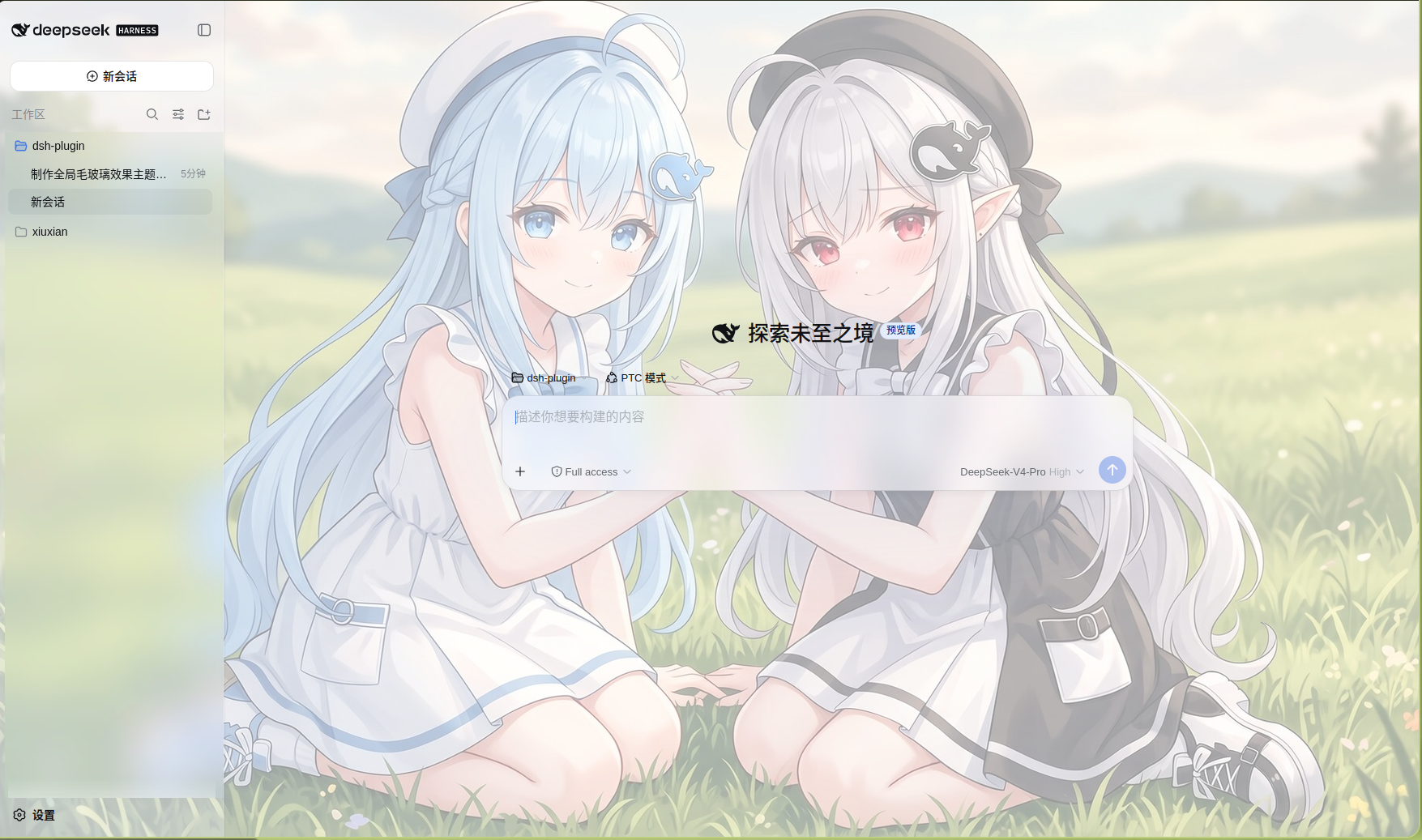
Two browser-side halves:
Global stylesheet (inlined by lib/client.js)
bg.jpeg as a centered, cover background on body (inlined as base64; source kept at assets/bg.jpeg), shown as-is in light mode and dimmed behind a translucent dark veil in dark mode — the content the blur reveals.backdrop-filter: blur(...) saturate(...) to the three-column shell frame and to floating surfaces ([role="menu"], [role="dialog"], [role="listbox"], [role="tooltip"], ...).<body>, giving them the same frosted glass without any per-plugin adaptation.--dsw-mask-blur token so dialogs / image masks blur harder.Translucent surface-token override (via ctx.theme.overrideTokens)
--dsw-alias-bg-base, --dsw-alias-bg-layer-1/2/3, --dsw-alias-bg-overlay, --dsw-specific-sidebar-fill, --dsw-specific-menu, ... to translucent rgba(...), each with a { light, dark } pair.var(--dsw-*), this layer is class-name agnostic and survives shell re-hashing.Theme-switch animations
ctx.theme.setTheme with the browser-native View Transition API: the browser snapshots the REAL before/after frames and uses the new frame as the mask — fade, circle reveal centered on the click, or wipe from top — with no solid-color veil.prefers-reduced-motion; switches without an animation when the resolved scheme stays the same (e.g. “System” resolving to the current scheme), and falls back to an instant switch where View Transitions are unavailable.Scheduled light/dark switching
ui-theme section of the user-settings document with frosted*-prefixed fields.Custom background
ui-theme.frostedBackgroundUrl; local images are compressed and stored in localStorage.ui-theme.frostedBackgroundVideoUrl; local videos are stored as Blobs in IndexedDB.<video> layer (object-fit: cover, muted loop) while static backgrounds override the --frosted-bg-image variable on <body>.bg.jpeg.Composer glow (lighting effect)
ui-theme.frostedGlowEnabled (default on) and is mirrored to body[data-frost-glow].[data-composer-card] input gains a blue glowing edge (masked gradient ring) plus a brand-colored soft glow (box-shadow), driven by --dsw-alias-brand-primary so it recolors in real time when theme tokens change.conic-gradient rainbow from the moment the conversation starts running until it completes — the session runtime's running flag is mirrored to body[data-conversation-running] by JS (covers tool-call phases), with body:has([data-streaming]) as a fallback; the edge reverts to blue when the run ends (respects prefers-reduced-motion, degrading to a static rainbow).box-shadow light — everything stays OUTSIDE the dialog, the interior remains clean with no hard boundary.System notifications
ui-theme.frostedNotifyEnabled (default off, opt-in). The browser only allows the notification permission prompt inside a user gesture, so it's an explicit switch: turning it on calls Notification.requestPermission() and, once granted, immediately sends a test notification to confirm it works.running flag flips true→false (a real run ending; switching sessions does not misfire), a “Conversation finished” notification is sent.[data-question-key] / [data-plan-review-key] (the stable ask_user_question markers) appearing and sends a “Your choice is needed” notification carrying the question title.Monet colors (wallpaper color extraction)
ui-theme.frostedSkinMode (glass / monet, default glass); selecting monet removes the frosted-glass token layer and backdrop blur. Monet's light/dark/system mode persists as ui-theme.frostedMonetScheme, and the extracted seed as ui-theme.frostedMonetSeed.ctx.theme.register as monet-light and monet-dark (ThemeDefinition spec); the plugin re-applies the selected one from durable settings after each sync because third-party theme ids are intentionally process-only.wallpaper package — GNOME / KDE / XFCE / MATE / Cinnamon / swaybg / swww / macOS / Windows — and falls back to built-in detection scripts), or extract from the screen via browser getDisplayMedia (choose the whole screen and minimize windows to sample the desktop wallpaper), choose an image file, or pick a color manually with <input type="color">.applySkinMode registers the translucent surface layer in glass mode and removes it in monet mode, while body[data-frost-skin="monet"] disables the background image and every backdrop-filter, so Monet renders flat opaque surfaces.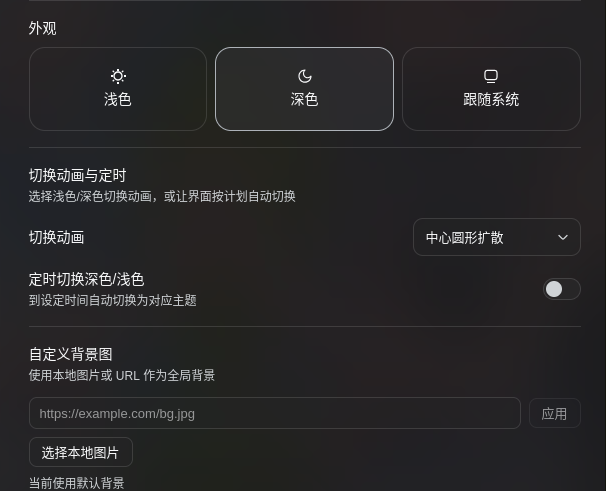
dsh-client-ui-frosted-glass/
├── package.json          # dsh.bundle (self-inserting row) + dsh.client (browser half)
├── cordis.patch.yml      # bundle patch: inserts the ui-frosted-glass row
├── lib/
│   ├── index.js          # host half (desktop-wallpaper API route; wallpaper package + subprocess fallback)
│   └── client.js         # browser half (window.__ModuleLoader__.load bundle format)
├── README.md
└── README.zh.md
lib/client.js is a hand-authored browser bundle in the same window.__ModuleLoader__.load({ id, factory }) format tsdown emits — no local build step required.
Clone the repo, then install into the web profile via the profile plugin manager:
git clone https://github.com/makuralymi/dsh-webUI-Glass-Theme.git
dsh plugin --profile web add ./dsh-webUI-Glass-Theme
This runs pnpm in the profile directory and, because the package declares dsh.bundle.patch, auto-adds it to dsh.profile.bundles; its bundle patch then inserts the ui-frosted-glass row automatically — no manual cordis.patch.yml edit is needed. Then:
dsh --profile web
# or
dsh web
Note: the host composition is assembled at boot, so adding/removing a plugin requires restarting the web process before a refresh shows it.
dsh plugin)Use this OR the dsh plugin path above, not both (they insert the same row). For cases where dsh plugin is unavailable:
Add the directory as a profile dependency:
cd "$DSH_HOME/profiles/web" pnpm add <path-to-the-cloned-repo, e.g. ./dsh-webUI-Glass-Theme>
Append a row to $DSH_HOME/profiles/web/cordis.patch.yml:
<style data-plugin="dsh-client-ui-frosted-glass"> in <head> and inline translucent tokens (--dsw-alias-bg-base, ...) on body.body[data-ds-dark-theme] switches the dark gradient and dark translucent tokens.ui-theme.frosted* in $DSH_HOME/settings.yaml.<video> layer immediately, and “Reset to default background” restores the built-in background.data-frost-glow disappears from body).--frosted-blur (default 20px) and --frosted-saturate (default 180%) in lib/client.js.assets/bg.jpeg then re-inline (or edit the --frosted-bg-image data URI in lib/client.js); dark-mode dim strength is the linear-gradient alpha under body[data-ds-dark-theme].rgba alpha values in FROSTED_TOKENS.MONET_DEFAULT_SEED (default #4d6bfe), the MONET_CHROMA_SCALE mapping and the role/tone tables in buildMonetScheme / buildMonetLightTokens / buildMonetDarkTokens.--dsw-alias-bg-* / --dsw-specific-* tokens to FROSTED_TOKENS.--frost-vt-duration in lib/client.js (default 340ms).--frost-vt-easing.frostedDarkTime / frostedLightTime in SETTINGS_DEFAULTS.compressImage maxDimension (default 2560) and quality (default 0.86).--frost-glow-color (defaults to --dsw-alias-brand-primary) in lib/client.js; flow speed is the frost-glow-ring-flow animation duration (default 2.4s); glow strength is the idle/running box-shadow layers and the edge-ring opacity.backdrop-filter ride stable data-* attributes (:has(> [data-shell-overlay]) and [data-composer-card]) rather than hashed module classes; floating surfaces use [role=...], and the translucent-token override is class-name agnostic.CLASSIFICATION EVIDENCE
系统优先读取 GitHub Topics,再与站内分类词典和词根规则比对。当前命中: 无有效分类标签。
deepseek-ai
DeepSeek Harness: Everything is a Plugin.

anywhere-labs
为 DeepSeek Harness (DSH) 插件生态打造的现代化桌面端解决方案。万物皆「插件」,桌面本身也是「插件」。

walkinglabs
Harness engineering beginner tutorial, from 0 to 1