
模型与 MCP
待识别

rea
morluto
Reverse engineer anything with agents, from app behavior down to native binaries.
PROJECT TOPICS
INSTALL REFERENCE
dsh plugin --profile web add github:machine202502/dsh-voice-ext
该命令指向仓库当前默认分支;尚无绑定当前 commit 的完整验证结果。
PROJECT README
Local Russian speech recognition for DeepSeek Harness.
The plugin does not replace the built-in Voice input: it adds a provider to the shared
ctx.speechToText service, so the microphone button, recording and text insertion stay stock.
microphone button → ctx.speechToText → provider dsh-voice-ext → GigaAM v3 (sherpa-onnx)GigaAM v3 CTC (MIT), ONNX conversion sherpa-onnx-nemo-ctc-giga-am-v3-russian.
model.int8.onnx — 224,721,476 bytes, SHA-256 is verified after download;tokens.txt — the model vocabulary;%LOCALAPPDATA%\dsh-voice-ext\models\gigaam-v3;Page Plugins → Voice ext:
| Field | Default | Meaning |
|---|---|---|
| Model directory | %LOCALAPPDATA%\dsh-voice-ext\models\gigaam-v3 |
any directory with model.int8.onnx and tokens.txt |
| CPU threads | 2 | recognizer numThreads |
| Download automatically | on | fetch the model at start if it is missing |
Provider and language selection live in Voice input itself (the speechToText service);
this plugin declares the languages ru and auto.
Bridge for the form: 127.0.0.1:49234 — GET /status, POST /settings, POST /prepare.
Interface languages: Russian, English, Chinese.
The interface language comes from the language extension setting when it is ru, en or
zh. The value auto follows the application language: document.documentElement.lang, then
navigator.language; ru* → ru, zh* → zh, otherwise en. With no setting at all the
default is ru.
The setting is changed in the plugin form Plugins → Voice ext and stored in the file
%LOCALAPPDATA%\dsh-voice-ext\settings.json.
- insert:
    - id: voice-ext
      name: 'dsh-voice-ext'
      config:
        providerId: dsh-voice-ext
        language: ru
        threads: 2
        autoDownload: true
To make the plugin the default provider, name it in the speech-to-text entry:
- id: speech-to-text
  config:
    defaultProvider: dsh-voice-ext
    language: ru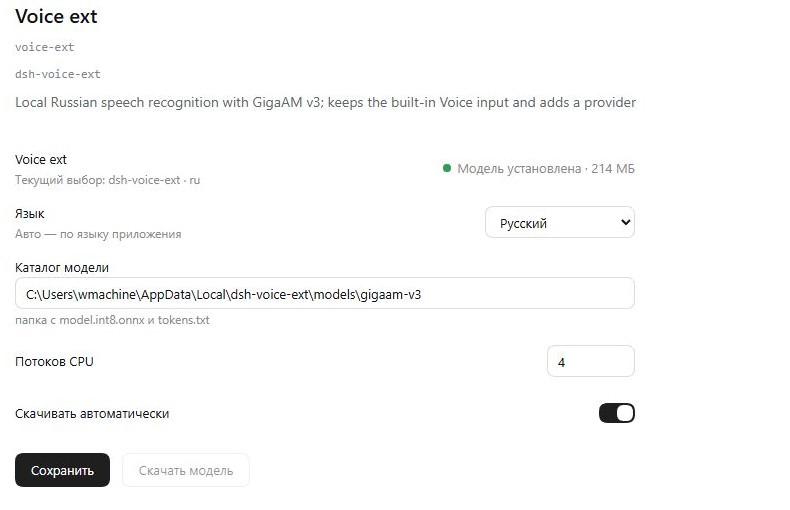
"@machine202502/dsh-voice-ext": "^0.1.1"and add dsh-voice-ext to dsh.profile.bundles. Installation pulls in
sherpa-onnx-node@1.13.8 and the platform binary (sherpa-onnx-win-x64 on Windows).
After a restart the provider is registered; if the model is not found and autoDownload is on,
it is downloaded at start (224 MB).
node tests/probe.mjs      # recognizes tests/fixtures/sample-ru-16k.wav directly
node tests/provider.mjs   # registers the provider and recognizes through its API
Reference: «Вот мой голос, меня же слышно хорошо» — “Here is my voice, I can be heard well”.
A diagnostic run through the shared service is enabled with selfTest: <path to wav>;
the result is written to %LOCALAPPDATA%\dsh-voice-ext\selftest.json.
sherpa-onnx-node@1.13.8 and the platform binary (sherpa-onnx-win-x64 etc.).
MIT. The GigaAM model is distributed under MIT; the conversion is under the sherpa-onnx license (Apache-2.0).
CLASSIFICATION EVIDENCE
系统优先读取 GitHub Topics,再与站内分类词典和词根规则比对。当前命中: deepseek-harness。
morluto
Reverse engineer anything with agents, from app behavior down to native binaries.

deepseek-ai
DeepSeek Harness: Everything is a Plugin.

nexu-io
The 1st Collaborative AI Design Agent Workspace. Local-first and open source. Create motion, prototypes, websites, apps, dashboards, presentations, images, and videos with your team and AI agents. Share work, exchange feedback, and iterate together in one workspace.