
开发工具
待识别

treg
superdesigndev
OpenRouter for agent tools. Join community here: https://discord.gg/6mQYYfFMAn
PROJECT TOPICS
INSTALL REFERENCE
dsh plugin --profile web add github:machine202502/dsh-restart
该命令指向仓库当前默认分支;尚无绑定当前 commit 的完整验证结果。
PROJECT README
Restart DeepSeek Harness from the interface or with an agent tool — with the option to continue the same session after the start.
| Capability | Where |
|---|---|
| "Restart" button | sidebar footer, next to the account (power icon) |
| Confirmation | a modal with two buttons, no extra options |
| Agent tool | dsh_restart({ fake, reason, plugins }) — for extension development only |
| Session continuation | a restart via the tool opens the session and writes [auto.continue.<token>] |
| Watchdog window | while a restart runs: phase, timer, reason, plugins, live log tail |
| Recovery | rollback of the profile, quarantine of the suspect plugin, safe mode |
The restarting process cannot be a child of the application: taskkill /T kills the whole
tree together with it. So the plugin:
%LOCALAPPDATA%\dsh-restart\pending.json;prestart.json, pending-profile);DSH-Restart (Windows) or spawns a detached sh helper
(macOS/Linux);A boot counts as healthy only when the renderer reported in (client-ready.json) and no new
crash log appeared. Then the helper marks the current profile as the rollback target. When the
boot is not healthy it restores backup\last-good, quarantines the plugins whose working tree
changed (their edits go to git stash), and starts again; if that still fails, it boots with
the base bundles only and records safe mode in safe-mode.json.
The profile is never edited under a running app: POST /profile/restore stages the files and
the helper moves them into place while the app is down. Editing package.json or
cordis.patch.yml live makes the loader re-apply the plugin tree and freezes the window.
After the start the client reads the marker through the local bridge 127.0.0.1:49233:
GET  /claim           → { marker } — one client at a time, the delivery flag lives in the marker
POST /claim/release   → give the marker back after a failed attempt
POST /consumed        → retire the marker once the message was really sent
POST /restart         → write the marker and restart
GET  /health          → a live-host signal for the watchdog
GET  /settings        → current overrides
POST /settings        → save overrides (no restart)
The continuation text carries the restart token: [auto.continue.<token>], or
[auto.continue.failed.<token>] after an unrecovered boot. The token is the same one in
pending.json and overlay.json, so a duplicated or lost message in the chat can be traced to
its restart. A marker is delivered to one client only — a 15 second lock plus a persistent
deliveredAt field — and a single attempt sends at most once: the client clicks the send
button, waits for the composer to clear, and never mixes the button with Enter.
A restart via the tool returns the session with that message: the client opens the same session, waits for the composer to be ready, inserts the text and sends it. The sidebar footer button does not create a marker and does not continue the session.
The user's draft is not lost: if the field already contains text, it is temporarily stashed
in localStorage, the marker is sent, and then the text is returned to the input field
(without being sent). The message queue is session state — the plugin neither reads nor
changes it.
The tool exists for developing and debugging DSH itself: a plugin, cordis.patch.yml, the
profile. It is not intended for ordinary work, for "refreshing state", or for calls without
a code/config change that needs a fresh process.
dsh_restart { fake: true }
→ Preflight passed; fake restart requested, nothing was restarted.
Without fake the tool restarts the application and returns the session with an
[auto.continue] message. The fake flag runs every check but restarts nothing — for
tests. If the tool is disabled, a call from old memory fails with
unknown tool "dsh_restart".
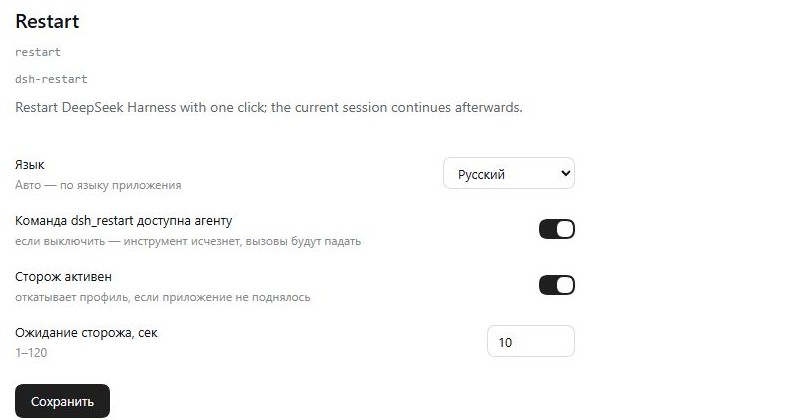
On the Plugins → Restart → Configure page:
| Setting | Default | What it does |
|---|---|---|
| Language | Russian | language of the button and the form: Russian, English, Chinese, or "Auto" (follows the application language) |
The dsh_restart command is available to the agent |
enabled | when disabled the tool disappears; a call from old memory fails with unknown tool "dsh_restart" |
| Watchdog active | enabled | when disabled a restart just closes and opens the application, with no profile rollback |
| Watchdog wait, sec | 10 | how long to wait for a live-start signal before rolling back (1–120) |
Overrides are stored in %LOCALAPPDATA%\dsh-restart\settings.json; the values from
cordis.patch.yml remain the defaults. Saving settings needs no restart: the tool is
registered and unregistered on the fly, and the interface language is applied immediately.
Interface languages: Russian, English, Chinese.
language when it is ru / en / zh.auto follows the application language: document.documentElement.lang first, then
navigator.language; ru* → ru, zh* → zh, otherwise en.ru.%LOCALAPPDATA%\dsh-restart\settings.json.dsh_restart is available to the agent only in "quiet" mode — when a restart will not
disturb anyone:
| Check | Refusal |
|---|---|
| Call from a subagent | dsh_restart is only available to the main agent: a subagent cannot restart the app; do not retry, report the need to the parent agent instead |
| Access mode is not Full access | dsh_restart requires the Full access permission preset (current: …) |
| Another session or subagent is still working | dsh_restart refused: N other session(s) or subagent(s) are still working (…) |
| A background job is still running | dsh_restart refused: N background job(s) are still running (…) |
The checks go through ctx.permissionPresets.current(agent.session), ctx.agents.list()
and ctx.jobs.list(agentId); a "working" status is running or a non-empty agent input
queue. A subagent is detected by exec.agent.options.subagentDepth (plus exec.parent).
The button in the interface performs none of these checks: the user decides when to restart.
src/helper.sh) mirrors the Windows chain and passes sh -n, but
has not been run on a real POSIX machine yet;dsh_restart (agent) — always opens the session and writes [auto.continue.<token>]
(or [auto.continue.failed.<token>] when the boot was not recovered).Every launch of Desktop Host takes a new port and sets a dsh-auth-<random> cookie for
127.0.0.1. Chromium stores cookies per host, not per port, so old cookies are not replaced
and accumulate. Measured on a live installation: about 122 such cookies produce a Cookie
header of roughly 17.5 KB, it stops fitting into the limit (16 KB), the welcome request
receives 431, and the application fails with
desktop welcome: Web authentication failed. In addition, the lifetime of these cookies is
capped in the profile: connection.cookieMaxAgeDays: 7.
Before every launch (after the application is killed, before Start-Process) the helper
runs src/cookie-clean.py and deletes only the dsh-auth-* lines for
127.0.0.1/localhost. Other cookies are left alone.
If the application did crash on the welcome step (the crash log contains
Web authentication failed), the watchdog does not roll the profile back and does not
disable plugins: it cleans the cookies, launches the application once more and waits for a
healthy start.
Every restart gets a token. The marker and prestart.json carry it, the overlay shows the
reason and the plugins, and the continuation text ends with it.
start     → boot is healthy when client-ready.json is fresh and no crash log appeared
healthy   → the current profile is marked as the rollback target (backup\last-good)
not healthy → restore last-good, quarantine the plugins whose git tree changed (stash their edits)
still bad → safe mode: base bundles only, the restored list goes to safe-mode.json
A recovered boot continues the session normally; only safe mode reports
[auto.continue.failed.<token>]. The profile files are written without a BOM
(UTF8Encoding(false)), otherwise the host cannot read package.json.
The window is optional: the recovery itself is pure Node. Three tiers, chosen at start:
| Condition | Window |
|---|---|
| Python with tkinter and a display | Tk window (src/overlay.py), localized ru/en/zh |
| tkinter missing, Windows | thin PowerShell window (src/overlay.ps1), localized |
| no GUI at all (e.g. Linux without a display) | tail -f of restart.log |
The log fills the remaining height, the window is resizable, both tiers start at
640×420, and the view stays pinned to the bottom unless the user scrolls up.
If a subagent started a background job and finished its turn, DSH deletes the record of that job together with the agent, although the job itself keeps running. The pre-restart check will not see such a job and will not refuse the restart.
What is covered:
| Owner of the work | Refusal |
|---|---|
| Own background job | yes |
| A subagent or another session is still working | yes |
| Their jobs, while the owner is alive | yes |
| A subagent's job after its turn finished | no |
Why: the job registry ctx.jobs is keyed by agent id and is cleared when the agent is
destroyed; the jobs.start wrapper sees only jobs started through that path, while a
subagent starts them differently. Detection by child processes is unreliable: the
application's service processes constantly appear and disappear nearby. The solution is
deferred.
dsh plugin --profile desktop add @machine202502/dsh-restartOr manually:
"@machine202502/dsh-restart": "^0.2.1"and add @machine202502/dsh-restart to dsh.profile.bundles.
After installation the application needs a restart (you can use the button once it appears).
node tests/smoke.mjs                   # tool, checks, fake, bridge
node tests/load-client.mjs client.js # the client module loads and returns applyMIT
CLASSIFICATION EVIDENCE
系统优先读取 GitHub Topics,再与站内分类词典和词根规则比对。当前命中: developer-tools。
superdesigndev
OpenRouter for agent tools. Join community here: https://discord.gg/6mQYYfFMAn

T-Auto
A toolkit for low-level operations in DSH, designed to reduce token usage and task execution time / DSH 底层操作工具插件,旨在减少 Token 消耗与任务耗时

crafter-station
A public gallery of animated pets for Codex, Claude Code, DeepSeek Harness, Hermes, OpenCode, Gemini CLI, and more.