
模型与 MCP
待识别

rea
morluto
Reverse engineer anything with agents, from app behavior down to native binaries.
PROJECT TOPICS
INSTALL REFERENCE
dsh plugin --profile web add github:machine202502/dsh-browser
该命令指向仓库当前默认分支;尚无绑定当前 commit 的完整验证结果。
PROJECT README
DSH plugin: an isolated Playwright browser per session — live tab thumbnails in the composer dock,
a Browser section in the sidebar, a per-site proxy and DevTools-grade tooling for agents.
16 tools, 33 browser_run commands (including list/help and the network presets), a settings
form, and a regression suite.
Real Chromium (Playwright) for every DSH session: live thumbnails in the dock, a Browser section in the sidebar, a per-site proxy and full DevTools access.
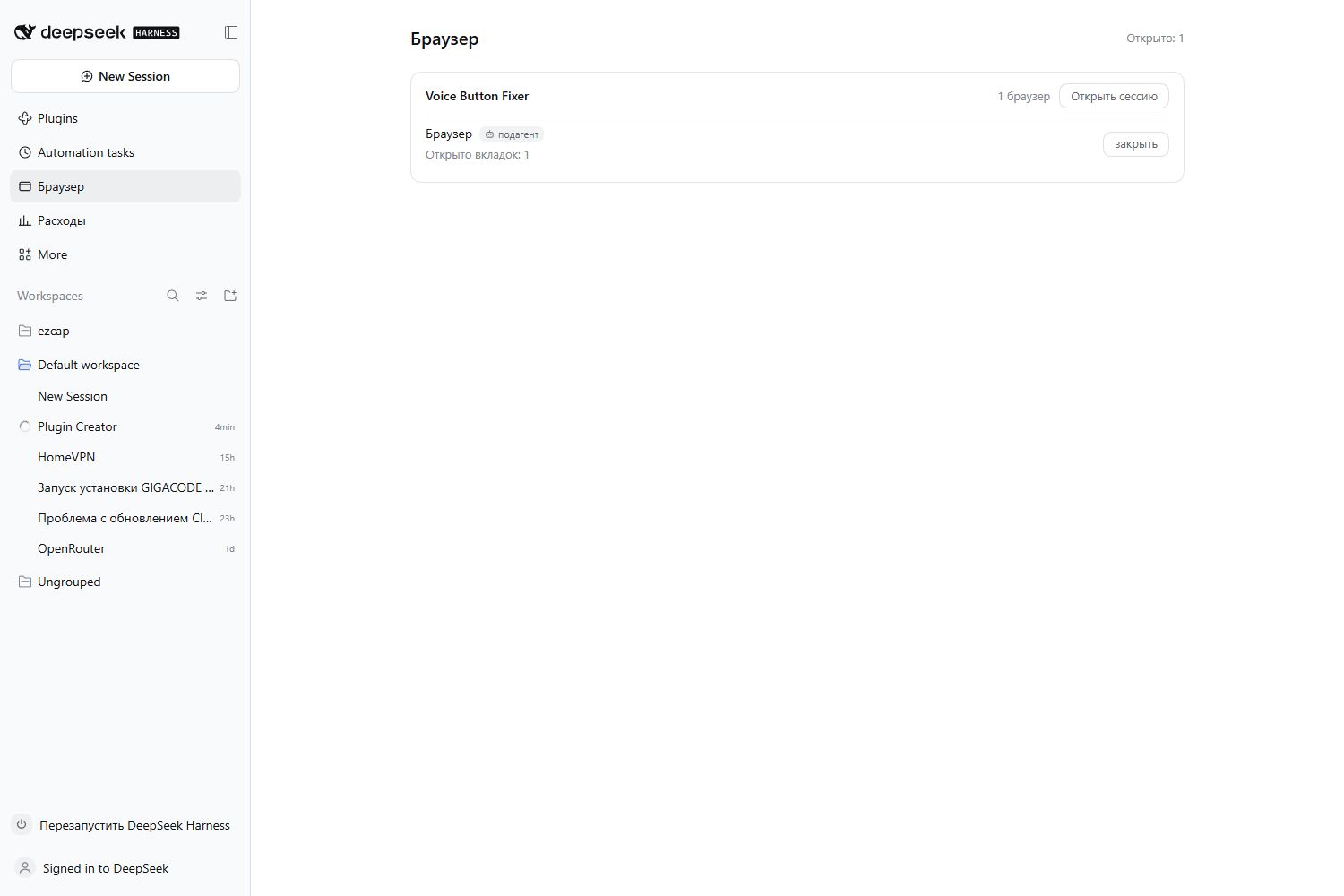
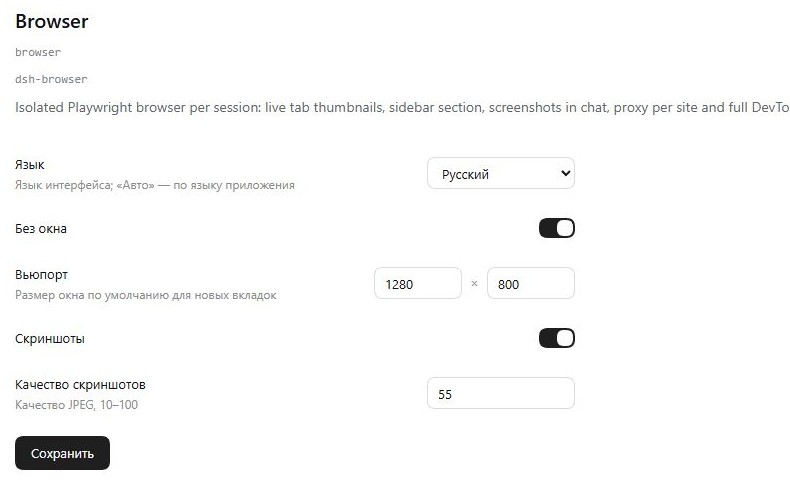
One command — it adds the dependency from GitHub and runs the package manager:
dsh plugin --profile desktop add @machine202502/dsh-browserThen restart DSH: the Browser section appears in the sidebar and the browser card in the dock.
Useful variants:
node install.mjs --profile desktop --dry-run   # show what will change
node install.mjs --home /path/to/.dsh          # a different DSH directory
node install.mjs --uninstall                   # remove the plugin
Chromium is installed separately; playwright-core does not pull it in:
npx playwright install chromiumManual installation (if pnpm is unavailable) — in ~/.dsh/profiles/desktop/package.json:
{
  "dependencies": { "@machine202502/dsh-browser": "^0.1.1" },
  "dsh": { "profile": { "bundles": ["…", "@machine202502/dsh-browser"] } }
}
Check: npm test in the plugin directory (requires the node tests/qa-page.mjs page).
ctx1, ctx2, … — isolated cookies and storage inside one browser,
so two clients can be tested against one server.open, navigate, click, resize, drag) a frame is posted to the chat.127.0.0.1:49222: it looks at the host
of every connection and routes only the listed sites through Hiddify, everything else goes direct.
Chromium 156 ignores PAC (both --proxy-pac-url and chrome.proxy from an extension), so the
decision is made outside the browser. The site list and the proxy address persist across restarts
in the data directory: %LOCALAPPDATA%\dsh-browser (Windows), ~/.local/share/dsh-browser (Linux),
~/Library/Application Support/dsh-browser (macOS).| Tool | Purpose |
|---|---|
browser_open |
open a tab (optionally in a specific ctx) |
browser_navigate |
navigate to a URL |
browser_click |
click a CSS selector (not blocked by a dialog) |
browser_fill |
fill a field |
browser_hover / browser_drag |
pointer and drag (within the viewport) |
browser_resize |
viewport size |
browser_text |
page text |
browser_tabs |
tab list |
browser_close |
close a tab (the last one shuts the browser down) |
browser_cdp |
raw Chrome DevTools Protocol call |
browser_run |
command dispatcher (see below) |
browser_proxy_enable / browser_proxy_disable / browser_proxy_status / browser_proxy_list |
proxy |
All tools accept timeout (ms). The default is 10–45 s depending on the operation.
browser_run commandsbrowser_run({ command: "list" }) — the catalogue; { command: "help", args: { name: "network" } } — details.
| Command | What it does |
|---|---|
console |
console.* and page errors, including asynchronous ones |
network |
requests with codes, types and errors |
cookies |
get / set / clear |
storage |
localStorage / sessionStorage |
idb |
IndexedDB: databases, stores, rows |
eval |
run JS, return the value |
dom |
html / text / attrs / styles / count of an element |
snapshot |
accessibility tree (role and name) |
keyboard |
press, type, down, up |
dialog |
accept / dismiss / text for prompt |
emulate |
network, color scheme, CPU, time zone, geolocation |
metrics |
page performance metrics |
perf |
record the main thread for N seconds: where the time went |
slow3g / fast3g / offline / off |
network presets in one word |
trace |
record a Playwright trace |
coverage |
JS coverage between start and stop |
downloads |
files downloaded by the browser |
lighthouse |
audit: scores, metrics, failed checks |
report |
parse a saved report: list or a single audit |
css |
matched rules for an element: selectors, properties, media queries, fonts |
assets |
page resources by type, download: true — save to disk |
html |
the full document HTML into a file |
screenshot |
page or element snapshot into a file (opened with read_image) |
diff |
pixel comparison of two screenshots |
ws |
WebSocket connections and frames in both directions |
wait |
wait for a selector or text |
ctx |
tabs by context |
cdp |
an arbitrary protocol method |
- id: browser
  name: 'dsh-browser'
  config:
    language: ru
    headless: true
    bridgePort: 49221
    idleTimeoutMs: 900000
    viewport: { width: 1280, height: 800 }
    proxy:
      server: 127.0.0.1:10901
    shots:
      enabled: true
      on: [open, navigate, click, resize, drag]
      quality: 55
minIntervalMs: 1500Interface languages: Russian, English, Chinese.
The language setting is used when it is ru / en / zh; auto follows the application
language (document.documentElement.lang, then navigator.language): ru* → ru,
zh* → zh, otherwise en. The default is ru.
The language is changed in Plugins → Browser → Configure — the settings form offers
Русский / English / 中文 / Авто — and applies immediately, without restarting DSH.
The value is stored in %LOCALAPPDATA%\dsh-browser\settings.json.
The plugin makes no platform-specific calls: Chromium is located through the Playwright paths for
Windows, Linux and macOS (or set via DSH_BROWSER_EXE), the process watchdog talks to the browser
over CDP rather than through taskkill or kill, and paths are built with node:path.
Windows   %LOCALAPPDATA%\ms-playwright\chromium-*/chrome-win64/chrome.exe
Linux     ~/.cache/ms-playwright/chromium-*/chrome-linux/chrome
macOS ~/Library/Caches/ms-playwright/chromium-*/chrome-mac*/Chromium.app/Contents/MacOS/Chromiumindex.js) keeps one manager per agent, registers the tools and the 127.0.0.1:49221
bridge for the client part.src/browser-manager.js) launches Chromium through launchPersistentContext
in a temporary profile that is deleted when the browser closes.src/bridge.js) serves tabs, frames and proxy state to the client.client.js) draws the dock card, the sidebar section and the tool-row view
with a frame thumbnail.src/routing-proxy.js) routes connections according to rules from the bridge.lighthouse requires the package to be installed; without it the command returns a clear
error and the rest of the plugin keeps working.ms-playwright); the path can be set via DSH_BROWSER_EXE.lighthouse — an optional dependency: the lighthouse command returns a clear error
if the package is not installed. The rest of the plugin works without it.The browser does not outlive the host. Besides the regular shutdown on dispose, a separate
watchdog (src/watchdog.mjs) runs next to every browser: if the DSH process disappears, it closes
Chromium through its own DevTools endpoint. The platform does not matter — it is Node and CDP, no taskkill.
CLASSIFICATION EVIDENCE
系统优先读取 GitHub Topics,再与站内分类词典和词根规则比对。当前命中: deepseek-harness。
morluto
Reverse engineer anything with agents, from app behavior down to native binaries.

deepseek-ai
DeepSeek Harness: Everything is a Plugin.

nexu-io
The 1st Collaborative AI Design Agent Workspace. Local-first and open source. Create motion, prototypes, websites, apps, dashboards, presentations, images, and videos with your team and AI agents. Share work, exchange feedback, and iterate together in one workspace.