

其他
完整应用

deepseek-harness
deepseek-ai
DeepSeek Harness: Everything is a Plugin.
PROJECT TOPICS
INSTALL REFERENCE
dsh plugin --profile web add github:lzbaclz/dsh-selection-ask
该命令指向仓库当前默认分支;尚无绑定当前 commit 的完整验证结果。
PROJECT README





简体中文 · Installation · Usage · Development · Troubleshooting · License
Select it. Quote it. Ask DeepSeek.
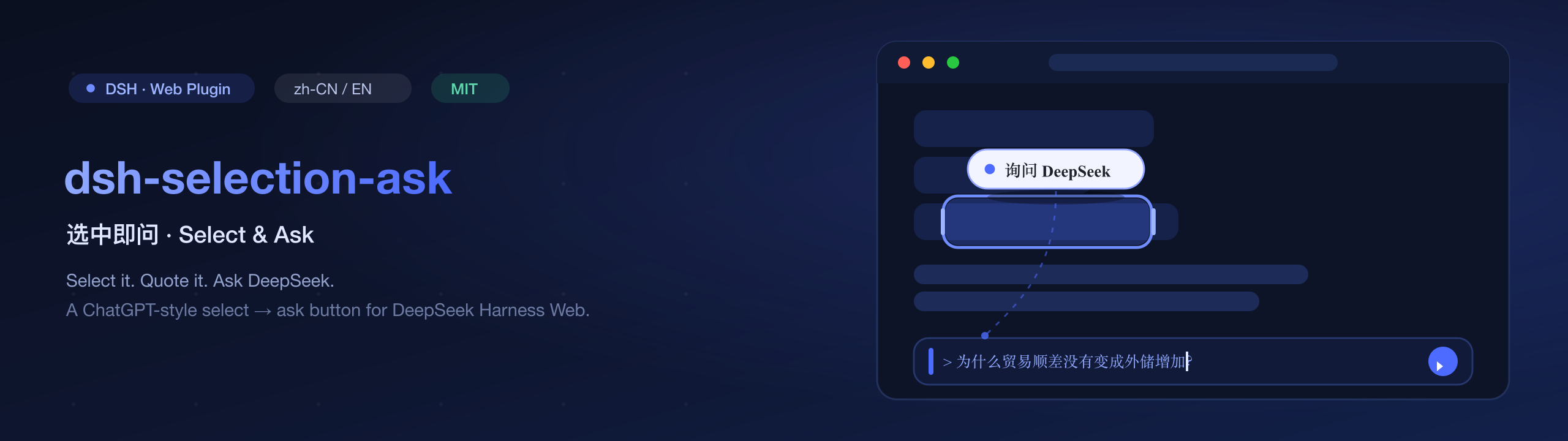
DeepSeek Harness is a text-first terminal/agent workspace. But quoting a piece of context back into the chat should be one gesture, not a copy-paste chore. dsh-selection-ask gives the web GUI a ChatGPT-style selection helper: select text in a conversation and a floating 「询问 DeepSeek」 button appears beside it. Click it — the selection is quoted into the composer as a Markdown blockquote (>), the composer is focused, and the caret is parked at the end. Just type your follow-up and send.
inputActions.setDraft input-machine API, so undo history and draft persistence keep working. It never touches DSH internals or DOM state directly.lib/ is committed, so a github: install fetches ready-to-load artifacts with no build step.position: fixed), clamped to the viewport, hidden once the selection scrolls away.[data-conversation-scroll]); selecting inside the composer itself does nothing (quoting the draft back into itself is nonsense).> prefix; an empty draft is replaced, a non-empty draft gets the quote appended as its own paragraph (blank line in between).web profile (dsh web), DSH packages of the 0.1.0-rc.6 era.http://127.0.0.1:3080 by default).^22.19.0 || >=24 and pnpm. Installing the prebuilt package does not (compiled lib/ is committed).Requirements: DSH ≥
0.1.5-rc.2(thenextchannel / the DSH Desktop app).
Plugin version Works with 0.1.1DSH ≥ 0.1.5-rc.20.1.0DSH 0.1.0-rc.x(thedsh-client-runtimeera)ation
Using the DSH Desktop app? Run the same command in the app's built-in terminal without
--profile— it targets thedesktopprofile automatically. The first install needs one restart of that DSH; later upgrades hot-reload (no restart).
From npm (recommended — one command)
dsh plugin --profile web add dsh-selection-askFrom GitHub (latest commit, no build step needed)
dsh plugin --profile web add github:lzbaclz/dsh-selection-askPin a release for reproducibility: dsh plugin --profile web add github:lzbaclz/dsh-selection-ask#v0.1.1
From a local clone
git clone https://github.com/lzbaclz/dsh-selection-ask.git
dsh plugin --profile web add link:/absolute/path/to/dsh-selection-askdsh plugin add already registers the package in your profile's dsh.profile.bundles list, and this package ships its own cordis.patch.yml, so the entry row is inserted automatically at boot. Choose one of the two activation paths — never both.
Path A — restart (zero YAML editing; recommended for new setups)
Restart dsh web (or just start it if it is not running). Done — no config files to edit.
# stop your dsh web process, then:
dsh web
Path B — hot activation on a running server (no restart)
Use raw pnpm (not dsh plugin, which would also register the bundle) so the bundles list is untouched, then patch the profile's patch layer, which DSH watches and applies live:
cd ~/.dsh/profiles/web
pnpm add github:lzbaclz/dsh-selection-ask
Now open ~/.dsh/profiles/web/cordis.patch.yml and replace the [] with the insert block — the file must stay a valid YAML list:
# BEFORE:
# Your patch layer for this dsh profile, applied after every bundle layer:
# a top-level YAML array of loader patch entries (id-targeted config
# overrides, disables, and insert lists; `!!js` expressions allowed).
[]

# AFTER:
# Your patch layer for this dsh profile, applied after every bundle layer:
# a top-level YAML array of loader patch entries (id-targeted config
# overrides, disables, and insert lists; `!!js` expressions allowed).
- insert:
    - id: dsh-selection-ask
      name: dsh-selection-ask
      config: {}
Save the file and refresh the browser page — the plugin is loaded.
⚠️ Do not combine Path A and Path B (e.g.
dsh plugin add+ a manual patch row): the entry would be registered twice anddsh webfails to boot withduplicate loader entry id: dsh-selection-ask.⚠️ Do not append the YAML block after an existing
[]— that produces an invalid file anddsh webfails to boot withfailed to parse patches. Replace the[]as shown above.If your profile is not named
web, substitute your profile name; if you set a custom harness home, substitute your$DSH_HOMEfor~/.dsh.
Older profiles (created by an earlier dsh version) may lack the autoInstallPeers: false line in pnpm-workspace.yaml. Add it so pnpm never tries to auto-install pre-release peers:
packages:
  - .

nodeLinker: hoisted
autoInstallPeers: falseRefresh the GUI page and select a sentence in the chat flow — the 「询问 DeepSeek」 button floats beside the selection. Click it: the text lands in the composer as a quote.
dsh plugin --profile web add dsh-selection-ask@latest # fetch the new versionThe DSH composition always mounts the dsh-client-hmr chain, which watches
installed plugin bundles and reloads them:
Every side effect (style tag, locale dictionaries, slot registrations) is owned by the plugin fiber, so a hot reload never leaves stale code behind.
> selected text), the composer is focused and the caret is at the end — type your follow-up question and send.dsh plugin --profile web remove dsh-selection-askIf you used Path B, also remove the insert block from cordis.patch.yml (put the [] back), then refresh / restart.
| Symptom | Cause & fix |
|---|---|
dsh plugin add fails with ERR_PNPM_NO_MATCHING_VERSION for @deepseek-ai/... |
Your profile is missing the autoInstallPeers: false line in pnpm-workspace.yaml (older profiles), so pnpm tries to auto-install pre-release peers. Add the line (see below), remove any stray @deepseek-ai/* entries from the profile's package.json dependencies, delete the profile's pnpm-lock.yaml, then re-run. This plugin also marks every peer optional, so it never triggers auto-install. |
dsh web fails to boot: failed to parse patches |
The insert block was appended after the file's existing [], making the YAML invalid. Replace the [] with the block instead (see Path B). |
dsh web fails to boot: duplicate loader entry id: dsh-selection-ask |
The package is registered twice — you used dsh plugin add (which adds the bundle) and a manual patch row. Remove one of the two. |
Installed via dsh plugin add but nothing appears after a page refresh |
Bundle-list changes are composed at boot — restart dsh web (Path A), or use the hot-activation Path B. |
| Button never appears after selecting text | Selection is outside the transcript (try selecting a chat message), the page wasn't refreshed after activation, or the insert row is missing. |
| Button appears but click does nothing | An outdated bundle is cached — hard-refresh the page (Cmd/Ctrl+Shift+R). If the package was rebuilt locally, re-run pnpm build and re-link: it. |
| Button gone while a question card is showing | Expected: the overlay hides with the default composer under a takeover. It returns when the default composer does. |
dsh plugin add fails |
Any pnpm specifier works (link:, github:, tarball URL). Check the profile path under ~/.dsh/profiles/ and your Node version. |
The compiled lib/ is committed, so normal installs never need a build. To hack on it:
git clone https://github.com/lzbaclz/dsh-selection-ask.git
cd dsh-selection-ask
pnpm install
pnpm typecheck   # host + client tsc programs, zero errors
pnpm build       # tsc(host) + tsc(client) + tsdown bundle
pnpm verify      # offline smoke: manifest/exports/patch/bundle shape
pnpm test:dom    # headless DOM test: mounts the built button in jsdom and asserts the quote flow      # offline smoke checks over the built artifacts
src/index.ts — host half (empty apply; exists so the roster scan finds the package).src/client/index.tsx — browser half: injects CSS, registers into the conversation.input.overlay slot.src/client/SelectionAskButton.tsx — the floating button: selection detection, positioning, quote writing.src/client/quote.ts — pure buildQuote / appendQuote helpers (exercised offline by verify).src/client/styles.ts — button CSS + HMR-safe <style> injection.After changing src/, rebuild, reinstall (or re-link:), and refresh the page.
The plugin registers a component into the session-scoped conversation.input.overlay slot, which grants it the session input kit (useInput, inputActions). A document-level selectionchange/mouseup listener detects selections inside the transcript and renders a position: fixed button at the selection's bounding rect. Clicking builds a Markdown quote, joins it with the current draft, writes the full draft through inputActions.setDraft — the input machine's official write path — then focuses the composer textarea.
dsh plugin --profile web add dsh-selection-ask).MIT © lzbaclz
Issues and PRs are welcome any time — open an issue and tell us what you built with it.
CLASSIFICATION EVIDENCE
系统优先读取 GitHub Topics,再与站内分类词典和词根规则比对。当前命中: 无有效分类标签。
deepseek-ai
DeepSeek Harness: Everything is a Plugin.

anywhere-labs
为 DeepSeek Harness (DSH) 插件生态打造的现代化桌面端解决方案。万物皆「插件」,桌面本身也是「插件」。

walkinglabs
Harness engineering beginner tutorial, from 0 to 1