
其他
完整应用

deepseek-harness
deepseek-ai
DeepSeek Harness: Everything is a Plugin.
PROJECT TOPICS
PROJECT README
Codex-style custom instructions for DeepSeek Harness: edit a global instruction from the settings panel that applies to every conversation on this machine, across all models.
Just like Codex's global AGENTS.md or ChatGPT's Custom Instructions, the notes and context you write in the "Custom Instructions" panel are automatically carried into every future conversation — no need to repeat yourself in every message.
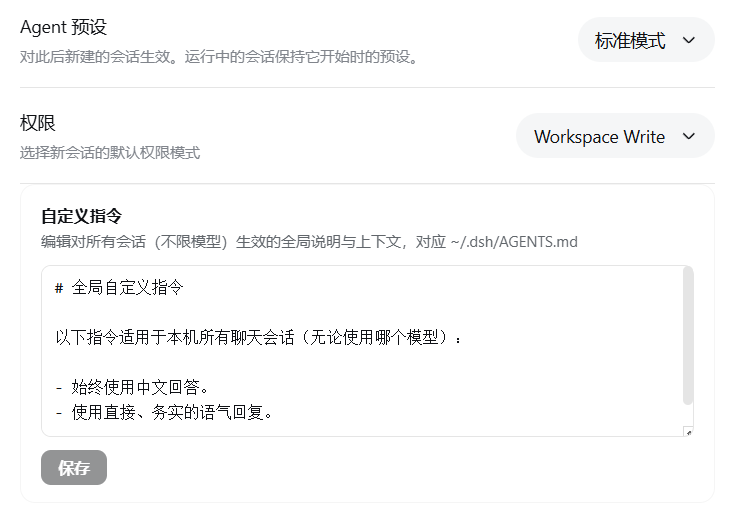
~/.dsh/AGENTS.md, saved straight to disk.dsh-agent-instructions mechanism — new conversations pick it up from the first message; the current conversation picks it up after the next file operation.window.__ModuleLoader__.load client bundle + pure Node ESM host — no build authorization needed to install.dsh plugin --profile web add github:lyke-61/dsh-custom-instructionsThen restart dsh web once so the bundle layer loads.
// ~/.dsh/profiles/web/package.json
{
  "dependencies": {
    "dsh-custom-instructions": "github:lyke-61/dsh-custom-instructions"
  }
}cordis.patch.yml — either merge its row into your profile's cordis.patch.yml, or install via the dsh plugin command above which does it for you):# ~/.dsh/profiles/web/cordis.patch.yml
- insert:
- id: custom-instructions
name: dsh-custom-instructionspnpm install in the profile directory, then restart dsh web.| Layer | File | What it does |
|---|---|---|
| Host | lib/index.js |
Registers GET/POST /custom-instructions routes on the webServer to read/write ~/.dsh/AGENTS.md; the path is resolved via @deepseek-ai/dsh-home-paths — the same file dsh-agent-instructions reads |
| Client | lib/client.js |
Registers the "Custom Instructions" panel in the General settings slot (settings.general.item, id custom-instructions, right below "Permissions"); loads content via fetch on open, saves via POST |
| Bundle | cordis.patch.yml |
The loader row that mounts both halves |
Effect mechanism: the panel edits the very global-instruction file dsh-agent-instructions injects into every session, so the plugin needs no hot-reload of its own — new sessions see it immediately; the current session picks it up after the next read / write / edit file operation.
0.1.0-rc.6 (web profile).dsh-agent-instructions (shipped with the standard preset by default); if your profile disables it, the instructions won't be injected.The client bundle is hand-written in the exact wire format (window.__ModuleLoader__.load({ id, factory })), so no build step is required:
node --check lib/index.js
node --check lib/client.jsMIT
CLASSIFICATION EVIDENCE
系统优先读取 GitHub Topics,再与站内分类词典和词根规则比对。当前命中: 无有效分类标签。
deepseek-ai
DeepSeek Harness: Everything is a Plugin.

walkinglabs
Harness engineering beginner tutorial, from 0 to 1

anywhere-labs
为 DeepSeek Harness (DSH) 插件生态打造的现代化桌面端解决方案。万物皆「插件」,桌面本身也是「插件」。