模型与 MCP
待识别

rea
morluto
Reverse engineer anything with agents, from app behavior down to native binaries.

lxg103/dsh-chat-shell
A Chat / Harness switch for DeepSeek Harness desktop. Embed DeepSeek, Doubao or ChatGPT in the whole window as a real embedded browser, then switch back to the untouched Harness UI in one click - sessions, scroll position and streaming replies keep running.
PROJECT TOPICS
INSTALL REFERENCE
dsh plugin --profile web add github:lxg103/dsh-chat-shell
该命令指向仓库当前默认分支;尚无绑定当前 commit 的完整验证结果。
PROJECT README
A Chat / Harness switch for DeepSeek Harness: embed DeepSeek, Doubao or ChatGPT in the whole window, and get back to Harness with one click — without losing your conversation, your scroll position or a reply that is still streaming.




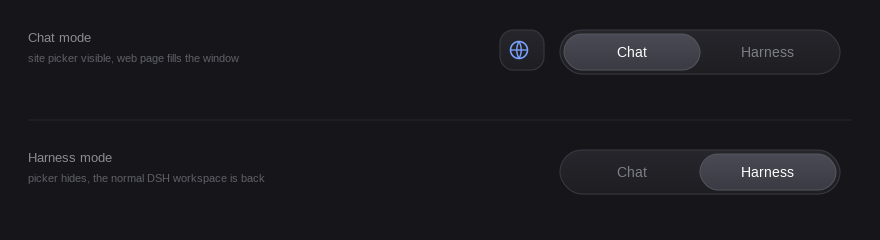
DeepSeek Harness is one window with one interface. This plugin adds a second one: a glass segmented switch in the title bar, with the sites you use beside it.
Harness                            Chat
┌────────────────────────────┐    ┌────────────────────────────┐
│  应用  编辑   Chat│Harness  │    │  应用  编辑  ⬤▾  Chat│Harness│
├────────────────────────────┤    ├────────────────────────────┤
│                            │    │                            │
│   the untouched DSH UI     │ ⇄  │   a real browser showing   │
│   (sessions, tools, tasks) │    │   chat.deepseek.com        │
│                            │    │   (or Doubao / ChatGPT)    │
└────────────────────────────┘    └────────────────────────────┘
Both sides stay alive. Switching is a fade, not a page load:
| Segmented switch | Chat \| Harness, centred in the title bar. Click either label, or drag the glass thumb and drop it where you want it. |
| Site button | Real brand mark + a caret, left of the switch. Open it to pick a site, or to add one of your own. |
| Three presets | DeepSeek, Doubao (豆包), ChatGPT — each in its own browser session. |
| Add any website | Paste a URL; the label is derived from the hostname. Custom sites are stored next to the presets. |
| Instant switching | Sites are mounted once and toggled with CSS, never torn down on a switch. |
| Remembers everything | Last mode, last site and your site list survive a reload. |
| Follows the theme | Light and dark are detected from the live page and re-applied whenever the app theme changes. |
| Fails soft | On a browser-hosted DSH (no desktop bridge) the switch simply hides itself instead of breaking the page. |
dsh web.dsh plugin add dsh-chat-shellCopy this folder into the profile's node_modules:
%USERPROFILE%\.dsh\profiles\desktop\node_modules\dsh-chat-shellAdd the plugin to the profile patch, …\profiles\desktop\cordis.patch.yml:
- insert:
    - id: chat-shell
      name: dsh-chat-shell
Save. The desktop app hot-reloads the plugin graph, so the switch appears without restarting; if it does not, restart the app once.
Chat or Harness, or drag the thumb.+ 添加 AI 网页, paste a URL, Enter.The plugin keeps exactly one preference key in localStorage:
// dsh-chat-shell:state
{
  "mode": "chat",                                  // "chat" | "harness"
  "active": "deepseek",                            // id of the selected site
  "sites": [{ "id": "deepseek", "label": "DeepSeek", "url": "https://chat.deepseek.com/" }]
}
To reset everything, run localStorage.removeItem("dsh-chat-shell:state") in the
app's devtools and reload.
Out of the box the embedded browsers use an in-memory session partition, so every restart of the app logs you out again. That is a property of the shell, not of this plugin.
scripts/patch-persistent-login.mjs fixes it with a one-line change to the
shell, made on a copy, with the original archive kept for rollback:
- partition = `dsh-sidebar-browser-${randomUUID()}`;
+ partition = `persist:dsh-sidebar-browser-${createHash("sha1").update(workspace)…}`;
node scripts/patch-persistent-login.mjs status # is the shell patched?
node scripts/patch-persistent-login.mjs build # extract + patch (no swap)
node scripts/patch-persistent-login.mjs apply # prepare the swap…
# …then double-click apply-patch.cmd and quit DSH (应用 → 退出)Read docs/persistent-login.md before running it:
it edits the installed application, it is Windows-only, and a DSH update
overwrites it (re-run build + apply afterwards). The plugin works without it.
dshDesktop.browser,
which the browser-hosted DSH does not expose. The plugin detects this and stays
out of the way.chat-shell entry from cordis.patch.yml (or run
dsh plugin remove dsh-chat-shell).…\profiles\desktop\node_modules\dsh-chat-shell.node scripts/patch-persistent-login.mjs restore first — otherwise the
patched shell keeps loading, which is harmless but no longer updated by the
plugin's uninstall.The package is a client plugin: lib/client.js is a plain ES module wrapped
in window.__ModuleLoader__.load({ id, factory }), and lib/index.js exists
only because the loader mounts every package on both sides.
On mount it registers nothing into the slot tree. Instead it paints three
elements into document.body — a full-screen panel, the site button and the
switch — and positions them over the app shell (z-index above the layout,
-webkit-app-region: no-drag so the title bar stays clickable).
Each site becomes a <webview> created exactly the way the built-in sidebar
browser creates it:
const { lease, partition } = await window.dshDesktop.browser.acquire("chat-shell:" + site.id);
const view = document.createElement("webview");
view.setAttribute("name", lease);
view.setAttribute("partition", partition);
view.setAttribute("allowpopups", "");
view.setAttribute("src", "about:blank#" + lease);
view.addEventListener("dom-ready", () => view.loadURL(site.url));
The shell only attaches a webview whose src is about:blank#<lease> and
overwrites the web preferences itself, so a wrong element is rejected rather
than silently running with different privileges.
Colours are read from the live page (getComputedStyle), turned into a small
palette of CSS custom properties, and recomputed when the app theme changes
(MutationObserver on <html>/<body> + prefers-color-scheme).
No build step, no dependencies, no network requests of its own.
The package is plain JavaScript, aimed at the browser. There is nothing to compile:
node --check lib/client.js                    # syntax only
node scripts/patch-persistent-login.mjs status
To iterate: edit lib/client.js in your profile's node_modules, save, and the
desktop app reloads the plugin graph. The file is UTF-8 and contains Chinese
labels inline — edit it with a UTF-8 aware editor (PowerShell Set-Content
will corrupt it).
CLASSIFICATION EVIDENCE
系统优先读取 GitHub Topics,再与站内分类词典和词根规则比对。当前命中: deepseek、deepseek-harness。
morluto
Reverse engineer anything with agents, from app behavior down to native binaries.

deepseek-ai
DeepSeek Harness: Everything is a Plugin.

nexu-io
The 1st Collaborative AI Design Agent Workspace. Local-first and open source. Create motion, prototypes, websites, apps, dashboards, presentations, images, and videos with your team and AI agents. Share work, exchange feedback, and iterate together in one workspace.