
模型与 MCP
待识别

rea
morluto
Reverse engineer anything with agents, from app behavior down to native binaries.
PROJECT TOPICS
PROJECT README

腾讯文档 in the DSH left sidebar. Click the icon, get your real recent files, folder tree and title search — read live from Tencent Docs' official MCP endpoint with a token you paste once.
由 liuxc 制作 · MIT · v0.3.5
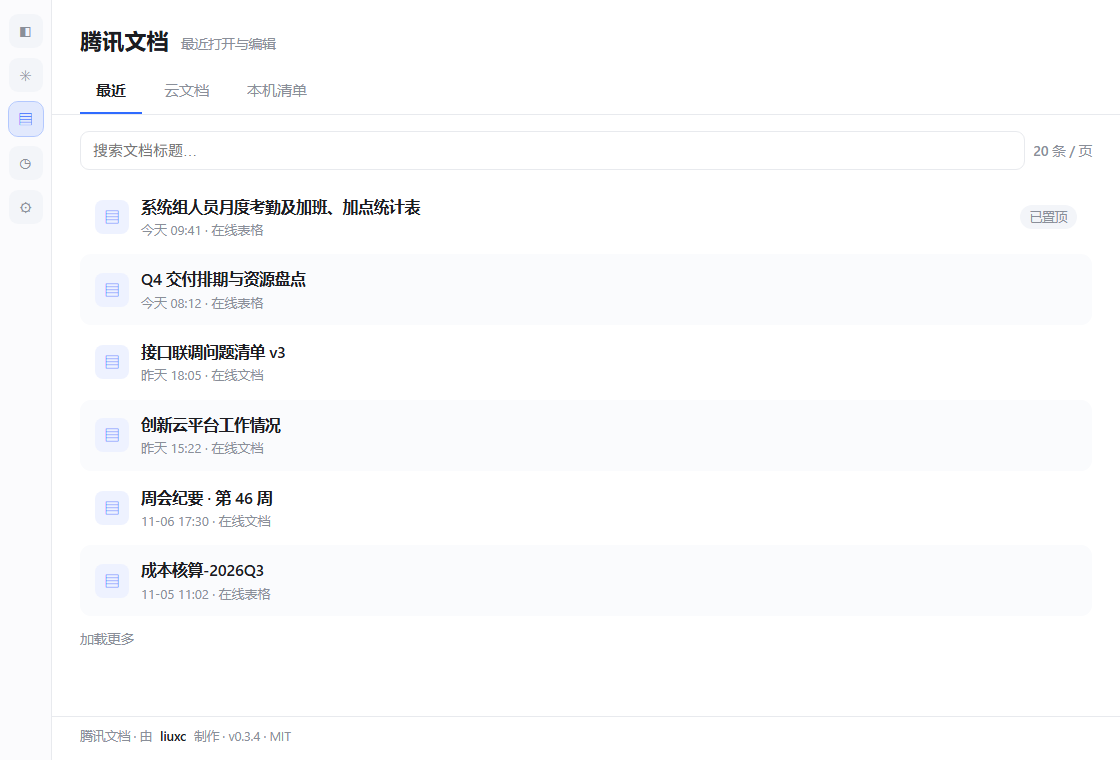
| 最近 | 云文档 | 本机清单 |
|---|---|---|
|
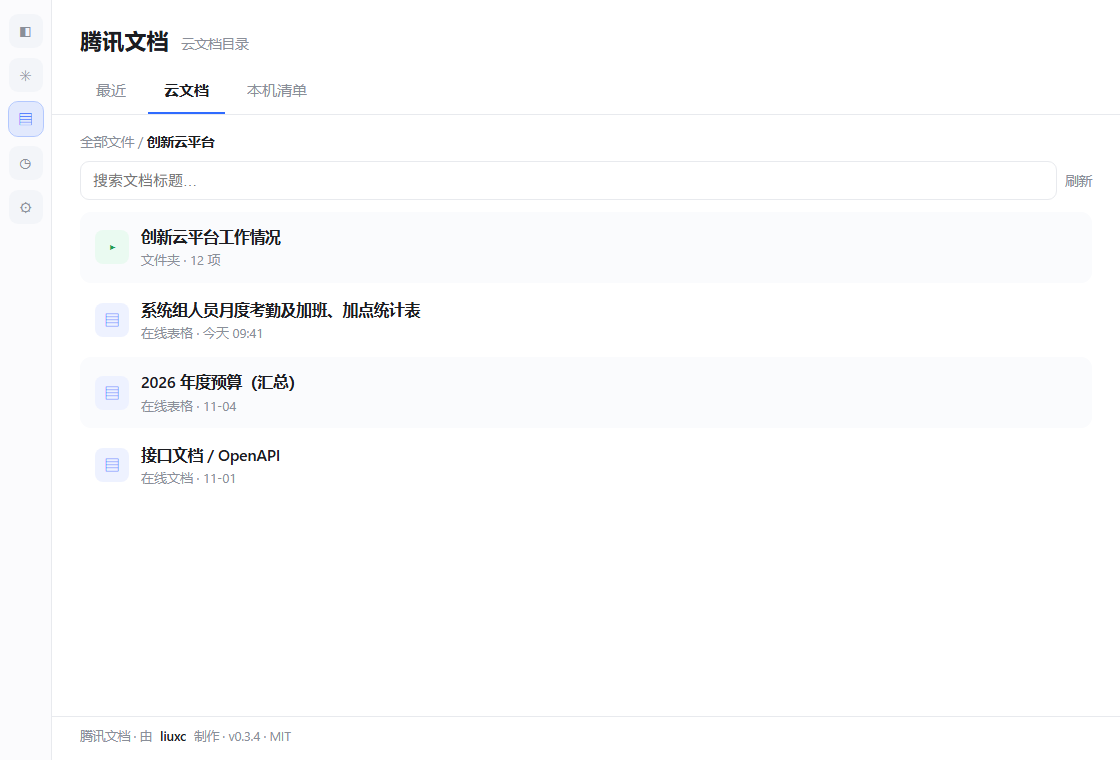 |
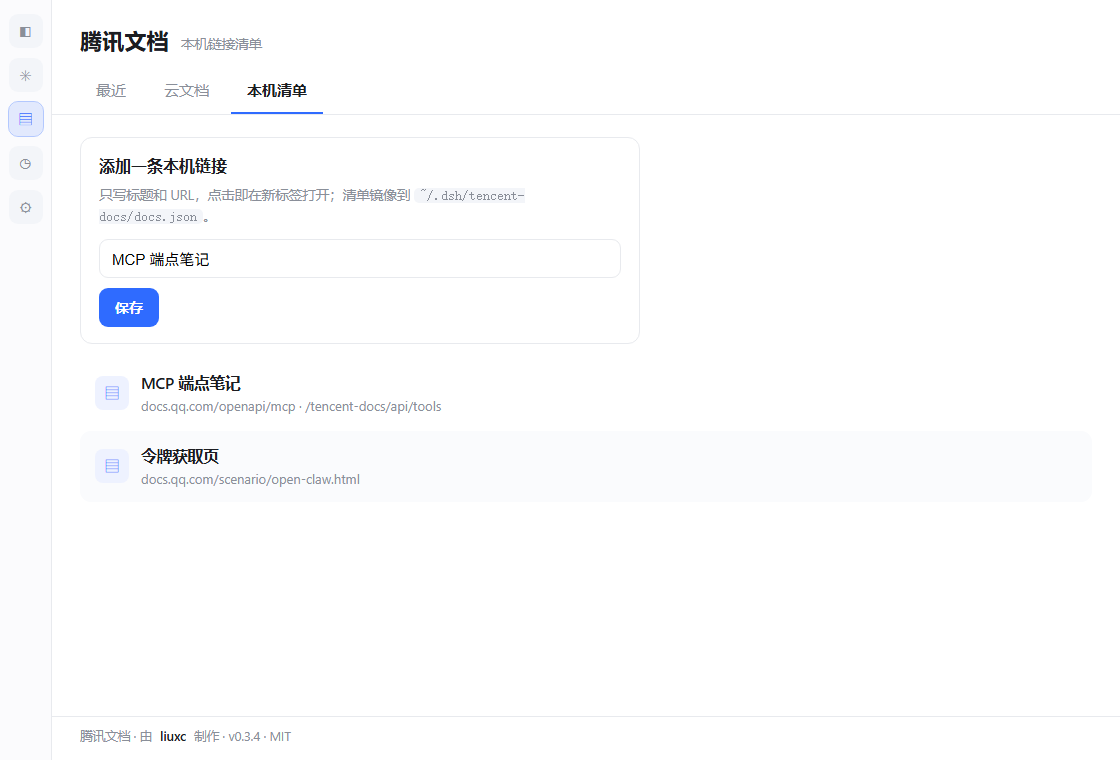 |
以上为面板截图(示意数据,真实条目来自你自己的腾讯文档账号)。
manage.recent_online_file,每页 20 条,翻页加载;默认首页。manage.folder_list 逐层下钻真实目录,面包屑导航,manage.search_file 按标题搜索,文件点开即在新标签打开。~/.dsh/tencent-docs/docs.json,换浏览器不丢。dsh plugin --profile desktop add dsh-tencent-docs本地目录 / tarball:
dsh plugin --profile desktop add "C:\path\to\dsh-tencent-docs"
dsh plugin --profile desktop add "C:\path\to\dsh-tencent-docs-0.3.4.tgz"
装完刷新 Web GUI,左侧栏出现文档图标(排在 dsh-context 与 dsh-purge 之间)。
%USERPROFILE%\.dsh\tencent-docs\auth.json(0600),浏览器脚本拿不到;「断开」即清除。| 能力 | 用途 | 边界 |
|---|---|---|
| 网络 | 访问 https://docs.qq.com/openapi/mcp |
只此一个域名,无遥测、无作者服务器 |
| 读写文件 | ~/.dsh/tencent-docs/ 下 auth.json、docs.json |
不碰其他路径 |
| 凭证 | 你粘贴的访问令牌 | 只落本机、只发给腾讯文档;接口只回 len32:… 摘要 |
沙箱静态扫描会看到 fs-read / fs-write / network;没有 shell、没有 env、没有 credentials 读取。
| 路由 | 方法 | 用途 |
|---|---|---|
/tencent-docs/api/recent?page=&count= |
GET | 最近文件(count 上限 20) |
/tencent-docs/api/tree?folder=&start= |
GET | 目录列举 / 下钻 |
/tencent-docs/api/search?q= |
GET | 标题搜索 |
/tencent-docs/api/auth |
GET/POST | 令牌状态 / 保存 |
/tencent-docs/api/auth/clear |
POST | 清除令牌 |
/tencent-docs/api/tools |
GET | MCP 工具清单(缓存 60s) |
/tencent-docs/api/load · /save |
GET/POST | 本机清单读写 |
错误统一 { ok: false, error, authRequired };缺令牌 → 401。
frame-ancestors),所以文件一律新标签打开,面板内不做预览。manage.recent_online_file 的 count 上限 20,传更大值会被拒;Host 侧已截断。liuxc — host bridge, client panel, packaging. Fork 或再分发时保留 package.json 的 author 与面板页脚的「由 liuxc 制作」(MIT 本来就要求保留版权声明)。
MIT © 2026 liuxc
CLASSIFICATION EVIDENCE
系统优先读取 GitHub Topics,再与站内分类词典和词根规则比对。当前命中: mcp、tencent-docs-mcp。
morluto
Reverse engineer anything with agents, from app behavior down to native binaries.

deepseek-ai
DeepSeek Harness: Everything is a Plugin.

nexu-io
The 1st Collaborative AI Design Agent Workspace. Local-first and open source. Create motion, prototypes, websites, apps, dashboards, presentations, images, and videos with your team and AI agents. Share work, exchange feedback, and iterate together in one workspace.