
其他
完整应用

deepseek-harness
deepseek-ai
DeepSeek Harness: Everything is a Plugin.
PROJECT TOPICS
INSTALL REFERENCE
dsh plugin --profile web add github:luobosibing2/dsh-jev-plugin
该命令指向仓库当前默认分支;尚无绑定当前 commit 的完整验证结果。
PROJECT README
Native DeepSeek Harness (DSH) plugin integrating TypeSafe Jev as a System One decision layer.
deepseek-harness-jev connects DeepSeek Harness (DSH) to Jev by TypeSafe AI for agent skill and file selection, task supervision, shared-finding corrections, tool-output filtering, single-operation approval assistance, and historical stage navigation. Its 12 features are individually configurable from one Jev settings page and are all disabled by default.
The main model continues to plan, generate answers, and call native tools. The plugin automatically invokes enabled Jev judgments at DSH extension points for skill catalogs, agent lifecycle, tool results, and approvals, then applies results according to each feature. DSH configures the main model; Jev has a separate connection. Integration uses public Cordis / DSH plugin APIs without modifying the host source.
This is an independent community project, not an official DeepSeek or Jev release. It is an early-stage plugin tested with DSH 0.1.7-rc.2; its APIs and model judgments are not a correctness guarantee.
The Chinese feature website explains each DSH integration point, the information sent to Jev, and the observed test cases and limits.
The following features are in main. Every feature is independently disabled by default. Installing the package does not enable them.
| Feature | What it does |
|---|---|
| Skill selection | Ranks skill names and summaries before catalog publication. The main agent still loads the original skill. |
| File ranking | Ranks the original glob path results without another filesystem scan or file-content read. |
| Drift reminders | Checks progress between model steps and can deliver one nonblocking reminder. |
| Completion checks | Reviews the visible final answer against recorded evidence and can request at most one supplemental attempt. |
| Goal supervision | Checks native goal completion and pauses after a configurable run of rounds without progress. |
| Instruction guidance | Reads current user instructions and applicable agent rules, then supplies a nonblocking reminder when needed. |
| Interjection routing | Routes a running user's correction to the next step; queues other messages for a later turn. |
| Shared-finding corrections | Compares reports and messages already shared, then sends corrections to affected recipients. |
| Long-log admission | Can remove clearly unneeded progress or repeated notices after a command returns, with an original-output recovery reference. |
| Test-log admission | Protects failures, summaries, named and slow tests while judging whether ordinary passing details are needed. |
| Workspace approval | In workspace-write, can answer eligible native single-operation escalation requests; non-affirmative answers return to human approval. |
| Stage navigation | Classifies complete recorded model steps on request, then links consecutive stages to their original trajectory evidence. |
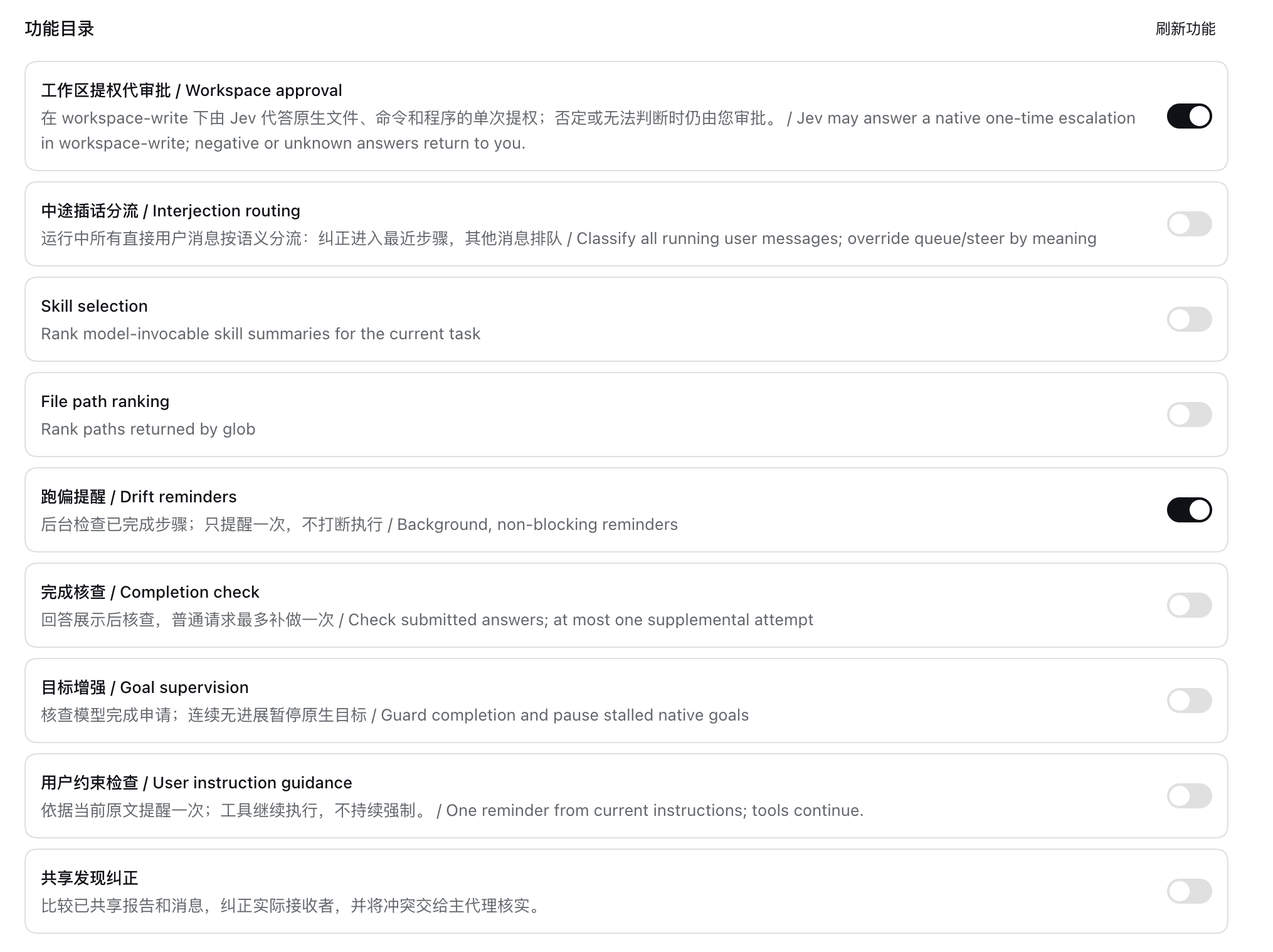
Example feature settings from an earlier build. The screenshot shows nine switches and user-selected states; current main includes the twelve features listed above, all disabled on a fresh installation.
All features share a connection, profile-scoped settings, decision records, and operation receipts. Most agent-facing features target live Web root sessions; correcting a child agent does not enable every feature inside that child.
Feature branches are not all included in main. Tool-output filtering is included in main; codex/jev-tool-output-admission preserves its development snapshot. Native web execution is on codex/jev-native-web-execution and is paused; ordinary-site effectiveness has not passed acceptance. Historical split branches preserve earlier work. See branch status before switching branches; this table always describes main.
The Stage navigation tab follows Trajectory in the Web client. It reads recorded turns without changing the original Session.
The independent Stage navigation switch is off by default. It controls the tab's visibility: enabling shows the page without calling Jev, and disabling hides it, cancels unfinished classification, and retains saved results. Analysis starts only when the user selects a completed turn or requests the session's unanalyzed completed turns.
Each classification covers one complete DSH model step: its recorded reasoning, text, all tool calls, and paired results. Jev selects one of six stages, mixed, or unknown; adjacent equal labels merge only within the same turn. The page keeps a multi-turn directory beside the original steps and exposes the actual classification input and answer. Labels and confidence do not establish tool success or classification accuracy. See the package reference for input, storage, and failure behavior.
If you already use DSH 0.1.7-rc.2 Web, install directly from the GitHub repository URL. No source checkout, manual packaging, or npm login is required.
https://github.com/luobosibing2/deepseek-harness-jev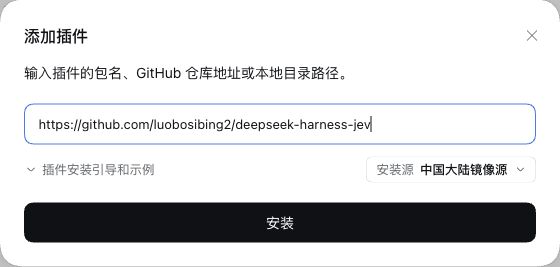
Paste the repository URL into “Package name or address”, then click Install.
Enabling the package does not enable its 12 Jev features; they remain off by default. Installation applies to the Host profile serving the current Web UI. The Host needs pnpm and access to GitHub. The repository includes the plugin entry and prebuilt files, so installation does not compile source on the user's machine or require an npm registry publication.
The GitHub entry provides the main features, not experimental branches. The older v0.1.0 release does not include the newly integrated log filters. Build from source below only when changing or building the code yourself.
Use the following steps when modifying or building the plugin yourself. Existing DSH Web users can install using the GitHub URL above.
PATH.If needed, install the tools:
npm install --global pnpm@11.7.0 @deepseek-ai/dsh@0.1.7-rc.2Build a .tgz from source, then install it through the Web UI or official CLI.
git clone https://github.com/luobosibing2/deepseek-harness-jev.git
cd deepseek-harness-jev
pnpm install --frozen-lockfile --ignore-scripts
pnpm run build
mkdir -p dist
pnpm -C packages/jev pack --pack-destination "$PWD/dist"You can also paste the built tarball's absolute path into an existing Web plugin manager. The CLI method below creates a separate trial environment.
Use a new, unused profile name for a first trial; the example uses jev. Initialize it from the Web template before adding the plugin:
dsh --profile jev --from-default-profile web --dump-default-config > /dev/null
dsh plugin --profile jev add ./dist/dsh-jev-plugin-0.1.0.tgz
dsh --profile jev
The first command creates the Web profile without launching it. Adding a plugin to a brand-new profile without this step initializes only the base configuration, not the Web application. The plugin's bundle patch is applied by the official installer; no manual host-source changes are needed.
Open the authenticated Web address printed by DSH. Configure your main model through DSH, then open the plugin's Jev page.
https://api.typesafe.ai/v1/systemone.jev-latest.The main agent's provider and the Jev judgment connection are separate. A credential marked “configured” is not a successful connectivity test. Connection tests and enabled judgments make requests to your provider.
Selection defaults are 5 skill summaries, at most 40 glob matches eligible for ranking, and 12 displayed ranked paths. A larger glob skips Jev rather than silently judging only the first 40. Supervision defaults are a drift check every 6 completed model steps and a pause after 3 native goal rounds without progress. These values can be changed without enabling the features.
Long-log and test-log admission have independent switches, both off by default. Generic command logs start at 6,000 Unicode code points and recognized test logs at 4,000. The default omit-probability threshold is 0.8 and the judgment wait limit is 4 seconds. The settings page exposes these and the other admission budgets without enabling either feature.
approve can supply allowed-once; unauthorized or unknown returns to the original human approval flow. Technical failures retain manual Retry/Cancel.Enabled features send the relevant task context or operation data to the configured judgment endpoint. Exact judgment inputs and answers are stored in the profile's local plugin records; model-visible effects use normal DSH session records. Keep runtime records and credentials private. Public source history excludes personal QA screenshots and raw session captures.
For an existing profile, rebuild and pack, then install the new tarball with dsh plugin --profile jev add <new-tarball-path> and restart that profile. Do not rerun --from-default-profile on an existing profile. Use a new tarball filename for a changed build of the same package version and check the installed contents when validating an update.
Disable individual features in the Jev page. For package removal, consult dsh plugin --help for the CLI version you have installed. Removing or switching the package can remove branch-specific features; keep a profile backup before replacing an experimental branch build.
The project is named deepseek-harness-jev; its internal package and import identifier remains @dsh-jev/plugin, matching existing profile plugin configurations.
The repository root is the GitHub install entry; packages/jev retains development sources. pnpm run build also regenerates runtime/; commit these generated files when releasing source changes.
Maintainers can use the DeepSWE paired-evaluation runner for coding tasks and the glob-ranking pipeline for fixed path-selection cases. Both use isolated DSH/Pier trials and keep model execution separate from offline checks and reports. The Chinese evaluation guide covers the coding-task workflow.
The completion and skill evaluation entry provides four named scenarios, including completion-recovery-16, explicit resource manifests, new-batch preparation, keyless preflight, paid execution, and offline reports. The new fixed diagnosis and historical results remain separate from validation of the maintained runner. A rerun records the runner commit and source hashes; dependencies and credentials remain local prerequisites.
The public glob experiment records six synthetic cases and 12 real DeepSeek/Jev trials: four successful Jev judgments returned 69 scores, while zero and 41 candidates bypassed ranking. It retains quality failures, recovery checks, source-read counts, and estimated costs. The historical run used a pinned earlier plugin artifact; the maintained pipeline does not imply the current main was rerun or that general task success improved.
pnpm run typecheck
pnpm run build
pnpm exec vitest run packages/jev/tests/host.test.ts packages/jev/tests/wire.test.ts
Run the focused tests for the feature you change. Do not enable real-provider experiments or use someone else's credentials without explicit authorization. Development fixtures and tests are excluded from the installable tarball.
| Module | DSH extension points | Source |
|---|---|---|
| Skill and file selection | agent/pre-step, tools/execute, tools/post-execute |
selection.ts |
| Supervision and instruction guidance | session/event, agent/pre-step, agent/turn-stopping, tools/pre-execute |
supervision.ts, instructions.ts |
| Message routing and shared corrections | Native Agent inbox, agent/pre-step, tools/result, subagent messaging |
interjection.ts, shared-findings.ts |
| Tool-output and test-log filtering | tools/post-execute |
output-admission.ts |
| Single-operation approval | tools/execute, approval/request |
workspace-approval.ts |
MIT; see LICENSE. Package-level third-party licenses are included in THIRD_PARTY_NOTICES.md.
The feature research was inspired by Mu. This project implements DSH plugins against public extension points; it does not ship a modified DeepSeek Harness, Mu, or Cua runtime. DeepSeek Harness, its Typert tooling, and Zod retain their respective notices.
CLASSIFICATION EVIDENCE
系统优先读取 GitHub Topics,再与站内分类词典和词根规则比对。当前命中: 无有效分类标签。
deepseek-ai
DeepSeek Harness: Everything is a Plugin.

anywhere-labs
为 DeepSeek Harness (DSH) 插件生态打造的现代化桌面端解决方案。万物皆「插件」,桌面本身也是「插件」。

walkinglabs
Harness engineering beginner tutorial, from 0 to 1