

模型与 MCP
待识别

rea
morluto
Reverse engineer anything with agents, from app behavior down to native binaries.
PROJECT TOPICS
INSTALL REFERENCE
dsh plugin --profile web add github:lukeinx/dsh-remote-wecom
该命令指向仓库当前默认分支;尚无绑定当前 commit 的完整验证结果。
PROJECT README

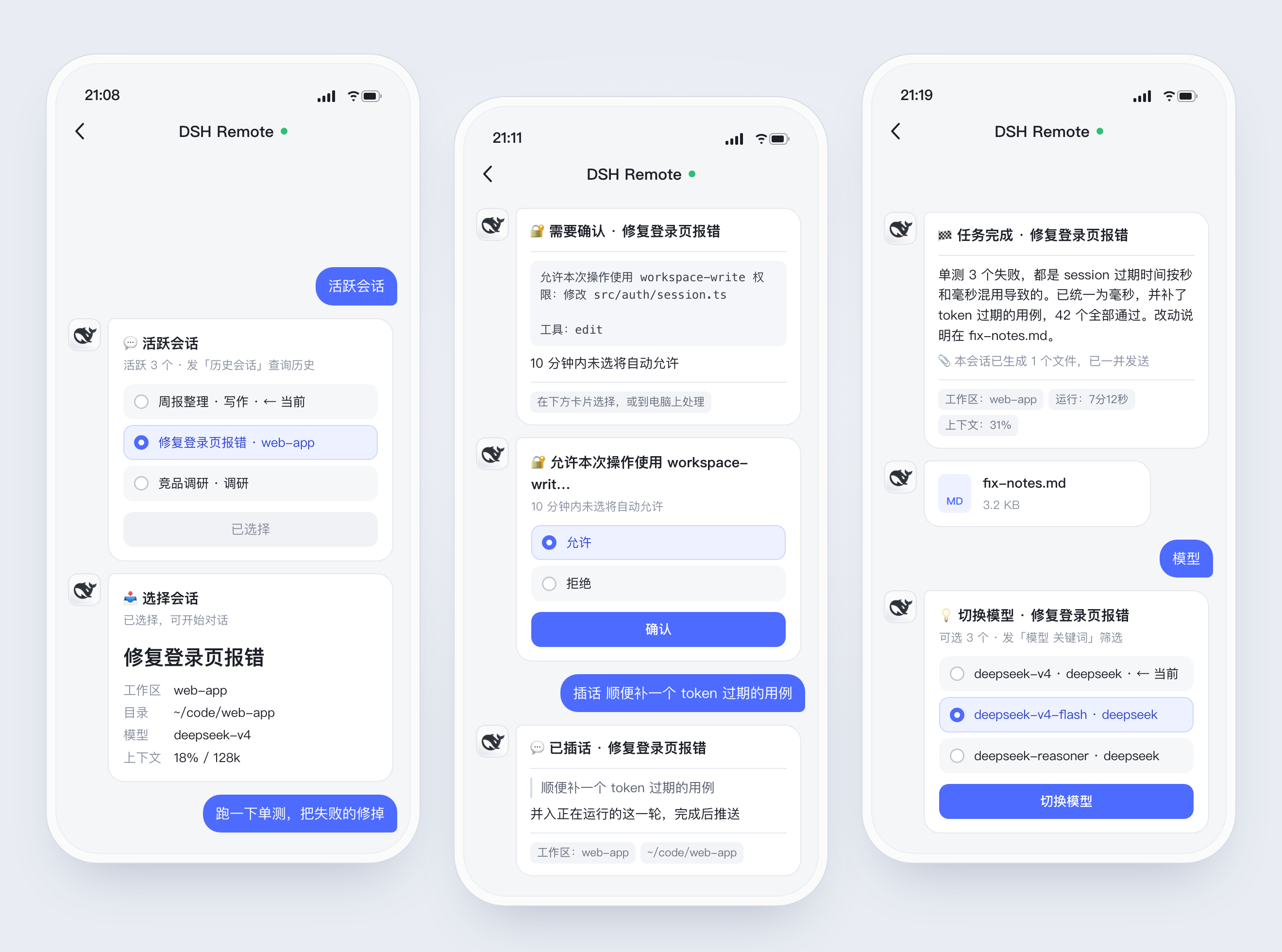
Control DeepSeek Harness Desktop sessions from WeCom (企业微信) on your phone: send prompts, get results and files back, approve tool calls, switch sessions and models. Docs and commands are in Chinese.
在手机企业微信里遥控 DeepSeek Harness Desktop:发消息、收结果、切会话和模型、审批与回答提问、取回产物。插件跑在 Desktop 里,自己持有企微智能机器人的长连接。
>=0.2.0-rc.2)>=22.19.0(命令行用)Desktop 运行时会锁住 desktop profile,dsh plugin add 用不了,需要手动加:
退出 Desktop。
在 ~/.dsh/profiles/desktop/package.json 里追加(保留已有条目):
{
  "dependencies": { "dsh-remote-wecom": "^0.1.2" },
  "dsh": { "profile": { "bundles": ["…", "dsh-remote-wecom"] } }
}
安装并启动:
cd ~/.dsh/profiles/desktop
node "/Applications/DeepSeek Harness.app/Contents/Resources/runtime/primary-runtime/dependencies/pnpm/bin/pnpm.mjs" install
open -a "DeepSeek Harness"
升级时改版本号,再重复第 3 步。
也可以把下面这段发给 Agent(Claude Code、Cursor、pi 等)代装:
按 https://github.com/lukeinx/dsh-remote-wecom 的 README 给我的 DeepSeek Harness Desktop 安装 dsh-remote-wecom,
遵守「让 Agent 代装」一节的规则;装好后提醒我到「设置 → 企微远程」扫码绑定。打开 Desktop「设置 → 企微远程」:
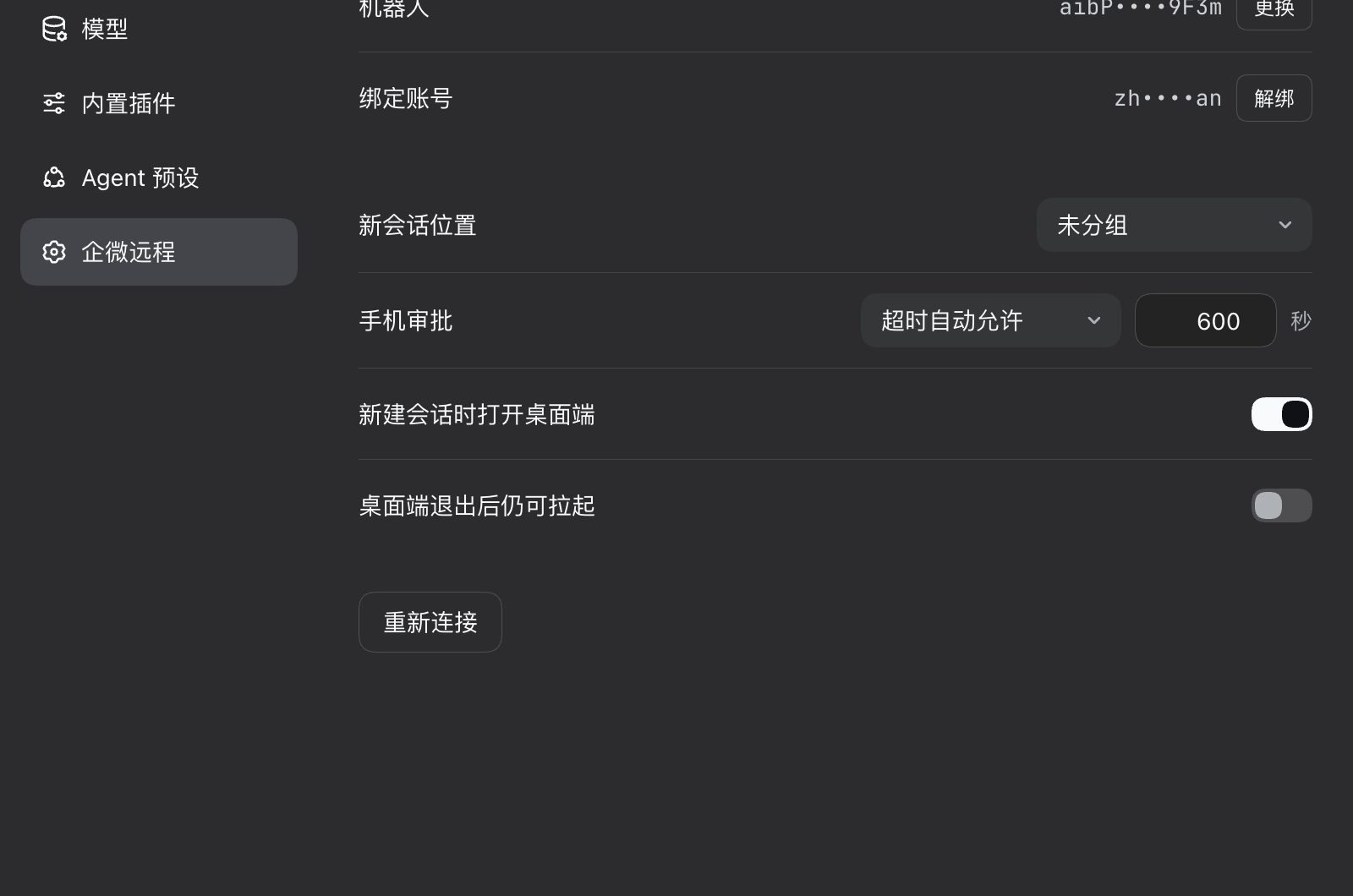
同一页可以换机器人、解绑、选新会话位置、设置手机审批超时。扫不了码时可以手动填 BotID / Secret。
打开「桌面端退出后仍可拉起」(macOS):Desktop 没开时,手机发来的消息先暂存,并在后台启动 Desktop,启动后自动处理。移除插件前先关掉它。
选中会话后直接发消息;引用某条推送回复,消息会发给该推送所属的会话。图片和文件可以先发,5 分钟内再补说明。任务完成后自动推送结果;审批和提问同时出现在手机和 Desktop,谁先答用谁的。
还没选会话时,发消息或 模型、模式 等针对会话的命令会弹出选择卡片(列最近会话,末尾可在默认位置新建;停止 只列运行中的会话),选好后自动切过去并接着执行,不用重发。
| 命令 | 作用 |
|---|---|
最近会话 [工作区] / ls |
跨工作区列出最近 10 个会话,待确认、运行中、置顶的在前;带工作区名只看该工作区(也可发 活跃会话) |
历史会话 [关键词] / h |
查找并继续历史会话 |
创建会话 [模式] [工作区] [消息] / n |
新建会话并发送首条消息;模式写 创造模式、PTC 模式 或 模式=minimal,也可以放在工作区后面 |
工作区 [名称] / cd |
选择新会话的默认位置 |
插话 内容 / steer |
插进正在运行的这一轮 |
目标 [描述] / goal |
设置长期目标,自动续跑到完成 |
模型 [关键词] / model |
切换模型 |
思考强度 [强度] / think |
切换思考强度 |
模式 [名称] / mode |
切换 Agent 模式(标准 / PTC / 极简 / 创造),只能在会话第一条消息前切换 |
权限模式 [模式] / perm |
切换当前会话的权限模式 |
压缩 / compact |
压缩当前会话上下文 |
产物 / art |
取回当前会话生成的文件 |
回顾 / recap |
查看当前会话上一轮已结束的对话 |
关注 / 取关 |
电脑上发起的任务也推到手机 / 只推手机发起的 |
状态 / 停止 / 重启 / 帮助 |
查看状态(还有其他运行中会话时先弹卡片选看哪个)、中断任务、重连、查看全部命令 |
中文命令和参数之间要有空格:模型 high 是命令,模型high 会当普通消息发出。
设置页之外的备用入口:
alias dsh-remote-wecom='node ~/.dsh/profiles/desktop/node_modules/dsh-remote-wecom/bin/dsh-remote.mjs'| 命令 | 作用 |
|---|---|
setup [--bot-id ID --secret S] |
写入机器人凭证并生成绑定码 |
bind |
解除当前主人,生成新绑定码 |
status |
查看配置、绑定状态和最近日志 |
alias [名称 目录 \| rm 名称] |
管理目录别名,供「创建会话」「工作区」使用 |
watchdog install\|uninstall\|status |
「桌面端退出后仍可拉起」的开关与状态 |
数据在 ~/.dsh/integrations/dsh-remote-wecom/,config.json 权限为 600。可选配置和实现细节见 docs/DESIGN.md。
dependencies 和 bundles。dsh-remote-wecom status 验证:出现 Secret:已配置 和 主人:已绑定 即完成。git clone https://github.com/lukeinx/dsh-remote-wecom.git && cd dsh-remote-wecom
npm install
npm run check # 打包设置页 + 语法检查 + 单元测试
npm run test:e2e # 隔离的 DSH + 假企微,约 30 秒本地调试时把 profile 里的依赖改成 "dsh-remote-wecom": "link:<仓库绝对路径>",改完代码重启 Desktop。
CLASSIFICATION EVIDENCE
系统优先读取 GitHub Topics,再与站内分类词典和词根规则比对。当前命中: deepseek、deepseek-harness。
morluto
Reverse engineer anything with agents, from app behavior down to native binaries.

deepseek-ai
DeepSeek Harness: Everything is a Plugin.

nexu-io
The 1st Collaborative AI Design Agent Workspace. Local-first and open source. Create motion, prototypes, websites, apps, dashboards, presentations, images, and videos with your team and AI agents. Share work, exchange feedback, and iterate together in one workspace.