

模型与 MCP
待识别

rea
morluto
Reverse engineer anything with agents, from app behavior down to native binaries.
PROJECT TOPICS
INSTALL REFERENCE
dsh plugin --profile web add github:lukeinx/cursor-to-dsh
该命令指向仓库当前默认分支;尚无绑定当前 commit 的完整验证结果。
PROJECT README

Use Cursor models as the
cursorLLM provider in DeepSeek Harness (DSH) and DeepSeek Desktop, through the official@cursor/sdkand your own Cursor API key. DSH keeps the agent loop, tools and permissions; Cursor is only the model. The docs are in Chinese.
把 Cursor 注册为 DeepSeek Harness(DSH,含 DeepSeek Desktop)的模型提供方 cursor。DSH 负责 agent 循环、工具和权限,Cursor 只当模型。
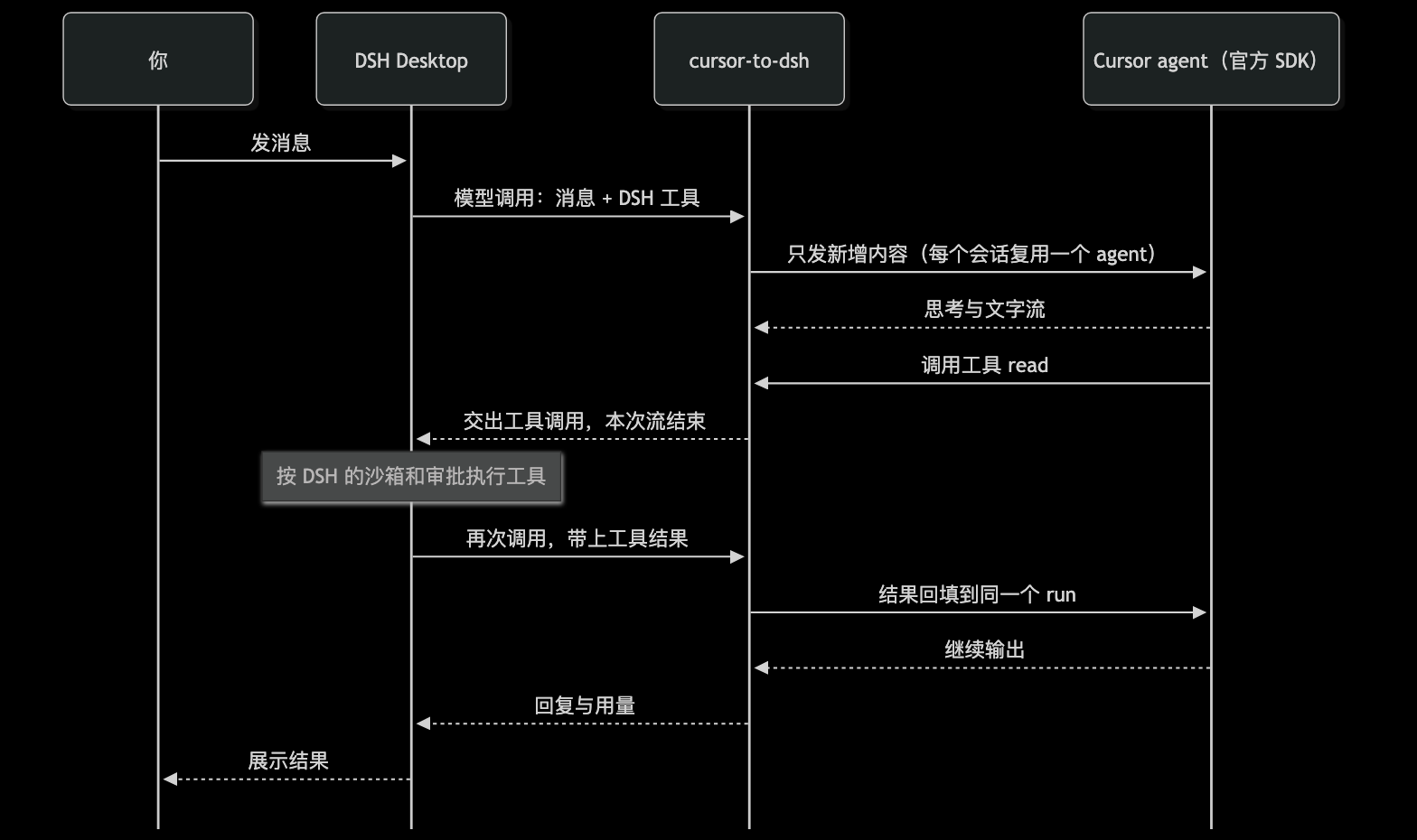
@cursor/sdk 和你自己的 API Key,不逆向私有协议、不读 Cursor IDE 登录态;通过 DSH 的 ctx.llm.registerAdapter 注册,不改宿主代码。cordis.patch.yml;无 Web 界面的 profile 才需要自己写文件或环境变量。fast=false;按 DSH 互不重叠的用量桶上报,不误报超限。前置:DSH 0.2.0-rc.2 及以上(DeepSeek Desktop 内置 0.2.2-rc.3)。
DeepSeek Desktop / Web:侧栏插件 → 添加插件,填包名 cursor-to-dsh,安装完成后点立即启用。装完「设置 → 模型」里多出 Cursor 一行。
CLI 或其他 profile:dsh plugin --profile <名称> add cursor-to-dsh。
升级同样在插件页进行:卸载后重新添加 cursor-to-dsh(CLI profile 用 dsh plugin add cursor-to-dsh@latest)。
密钥只写入本机凭据(~/.dsh/.credentials.yaml 的 CURSOR_API_KEY,权限 0600,热加载),不会写进 cordis.patch.yml,也不会进入会话记录、模型上下文或插件日志。写入走 DSH 的 credentials/set Remote:Host 侧只接受 owner 页面的调用,共享/只读页面上的点击会被 Gateway 直接拒绝;页面只写不读,已保存的密钥不会回传到浏览器。
没有 Web 界面时(CI、纯 CLI profile)仍可手工提供密钥,三选一:
环境变量 CURSOR_API_KEY;
凭据文件——文件已存在时只在 refs: 下加一行:
version: 1
refs:
  CURSOR_API_KEY: <你的 key>
插件配置 apiKey(明文,不推荐)。
查找顺序:凭据文件 → 环境变量 → 插件配置 apiKey。改了 apiKeyEnv 时以配置里的名字为准,设置页的卡片也会写到同一个名字。
「设置 → 模型」里出现 Cursor 行、有绿色已保存标记,模型选择里有 cursor 下的模型即成功。也可以把 agent-default-model 设为 provider: cursor。
把下面这段发给 Claude Code、Cursor、pi 等:
按 https://github.com/lukeinx/cursor-to-dsh 的 README 给我的 DeepSeek Harness Desktop 安装 cursor-to-dsh。
装好后告诉我怎么在「设置 → 模型」里填 Cursor API Key,key 由我自己填。
给 Agent 的规则:
dependencies 和 bundles。完全退出 DeepSeek Harness Desktop。
在 ~/.dsh/profiles/desktop/package.json 里追加两处,已有条目不动:
{
  "dependencies": { "cursor-to-dsh": "^0.2.0" },
  "dsh": { "profile": { "bundles": ["…已有条目…", "cursor-to-dsh"] } }
}
用 Desktop 自带的 pnpm 安装,然后启动:
cd ~/.dsh/profiles/desktop
node "/Applications/DeepSeek Harness.app/Contents/Resources/runtime/primary-runtime/dependencies/pnpm/bin/pnpm.mjs" install
open -a "DeepSeek Harness"默认不用配:密钥在「设置 → 模型」里填,其余都能用默认值。设置页只提供密钥;context、cwd、apiKeyEnv 仍是 patch 级配置。需要时在 profile 的 cordis.patch.yml 覆盖插件这一行(patch 会替换整个 config,要写全):
- id: llm-cursor
  name: cursor-to-dsh
  config:
    apiKeyEnv: CURSOR_API_KEY
context: min| 配置项 | 默认值 | 环境变量覆盖 | 含义 |
|---|---|---|---|
apiKeyEnv |
CURSOR_API_KEY |
存 key 的凭据名 / 环境变量名;设置页卡片跟着它走 | |
apiKey |
无 | 明文 key,只在前两者为空时使用,不推荐 | |
context |
min |
DSH_CURSOR_CONTEXT |
上下文档位:min、max 或如 300k;被拒时自动降档 |
cwd |
会话工作目录 | DSH_CURSOR_CWD |
Cursor agent 的工作目录 |
其他环境变量:DSH_CURSOR_DEBUG=1 输出调试日志到 stderr;DSH_CURSOR_PREWARM=0 关闭预热(插件加载后在后台预建一次 agent,省掉 Cursor SDK 首次约 8 秒的初始化)。
dsh web);无 Web 界面的 profile 仍用凭据文件、环境变量或 apiKey。stop(报 UNSUPPORTED_OPTION);temperature、maxTokens 被忽略。npm install && npm run build # DSH 加载的是 lib/,改 src/ 后要重新 build 并重启 DSH
npm test # 假 Cursor agent 的单测,外加浏览器半侧的契约测试
npm run check # 类型检查 + client.js 语法检查
npm run check:public # 推 GitHub / 发 npm 前:不含内网链接和本机路径
CURSOR_API_KEY=... node --experimental-strip-types scripts/live.ts [模型 id] # 真实 Cursor 实测client.js 是浏览器半侧,手写、不参与 tsc:它由 Web 壳的模块加载器直接执行,只 require 壳自带的 react 基座。改完在 Desktop 里刷新页面(HMR 传输会先自动重载模块),改 src/ 则要重新 build。
本地源码接入 Desktop:添加插件里直接填仓库的绝对路径;或手动改 profile 时把依赖写成 "cursor-to-dsh": "link:<仓库绝对路径>"。
不动 profile、在真实 DSH 里试跑一次(overlay 里的路径必须是绝对路径):
# /tmp/cursor-overlay.yml
- insert:
    - id: llm-cursor
      name: <仓库绝对路径>/lib/index.js
- id: agent-default-model
  name: '@deepseek-ai/dsh-agent-default-model'
  config:
    provider: cursor
    model: claude-haiku-5-5
DSH="/Applications/DeepSeek Harness.app/Contents/Resources/runtime/cli/bin/dsh"
CURSOR_API_KEY=... DSH_CURSOR_DEBUG=1 "$DSH" --profile headless --patch /tmp/cursor-overlay.yml --json "Read README.md and summarize it in one line"调试日志里工具结果回填那次应显示 plan=results,多轮对话的第二轮应显示 plan=send。--patch 挂载的插件用自己的 @deepseek-ai/dsh-llm 副本,错误码会变成 UNKNOWN,只用于试跑。
架构和约束见 AGENTS.md。
MIT,见 LICENSE。Copyright (c) 2026 Luke。
CLASSIFICATION EVIDENCE
系统优先读取 GitHub Topics,再与站内分类词典和词根规则比对。当前命中: deepseek、llm-provider、deepseek-desktop、deepseek-harness。
morluto
Reverse engineer anything with agents, from app behavior down to native binaries.

deepseek-ai
DeepSeek Harness: Everything is a Plugin.

nexu-io
The 1st Collaborative AI Design Agent Workspace. Local-first and open source. Create motion, prototypes, websites, apps, dashboards, presentations, images, and videos with your team and AI agents. Share work, exchange feedback, and iterate together in one workspace.