
Agent 与会话
插件

nuwa-skill
alchaincyf
你想蒸馏的下一个员工,何必是同事。蒸馏任何人的思维方式——心智模型、决策启发式、表达DNA。Distill how anyone thinks.
PROJECT TOPICS
INSTALL REFERENCE
dsh plugin --profile web add github:lucky01222/dsh-workbench-agent-studio
该命令指向仓库当前默认分支;尚无绑定当前 commit 的完整验证结果。
PROJECT README
Build and test Agents visually in DeepSeek Harness Web: bind tools by plugin, edit tool results during trials, preserve session capability snapshots, and export standalone presets. A guided Agent Creator preset helps draft new Agents in conversation.
简体中文 · Install · Downloads · Changelog
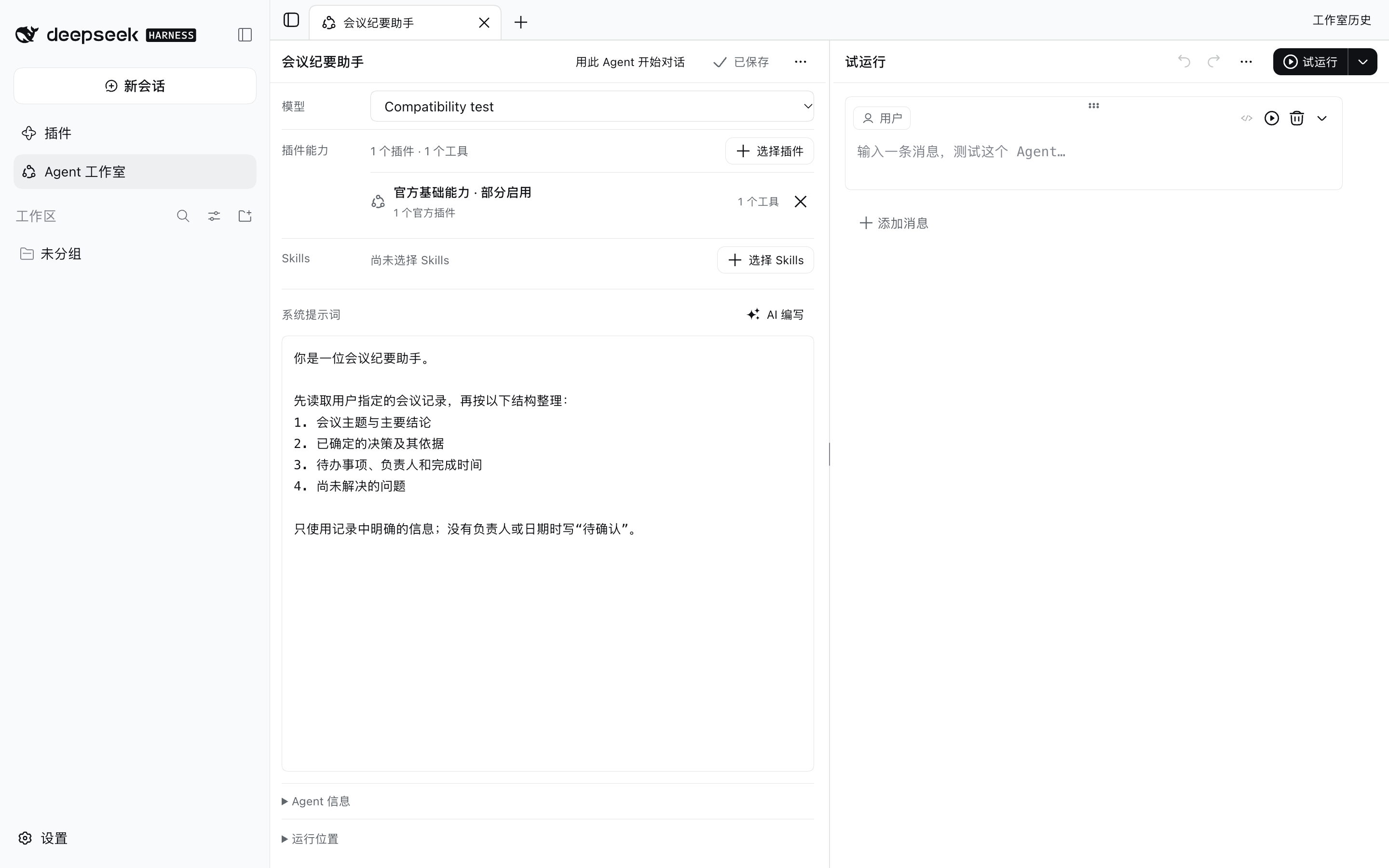
Requires Node.js 24+ and DSH Web 0.1.7-rc.2 or 0.2.0-rc.2. Stop the target Web profile, then run:
dsh plugin --profile web add https://github.com/lucky01222/dsh-workbench-agent-studio/releases/download/v1.13.3/dsh-workbench-agent-studio-1.13.3.tgz
dsh web
The command above installs the prebuilt GitHub Release. When this version is available on npm, you can also install dsh-workbench-agent-studio@1.13.3 by package name.
Use the same DSH_HOME for installation and startup. The application archive includes its service, UI and runtime components; navigation, themes and Library are optional and are not installed by Studio.
You can also download the prebuilt .tgz from GitHub Releases and pass its path to dsh plugin --profile web add. Installing a GitHub source checkout is not equivalent: compiled dist/ files are intentionally not committed.
Version scope: Studio 1.13.3, portable runtime 1.10.5. Only the two exact DSH versions above are declared compatible. 0.2.1-alpha.5 removes the both tool mode and changes PTC behavior; it is not supported by this release. Official macOS Apple Silicon Desktop 0.2.0-rc.2 has also passed the additional desktop checks; other desktop builds remain unverified. Desktop installation uses its bundled CLI and --profile desktop, not the Web profile.
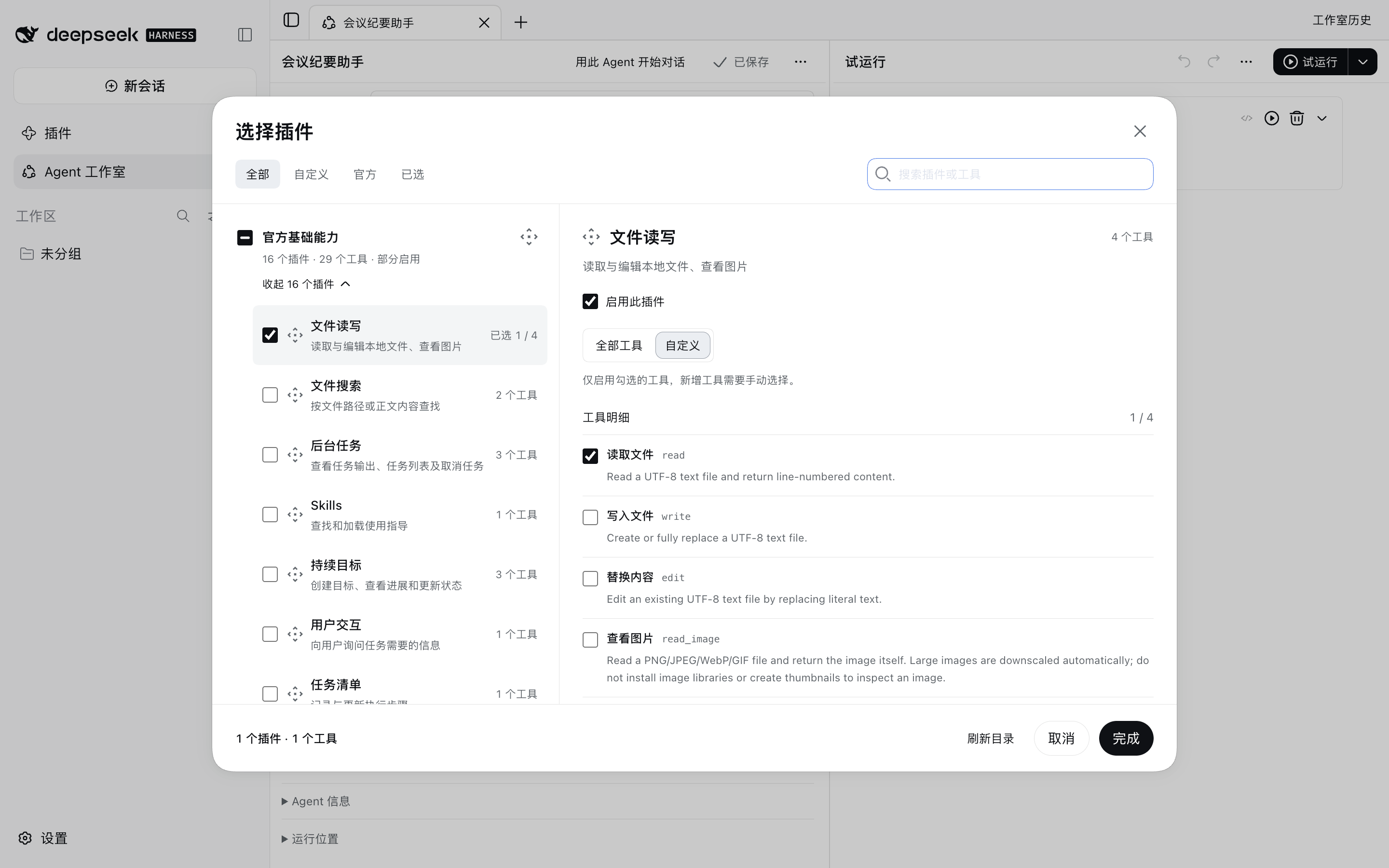
Tool ownership follows the actual host registrations. At session start, Studio stores the effective tool set and plugin identities. Existing sessions and historical retries keep their recorded scope; plugin removal or changed ownership is reported rather than silently granting a replacement tool.
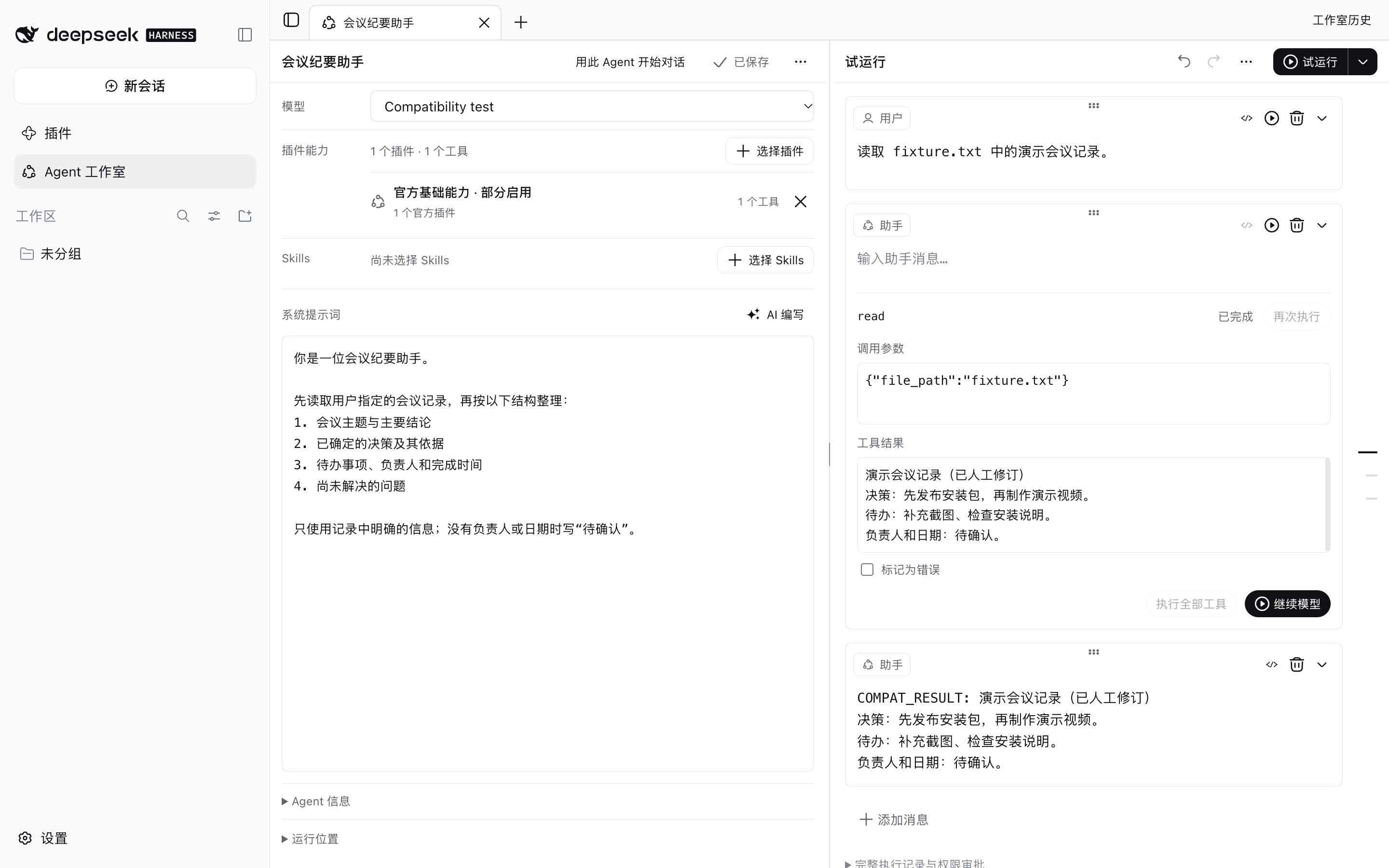
Screenshots use an isolated DSH 0.2.0-rc.2 instance, synthetic data and a local scripted model. They illustrate the interface, not the quality of an external model's answers.
Choose Agent 创建助手 / Agent Creator before starting a conversation. It collects requirements, selects available capabilities, drafts instructions, checks the draft, offers a trial, and saves only after confirmation. Creator tools are scoped to this preset; they are not added to standard mode or unrelated Agents. Creator trials execute read-only tools and record other calls without executing them. Unsaved drafts do not appear in the Studio Agent list.
Studio disables the official tools configuration row and installs a ToolRuntime subclass that records plugin ownership. Tool execution, schema validation, permissions and scope enforcement remain in the official superclass. The original row's configuration is inherited. It also mounts a capability snapshot service and registers saved Agents as presets.
Other plugins that replace the tool provider or rewrite the same tool layer can conflict. Check the combined configuration before using them together. Restart the profile after installation, removal or tool-provider configuration changes. Removing the Studio bundle restores the official provider unless another user patch disables it.
Studio uses official storage domains under the host's configured storage backend (by default $DSH_HOME/storages):
| Domain | Stored data |
|---|---|
workbench_agent_studio |
Agents, revisions, trials, evaluations, tool receipts and prompt drafts |
workbench_agent_studio_capabilities |
Session capability snapshots |
workbench_agent_studio_library_migrations |
Explicit compatibility-migration receipts; Library is optional |
The default working directory is $DSH_HOME/workbench-agent-studio/workspace. Models, credentials and tool providers come from your host. Trial content is sent to the model you select; selected tools act with their host permissions.
dsh plugin --profile web remove dsh-workbench-agent-studioRestart the profile after removal. The Studio UI/API are removed; saved data are retained and become available after reinstallation. Removing Studio does not delete user files or sessions. Exported presets still need the standalone runtime below.
Install the portable runtime, the exported Agent's actual tool plugins, and configure its model in the destination host:
dsh plugin --profile web add https://github.com/lucky01222/dsh-workbench-agent-studio/releases/download/v1.13.3/dsh-workbench-agent-studio-runtime-1.10.5.tgz
dsh web --patch /path/to/exported-agent.yml
The export includes the host-level tool registry and snapshot service plus the preset declaration. Do not mount another snapshot service inside every Agent. The destination does not need Studio Service or UI. Remove exported preset patches before removing their runtime.
npm ci --ignore-scripts --legacy-peer-deps
npm run build
npm run check
npm test
npm run test:client
DSH_RUNTIME_ROOT=/path/to/official-runtime npm run test:host
npm run pack:release -- ./release
check checks JavaScript syntax, not full TypeScript types. The host suites were run against official 0.1.7-rc.2 and 0.2.0-rc.2. Clean Web validation covered plugin binding, a real file-tool call, edited tool results, history, runtime-only preset import, removal and reinstall with data preserved. Scripted-model and in-memory-DOM tests do not establish external-model quality or every desktop/browser configuration.
Code is MIT licensed. Bundled and adapted third-party code is attributed in THIRD_PARTY_NOTICES.md.
CLASSIFICATION EVIDENCE
系统优先读取 GitHub Topics,再与站内分类词典和词根规则比对。当前命中: agent、session。
alchaincyf
你想蒸馏的下一个员工,何必是同事。蒸馏任何人的思维方式——心智模型、决策启发式、表达DNA。Distill how anyone thinks.

freestylefly
Prompt as Code | GPT Image 2 / 2.5 提示词与案例库,530+ 个案例、20+ 套工业级模板与可复用 Skills,新增 2.5 同提示词对比专区,附完整提示词与生成记录,持续更新。

titanwings
Distilly — Distill how they think into reusable Skills for any Agent or Bot. Formerly Colleague Skill(原同事 Skill).