
模型与 MCP
待识别

rea
morluto
Reverse engineer anything with agents, from app behavior down to native binaries.

ltmroberthk915/dsh-computer-use
The most precise Windows computer use for DeepSeek Harness: 19 tools address controls by exact UI Automation identity, and numbered marks are checked against the live window before input, so a stale target is refused instead of mis-clicked. Batches, incremental observations and compact receipts cut round trips and token cost.
PROJECT TOPICS
PROJECT README
The most precise way to drive Windows from DeepSeek Harness — and the cheapest per task.
Describe the goal. Your agent reads exact control identities, acts through the controls themselves, verifies the result — and finishes a known sequence in one model round trip instead of ten.
English | 中文 | Français | Deutsch | Español | Português | العربية | Русский | فارسی · Install · Changelog · 2.0.0 changes
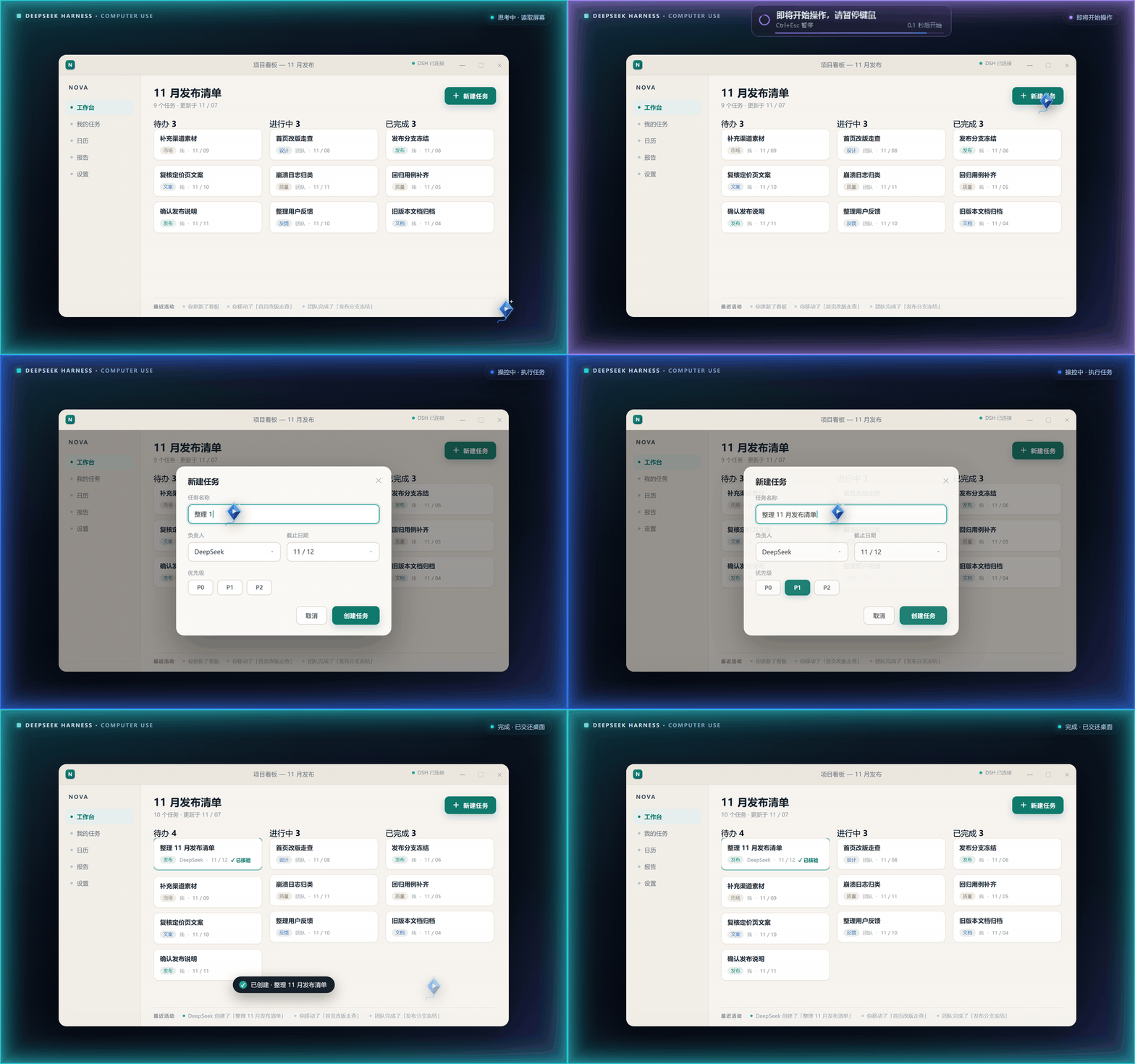
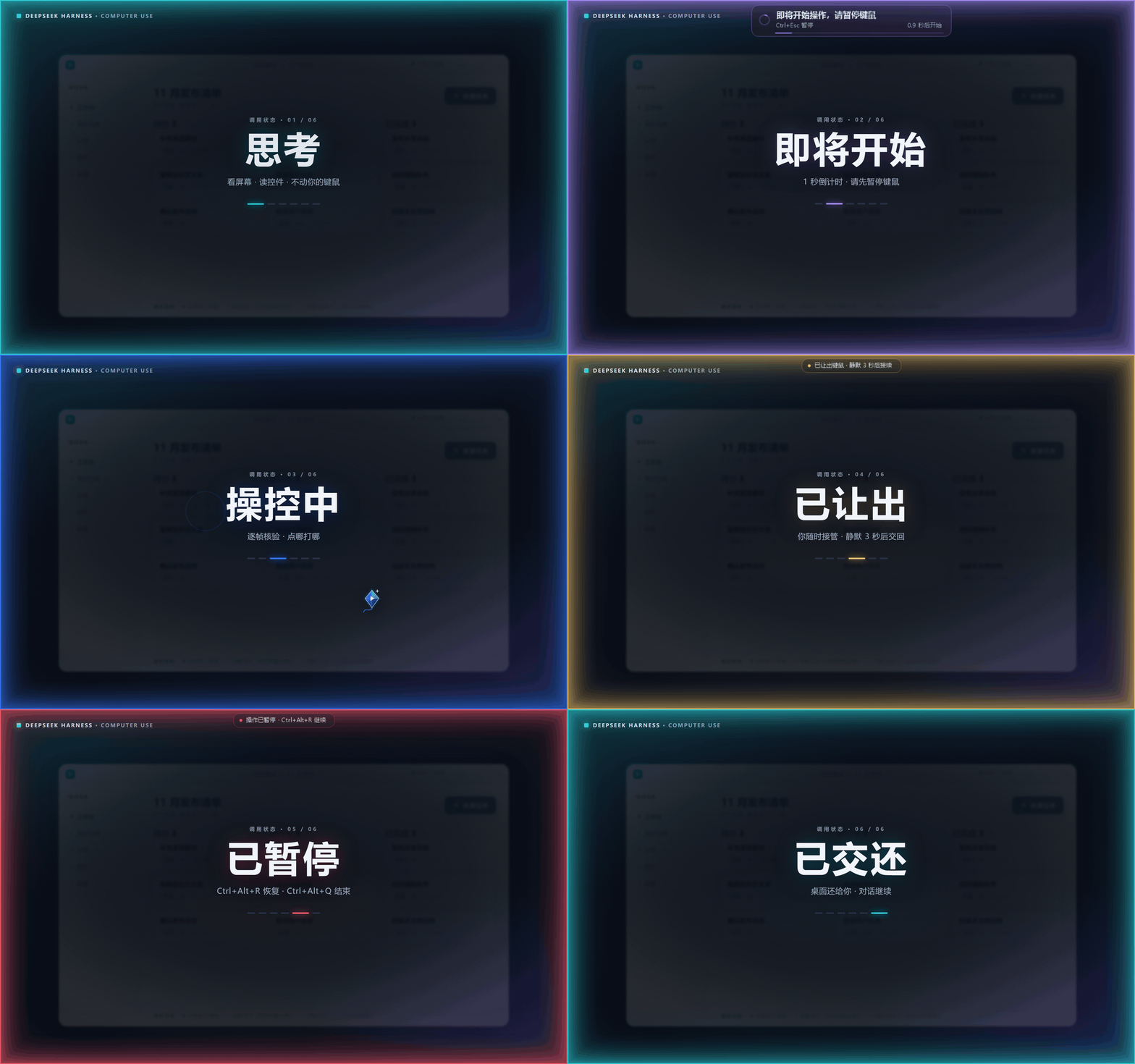
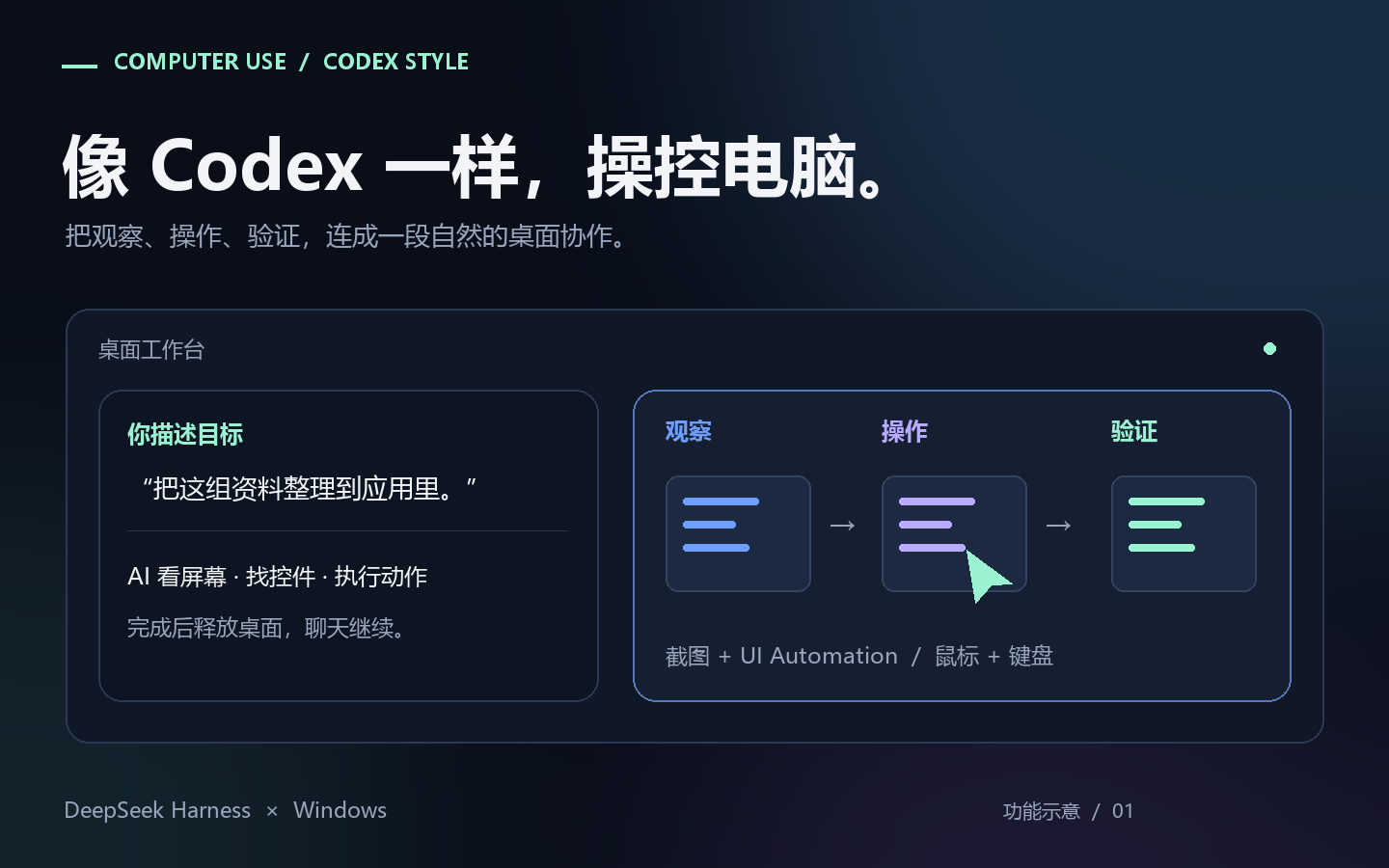
AutomationIds, and actions can drive a control through its own UI Automation patterns instead of clicking coordinates.uiaOnly pins identity to the window handle and geometry while the dispatch-time occlusion check still applies.anchor, so a query cannot quietly sweep the wrong region.computer_ocr returns lines and per-word boxes in absolute screen pixels, so zero-UIA applications can be located by name.computer_state {windows:true}. When you need a control, pass that window's handle to computer_uia.computer_batch call runs a list of actions serially, stops at the first failure, and costs one model round trip instead of one per action.since and receive additions, changes, removals and ordering — not the whole tree again.feedback: full is still there when detail matters more.Ctrl+Esc pauses, Ctrl+Alt+R resumes, Ctrl+Alt+Q exits, and a stop is pushed into the running session. Approvals stay on by default and password fields are refused by default.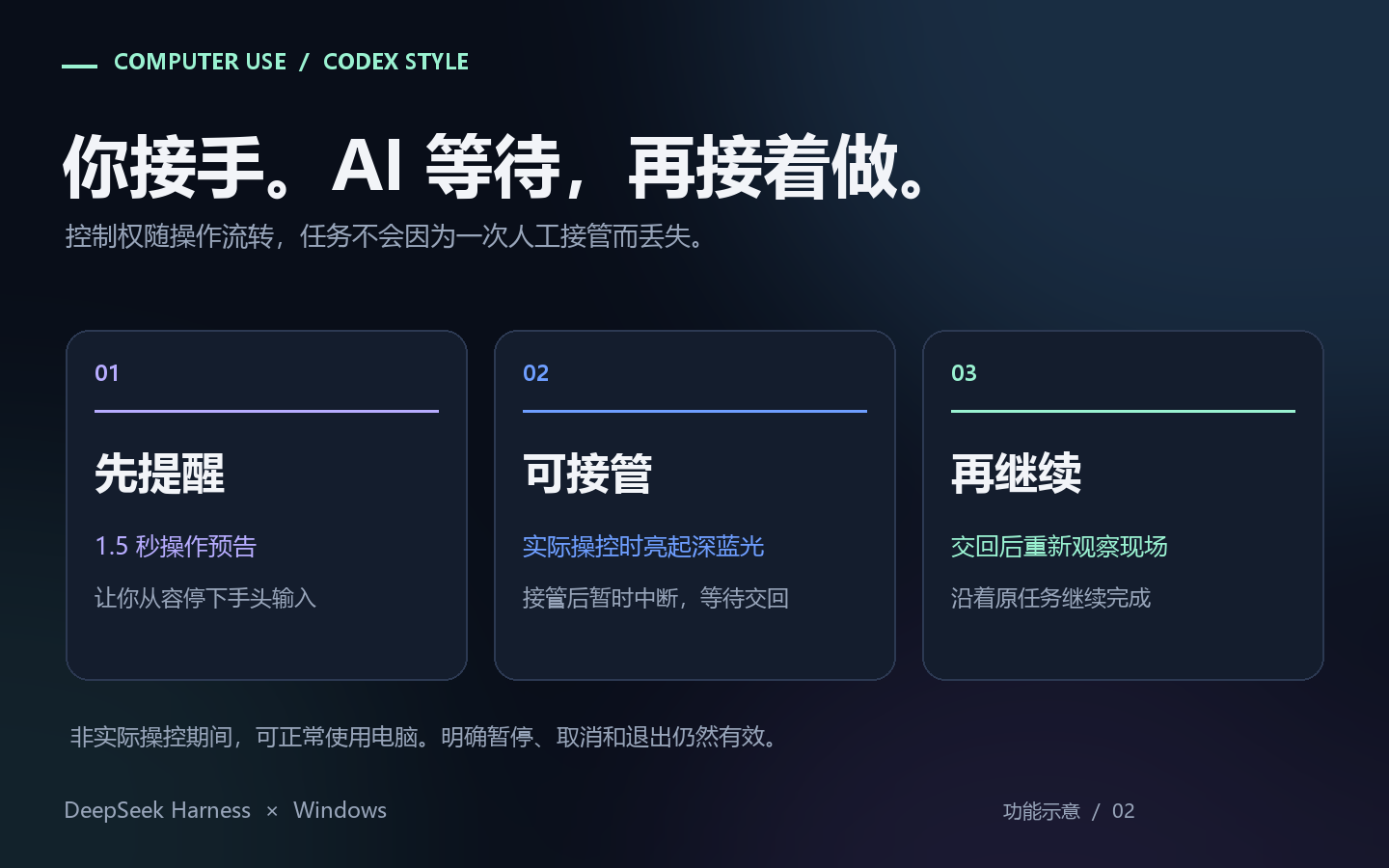
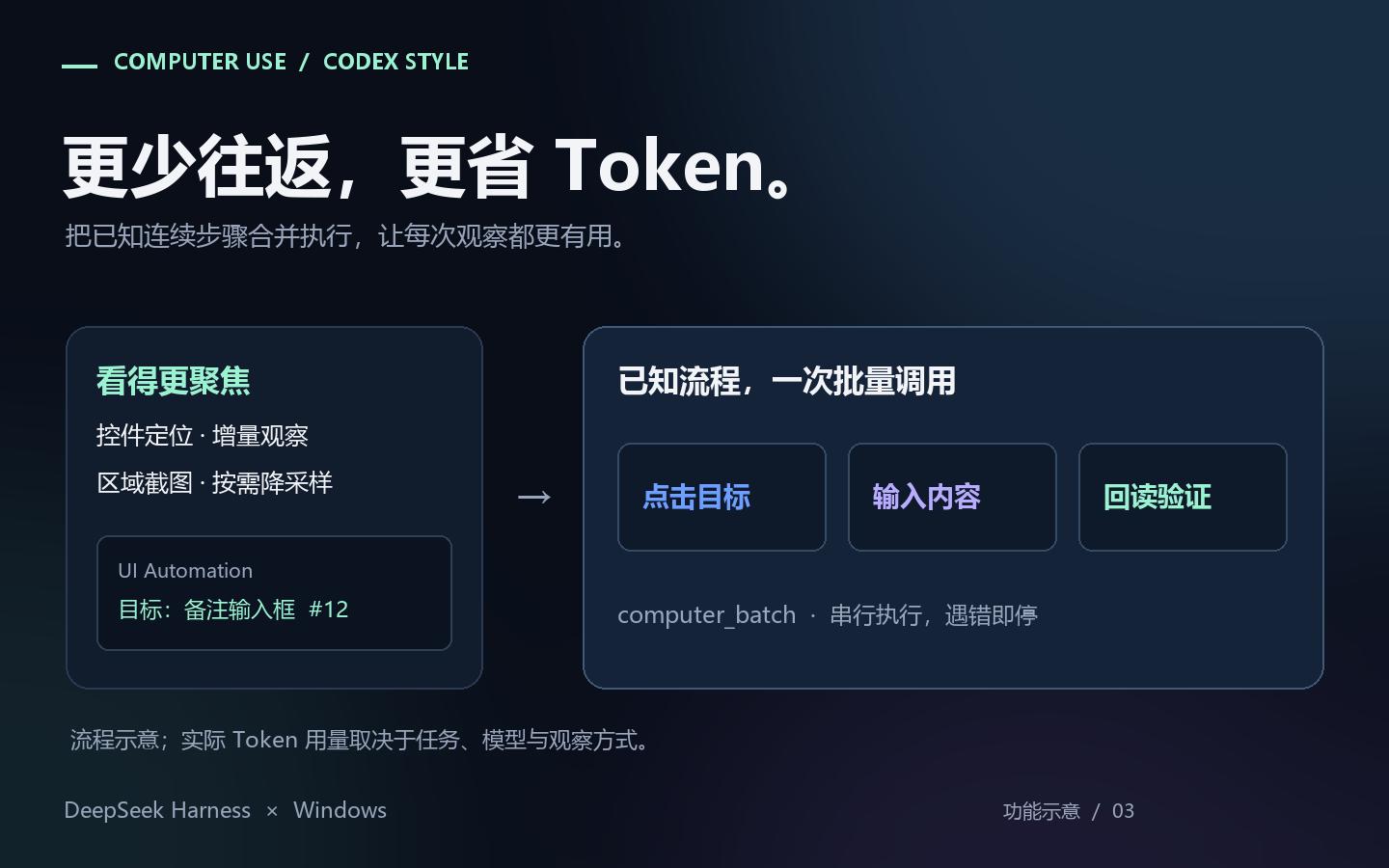
The illustrations above show the interaction model introduced in 1.3.0; the 2.0.0 kite pointer, bounded queries and compact receipts are described above. Actual token use depends on the task, model and observation strategy. Approvals remain enabled by default; explicit pause, cancellation and exit remain authoritative.
Ready to install. 19 desktop tools, with native helpers included. No SDK or install-time compilation. Requires Windows, Node.js ≥ 22 and the .NET Framework 4.x included with Windows. An independent community plugin; Codex describes the interaction style.
feedback: full and feedback: none are explicit alternatives.anchor.2.0.0 is the new major release, initially distributed on npm next while the 24-hour release gate runs. See 2.0.0 changes and migration. Check registry tags for current stable availability.
Version 1.3.1 reads text from the screen by name, notices the Windows secure desktop and resumes on its own, and keeps every colour on the same DPI-derived edge rail with a visible breathing floor. Version 1.3.0 releases desktop control when work ends while the chat continues.
Earlier fixes: 1.2.3 approval attribution · 1.2.1 native attention · standalone host patch.
Version 2.0.0 also uses a compact blue kite pointer during AI operation and scene hold. Its tilted tip marks the click point, with small text/resize symbols inside the kite. A breathing kite means the page and pointer position should stay in place; free mode restores the application's normal cursor. The user's Windows cursor theme is preserved.
Version 2.0.0 bounds UIA traversal and defaults to compact post-action text. Existing image feedback remains available; feedback: compact|full|none controls detail, and click verificationRegion: "x,y,w,h" names the expected effect area independently of the input point. Compact text normally adds at most 6 KiB to the original action receipt. Complete point evidence can be retained in a bounded, expiring local cache and retrieved on demand. Disk failure falls back to bounded memory; if no retrievable snapshot can be retained, the current evidence is returned inline in full, outside that compact budget, without another observation or input.
Filtered UIA queries require hwnd. Defaults are depth 6, 120 nodes and a 1200 ms soft budget. A query deeper than 6 or larger than 300 nodes requires a measured anchor:"x,y" in that window; an exact id does not bypass this rule. A provider call can exceed the soft budget, and partial results cannot establish absence or uniqueness. After a window-management shortcut, inspect computer_state {windows:true}, activate the intended window successfully, then observe it before more keyboard input.
AutomationIds.computer_batch call runs a list of actions serially and stops at the first
failure, so a known sequence costs one model round trip instead of ten.computer_ask raises a question on the same chat card DSH uses for ask_user_question,
with no countdown.The tools observe the desktop rather than crawl user documents. The plugin manages native helpers in
%LOCALAPPDATA%\dsh-computer-use\worker\, and audit logs, screenshots and its own bounded
observation-cache under $DSH_HOME/data/computer-use/. computer_ctrl {action:"clear_cache"} clears
this Agent's observation cache; it does not delete screenshots, attachments or user documents.
Search computer-use or Codex-style in the market. Look for repository ltmroberthk915/dsh-computer-use and npm package dsh-codex-style-computer-use (maintainer: ltmroberthk), then click Install. Use Update or Update all for stable-channel updates. Both native helpers are included; no PowerShell 7 or build permission is needed.
Alternatively, enter dsh-codex-style-computer-use in Settings → Plugins → Add plugin for the current stable channel, or dsh-codex-style-computer-use@2.0.0 for the version described here. Enter the npm package spec directly. Your host may apply a waiting period to fresh versions; follow its indication. A newly added bundle can load live on supported hosts; check that its tools and skill appear. Restart from the tray when replacing a loaded version, when the client remains stale, or when DSH reports restart-required.
The default non-strict pnpm 11.7.0 configuration automatically records a single-version exception and installs. A successful install on one machine does not establish that another machine permits fresh versions.
With minimumReleaseAgeStrict: true (or a host policy that enables strict release-age checks), and no applicable exception, a version below the configured age is rejected before plugin code runs. The bare name, an exact @1.2.0 pin, and the npm tarball URL were all verified to fail with ERR_PNPM_NO_MATURE_MATCHING_VERSION under that policy. Explicitly setting minimumReleaseAge: 1440 also enables strict behavior in pnpm 11.7.0 unless minimumReleaseAgeStrict is separately set to false. Restarting DSH, installing PowerShell, or retrying the same command does not fix a strict-policy refusal. The official desktop bridge does not accept extra pnpm flags.
If a strict policy blocks installation, wait until the version meets the configured age to install without changing policy. Version 1.2.0 was published at 2026-10-03T03:50:11.586Z; it meets a 24-hour cutoff after 2026-10-04 03:50:12 UTC (11:50:12 in China). A longer custom cutoff or a lagging registry mirror can delay availability further. Default non-strict users do not need to wait or edit configuration for this package.
If you explicitly choose to install earlier, merge this single-version exception into the target profile's existing pnpm-workspace.yaml, then retry the market install. Preserve other entries; do not disable the global age policy:
minimumReleaseAgeExclude:
  - dsh-codex-style-computer-use@1.2.0
The default desktop path is %USERPROFILE%\.dsh\profiles\desktop\pnpm-workspace.yaml; use the actual directory if DSH_HOME is customized. Remove this one exception after the version matures if desired.
The earlier documentation and publisher-check corrections did not change the 1.2.0 runtime and needed no reinstall. The native attention fix in 1.2.1 does require an update. Re-adding the same source can produce a host ambiguous-install error on some installation paths; reinstalling 1.2.0 will not apply the 1.2.1 fix.
Migrating an older Git/tarball installation from this repository: remove the old dsh-computer-use entry in the market, then install dsh-codex-style-computer-use. The unscoped npm name dsh-computer-use belongs to a different repository; do not install it as an upgrade of this plugin. A Git installation cannot switch its dependency identity just by fetching a new commit. After this one-time UI migration, use normal market updates. Existing computer_* tool names and the computer-use settings namespace are retained.
Preserve your saved configuration too: back up the profile's cordis.patch.yml, then change only name: dsh-computer-use on an override with id: computer-use to name: dsh-codex-style-computer-use. Keep its entire config and disabled fields. Retaining the settings namespace alone is insufficient: a name mismatch makes DSH skip even read-only, dryRun, and disabled-state overrides. Do not replace other plugins or a shared home patch globally. The repository's scripts/migrate-profile.mjs previews by default; --apply creates a backup and replaces the file atomically, refusing concurrent edits.
Alternatively, download the configuration migration utility, extract it and double-click migrate-profile.cmd. It locates the installed official Desktop app and uses Windows PowerShell 5.1 plus DSH's bundled Node to repair the default desktop profile. It stops if the new bundle is absent or the old bundle is still selected. It does not change release-age policy. For another profile, run migrate-profile.ps1 -ProfileDirectory <absolute-directory> to preview, then add -Apply when ready.
The GitHub Release also includes dsh-computer-use.tgz for offline/manual installation; registry installation is the default for market updates.
CLI users (web profile):
dsh plugin --profile web add dsh-codex-style-computer-useDesktop diagnostics must use the CLI bundled with the official Desktop app:
$CuDshInstall = Join-Path $env:LOCALAPPDATA 'Programs\DeepSeek Harness'
& "$CuDshInstall\resources\runtime\cli\bin\dsh.cmd" plugin --profile desktop why dsh-codex-style-computer-use
For a custom installation, set $CuDshInstall to the directory in the Desktop shortcut's target. An older global npm dsh can reject the desktop profile. Do not add resources/runtime/bin to the global PATH or install a separate pnpm for this task. Prefer the plugin UI for installation.
The driving tools stay locked until the session produces a receipt phrase that exists only inside
skills/computer-use/SKILL.md. That is deliberate — it is the strongest honest version of "read the
manual before driving", because no tool layer can see whether a model read a document.
The plugin registers the bundled skill through ctx.skills.register() when available. If that service is absent, computer_use_activate returns the same manual, its absolute source path and the scoped tool list. The receipt and all existing approval/brake checks still apply.
This pre-release introduces immediate human takeover, automatic waiting after 2 seconds of continued input, and continuation after 3 quiet seconds. Waiting happens locally without model polling. Interrupted writes require a fresh readback and are never blindly replayed. Host cancellation releases accepted automation-owned input without creating a new persistent pause. Existing DSH Pet/main-window and original-topmost handling is retained.
The configured GLM 5.3 Max, GLM 5.3 Flash and DeepSeek Flash routes passed a controlled continuation-protocol test. Native input and physical hotkeys were verified separately; this is not a general desktop or vision benchmark. See release verification for scope.
computer_use_activate, computer_ctrl and computer_ask. A successful computer-use skill load, receipt or activation exposes the 19 desktop tools plus the activation entry to that Agent. Other Agents and children activate independently. Native calls and Node run_code are supported. Activation does not start control or release a human brake.rebind:true allows unique identity or semantic recovery after replacement in the same window. Changed context, ambiguity and incomplete scans refuse. Broad queries skip recovery handles unless targets:true; creating witnesses for a large list costs extra native work.since with the same query. Deltas preserve additions, changes, removals and ordering. Snapshots are isolated by Agent, with at most 64 indexed observations and 4 MiB of retained JSON per store. snapshot retrieves a retained historical result; offset and limit page its arrays. Missing bases, changed scope, incomplete evidence or a larger delta fall back to full output.See the detailed protocol for cache limits and recovery boundaries. UIA snapshots preserve provider-returned fields within existing provider limits; historical retrieval is not fresh outcome verification.
| Group | Tools |
|---|---|
| Activate | computer_use_activate |
| Observe | computer_state computer_shot computer_ocr computer_marks computer_uia |
| Act | computer_click computer_move computer_drag computer_scroll computer_select computer_key computer_type computer_uia_act computer_window computer_clip |
| Flow | computer_wait computer_batch |
| Meta | computer_ask computer_ctrl |
computer_marks returns numbered marks for the elements it found on screen; computer_marks {shot:true} also saves an annotated image. computer_shot returns a plain screenshot and, on image-capable routes, a native image attachment. A mark is a snapshot ID: it is validated against window
identity and sampled pixels before any input is dispatched, so a stale mark is refused rather than
clicked at the wrong place.
For a host that reports a disabled-prompt automatic refusal as “the user rejected tool”, see the DSH approval attribution patch and regression test.
automationMode is set in the plugin's settings and defaults to standard:
| Mode | Observation | Actuation |
|---|---|---|
read-only |
allowed | denied |
standard |
allowed | every action asks through the host's approval card (with no card available it refuses) |
autonomous |
allowed | allowed, high-risk operations still ask |
unrestricted |
allowed | allowed (worker failsafe and rate limit still apply) |
High-risk operations (closing a window, alt+f4, win+r, and the like) ask in every mode — as long
as the session can show a card; the full-access case is described below. Password
fields are detected through UI Automation's IsPassword and refused by default.
An ask is only honoured when the session can actually ask. The host reports a per-session
approval policy; its danger-full-access preset selects never, where no card can be shown and
every ask is auto-rejected. The plugin therefore settles its own asks instead of forwarding an
unanswerable one:
autonomous + proven full access: the high-risk action runs under the human's standing grant
(recorded as escalated:"full-access" in policy.jsonl).standard: refuses and says so. Full access is not an approval, and the mode's contract is
per-action consent — raise automationMode to autonomous if that is what you want.@deepseek-ai/dsh-subagent pins never on every child
and copies the parent's sandbox, so neither fact is the human's grant.approval prompts are unavailable in this session (approval policy: never) reason that says
nothing ran and the user was not asked.The host's legacy the user rejected tool "…" wording is corrected for computer_* calls, so an
automatic refusal is never reported as a human decision. Whenever a card can be shown, standard
and autonomous ask exactly as before. Gate diagnostics land in
$DSH_HOME/data/computer-use/policy.jsonl (modes, channel, verdict; launch URLs are redacted;
no typed text).
computer_ctrl {action:"release"} first. Keep the cycle only while the next call is still in the same block, including one quick readback you type straight back. An artifact in hand (token, clipboard text, value, path, screenshot) is a signal that the block may be ending, not an automatic release point. Do not hold "in case I need the desktop later"; reacquiring the lease is cheap, while a lit border and an exclusive lease during a long command are not. hold is only for position-sensitive readback inside the block, never across a build/publish/upload or long command; free then release. A deterministic 100-second leave backstop (leaveDesktopGraceMs; 0 disables) releases the lease if no computer_* call starts within the grace after a non-desktop tool; it is owner-scoped, cancelled by an actual computer start, never releases a newer cycle, and hold does not extend it.Ctrl+Esc raises a persistent input brake; Ctrl+Alt+R resumes. Ordinary Esc, typing, scrolling, pointer distance/frequency and the screen corner do not create this pause. Explicit question/diagnostic holds remain separate.Ctrl+Alt+Q ends the session: the overlay goes away, its listeners are torn down, and
further actuation is refused until a later turn opens a new one.waitForHuman ends the
wait with HANDOFF_WAIT_TIMEOUT and tells the agent to re-observe (retryable, no input replay).
Every real input event re-arms that quiet timer, so a human who keeps using the machine is never
cut off; a ping recovery probe runs every 5 s to recover a lost handoff:idle event. A genuinely
held key/button is different: it gets five windows (about 5 minutes by default) and then ends with
HANDOFF_HELD_TIMEOUT, so a stale heldCount cannot wait out the cooperative 3,600,000 ms
deadline. A host approval card happens before waitForHuman and is bounded by the host's own
approval wait, not by this local limit.$DSH_HOME/data/computer-use/audit.jsonl with argument
sanitisation.DSH_COMPUTER_USE_KILL=1 makes the plugin refuse to start;
dryRun: true simulates actuations and only logs them.| Key | Default | Meaning |
|---|---|---|
automationMode |
standard |
approval mode (above) |
progressiveTools |
true |
per-Agent activation; false exposes the 19 desktop tools globally |
actionFeedback |
true |
automatically observe after direct actions and batches |
actionFeedbackDetail |
compact |
compact, full or none; a call's feedback overrides this default; uncached evidence falls back to full inline output |
dryRun |
false |
simulate actuations, log only |
maxActionsPerMinute |
60 |
core-level actuation rate limit |
leaveDesktopGraceMs |
100000 |
grace after leaving the desktop for another tool; automatic lease expiry, 0 disables |
annotateMarks |
true |
draw Set-of-Marks boxes on screenshots |
workerExe |
"" |
explicit worker path; empty = autodiscover or compile |
snapshotDir |
"" |
screenshot directory; empty = $DSH_HOME/data/computer-use/shots |
When the desktop host does not render the plugin settings card: set config directly on the
- id: computer-use row in the target profile's cordis.patch.yml (for example
automationMode: autonomous, dryRun: false), preserving existing keys; restart the host. If a CLI
install did not reconcile into dsh.profile.bundles, the same - insert: row can mount it manually
(issue #3).
mcp/ is a zero-dependency MCP stdio server over the same core, for clients that speak MCP rather
than Cordis:
# published package (2.0.1 and later) — no checkout needed
npx -y dsh-codex-style-computer-use

# from a checkout
node mcp/src/index.js
The embedded server reports the version of this root package. It starts with observation only.
The launching host may set DSH_CU_ALLOW_INPUT=1 when it owns authorization for desktop actions;
MCP tool calls cannot enable input. The compatibility tool cu_approve only reports this rule and
never grants consent. DSH's automationMode policy belongs to the Cordis adapter and is not an
MCP approval service. DSH_CU_DRY_RUN=1 simulates input that the host has already enabled.
Both adapters use the same key-command grammar, batch failure and continuation rules, and image
coordinate mapping. MCP returns structured capture metadata and one latest PNG/JPEG image, without
serializing image bytes into JSON text. cu_hold / cu_free reserve or release the scene between
actions; cu_release ends the desktop cycle. cu_drag accepts expectCursor and hwnd checks.
MCP exposes a smaller tool surface; DSH-specific human-question and host-lifecycle integration are
provided by the Cordis adapter.
Publisher release checks use npm's official registry by default. If that origin is unreachable on your network, CU_REGISTRY selects an explicit mirror for the read-only check command; the JSON result includes registry and authoritative. Example in PowerShell (this changes only the current shell):
$env:CU_REGISTRY = 'https://registry.npmmirror.com'
node scripts/release-channel.mjs check 1.2.0
Remove-Item Env:CU_REGISTRY
Exit code 0 means the version has passed the 24-hour publisher check, 2 means it is still cooling, and 1 means the check failed. A network failure does not establish that a package is unpublished, and mirrors can lag. promote always rechecks and writes https://registry.npmjs.org, ignoring CU_REGISTRY; it needs access to that origin, using npm's proxy configuration when necessary. This publisher tool is not part of end-user installation. See the release procedure.
The repository ships the guard suite that protects the invariants above — the cycle lifetime, the ask/brake protocol, the operation classification, the skill gate, and the bundled-skill wiring:
pwsh -NoProfile -ExecutionPolicy Bypass -File build/run-guards.ps1   # all guards
node build/verify-tools-schema.mjs                                   # tool-schema load guard
The tool definitions are compiled through the real @deepseek-ai/dsh-tools DSL, so a schema mistake
fails here instead of taking the host's plugin tree down on restart. Some guards compile the native
worker and are Windows-only.
Publishing runs npm run verify:package first: it checks the packed identity, the prebuilt helper
hashes and every bin entry (target present, node shebang). It is deliberately not a publish hook —
the package ships no lifecycle scripts — so run it yourself immediately before npm publish.
MIT — see LICENSE.
CLASSIFICATION EVIDENCE
系统优先读取 GitHub Topics,再与站内分类词典和词根规则比对。当前命中: mcp-server、deepseek-harness。
morluto
Reverse engineer anything with agents, from app behavior down to native binaries.

deepseek-ai
DeepSeek Harness: Everything is a Plugin.

nexu-io
The 1st Collaborative AI Design Agent Workspace. Local-first and open source. Create motion, prototypes, websites, apps, dashboards, presentations, images, and videos with your team and AI agents. Share work, exchange feedback, and iterate together in one workspace.