
其他
完整应用

deepseek-harness
deepseek-ai
DeepSeek Harness: Everything is a Plugin.
PROJECT TOPICS
PROJECT README
简体中文 | English
Windows desktop notifications, optional sounds, and DSH-styled in-page cards for DeepSeek Harness Web. Keep the DSH tab open and receive task results or requests for attention while working in another application.
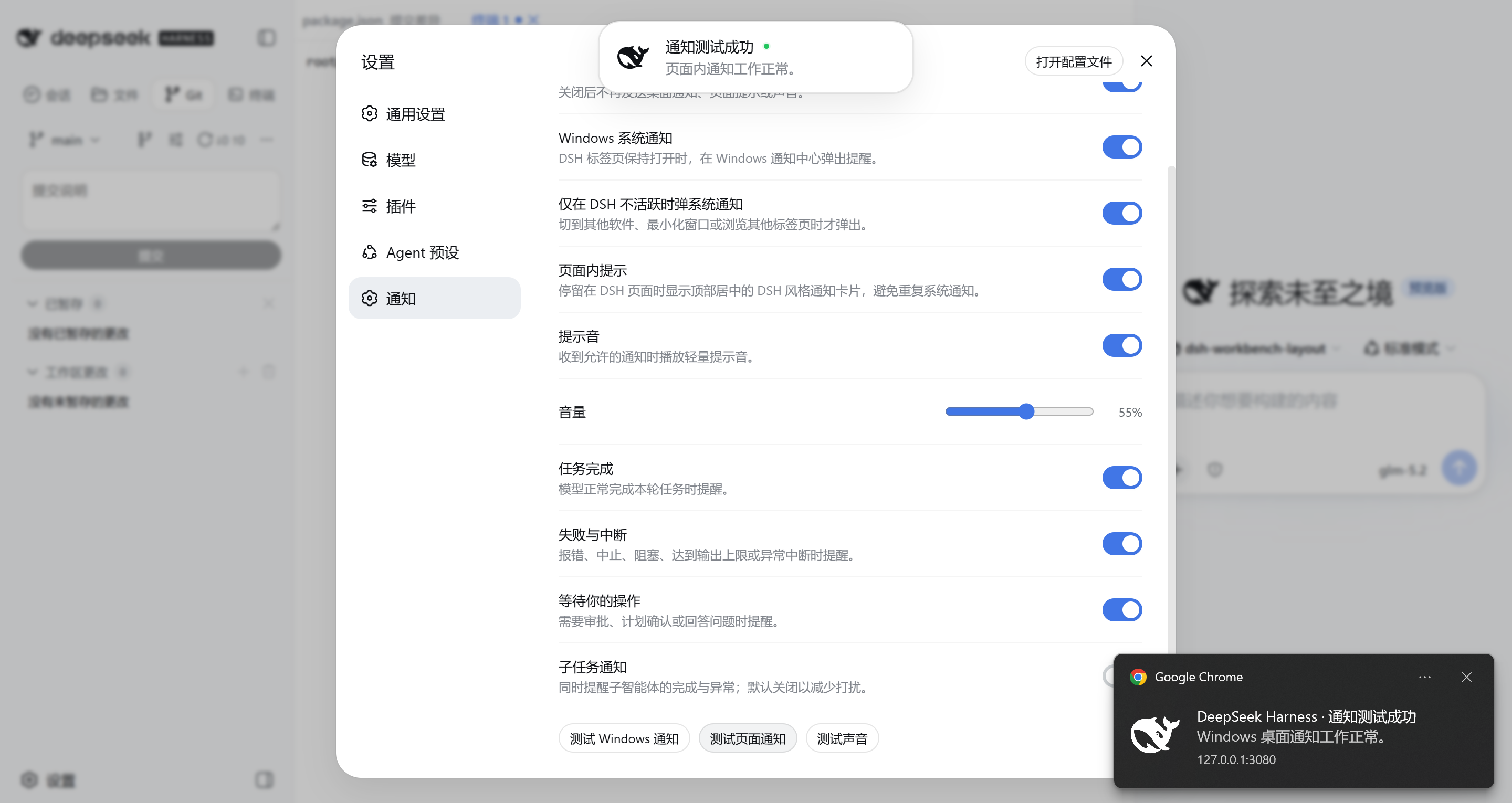
By default, one event produces either a Windows notification or an in-page card, not both. Sound is independent and can accompany either presentation.
| DSH state | Default presentation |
|---|---|
| Tab visible and browser window focused | DSH in-page card |
| DSH visible on another monitor while a different application is focused | Windows notification |
| Another browser tab is active or the browser is minimized | Windows notification |
| Windows notification unavailable or rejected | In-page card fallback, when enabled |
The decision uses browser visibility and focus rather than monitor count. If “Only show system notifications while DSH is inactive” is disabled, Windows notifications may also appear while DSH is focused; a successfully delivered Windows notification still suppresses the in-page card for that same event.
Clicking a Windows notification focuses DSH and opens the related Session. The plugin reads the durable Harness turn/end result instead of inferring completion from a transient running-state change. Initial page load, refresh, and reconnect establish a silent baseline, so old events are not replayed as new notifications.
Open Settings → Notifications inside DSH Web.
| Setting | Default | Purpose |
|---|---|---|
| Enable notifications | On | Master switch for task notifications |
| Windows notifications | On | Use the browser Notification API |
| Only while DSH is inactive | On | Avoid a system alert while actively viewing DSH |
| In-page notifications | On | Show a DSH-styled card when no Windows alert is delivered |
| Notification sound | On | Play a synthesized Web Audio chime |
| Volume | 55% | Set the chime volume |
| Task completed | On | Notify successful task completion |
| Failures and interruptions | On | Notify non-successful turn endings |
| Waiting for your action | On | Notify approvals, plan reviews, and questions |
| Subagent notifications | Off | Include subagent completion and failure events |
Windows notifications, in-page cards, and sound each have a separate test action. Repeated Windows or in-page tests replace the unfinished test of the same kind instead of building a queue; real task notifications retain their arrival order.
Install the public package into the DSH Web profile:
dsh plugin --profile web add @lsq64737/dsh-windows-notificationsRestart DSH Web if it is already running. Run the same add command to update an existing installation.
Remove the plugin with:
dsh plugin --profile web remove @lsq64737/dsh-windows-notificationsBrowsers require a user gesture before requesting permission, so the plugin never opens the permission prompt automatically during page load. If permission was denied previously, restore it from the site's permission settings in the browser before testing again.
windows-notifications: prefix in Harness logs or the browser console. They cover permission, delivery, settings, and audio failures without recording credentials.Requirements: Node.js 24 or newer and a compatible DSH development workspace.
npm ci
npm run typecheck
npm test
npm run buildCLASSIFICATION EVIDENCE
系统优先读取 GitHub Topics,再与站内分类词典和词根规则比对。当前命中: 无有效分类标签。
deepseek-ai
DeepSeek Harness: Everything is a Plugin.

anywhere-labs
为 DeepSeek Harness (DSH) 插件生态打造的现代化桌面端解决方案。万物皆「插件」,桌面本身也是「插件」。

awesome-dsh-plugin
A curated list of plugins for DeepSeek Harness (dsh) · DeepSeek Harness 插件精选列表