
其他
完整应用

deepseek-harness
deepseek-ai
DeepSeek Harness: Everything is a Plugin.

loyalchiiina/dsh-font-enhancer
DIY your DSH UI: per-region CN/EN font, size, weight, italic, colour (15 calibrated regions), pick-region drag, unified overrides, theme save/switch, random font/colour, one-click cute-font install with progress, upload your own font, 128 shared skins, Web + Desktop. 按区域自定义中英文字体字号字重颜色、框选建区、全局统一、主题保存切换、随机配色、一键装可爱字体的 DSH 界面 DIY 插件。
PROJECT TOPICS
PROJECT README
按区域分别设置 DSH 界面字体、字号、颜色,支持统一控制、主题保存/切换、随机配色/字体。
DSH 的界面长什么样,你说了算。
You decide what DSH looks like.


A DSH (DeepSeek Harness) plugin that lets you style the UI per-region — each region (sidebar, message area, input box, code block, etc.) gets its own Chinese/English font, font-size, line-height, weight, italic, and text color. Features unified global font/color overrides, theme save/switch, 框选 (pick-region) element selection, and random font/color generators.
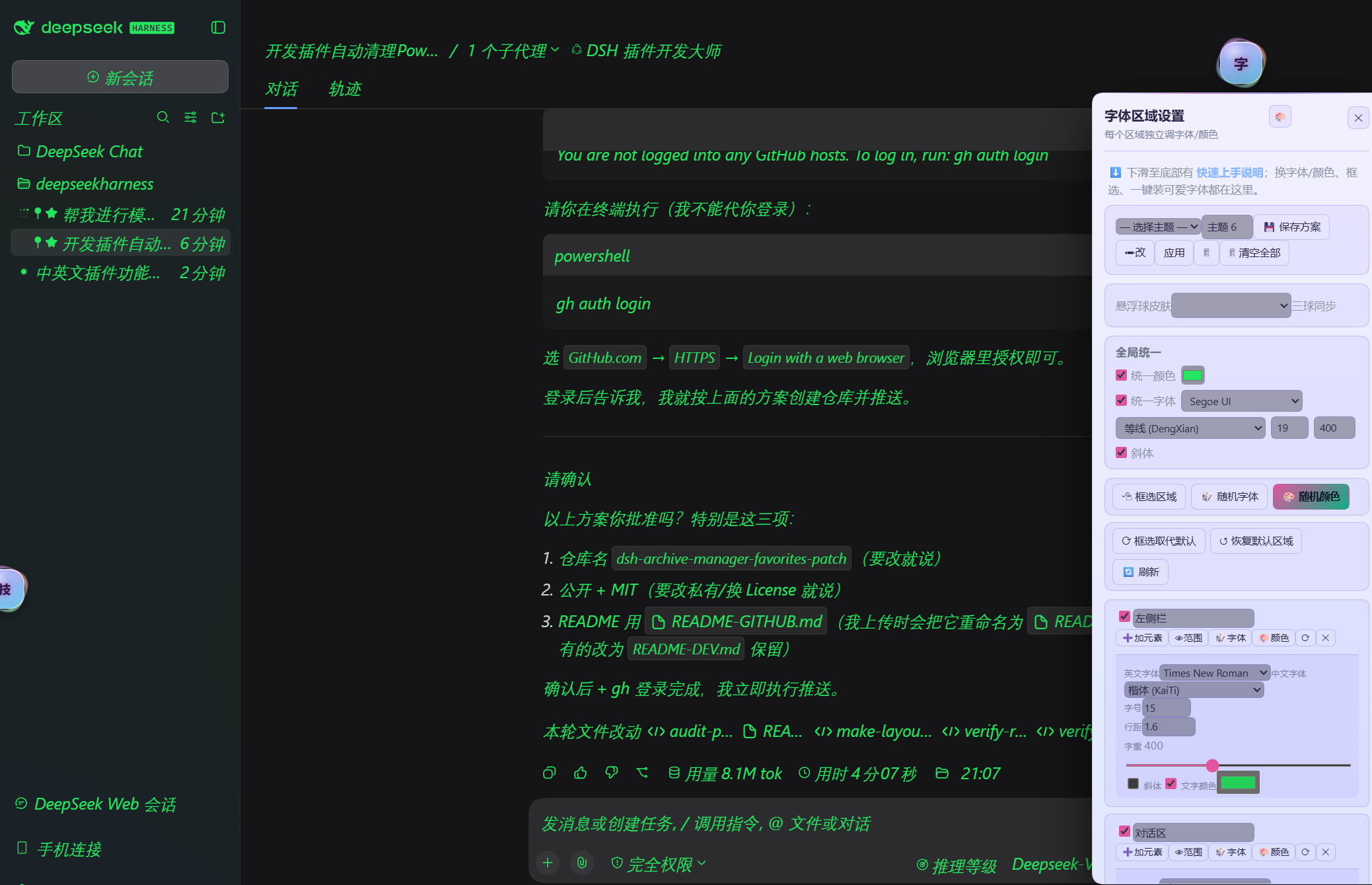
右侧「字体区域设置」面板:选择主题 / 保存方案、全局统一(颜色 / 字体 / 字号 / 字重 / 斜体)、框选区域、随机字体 / 随机颜色、刷新,以及按区域展开的独立属性(英文字体 Times New Roman、中文字体 楷体、字号 15、行距 1.6、字重 400 + 文字颜色)。 The per-region panel: theme picker and save, unified colour/font/size/weight/italic, pick-region, random font/colour, plus per-region attributes.
为什么值得装 / Why it's worth it — 觉得默认字号太小?中文字体不好看?想给整个界面统一换字体就开「全局统一」,想给某个角落单独上色就点「框选区域」在页面上直接框元素(不用记 CSS 选择器)。配色纠结就点「随机配色」生成一套,喜欢就存成主题随时切回来。
Default font too small? Chinese typeface not to your taste? Flip on Unified for one font everywhere, or hit Pick Region and drag a box right on the live page to style one corner — no CSS selectors needed. Can't decide on colours? Random Color generates a palette; save the ones you like as themes.
✅ v1.3.0 同时支持 DSH 网页端(浏览器访问 Web GUI)和 桌面端(Electron 内置窗口)。 新增一键下载安装可爱字体(霞鹜文楷/得意黑/站酷快乐体等,带实时下载进度)、添加自提供安装包、 🔄 刷新按钮、保存方案记住统一状态等功能。搜「字体」即可在插件市场找到本插件。
✅ v1.3.0 supports both the DSH Web GUI (browser) and the Desktop Electron window. New: one-click install of cute fonts (LXGW WenKai / Smiley Sans / ZCOOL KuaiLe etc. with live download progress), add your own font file, refresh button, themes remember unified overrides. Search "font / 字体" on the plugin market to find it.
| 中文 | English |
|---|---|
| 15 个预校准区域:左侧栏、Logo、新建会话、任务板、工作区名、设置、消息区、会话标题、输入区、Tabs、轮次指示、Agent/模型名、右侧扩展面板、代码块、底部展开条 | 15 pre-calibrated regions: sidebar, logo, new-session, taskboard, workspace name, settings, messages, session title, composer, tabs, turn indicator, agent/model name, right panel, code blocks, bottom bar |
| 每区域独立设置:中文字体、英文字体、字号、行距、字重(100–900 滑块)、斜体、文字颜色(取色器) | Per-region controls: Chinese/English font, size, line-height, weight (100–900 slider), italic, text colour (picker) |
| 勾选区域复选框展开该区域设置面板 | Tick a region's checkbox to expand its settings panel |
| 中文 | English |
|---|---|
| 「统一颜色」:一个取色器应用到所有启用区域 | Unified Colour: one picker applies to all enabled regions |
| 「统一字体」:一种字体+字号应用到所有启用区域 | Unified Font: one family + size applies to all enabled regions |
| 「框选区域」:在实时页面上拖框直接选中元素,无需记 CSS 选择器 | Pick Region: drag a box on the live page to style elements — no CSS selectors needed |
| 中文 | English |
|---|---|
| 保存整套配置为命名主题 | Save the full configuration as a named theme |
| 应用 / 重命名 / 删除主题 | Apply, rename and delete themes |
| 主题跨 DSH 重启与插件版本升级保留 | Themes survive restarts and plugin version bumps |
| 中文 | English |
|---|---|
| 🎲 随机字体(中/英)与 🎨 随机配色(黄金角高区分度配色) | 🎲 random fonts and 🎨 vivid high-distinction colours (golden-angle stepping) |
| 一键下载安装可爱字体(霞鹜文楷 / 得意黑 / 站酷快乐体等,带实时进度) | One-click install of cute fonts (LXGW WenKai / Smiley Sans / ZCOOL KuaiLe etc.) with live progress |
| 添加自提供安装包:选择本地字体文件自动校验并安装 | Add your own font file: pick a local file, auto-verified and installed |
| 字体列表与 Microsoft Word 一致(Times New Roman、楷体、宋体、微软雅黑…) | Font lists mirror Microsoft Word (Times New Roman, KaiTi, SimSun, Microsoft YaHei…) |
| 中文 | English |
|---|---|
与 dsh-todo-float-ball / dsh-skill-browser 共享同一套 128 款皮肤目录(window.__DSH_BALL_SKINS) |
Shares the same 128-skin catalogue with dsh-todo-float-ball / dsh-skill-browser (window.__DSH_BALL_SKINS) |
| 任一处切换,三个悬浮球与其面板颜色实时同步 | Switching anywhere syncs all three balls and their panels in real time |
| 「原版(仅本球)」选项可让字体球单独回到原始暖极光外观 | "Original (this ball only)" keeps the font ball's warm-aurora look |
| 中文 | English |
|---|---|
| 网页端(浏览器访问 Web GUI)与桌面端(Electron 内置窗口)双端可用 | Works on both the Web GUI (browser) and Desktop (Electron) |
| 全部设置存 localStorage,刷新与重启后保留 | All settings persist in localStorage, survive refresh and restart |
| 纯客户端插件,无宿主服务、无外部依赖、无构建步骤 | Pure client-side plugin: no host services, no external deps, no build step |
window.__DSH_BALL_SKINS)。localStorage; survive page refresh and DSH restart.# From the DSH profile directory:
dsh plugin --profile desktop add ./dsh-font-enhancerOr copy the folder into node_modules/ and add the package name to the profile
bundles list, then restart DSH.
0.1.0-rc.6).| 版本 | 说明 |
|---|---|
v1.3.0 |
最新:网页端+桌面端双端可用。一键下载安装可爱字体(带进度)、添加自提供安装包、刷新按钮、保存方案记住统一状态、字重斜体。搜「字体」可找到。 |
v1.0.0 |
旧版:内置区域样式 + 统一控制 + 主题。 |
想给所有消息区域换一种字体/颜色?
想单独设置 输入框 的字号?
想存一套配色以后换着用?
Pure client-side plugin. lib/client.js is a __ModuleLoader__ bundle that:
<style> tag with CSS rules per enabled region.localStorage for persistence with a SCHEMA_VERSION sentinel.lib/index.js is a minimal Cordis module so the bundle loads at all.No host services, no external dependencies, no build step.
body 兜底区域)覆盖。localStorage,升级插件版本也不会丢失。dsh-font-enhancer/
├── package.json # Plugin manifest with dsh.bundle + dsh.client
├── cordis.patch.yml # Cordis patch: registers the bundle
├── lib/
│ ├── index.js # Host half (minimal Cordis module)
│ └── client.js # Client bundle (all UI + logic, ~1000 lines)
├── README.md # This file
├── LICENSE # MIT
└── .gitignore发现 bug 或有功能建议?欢迎在 GitHub Issues 提 issue。
Found a bug or have an idea? Open an issue at GitHub Issues.
MIT
CLASSIFICATION EVIDENCE
系统优先读取 GitHub Topics,再与站内分类词典和词根规则比对。当前命中: 无有效分类标签。
deepseek-ai
DeepSeek Harness: Everything is a Plugin.

anywhere-labs
为 DeepSeek Harness (DSH) 插件生态打造的现代化桌面端解决方案。万物皆「插件」,桌面本身也是「插件」。

awesome-dsh-plugin
A curated list of plugins for DeepSeek Harness (dsh) · DeepSeek Harness 插件精选列表