

其他
插件

dsh-bili-scroll
c1overzz
DSH 插件:每天替你刷一轮 B站,读字幕挑出值得的、写一份日报,值得的 @ 你
PROJECT TOPICS
INSTALL REFERENCE
dsh plugin --profile web add github:loyalchiiina/dsh-console-sentinel
该命令指向仓库当前默认分支;尚无绑定当前 commit 的完整验证结果。
PROJECT README
功能描述:桌面控制台哨兵:扫描所有控制台窗口,标出哪些已空闲或跑完,一键关闭非白名单窗口,关之前先干跑预览再确认。白名单按进程名或窗口标题子串逐条添加,宿主进程默认受保护。v1.1.0 起设置面板顶部并列两张默认折叠卡片(当前版本 v1.3.1)——「系统控制台窗口(N 可关 · M 非DSH侧边栏 · MCP n 勿关)」与「DSH 侧边栏 · 当前面板(N)」,各自可展开逐窗关闭、也可标题行一键全关;MCP 宿主服务标红「勿关」不提供关闭按钮;图标视图的可关窗口带红 X 角标可点即关;资源管理器文件夹窗口可单关(不杀 explorer,桌面/任务栏不受影响)。适配 DSH 内核 0.2.2-rc.1。
English: Desktop console watchdog: scans every console window, marks which ones are idle or finished, and closes the non-whitelisted ones in one click, with a dry-run preview and a confirm step before anything closes. Whitelist entries are one row each by process image name or window-title substring, and shell hosts are protected by default. Since v1.1.0 the settings panel opens with two collapsible cards — "System console windows (N closable · M non-DSH-sidebar · MCP n protected)" and "DSH sidebar · current panels (N)" — each expandable for per-window closing or closable in one click from its title row; MCP host services are flagged protected with no close button; closable windows in the icon grid carry a red X badge; File Explorer folder windows can be closed individually without killing explorer.exe, so the desktop and taskbar stay up. Adapts DSH kernel 0.2.2-rc.1.
⚠️ 版本说明(2026-11-13):1.3.2 及更早版本的「自动隐藏」在失败时会每 10 秒写一条日志、
reason恒为unknown(本机实测一小时 208 条)。1.3.4 起:probe 按证据给出stale-handle/still-visible/unknown-state,失败记账并指数退避(封顶 10 分钟),连续 3 次进 30 分钟冷却,日志改为首次warn(带 pid/标题/窗口类/是否提权)+ 每 10 分钟或每 60 次一条汇总。1.3.5 另修console_windows_list工具:输出 schema 少了trace字段,导致每次调用都被宿主按additionalProperties: false拒收。Status (2026-11-13): On 1.3.2 and earlier, auto-hide wrote one log line every 10 s for the same window with
reasonhard-coded tounknown(208 entries in an hour on this machine). Since 1.3.4 the probe classifies failures asstale-handle/still-visible/unknown-state, tracks them with exponential backoff (capped at 10 min), enters a 30-minute cooldown after three consecutive failures, and logs onewarnwith full identity plus periodic summaries. 1.3.5 also fixesconsole_windows_list, whose output schema omittedtraceand made every call fail host-side validation.


A DSH (DeepSeek Harness) plugin for Windows that cleans up your taskbar in one click:
close every window of an app the way Alt+F4 would (graceful WM_CLOSE, not a force-kill),
close leftover empty console shells, close the panels the DSH sidebar still has open, and
never touch the harness itself or an in-progress Fluent / MPI solver run.
中文说明见 README.zh.md
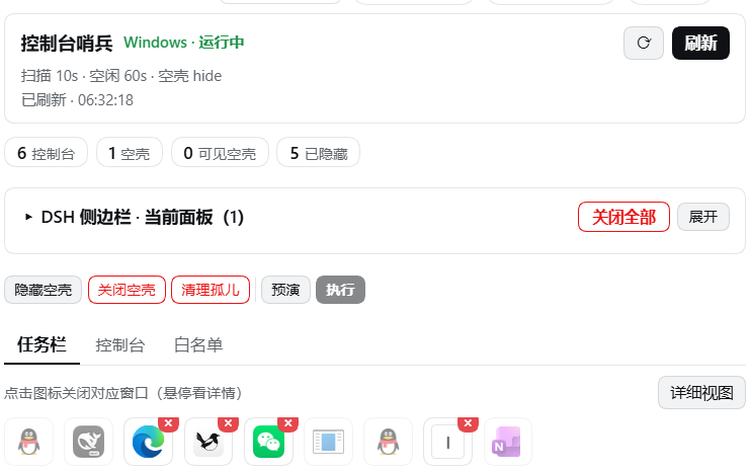
Windows accumulates windows you no longer need: empty PowerShell/cmd shells left behind by tooling, terminals you forgot about, apps you closed the document for but not the program — and a DSH sidebar that keeps every panel you ever opened. Closing them one by one is tedious, and a careless "kill everything" script will happily take down your harness or a running CFD job.
This plugin does the closing safely:
WM_CLOSE, exactly what Alt+F4 sends) so apps can save and exit;Both cards are collapsed by default (compact by design) and expand on a click anywhere on the title row; each has its own one-click "close all" on that same row, so you never have to expand first:
隐藏 (lossless) or 关闭
(WM_CLOSE); MCP services are flagged MCP服务·勿关 in red and get no close/hide buttons
at all, and "close all" skips them — closing one takes the tool bridge down with it. A 2px bar
under the title shows batch-close progress.关闭; 关闭当前面板 sits on the title row so it works while collapsed.预演清理 lists exactly which windows would be closed (with icons), 执行清理 then closes them.
Execute stays disabled until you have previewed — no blind destructive clicks. The final confirm is
a single yes/no prompt.
The icon grid view (default) packs every window into a compact 36×36 grid with a 24px app
icon; when an .exe icon cannot be extracted the cell falls back to the process-name initial
instead of a blank box, and the process path is back-filled through Win32_Process.ExecutablePath
(the host-side icon lookup). Closable windows
carry a red X badge in the top-right corner (关闭此窗口) so a single click closes that window
without opening anything else. Switch to detail view for a per-app card with full titles, a
whitelist checkbox, 关掉该软件 (close the whole app), and a per-window 关闭 button.
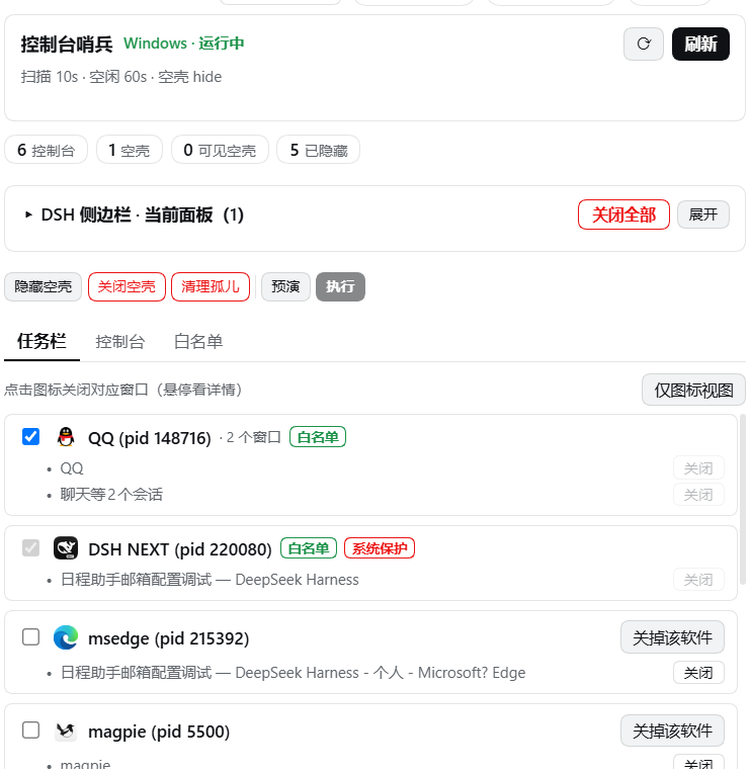
File Explorer folder windows (CabinetWClass / ExploreWClass) are listed and can be closed
individually. They are closed at the window level with WM_CLOSE — explorer.exe keeps
running, so the desktop, taskbar and Start menu are unaffected. Desktop shell surfaces
(Progman, WorkerW, Shell_TrayWnd, Shell_SecondaryTrayWnd, DV2ControlHost,
MsgrimeWindowClass, SysShadow) are hard-refused and reported as desktop-shell. The automatic
empty-shell sweep never includes folder windows.
A shell with no working child process (just conhost) is an "empty shell". Hide them
(lossless, the process keeps running) or close them for real — only bare
cmd / powershell / pwsh / python are ever targeted. Hidden shells stay listed with an
已隐藏 marker so nothing disappears silently.
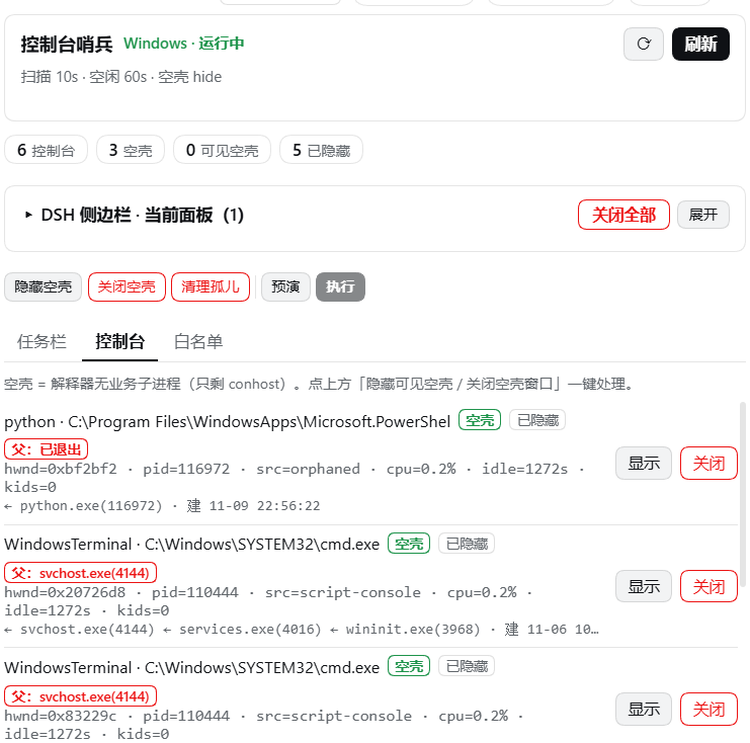
Every console row now carries a second line besides src= (source type):
← WmiPrvSE.exe(10384) ← svchost.exe(4144) · script monitor_writer_xxx.ps1 · since 11-06 10:47:36
← WmiPrvSE.exe means it was created through WMI's Win32_Process.Create, the usual path for
background/boot-time scripts. Seeing ← explorer.exe means a human double-clicked it.-File <x>.ps1 or a drive-absolute
.(ps1|bat|cmd|py|vbs|js) path). The row shows the file name; hover shows the absolute path and the
full command line (truncated past 600 chars).Boundary: src=wmi-detached only proves the parent is WmiPrvSE; "which caller invoked WMI" is not
retrievable — the Microsoft-Windows-WMI-Activity/Operational record carrying ClientProcessId gets
flushed by high-frequency query traffic. To find the culprit, read the script path in the command line:
that is the fingerprint the caller leaves behind.
Every row now also shows a red parent chip next to the process name: 父:svchost.exe(4144) when the parent is alive, or 父:已退出 for an orphan whose parent already exited (hover for the parent's full command line).
The Clean orphan windows button in the action bar monitors and closes console windows whose parent has exited but which kept running — a confirmation list is always shown before anything is closed. Safe mode: only bare interpreters (cmd/powershell/pwsh/python) with no working child process and not compute-related are touched; mpiexec / fluent / fl2610 / cx2610 / ansys / node are never closed — a running Fluent's mpiexec can also have an exited parent, and it will not be killed by mistake.
Programs and window-title keywords that must never be hidden or closed. Stored in
~/.dsh/console-sentinel/whitelist.json, editable from the panel or the tools. The whitelist page
also carries a system-protection row per entry, so you can see what the plugin protects on its own
before you add anything.
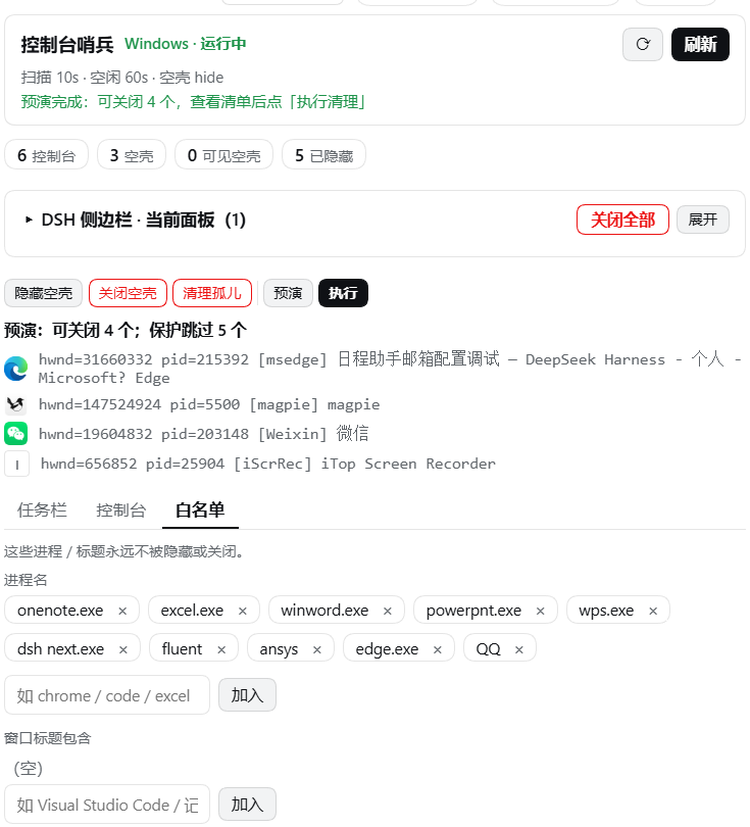
Bulk-closing windows is a destructive operation, so the plugin layers several hard guards:
| Guard | Behaviour |
|---|---|
| Host process tree | The DSH host, all its ancestors, and every descendant (dsh / electron / deepseek images) are never touched — closing one of those consoles can take the harness down. |
| MCP host services | Console windows whose process matches mcp / agent-bridge / ansys-bridge are flagged MCP服务·勿关: no close/hide buttons, skipped by "close all". |
| Compute protection | mpi / fluent / ansys / cx* / solver / cae / launcher are never selected. An mpiexec console looks like a plain window but killing it ends a running simulation. |
| Desktop shell red line | Progman / WorkerW / Shell_TrayWnd / Shell_SecondaryTrayWnd / DV2ControlHost / MsgrimeWindowClass / SysShadow are refused with reason desktop-shell — closing them removes the desktop, taskbar or IME. |
| Explorer stays alive | Folder windows (CabinetWClass / ExploreWClass) close at the hwnd level; explorer.exe is never killed. |
| Bare-interpreter only | Empty-shell closing is restricted to cmd / powershell / pwsh / python. |
| Foreground & self | The focused window and the plugin's own process are skipped. |
| Whitelist | Anything you tick is permanently exempt. |
Graceful close (WM_CLOSE) is used everywhere; taskkill /F is deliberately not offered.
A non-elevated process cannot close an elevated window — Windows UIPI silently drops the message,
which looks like "the button does nothing". When you close an admin window (Task Manager,
screen recorders, …) the plugin starts one elevated helper: you get a single UAC prompt, it
sends the same WM_CLOSE, and reports back through a temp file (an elevated child's stdout is
not readable). Answer No and nothing happens — the plugin says so instead of pretending success.
dsh plugin --profile desktop add dsh-console-sentinelWindows only. Declares dsh.bundle (host half) and dsh.client (settings-panel half), so it shows
up under Settings → 控制台哨兵 with a terminal icon.
Defaults in cordis.patch.yml:
| Key | Default | Meaning |
|---|---|---|
scanIntervalSec |
10 |
probe interval |
idleThresholdSec |
60 |
how long a console must idle before it counts as empty |
cpuThresholdPct |
1 |
CPU floor for the idle test |
autoAction |
none |
none | hide | close for idle consoles |
emptyConsoleAction |
hide |
action for empty shells |
guardForeground |
true |
never touch the focused window |
cleanup.protectedProcesses |
see above | never closed by the desktop cleanup |
whitelist.processes / .titles / .unprotect |
[] |
runtime-managed exemptions |
Host-side tools for scripted use: console_windows_list, console_windows_action,
console_windows_sweep, desktop_windows_cleanup, plus sentinel_whitelist for the
exemption list. A CLI is available via lib/desktop-cli.mjs list|cleanup.
MIT
CLASSIFICATION EVIDENCE
系统优先读取 GitHub Topics,再与站内分类词典和词根规则比对。当前命中: 无有效分类标签。
c1overzz
DSH 插件:每天替你刷一轮 B站,读字幕挑出值得的、写一份日报,值得的 @ 你

hellowind777
一个自主的高级智能伙伴,不仅分析问题,更持续工作直到完成实现和验证。

xing-shuyin
Just open your browser — get all your work done.