
模型与 MCP
待识别

rea
morluto
Reverse engineer anything with agents, from app behavior down to native binaries.

loyalchiiina/dsh-archive-favorites-forge
Favorites, copy id+path, per-session delete, idle batch archive and a favourites filter for DSH conversations — additive slot extensions over the shipped archive feature, editing no official file. 为 DSH 对话增加收藏、复制 ID+路径、单条删除、超时批量归档与收藏筛选。
PROJECT TOPICS
INSTALL REFERENCE
dsh plugin --profile web add github:loyalchiiina/dsh-archive-favorites-forge
该命令指向仓库当前默认分支;尚无绑定当前 commit 的完整验证结果。
PROJECT README
功能描述:DSH 对话管理工具箱:收藏常看会话、一键复制会话 ID 与记录文件路径;按闲置时长批量归档 —— 归档只写注册表标记、不搬动任何文件,默认同时把它们的快照账本送进系统回收站;收藏清单可搜索、可排序、可按有快照/无快照筛选;删除对话有二次确认与永久删除护栏;快照清理与孤儿缓存扫描都带实时进度;侧栏「未分组」可一键体检、可清理、默认隐藏。适配 DSH 内核 0.2.2-rc.1。
English: Conversation management for DSH: star the sessions worth keeping and copy a session id plus its transcript path in one click; bulk-archive conversations idle for more than N hours — archiving only marks them, moving no file, and by default it also sends their snapshot ledgers to the Windows Recycle Bin; search, sort and filter the favourites list by whether a snapshot exists; delete a conversation behind a two-step confirm with a permanent-delete guard; watch live progress on snapshot cleanup and orphan-cache sweeps; diagnose and clean the sidebar "Ungrouped" bucket, hidden by default. Adapts DSH kernel 0.2.2-rc.1.
Favourites, copy id+path, per-session delete, idle batch archive, a favourites filter, and edit-resend / undo-turn with automatic file rollback for DeepSeek Harness conversations — additive slot extensions over the shipped archive feature. It edits no official file.
给 DSH 的对话加上收藏、复制 ID+路径、单条删除、批量归档闲置对话、收藏筛选,以及「编辑重发 / 撤销整轮 + 文件自动快照回滚」 —— 全部挂在官方插槽上,不改官方一行代码。


English | 简体中文
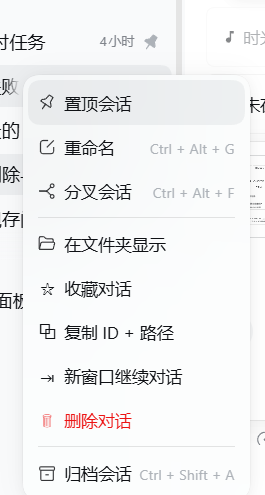
1. The session menu — favourite / unfavourite, copy id + path and continue-in-a-new-window added to the shipped 「…」 menu; pin, rename, fork and archive stay on the official rows:
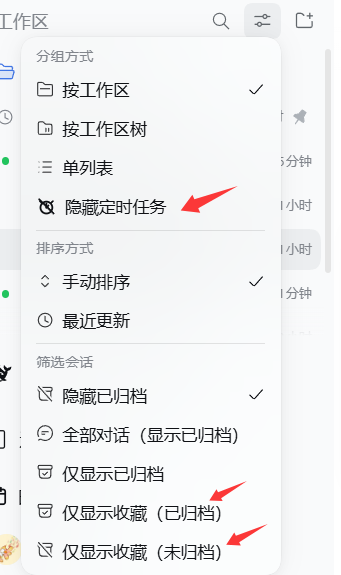
2. Favourites and filters — two extra rows in the official 筛选会话 group, narrowing the sidebar to favourites that are archived and to favourites that are not. The same menu carries grouping and ordering:
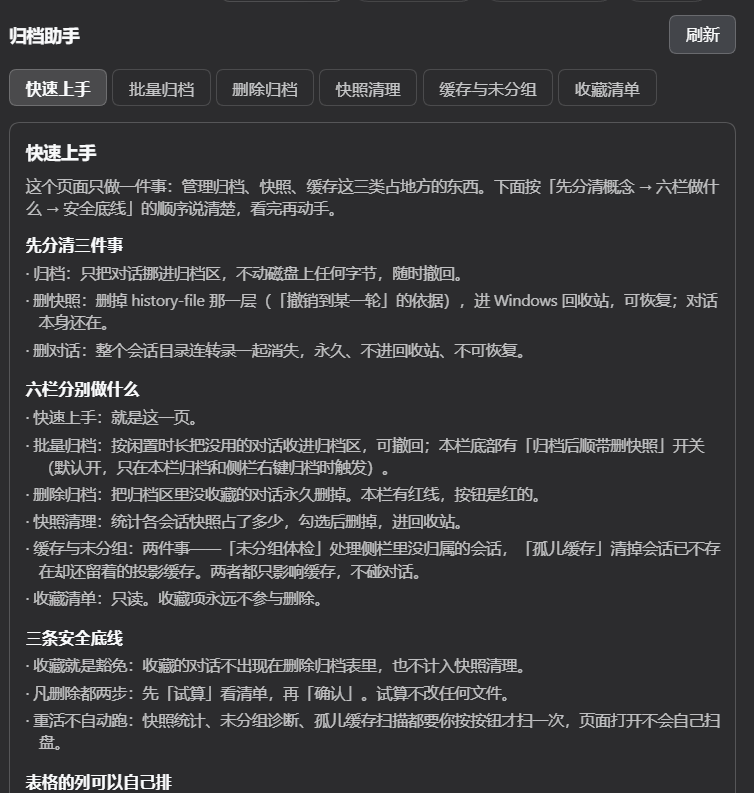
3. Quick start — the landing panel of Settings → 归档助手: three things to keep apart (archive / delete snapshots / delete the conversation), what each of the six panels does, and the three safety rules. Opening the page scans nothing:
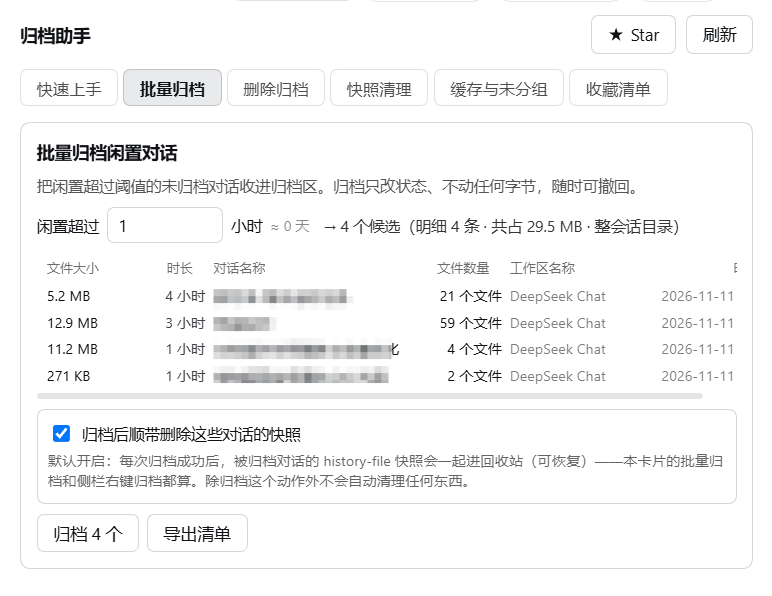
4. Batch archive — pick un-archived conversations by idle time; the six-column table carries real size, idle age, file count, workspace and timestamp. The 「归档后顺带删除这些对话的快照」 switch at the bottom is on by default:
5. Delete archived — lists only archived conversations that are not favourites, behind a red button and two confirmations. The title says outright that this delete is permanent and never reaches the Recycle Bin:
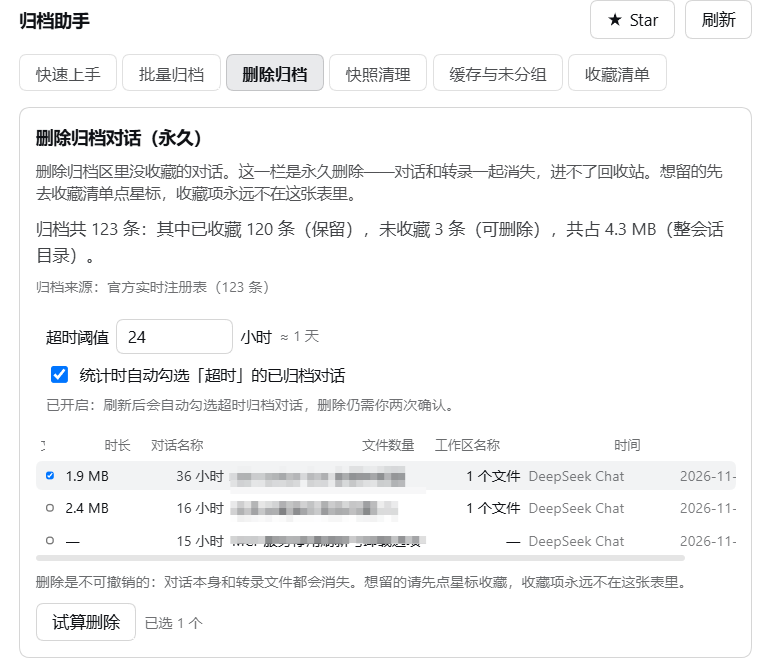
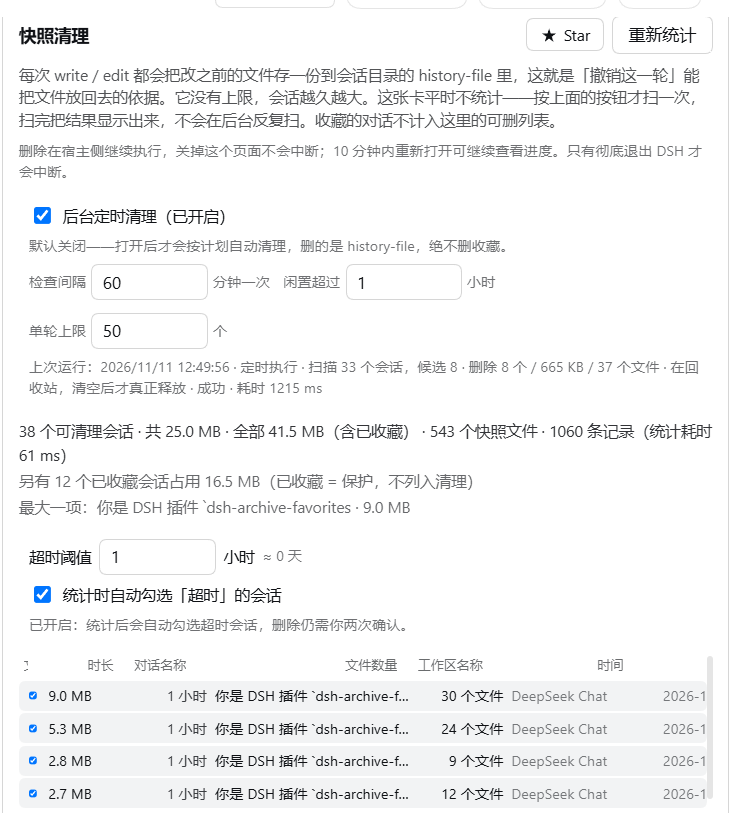
6. Snapshot cleanup — measures what each session history-file occupies, then sends the ticked ones to the Windows Recycle Bin (recoverable). Favourites are never part of the deletable list:
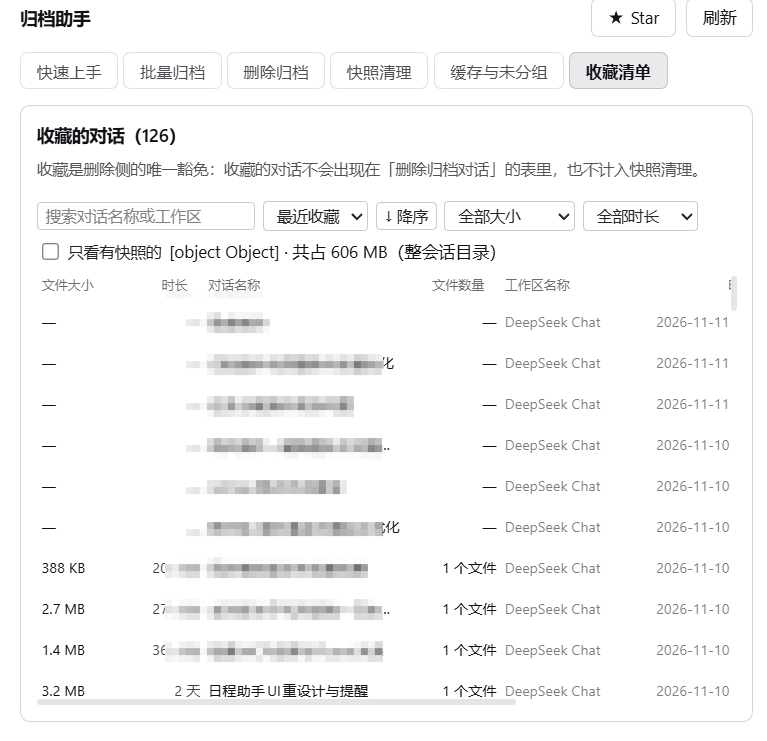
7. The favourites list — favourites are never part of the batch-delete list, but their snapshots can be cleared: tick rows and use 「取消所选收藏」 to unfavourite them in one go, or clear a single row's snapshots, and a three-way result reports 「已清快照 X / 无快照可清 Y / 失败 Z」 (a 0 B release simply means that row had no history-file/ to remove). Each row shows the whole session directory's size, idle time, file count and last update; the list can be sorted and filtered by size band (<1 / 1–5 / 5–10 / 10–20 / >20 MB). The card totals its rows as 「共占 Z(整会话目录,非可删快照)」 — a whole-directory measurement, not snapshot bytes, so it is not comparable to 快照清理's figure.
8. The per-turn buttons — 复制 → ↺ undo → ✏️ edit-and-resend → 🗑 delete under every human message, including the messages you interject mid-turn:

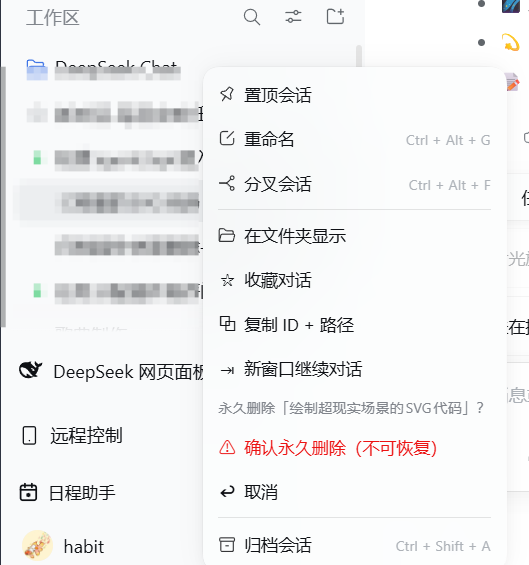
Deleting a conversation shows a red confirm step naming exactly what it wipes. There is no silent permanent delete.
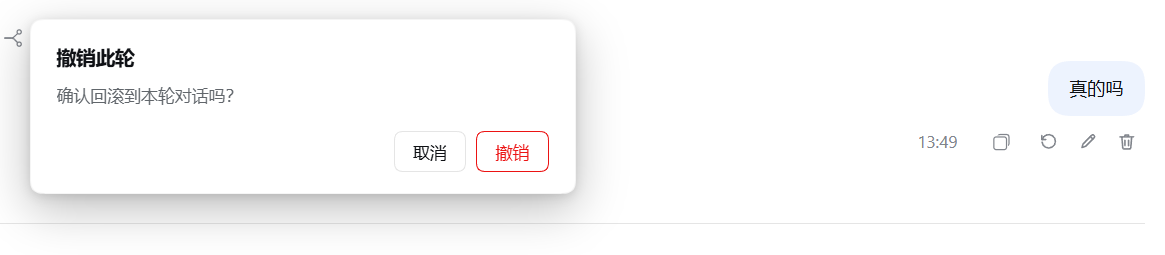
「撤销此轮」 asks before rolling the session back, and shows what will be removed.
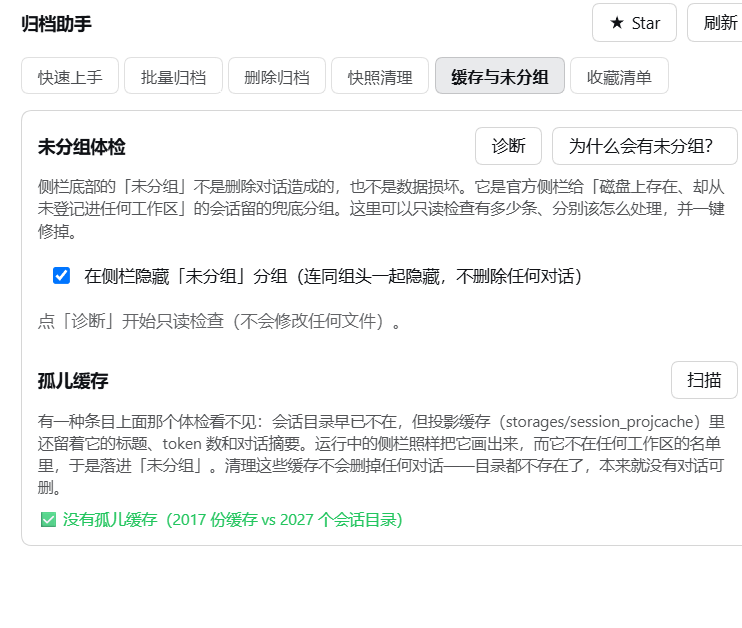
The ungrouped health check and the orphan-cache sweep — the two read-mostly panels that never touch your conversations.
DSH already ships an archive feature: the Workspace registry keeps a global
archivedSessionIds set and @deepseek-ai/dsh-client-ui-workspace renders the
sidebar rows plus a view-options filter. That shipped feature has no
favourites, no per-conversation delete, no copy-id/path affordance, and no
time-based batch archive — and it deliberately refuses to open an archived
conversation. The transcript has no per-message edit or undo either, and
nothing in the harness rolls back the files an assistant turn rewrote. The
sidebar's "Ungrouped" bucket has no explanation and no repair entry point.
This plugin adds those things by attaching to documented official slot points, so it composes with the shipped UI instead of patching it.
Every feature below marked "Settings → 归档助手" lives behind a single row of function buttons on one page: pick 快速上手 / 批量归档 / 删除归档 / 快照清理 / 缓存与未分组 / 收藏清单 and only that panel is shown. The other panels are hidden, not unmounted, so a report you just measured is still there when you come back. The choice is remembered across restarts, and a new install lands on 快速上手.
| 中文 | English | |
|---|---|---|
| ① | 收藏对话:归档或未归档的对话都能收藏;「…」菜单项 + 行内 ☆,星标即时生效 | Favourite any conversation — archived or not; a menu row plus an inline ☆ star, applied optimistically |
| ② | 复制 ID + 路径:「…」菜单一键复制会话 ID 与转录文件绝对路径(两行) | Copy id + path — one menu row copying the session id and the transcript's absolute path |
| ③ | 单条永久删除:任意非收藏对话可删,二次确认;删完侧栏立即移除该行 | Per-conversation permanent delete — any non-favourite, behind a confirmation, and the sidebar row disappears at once |
| ④ | 快照清理的永久删除(跳过回收站,宿主 API 与界面均已接入):请求体 permanent:true,且必须 confirm:true、dryRun:false 三条件同时满足才生效;只对本次请求有效、不写进任何策略文件。界面已接入:入口在快照清理卡的两段式确认块里,是一个默认未勾选的次级勾选项「⚠ 永久删除(不进回收站,无法恢复)」;勾上只换样式与文案(确认按钮变红、按钮文字变「确认永久删除(不可恢复)」、并显示「即将永久抹掉 N 个会话的快照,共 X」),勾选本身不发请求,再点那个红按钮才发请求(permanent:true,且必须同时 confirm:true、dryRun:false 三条件);点「预览」时无论勾没勾都只试算、绝不带 permanent;删完回执首行是「【已永久删除:不进回收站,无法恢复】…|永久抹除 N」;只对本次请求生效、不写进任何策略文件,后台定时清理永不使用永久删除。不勾选则默认仍走 Windows 回收站 |
Permanent delete for snapshot cleanup that skips the Recycle Bin (host API and UI) — takes effect only when permanent:true, confirm:true and dryRun:false are all present; it applies to that one request and is never written into a policy file. The UI is wired up too: the entry is a sub-checkbox inside the snapshot cleanup card's two-step confirmation block, 「⚠ 永久删除(不进回收站,无法恢复)」, unchecked by default; ticking it only swaps styling and copy (the confirm button turns red, its label becomes 「确认永久删除(不可恢复)」, and it shows 「即将永久抹掉 N 个会话的快照,共 X」) — ticking alone sends no request; the red button then sends permanent:true, which still requires confirm:true and dryRun:false; 「预览」 only ever dry-runs and never carries permanent; the receipt's first line is 「【已永久删除:不进回收站,无法恢复】…|永久抹除 N」; it applies to that one request and is never written into a policy file, and the background timer never uses permanent delete. Left unticked, the default stays the Windows Recycle Bin |
| ⑤ | 批量归档闲置对话:把闲置超过 N 小时的未归档对话一次性归档,可撤回;候选直接列在卡片里(统一六列,见 ⑲),不必先导出清单才知道要归档什么 | Idle batch archive — archives conversations quiet for more than N hours, undoable; the candidates are listed right in the card in the shared six columns (see ⑱), so you never have to export a list just to see what would be archived |
| ⑥ | 导出清单:制表符分隔的 txt,含对话名称 / 对话ID / 所属工作区 / 闲置时长 / 最后活动时间;可复制路径或直接打开所在文件夹 | Export list — a tab-separated txt with name, id, workspace, idle time and last-activity time; copy its path or reveal it in the file manager |
| ⑦ | 筛选会话:5 个互斥单选项,任一时刻只有一个 ✓、点一下立即生效 —— 隐藏已归档(默认)/ 全部对话(显示已归档) / 仅显示已归档 / 仅显示收藏(已归档) / 仅显示收藏(未归档) |
Conversation filter — five exclusive options, exactly one checked at a time and applied on click: hide archived (default) / all conversations (show archived) / archived only / archived favourites only / unarchived favourites only |
| ⑧ | 批量删除:一键永久删除「已归档且未收藏」的对话,清单用统一六列(见 ⑲) | Batch delete — permanently removes the archived-and-unfavourited conversations; the list uses the shared six columns (see ⑱) |
| ⑨ | 删除护栏:收藏项拒删、越出会话根目录拒删、符号链接拒删、逐条报告、批量上限 | Delete guardrails — favourites refused, paths outside the sessions root refused, symlinks refused, per-id reporting, batch cap |
| ⑩ | 编辑重发:任意一条用户消息下多一个 ✏️,点开就是内联编辑框(可拖入文件 / 粘贴图片,最多 10 个附件、单个 8MB),发送即截断到该消息之前并重发 | Edit and resend — a ✏️ under any user message opens an inline editor (drag files or paste images, 10 attachments max, 8 MB each); sending truncates the conversation to just before that message and resends |
| ⑪ | 撤销整轮:↺ 把对话回退到该轮之前,并默认同时还原这一轮里被 AI 改过的文件(确认框里列出将被回滚的路径,可取消勾选只回退对话) | Undo a turn — ↺ rewinds the conversation to before that turn and, by default, also restores the files the assistant changed during it (the confirm dialog lists the affected paths; untick to rewind the conversation only) |
| ⑫ | 文件快照:AI 每次改文件(write / edit / str_replace_editor)前自动留一份内容快照,撤销时按最早的改动记录还原;没有快照的老会话从日志反推 |
File snapshots — every write / edit / str_replace_editor call snapshots the file's prior bytes first; undo restores from the earliest change after the boundary, and falls back to reconstructing from the transcript log for conversations that predate the plugin |
| ⑬ | 未分组体检:只读诊断侧栏「未分组」里到底有哪几条会话、每条为什么在那儿、该怎么处置;先试算再执行,删的一律进回收站 | Ungrouped health check — a read-only diagnosis of exactly which conversations sit in the sidebar's "Ungrouped" bucket, why each one is there, and what to do with it; a dry run comes first and deletes go to the recycle bin |
| ⑭ | 未分组硬门:插件每次启动 8 秒后自检一次,有游离会话就在日志里告警并指路体检卡片;干净则记一行 clean |
Ungrouped boot gate — 8 seconds after every start the plugin re-checks; a non-empty bucket logs a warning naming the first ten ids, a clean one logs a single clean line |
| ⑮ | 孤儿缓存清理:清掉「会话目录已不在、但投影缓存还留着」的孤儿记录——这是「未分组」清完又冒出来的真正原因,目录扫描看不见它。0.36.0 起默认全部可删,要保留置顶/已归档那几条就勾一个框 | Ghost-cache sweep — removes orphan projection records whose session directory is long gone; this is why the bucket keeps reappearing and no directory scan can see it. Everything is deletable by default since 0.36.0; tick one box to spare the pinned / archived rows |
| ⑯ | 隐藏「未分组」分组:一个纯视图开关(默认开启),把侧栏底部那个分组(连组头)整体藏起来,不删任何对话 | Hide the "Ungrouped" group — a pure view switch (on by default) that hides the whole bucket (header and rows) from the sidebar; nothing is deleted |
| ⑰ | 新窗口继续对话:把长对话蒸馏成一份五段精简交接书(原对话信息 + 当前目的 + 完整 todo〔未完成在前、已完成留档〕+ 最新产物进度 + 产物/日志路径 + 你现在要做的;旧产物只留路径、不再贴原文),先弹窗报告「检测到任务进行到 第 N 轮」,确认后新开一个 新对话-<原名> 并自动把交接书发过去。预设默认继承原对话智慧体(勾选框默认勾上);取消勾选后下拉列出本机全部预设供改选,留空则不带预设 |
Continue in a new window — distils a long conversation into a compact five-section brief (session facts + current goal + full todo with unfinished items first + latest artefact progress + artefact/log paths + next steps; old artefacts are paths only), reports "you are N turns in" first, then on confirm opens 新对话-<original title> and sends the brief as its first message. The original agent preset is inherited by default (checkbox ticked); untick it to pick any local preset from a dropdown, or leave empty to go without one |
| ⑱ | 快照清理(统计 + 手动删除):设置页「快照清理」栏点「立即统计」才扫一次(统计不在渲染时扫;后台清理是另一套可选定时器),列出每个会话 history-file/ 占了多少、多少个快照文件、多少条记录、不活跃时长;收藏的会话不进可删列表,只在汇总行单独报;可选打开「超时预勾选」(默认关,开前须确认风险)自动勾上超时行,删除仍需先试算再二次确认,删的目录进 Windows 回收站;删除过程有实时进度(stream: true 走 NDJSON,扫描前先出 start 首帧,逐目录上报,断流自动退回 400 ms 轮询)。0.40.0 起提供可选的后台定时清理(默认关闭,需在设置页显式开启;开启后按小时自动清理「未收藏 + 超过阈值」会话的 history-file/,仍只动 history-file/、仍送回收站、每轮有上限) |
Snapshot usage & manual cleanup — one press of "measure now" scans the ledger directories once (measurement never runs on render; background pruning is a separate, optional timer), reporting bytes, blob count, row count, idle time and last snapshot time per conversation, in the shared six columns (see ⑱); favourited conversations are lifted out of the cleanup list and reported on a separate summary line; an optional "pre-tick idle rows" switch (off by default, risk acknowledgement required) ticks rows past the threshold after each scan; deletion still needs a dry run plus a confirm, and the directory goes to the recycle bin. Since 0.40.0 an optional background pruner exists (off by default, must be enabled explicitly; once on it prunes only the history-file/ of non-favourited sessions past the threshold, still to the recycle bin, still capped per run). Deletions report live progress (stream: true streams NDJSON, a start frame before scanning, one line per directory; the client falls back to a 400 ms poll if the stream stalls) |
| ⑲ | 列表统一六列:每一栏的列表都是同一套列 —— 文件大小 \| 时长 \| 对话名称 \| 文件数量 \| 工作区名称 \| 时间,由一个共用行组件渲染,缺失值统一显示破折号而不是留空(详见 "The six-column row format");文件大小与文件数量取自该会话的整个目录(转录 + 快照账本 = 删掉它能腾出多少),工作区名称取工作区注册表标题(没有标题才退回文件夹名),且只在你点开那一栏时才量,单次上限 120 行、并发 8;0.38.0 起列顺序可拖动、列宽可拖拽调整,表头与行共用同一套网格所以永远对齐 |
One row format everywhere — every list on the page uses the same six columns (文件大小 \| 时长 \| 对话名称 \| 文件数量 \| 工作区名称 \| 时间), drawn by a single shared row component, with an em dash for a cell that genuinely has no value instead of a blank one; size and file count come from the whole session directory (transcript + ledger — i.e. what deleting that row frees), the workspace name comes from the workspace registry title (falling back to the folder name), and all of it is measured only when you open that panel, capped at 120 rows per request with a fan-out of 8. Since 0.38.0 the columns are draggable (drag a caption to reorder, drag its right edge to resize) and caption plus rows share one grid, so they always line up |
| ⑳ | GitHub Star 入口:设置页「快照清理」标题行右端、以及「归档助手」页头右侧各一个小星标;地址取自 package.json 的 repository.url(回退 homepage,不硬编码),点击经宿主 shell.openExternal 打开,白名单只放行 https: + 精确 github.com / www.github.com |
GitHub star link — a small star in the 「快照清理」 card header and in the 归档助手 page header; the URL comes from package.json repository.url (falling back to homepage, never hard-coded), opened through the host's shell.openExternal, allow-listed to https: plus the exact hosts github.com / www.github.com |
| ㉒ | billion-context cache cleanup — clears the context-compression plugin's own caches: retrieval images (rebuilt on demand), rotated logs, rebuildable overview / model-catalog files; state files such as instances/, writers/ and prefix-affinity.json are never touched. Read-only scan first, then a dry run, then deletion to the Windows recycle bin with live progress; the retention window defaults to 0 days (everything eligible) and can be 1/3/7 |
billion-context cache — Settings → 归档助手 → 缓存与未分组 |
| ㉑ | 隐藏定时任务:只要某个会话与定时任务有关(为任务预留、是任务的投递目标、或被任务触及),该会话就隐藏;判定与时间无关 —— 未到点、刚到点、早已到点都一样隐藏,不会弹回来。想看的时候把开关关掉,被隐藏的会话即刻全部恢复显示(无需刷新)。这是独立开关,不与上一组 5 个互斥项混(那 5 个是「筛选」,这个是「藏起来看不着」);默认开,只对未归档会话生效(已归档会话走另一套过滤) | Hide scheduled tasks — when the toggle is on, any session tied to a scheduled task — reserved for one, delivered into by one, or merely touched by one — is hidden. The rule is time-independent: a session stays hidden whether its task is not yet due, just became due, or long overdue, and nothing pops back into the sidebar when a timer fires. Turn the toggle off whenever you want to look — every hidden session reappears immediately, no refresh needed. It is a separate switch, not part of the five exclusive filter rows (those five filter, this one just hides); on by default, applies to unarchived conversations only (archived ones are filtered separately) |
| Feature | UI location |
|---|---|
| Favourite / copy / delete one conversation | Sidebar row 「…」 menu (and a hover ☆ on the row) |
| Idle batch archive, export list, favourites list, batch delete of archived conversations (inlined list, per-row ticks, dry run → confirm, its own pre-tick switch), ungrouped health check, orphan cache sweep, billion-context cache cleanup, the six-column row format used by every list | Settings → 归档助手 |
| Favourites filter | 视图选项 → 筛选会话 |
| Edit-resend / undo turn / delete one message | The ↺ ✏️ 🗑 buttons under each user message in the transcript |
| Undo and edit confirmation | A modal (shell.overlay) — the only place the plugin draws outside the sidebar |
| Snapshot usage & cleanup | Settings → 归档助手 (the 「快照清理」 card) |
dsh plugin --profile <profile> add dsh-archive-favorites-forgeThen fully quit and reopen DSH. The host half (lib/index.js) has no watcher in this harness generation, so it only loads at process start.
The client half (lib/client.js) is usually hot-swapped by the host's bundle polling; when unsure, fully quitting and reopening is the reliable path.
The Windows desktop build binds no Ctrl+Shift+R — the only full-reload entry is the desktop menu's 「重新加载界面 / Reload Interface」.
lib/index.js    host half   — favourites store, transcript-path resolver,
                              JSON routes, guarded delete, archive/dearchive,
                              file snapshots + transcript-log parsing
lib/client.js   client half — official slot registrations + two DOM rules
                              (the favourites filter and the transcript buttons)
Slots used (all documented in the harness client contract):
| Slot | What it contributes |
|---|---|
sidebar.workspaces.session.menu.item |
4 rows: favourite, copy id+path, continue in a new window, delete |
sidebar.workspaces.session.row.action |
1 hover ☆ star |
settings.section |
the 归档助手 page |
shell.overlay |
the one confirmation modal used by edit-resend and undo |
Host routes (all under /plugins/dsh-archive-favorites-forge):
| Route | Purpose |
|---|---|
GET /status |
version + state paths, for diagnostics |
GET /favorites, POST /favorite |
the favourites set |
GET /archived, POST /unarchive |
the archived set, and undo of one archive |
GET\|POST /idle-archive |
preview and apply the idle batch archive |
POST /export-list |
write the tab-separated list |
POST /reveal |
open the file manager on a path |
POST /session-info |
one session's title / workspace / transcript path |
POST /delete |
guarded permanent delete (batch; the session-menu delete goes through it) |
GET\|POST /archive-delete-policy |
the idle pre-tick switch and threshold for the archive-delete list (its own policy file) |
POST /archive-delete |
batch delete of archived-but-unfavourited conversations; the host rebuilds the candidate set, dry run unless confirm: true, favourites refused |
POST /session-turn-info |
one turn's user text, its file-change list, and the rewind boundary |
POST /session-files-restore |
roll back the files changed after a given sequence number |
POST /session-rewind |
shadow the tail of a conversation after a given sequence number, in place — same session id, nothing deleted (0.39.0) |
POST /session-digest |
read-only: distil a long conversation into a compact five-section brief (current goal + full todo + latest artefact progress + artefact/log paths + next steps) for a fresh window |
POST /agent-presets |
read-only: list all local agent presets ([{id,label}]) for the new-window dialog's preset dropdown; degrades to an empty list on failure |
POST /ungrouped-diagnose |
read-only health check: which conversations would land in "Ungrouped", why, and what to do |
POST /ungrouped-cleanup |
one-click cleanup; dry run unless confirm: true, and it re-diagnoses before acting |
POST /ungrouped-explain |
the prose answer to "why does Ungrouped exist, and is it from deleting conversations?" |
GET\|POST /ghost-cache-diagnose |
read-only: orphan projection-cache records whose session directory is gone |
POST /ghost-cache-clean |
recycle orphan cache files; dry run unless confirm: true, re-scans first, pinned records kept by default |
Every contribution is registered through ctx.slots.inject — the "register once
the owning entry is mounted" contract — so the plugin never assumes the sidebar
is up, and never holds a reference to a node the host owns.
Two DOM rules exist, both deliberate exceptions:
[data-clock="start"]
node per message, and the owner is its
[data-chat-flow-kind="user"][data-chat-turn] or
[data-chat-flow-kind="steering"][data-chat-turn] ancestor — the harness
labels a turn-opening question user and a mid-turn interjection steering,
and both share the same UserMessageNodeView, so matching user alone leaves
every interjected message without buttons (fixed in 0.28.2). Never a
CSS-module hash (those are re-hashed on every build).
A MutationObserver re-runs the scan, so messages that stream in later get
their buttons too.localStorageRenderer localStorage is origin-scoped: the desktop shell, a phone view and a
remote browser are different origins and would each keep their own stars. The
host half persists them to
~/.dsh/data/dsh-archive-favorites-forge/favorites.jsonwhich survives a profile switch, a reinstall, and both ends.
There is no official session-delete RPC in this harness generation — the
shipped UI never deletes a session. "Delete this conversation" therefore means
removing the session's own artifact directory under ~/.dsh/sessions/. That is
irreversible, so the host applies these guards before it removes anything:
maxDeletePerCall.Each id is reported separately, so one failure never aborts the batch. After a
successful delete the host emits api-session/removed — the harness's own
row-removal event — so the sidebar drops the row immediately instead of showing
it until the next reload.
Until 0.38.x this was a three-step dance: sessions.fork({ sessionId, atSeq })
opened a new child conversation holding everything before atSeq, the
attachments were re-uploaded, the message was resent into the child, and then
POST /session-replace deleted the original because its own fork had superseded
it. It worked, and it was the wrong shape.
Every undo manufactured a brand-new conversation: new session id, and — because the tool list is serialised at the very front of the request payload — a new prefix. Measured on this machine over 14 consecutive requests: when the payload prefix is byte-identical the upstream cache hit rate holds at 99.4-99.6% and the first token arrives in 5.7-7.0 s; the first request of a forked child hit 2.5% and took 14.5 s. A single tool appearing or disappearing in the list was enough to drop a shared prefix from 100% to 38.4%. Undo was re-paying for the whole context every time.
0.39.0 uses the mechanism the harness itself uses when it compacts:
session.append("user/message", marker, {
  surfaceOp: { op: "replace", startSeq, endSeq },
  sourceEventSeqs: shadowed,
})
The event is appended; nothing is removed from the log. sourceEventSeqs
declares that this new event supersedes every surface node from startSeq to
endSeq, so folding the surface no longer derives wire messages for them. The
session id is unchanged, the transcript file is unchanged, and the original
conversation is still there in full.
Four details that are easy to get wrong:
startSeq / endSeq come from session.surface.nodes, not from log
indices. Trace events (turn/start, step/start, tool/call) live in the
log but own no surface node; computing the boundary by index lands on a seq the
surface does not know and the append is rejected with
surface replace: start seq X not found in surface.system/message; the host therefore never starts the shadow at index 0, and
reports only-the-system-prompt-remains instead of guessing.beforeSeq, so a second press would shadow the first marker and append another.
The host recognises its own markers (message.id starting with rewind-) and
answers already-rewound without writing anything.user/message, never a system/message. The v4
loader accepts system/message only inside an open turn and step, and an
undo is appended after turn/end. A system/message marker is written
happily and then makes the whole conversation refuse to load, with
system/message does not match an open turn and step. user/message is the
only surface type a replace may use outside a turn. 0.39.0-0.39.2 shipped the
broken shape; 0.39.3 fixes it.beforeSeq is the sequence number of the event immediately before the
turn's turn/start, not the turn/start itself: the boundary must sit outside
the turn, or the rewind would leave an unclosed turn/start behind.
Rewind is not free. A replacement bumps the surface content generation, so the
next request starts a new request series and the system prompt is re-sent; the
cache prefix breaks partially. That is a different order of magnitude from
forking, which broke it completely. (The harness's own /compact uses the same
primitive and lands at 0-14.8% on the first request afterwards — compressing and
caching are, in the end, opposites.)
This is also why POST /session-replace and the replace flag on
handleDelete are gone: rewind deletes nothing, so nothing needed a delete that
skipped the favourite guard. That route was a public endpoint that permanently
removed a favourited conversation with the guard switched off — dead code,
but the dangerous kind.
Before each write / edit / str_replace_editor call the host copies the
file's current bytes to
~/.dsh/sessions/<workspace-dir>/<session-dir>/history-file/blobs/<sha256>and appends one line to history-file/manifest.jsonl:
{"seq": 412, "turn": 7, "time": "...", "tool": "edit", "path": "C:\\...", "blob": "<sha256>"}blob: null means the file did not exist at that moment, so restoring it means
deleting it. Hashing the content means a file edited five times in one turn
is stored once, and rolling back consumes the manifest entries it used (and the
blobs they orphaned), so a rolled-back conversation does not keep growing.
Snapshots are written before the tool runs, so the very first write to a
brand-new file records "did not exist" rather than its post-write content.
Conversations that predate this plugin have no manifest. For those, the host
re-reads the transcript (session[.vN].jsonl.zstd, multi-frame zstd, header line
dropped) and applies the inverse of each recorded tool call in reverse order:
edit swaps new_string back to old_string, str_replace_editor create
deletes the file, str_replace swaps new_str back to old_str, insert
removes new_str.
write cannot be inverted — a full overwrite leaves no trace of what was there —
so a conversation whose only changes came from write gets a warning naming
the file instead of a silent no-op. That warning is surfaced in the confirm
dialog, which is why the file list is fetched before the dialog opens.
The official sidebar's sessionVisible() runs four checks in order:
if (session.origin === "subagent") return false           // 1. subagents out
if (session.blank && session.id !== current) return false  // 2. other blanks out
case "default": return !archived.has(session.id)           // 3. archived out
// 4. only now: "is this session accounted for by a workspace?"
Step 3 returns false outright, so an archived id never reaches the stray
branch that builds the bucket. The chain "delete a conversation → its id lingers
in archivedSessionIds → an Ungrouped group appears" therefore does not exist in
the code. Measured counter-evidence: this machine's archivedSessionIds holds
98 ids whose session directories no longer exist, and the sidebar stayed clean
throughout.
The one real cause is: a session was created but never accounted for by any
workspace. If WorkspaceRegistry.create() misses its attachSession, or the
session's cwd points at a directory that was never registered as a workspace,
it stays stray forever. A plugin cannot intercept the official create path, so
the design is "warn once per boot" + "fix it in one click" — never a silent
auto-delete.
| Key | Default | Meaning |
|---|---|---|
enabled |
true |
Master switch for the host routes |
maxDeletePerCall |
500 |
Hard cap on one delete request |
ungroupedCheck |
true |
Boot-time Ungrouped self-check; false silences the warning (the health card still works) |
ungroupedCheckDelayMs |
8000 |
How long after start the self-check runs, in ms |
- id: dsh-archive-favorites-forge
  config:
maxDeletePerCall: 200session-<uuid>, but artifact
directories on an upgraded machine use both <uuid> and session-<uuid>.
Every comparison goes through a normaliser and the resolver tries both
spellings, so this works for old and new conversations alike.新会话 / 未命名).cwd) is never counted or
acted on.archiveSession / unarchiveSession methods, and never writes another
plugin's internals.新对话-<original title> loses its last few characters when the original
title is long. This is a shipped DSH ceiling, not a limit this plugin adds:
the session-title service sets maxTitleBytes: 80
(@deepseek-ai/dsh-base/cordis.patch.yml) and rename() truncates to 80
UTF-8 bytes (three bytes per CJK character, never splitting one). The
original title DeepSeek 智能体团队任务:蒸馏消息回滚与侧边栏未分组排查 is
78 bytes; the 10-byte 新对话- prefix pushes it to 88, so it is cut to 33
characters / 79 bytes. Scanning all 574 session titles in this install, the
longest is exactly 79 bytes — 80 is the global ceiling. The plugin passes the
title through verbatim and imposes no length of its own; raising the limit
means editing session-title.config.maxTitleBytes in the profile, which
affects every title in the install and needs a restart.write, edit, and str_replace_editor.
Anything else that touches a file — a shell/terminal command, a Python script
the assistant ran, a formatter, a git checkout — leaves no snapshot and no
log record, so undo cannot see it. If a turn edited files only through the
terminal, undo rewinds the conversation and leaves the files alone.conversation.input.shell(sessionId).setDraft), falling back to the stored
draft key when that channel is unavailable.data-chat-flow-key, never by turn number — after a rewind you often resend
immediately, and the new message can legitimately reuse a turn number you
just discarded.Measuring and cleaning are two separate paths. Measurement scans only when you press the button. Cleaning either follows your click, or follows the optional background pruner you turned on yourself (since 0.40.0, off by default). The measurement side still has no size ceiling and no age policy; the pruner only ever considers sessions that are un-favourited and past the idle threshold you configured.
Automatic pruning was removed in October 2026 because it could delete the
wrong thing silently — and that reason still stands. It is back in 0.40.0
only as an opt-in, carrying three guardrails that make silent deletion
impossible: it does not exist unless the policy file says literal true;
favourited sessions are never touched; and each run deletes nothing but
history-file/ directories, capped per run, all to the recycle bin. A pruner
that is off by default cannot delete anything behind your back — that is the
entire reason it was allowed back.
Deleting a ledger costs that conversation its rollback history. The conversation itself, its transcript and every file on disk stay exactly as they are; what disappears is the ability to undo a turn in that conversation.
The delete is per-directory, not per-entry. There is no "drop only the
oldest snapshot" — a session's history-file/ is one unit. Keeping a
half-trimmed manifest would let a rollback fail with a missing blob instead of
failing cleanly.
Bytes are the ledger on disk right now, including the manifest itself. It is not an estimate of what a dedupe pass could reclaim.
The numbers are a snapshot in time. The card does not poll. Press the button again to refresh; a scan over a few dozen ledgers takes tens of milliseconds, so refreshing is cheap.
Idle time comes from the projection cache, not from the ledger. The card
reads the last prompt stamp out of
~/.dsh/storages/session_projcache/sessions/<id>.json. A ledger whose cache
row is gone shows - rather than 0 minutes — an unknown age must never be
able to pass an age threshold by looking brand new.
Favourites are protected twice. They are lifted out of the list for
display, and the host refuses them again on /snapshot-cleanup (logging the
refusal). Hiding a checkbox is a convention; refusing the write is the guard. The summary line reports both halves — 「可清理 N 个会话 / 共 X」 for the deletable subset and 「· 全部 Y(含已收藏)」 for the whole set — so a favourite is still counted after being lifted out of the list.
The idle pre-tick switch is not a delete switch. It only decides which rows arrive already ticked after a scan. Every delete still costs two clicks, and turning the switch on first shows a risk box that names what will be ticked and what deleting a ledger costs.
Snapshot deletion and conversation deletion have SEPARATE switches and SEPARATE thresholds. The blast radii differ: losing a ledger costs "undo an old turn", losing a conversation costs the conversation. One shared policy would let a cautious snapshot threshold silently authorise deleting chats, so the two policies live in different files.
Closing the settings page or the window does not stop a manual cleanup that is already running. Once 「清理快照」 is pressed the deletion runs inside the host Node process: closing the settings page, switching tabs or refreshing the page only drops the live progress frames, while the deletion loop keeps going and does finish. The job id lives in localStorage, so re-opening the settings page within 10 minutes resumes the progress view; past that window the job id is gone and the progress cannot be replayed — press 「立即统计」 to confirm what is left. Only fully quitting the DSH client (ending the host process) interrupts the deletion, and it may leave a half-deleted state.
The 90 seconds are not a failure deadline. The client pauses monitoring only after 90 seconds without any new progress, and then merely says the deletion may still be running in the background and can be resumed by re-opening within 10 minutes. Pausing is not a failure: it does not clear the job id and does not turn the job into an error. There is also an 8-minute total fallback.
Only one cleanup task runs at a time. A second request is refused outright
with 已有清理任务在运行,请等待它完成后再试。 (HTTP 409, already-running), so the
old "accepted first, error later" window is gone. That lock is shared rather than snapshot-only: 快照清理, 删除归档, 批量归档 and the 孤儿缓存 sweep all take the same one, so any one of them blocks the other three, and the detail field names the operation and stage that currently holds it.
Ticking nothing does nothing. With 0 conversations selected, pressing the
delete button no longer starts an empty job that would hold the lock: the host
answers accepted:false, reason:'nothing-to-do' and the UI simply stays put.
history-file/ lives inside it.The 批量归档 card carries a switch called 归档后删除快照. When it is on, every conversation
this card archives also has its history-file/ ledger sent to the Windows recycle bin. The card prints one total under its candidate list, 「共占 Z(整会话目录)」, summed over each candidate's whole session directory rather than snapshot bytes. Again, that total is not comparable with 快照清理's snapshot bytes: different measurement, different scope.
archiveSession emits no event of its own,
but the archive set lives in the storage-domain workspace global record and every write to
it emits domain/changed; the plugin subscribes to that, so archiving a single conversation
from the harness sidebar drops its ledger exactly like the batch button does.enabled: false, written when you untick the box, keeps the ledger. Re-arming it from OFF still costs the risk acknowledgement.watch armed — baseline of N. If the registry is not readable yet
the baseline stays empty and the first-event path applies (degraded, never unsafe)./archived
is re-read every time, so a conversation archived or unarchived a second ago
is already reflected./archive-delete recomputes "archived ∧ visible in the sidebar ∧ not blank ∧
not favourited", intersects it with the submitted ids, reports missing for
anything that no longer qualifies, and refuses refusedFavorites.dsh-aff-settings-view in localStorage.Every list on the settings page — 快照清理, 删除归档, the idle candidates in 批量归档, 未分组体检, 孤儿缓存, 收藏清单 — renders through the same six columns, always in this order:
文件大小 | 时长 | 对话名称 | 文件数量 | 工作区名称 | 时间One SessionRow component draws every row; one ListHead component draws every caption (the column names live in the LIST_COLUMNS constant). No panel builds its own columns, so the same conversation looks the same wherever you meet it.
Why a grid. Through 0.37.x each row was a flex line, but row tails were not the same width: 收藏清单 carries 已归档 + ID + 路径 + 取消收藏 (~205px), 未分组 carries a 建议 badge (~116px), 孤儿缓存 only a 62px badge. The caption has no tail, so in every panel the last column was pushed a different distance left — which is exactly what "the columns do not line up" looked like. No amount of width tuning fixes that; caption and rows now share one gridTemplateColumns, and the caption reserves an equally wide track for the tail (TAIL_ADVISE / TAIL_BADGE / TAIL_ACTIONS).
Drag a caption to move that column. Drop it on another caption and it takes that slot. All six columns move in every panel at once — they read one layout.
Drag the grip on a caption right edge to resize. Live while dragging, written once on release (a resize is not a reason to hit the disk per pixel). Double-click the grip to cycle default / +60 / +140. The grip is focusable: arrow keys step 10px, Enter cycles, Backspace restores that column.
Order and widths are stored locally (localStorage key dsh-aff-column-layout), so every panel and every restart agrees. Once you have changed something a 「恢复默认列」 control appears in the header — it is hidden while the layout is still the default, because a reset button on a page whose default is already right is an invitation to press it.
A broken stored layout cannot eat a column. Anything read back passes normaliseColumnLayout: unknown keys are dropped, missing ones are appended in default order, widths are clamped to each column min/max. One missing column means one missing fact in every list, so the file is never trusted.
The dash is not decoration. A cell that genuinely has no data prints — — it is not left blank and the column is not dropped. A blank cell pushes every later column one slot to the left, which is exactly how two lists end up looking like two different schemas.
The dash is a promise, and it is not zero. A measured empty directory prints 0 B; — means only that the value could not be read, so the two never collapse into each other. No cell is ever filled by scanning the disk behind your back. For real numbers, press that card's own button (立即统计 / 诊断 / 扫描) or just open the panel.
What each column means: 文件大小 = bytes in the session's whole directory (transcript + history-file/ ledger) — that is, what deleting the row frees; 时长 = how long ago the 时间 stamp is (one colour for the whole column — whether a row is past the threshold is answered by its checkbox, not by a hue); 文件数量 = file count of that directory; 工作区名称 = the workspace registry title (e.g. 「DeepSeek Chat」), falling back to the cwd's last segment; 时间 = last snapshot write (archive/idle rows use the conversation's update time, 未分组 uses creation time, favourites use the starred moment).
0.37.2 fixed three more. 时长 stopped tinting the rows past the threshold (two colours in one column read as two columns). A list that runs out of horizontal room scrolls sideways instead of crushing 对话名称 (收藏清单 had squeezed names down to De… because its rows also carried three buttons). And 收藏清单 no longer prints dashes for 文件大小 / 文件数量 — a favourite is stored as {at,title,cwd}, so the page now asks the host to measure that session's directory.
0.37.1 corrected three of those meanings. 0.37.0 pointed 文件大小 / 文件数量 at the snapshot ledger, and a ledger only exists for conversations that edited a file — 9 of the 212 archived sessions with a directory on this machine — so both columns read a dash on 96% of the rows. The workspace column printed the cwd's last segment (folder names like workspace), not the workspace name at all. Size and count now measure the whole directory; the name comes from the registry.
Cost policy (do not relax it). The archive, idle and favourite lists used to know only a title and a timestamp. Since 0.37.1 they measure two things per row — the whole session directory (size + file count, so the delete card can answer "what does this free") and the ledger (for 时间) — but only when you open that panel or press its button, at most 120 rows per request (the page renders 60, so the cap is invisible), with a fixed fan-out of 8. Walking 212 session directories took 46 ms here for 568 MB, so the numbers are cheap; they still never run on a timer, and never on render.
Microsoft.VisualBasic.FileIO.FileSystem.DeleteDirectory(..., 'SendToRecycleBin')).
If the recycle-bin call fails it degrades to moving the directory into
<dshHome>/sessions_quarantine_<stamp>/; it never hard-deletes. You clean that
quarantine folder up yourself.maxItems); the rest are reported as
budget-exhausted and a second click picks them up.~/.dsh/storages/session_projcache/sessions/<id>.json) whose
session directory is long gone. The check scans directories and the boot gate
reads the registry, so both report clean while the sidebar still draws the
bucket. Those are handled by the 孤儿缓存 card inside 「缓存与未分组」.This is the real reason the bucket keeps coming back, and it deserves its own paragraph.
When a session directory ~/.dsh/sessions/<workspace>/<id>/ is deleted,
storages/session_projcache/sessions/<id>.json is not deleted with it. That
file still holds the title, token usage, context pressure, turn outline and model
selection, so the running sidebar happily draws the row (drawing a title needs no
directory) — and the id is in nobody's sessionIds, so it lands in the stray
branch and shows up under "Ungrouped".
Which produces the contradiction you have probably seen: check-ungrouped.js
scans directories and reports 0, the boot gate reads the registry and reports
clean, yet the sidebar clearly draws the group. Neither can see cache ghosts.
Measured on this machine: 984 cache files, 657 session directories; 620 of those directories
have a matching cache → 364 ghosts, 9.77 MB (318 older than a week; note 984 − 657 ≠ 364).
There is also a false-alarm class worth knowing about: a freshly created
session that has never been used carries no blank flag in its header — the
harness writes sessionListMetadata.blank into the projection cache instead. A
header-only check reports such a session as a stray under "Ungrouped" while the
sidebar never draws it. The health check now consults the cache as well, excludes
the row when blank: true (matching the official rule), and treats an unreadable
or missing cache as "unknown" rather than guessing.
The 「孤儿缓存」 card inside 「缓存与未分组」:
DeleteFile, recoverable); on failure it degrades
to <dshHome>/projcache_quarantine_<stamp>/.keepPinned: true / keepArchived: true.
The old includePinned / includeArchived names are still accepted but their
meaning does not flip — a truthy value is ignored rather than reinterpreted
as "keep", so one word never means opposite things across versions.handleDelete now removes
<id>.json right after the directory (trying both the bare uuid and the
session-<uuid> spelling); a failure is logged as a warning and never blocks
the delete.The 「未分组体检」 card in Settings has one checkbox: 「在侧栏隐藏「未分组」分组(连同组头一起隐藏,不删除任何对话)」.
"0"
brings the group back. It is the sidebar's ownerless fallback bucket, nobody
asked for it, and every entry in it is reachable through the health card.workspace.json write, no session
directory or cache file touched; untick and it is back instantly.data-row-key="workspace:<key>" and the ungrouped bucket's key is the empty
string, so the selector can only ever match that ownerless bucket.div.groupSection > [header, div[role=group]]; hiding only the header would
leave its rows orphaned under the previous group. The plugin marks the header's
parentElement and hides the whole block.localStorage['dsh-aff-hide-ungrouped']), and the gate
attribute is removed when the plugin is disabled — so the group always comes
back rather than staying hidden with no UI left to undo it.lib/index.js host half
lib/ungrouped-guard.js self-contained Ungrouped diagnose/cleanup module
lib/client.js client half (a __ModuleLoader__ bundle)
test/probe-client.mjs DOM-stub probe of the client contract
test/probe-filehistory.mjs end-to-end probe of the snapshot/rollback bytes
test/probe-rewind.mjs probe of the in-place rewind: refusals, no-ops, the exact append, and a mirrored copy of the harness's surface planner rules (each with a negative control)
test/probe-ungrouped-guard.mjs isolated probe of the Ungrouped guard + ghost cache + blank-session detection (fake home, 11 session fixtures + 6 cache fixtures + perf contract)
test/probe-snapshot-usage.mjs isolated probe of the snapshot usage scan (read-only, concurrency, three-layer path guards)
test/probe-digest.mjs isolated probe of the handover brief (fake home, 18 events + a 60-requirement conversation)
test/probe-sidebar-watch.mjs probe of the domain/changed watcher that purges snapshots on a sidebar archive
test/probe-delete-ledger.mjs proves that deleting a conversation always takes its snapshot ledger with itRun all eight (808 assertions):
node test/probe-client.mjs
node test/probe-filehistory.mjs
node test/probe-rewind.mjs
node test/probe-ungrouped-guard.mjs
node test/probe-snapshot-usage.mjs
node test/probe-digest.mjs
node test/probe-sidebar-watch.mjs
node test/probe-delete-ledger.mjs
They answer different questions and neither substitutes for the other.
probe-client.mjs runs the real bundle against a stubbed DOM and proves the
client contract (which slots get registered, what each component renders, that
the sidebar enhancer does not eat the sidebar). probe-filehistory.mjs builds a
throwaway fake DSH home — a multi-frame zstd session log and real files on disk —
and proves the one claim a contract test cannot: that undoing a turn actually
puts the previous bytes back. It reproduces the real ordering (the tool/call
event is published before the tool runs, so the snapshot must capture the
pre-edit bytes), and it exercises the log-reverse fallback used for
conversations whose events predate the plugin, which never published a
session/event of their own.
Both suites write only inside .probe-* directories in this repo and delete
them on the way out.
probe-ungrouped-guard.mjs points DSH_HOME / DSH_AFF_SESSIONS_ROOT /
DSH_AFF_WORKSPACE_FILE / DSH_SESSION_ID at a fake home and builds nine
multi-frame zstd sessions covering every step of the four-check verdict, all five
advice classes, two guards and the item budget. What it really proves is that a
dry run writes nothing: with the default dryRun, the registry is never
called, nothing is emitted, all nine directories are still on disk, and
workspace.json is byte-identical.
It also covers the orphan-cache half: four projection-cache fixtures — one whose
session directory is still on disk, one plain ghost, one pinned ghost and one
archived ghost — assert that a session with a directory is never called a ghost,
that exactly the three orphans are picked out, that all three are advised
delete (0.36.0: pinned and archived are no longer keepers by default), that a dry
run touches neither the cache files nor workspace.json, that the default plan
contains all three with zero skips, that keepPinned: true is the only way a pinned
ghost is spared, that keepArchived: true is likewise the only way an archived ghost
is, that the legacy includePinned / includeArchived names no longer change the
plan, that a path outside the cache root is refused, that an entry with no file is
skipped rather than deleted, and that maxItems caps the plan. The two halves
together are the whole answer: when the directory scan says clean, the cache scan
is what can still tell the truth.
probe-digest.mjs builds a log shaped like a real conversation — reasoning
blocks, tool/call, tool/result, a steering injection, two todo/write
snapshots and two revisions of the same team/task — and proves the brief's two
core promises: every real requirement is on the timeline, and the newest
task snapshot wins and is named as the place to resume. It also proves what must
be dropped (reasoning, tool arguments and tool results never reach the text),
that a steering injection is not counted as a requirement, that a 60-requirement
conversation is thinned in the middle rather than truncated at the tail, and
that the client creates the new session only inside onConfirm — reading the
brief must never leave a stray empty conversation behind.
The probe is not a formality — it has repeatedly caught bugs that a syntax check and a careful read both passed, including:
C--Users instead of C-Users, which
would have handed every "copy path" a nonexistent file;session- prefix;It asserts against the real directories and the real registry on the
machine, plus DOM fixtures that mirror the official markup exactly (including
the selection tick being a bare <svg> on the selected row only) — which is
what exposed each of those.
MIT.
CLASSIFICATION EVIDENCE
系统优先读取 GitHub Topics,再与站内分类词典和词根规则比对。当前命中: deepseek-harness。
morluto
Reverse engineer anything with agents, from app behavior down to native binaries.

deepseek-ai
DeepSeek Harness: Everything is a Plugin.

nexu-io
The 1st Collaborative AI Design Agent Workspace. Local-first and open source. Create motion, prototypes, websites, apps, dashboards, presentations, images, and videos with your team and AI agents. Share work, exchange feedback, and iterate together in one workspace.