其他
完整应用

deepseek-harness
deepseek-ai
DeepSeek Harness: Everything is a Plugin.

love0d000721/dsh-file-upload
Windows file upload for DeepSeek Harness: configurable hotkey opens the native file dialog (PowerShell 7, 5.1 fallback), copy to workspace / safe path insertion, bilingual UI (中文/English), privacy-safe by default.
PROJECT TOPICS
PROJECT README


Windows file upload for DeepSeek Harness: a configurable hotkey opens the native Windows file dialog (via PowerShell 7, with a labeled Windows PowerShell 5.1 fallback), then a graphical chooser lets you copy files into the workspace, insert a safe file list into the composer, or both. The UI is bilingual (中文 / English). Privacy is protected by default — see Privacy.
⚠️ Windows-only. Requires PowerShell 7 (recommended) or the built-in Windows PowerShell 5.1.
| Settings — hotkey / language / privacy controls |
|---|
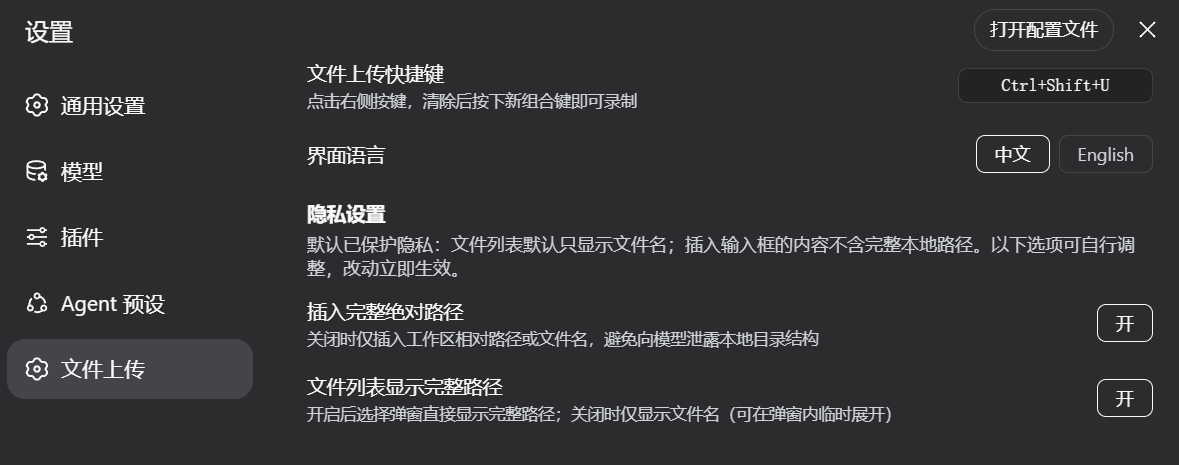 |
Only the settings page is published on purpose: other dialogs display file names/paths and are kept out of this public repo.
Ctrl+Shift+U by default — record any combination from Settings
(click the key, then press the new one; Esc cancels).where pwsh → Store
alias → Chocolatey), Windows PowerShell 5.1 as a clearly-labeled last resort.
Each path is tried until one actually runs; the result is cached.<workspace>\uploads\ (name
collisions become name (1).ext); the agent can read them.The plugin never reads file contents and never scans your disk. What it handles:
| Data | Where it goes |
|---|---|
| Selected file paths | Your browser only (modal + the copy request over loopback RPC) |
| Copied files | Your workspace <workspace>\uploads\ only |
| Text inserted into the composer | Your next message — controlled by settings below |
Default-safe behaviors (all user-configurable in Settings → File Upload → Privacy):
uploads/foo.txt) when the file was copied
into the workspace, and bare names otherwise.Nothing is sent to any network or model except what you deliberately place in the composer.
See docs/INSTALL.md for both loading paths (dynamic session load and host-composition mount) and cordis.row.yml for the composition row.
Quick start (dynamic load in a session):
src/host/body.js → paste as code.host of a new Cordis plugin.src/client/body.js → paste as code.client.cordis_run and approve the client half.npm test # unit + drift tests (zero-dependency runner)
npm run sync:assets # after editing assets/*.ps1, re-embed them into src/host/body.jsLayout:
src/host/body.js      # Host half: spawn-free engine discovery, one-shot spawns, hard timeouts
src/client/body.js    # Client half: i18n, privacy-safe flows, chooser/settings UI
assets/*.ps1          # Canonical PowerShell scripts (pick / copy)
tests/                # node tests/run-tests.mjs — fake-driven + real-pwsh integration
scripts/sync-assets.mjs
The two body.js files are plain-JS dynamic-plugin bodies (no imports), which makes them
loadable through the cordis dynamic tools and testable in Node. The PowerShell scripts live in
assets/ as the reviewable source of truth; tests/drift.test.mjs fails if the embedded
copies drift.
%LOCALAPPDATA%\Microsoft\WindowsApps\pwsh.exe) automatically.MIT — see LICENSE.
CLASSIFICATION EVIDENCE
系统优先读取 GitHub Topics,再与站内分类词典和词根规则比对。当前命中: 无有效分类标签。
deepseek-ai
DeepSeek Harness: Everything is a Plugin.

anywhere-labs
为 DeepSeek Harness (DSH) 插件生态打造的现代化桌面端解决方案。万物皆「插件」,桌面本身也是「插件」。

walkinglabs
Harness engineering beginner tutorial, from 0 to 1