
其他
插件

dsh-bili-scroll
c1overzz
DSH 插件:每天替你刷一轮 B站,读字幕挑出值得的、写一份日报,值得的 @ 你
PROJECT TOPICS
PROJECT README
把 DeepSeek Harness Web 界面改造成 VS Code 风格的工作台:活动栏 + 文件浏览器 + 源代码管理(Git)面板 + 编辑器标签页,由真实的文件系统与 Git 接口驱动。
A VS Code-style workbench for DeepSeek Harness Web — activity bar, explorer file tree, source-control (Git) panel and editor tabs, backed by real filesystem & Git routes.
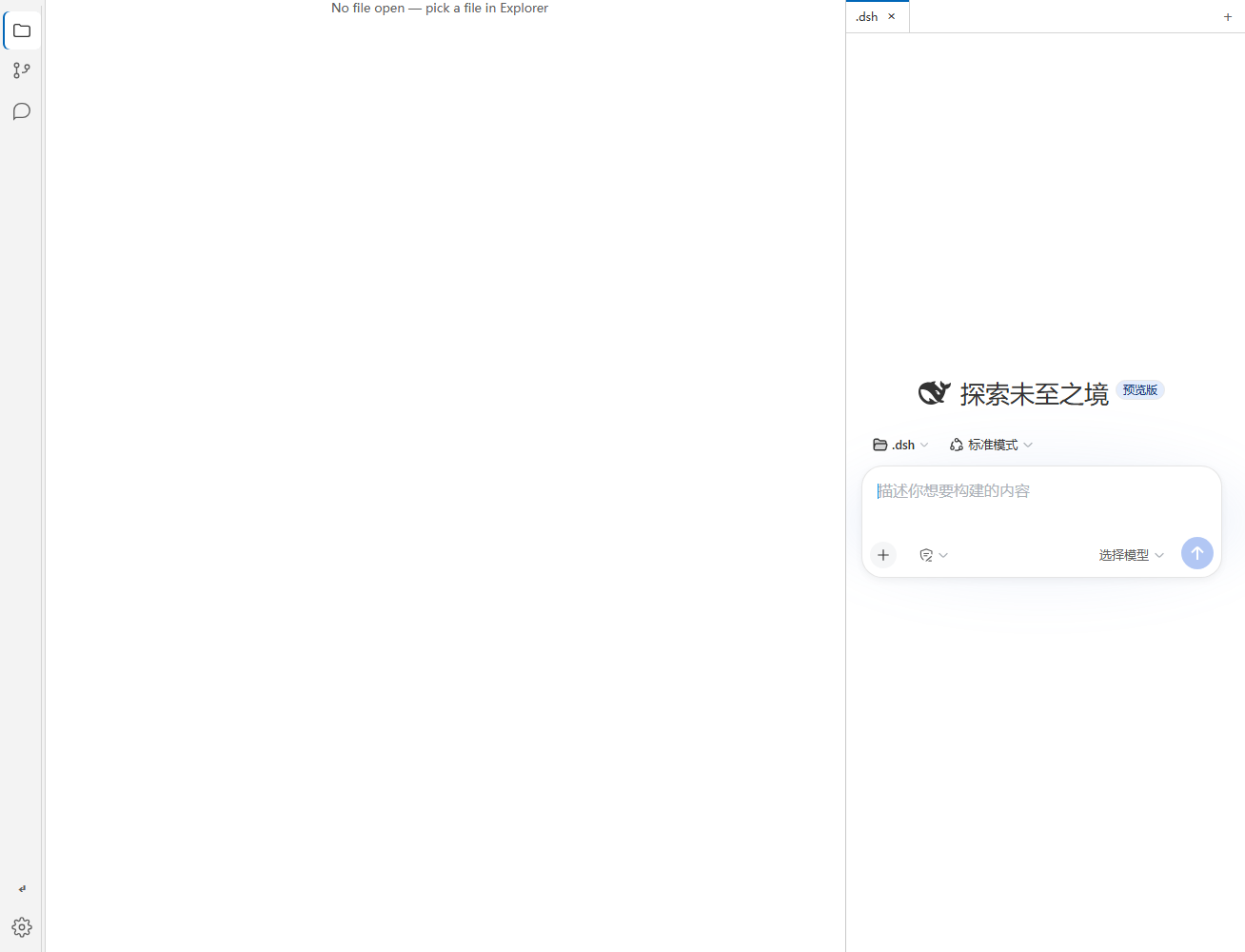
一个 DSH(DeepSeek Harness)插件,把默认的 Web 界面替换成 VS Code 风格的工作台布局:
# 方式一:从 npm 安装(发布后)
dsh plugin --profile web add dsh-vscode-shell

# 方式二:从 GitHub 安装
dsh plugin --profile web add github:lonebone/dsh-vscode-shell

# 方式三:本地开发(file: 直链)
dsh plugin --profile web add file:/绝对/路径/dsh-vscode-shell安装完成后重启 dsh web 并刷新页面。插件注册为 dsh.profile.bundles 层,重启后自动生效。
+ 暂存、− 取消暂存、↶ 放弃、# 加入 .gitignore0.1.0-rc.6 或更新版本git 命令行插件不注册任何模型工具、不读写用户文件;它只挂载两个 HTTP 接口供前端面板使用:
/vscode-fs — 列目录 / 读文件 / 资源管理器定位/vscode-git — git status / diff / commit / 暂存等操作(会真实执行 git 命令)接口参数为绝对路径。默认仅本机部署时使用;若把 DSH Web 暴露到公网,请自行加鉴权。
GitHub 上另有 Sim-xia/dsh-vscode-theme:它导入 VS Code 的 .vsix 配色文件并映射成 DSH 的 UI token(只换颜色)。本插件则把整个界面外壳改造成 VS Code 布局并内置文件/Git 面板(换布局 + 功能),两者互补不冲突。
git clone https://github.com/lonebone/dsh-vscode-shell.git
dsh plugin --profile web add file:./dsh-vscode-shell   # 本地链接安装
# 修改 lib/*.js 后重启 dsh web 生效MIT © lonebone
A DSH (DeepSeek Harness) plugin that replaces the default web UI with a VS Code-style workbench:
# from npm (after publish)
dsh plugin --profile web add dsh-vscode-shell

# from GitHub
dsh plugin --profile web add github:lonebone/dsh-vscode-shell

# local development (file: link)
dsh plugin --profile web add file:/absolute/path/dsh-vscode-shell
Then restart dsh web and refresh the page. The plugin registers itself as a dsh.profile.bundles layer and activates on boot.
+ stage, − unstage, ↶ discard, # add to .gitignore0.1.0-rc.6 or newergit CLI on PATH for the Source Control panelThe plugin registers no model tools and never reads/writes user files on its own; it only mounts two HTTP routes for the frontend panels:
/vscode-fs — list directory / read file / reveal in file manager/vscode-git — git status / diff / commit / staging ops (executes real git commands)Route parameters are absolute paths. It is designed for local deployments; add your own auth if you expose DSH Web publicly.
There is another Sim-xia/dsh-vscode-theme: it imports VS Code .vsix color themes and maps them onto DSH's UI tokens (colors only). This plugin restyles the whole shell into a VS Code layout and adds real file/Git panels (layout + functionality). They complement each other.
git clone https://github.com/lonebone/dsh-vscode-shell.git
dsh plugin --profile web add file:./dsh-vscode-shell   # local link install
# edit lib/*.js, then restart dsh webMIT © lonebone
CLASSIFICATION EVIDENCE
系统优先读取 GitHub Topics,再与站内分类词典和词根规则比对。当前命中: 无有效分类标签。
c1overzz
DSH 插件:每天替你刷一轮 B站,读字幕挑出值得的、写一份日报,值得的 @ 你

hellowind777
一个自主的高级智能伙伴,不仅分析问题,更持续工作直到完成实现和验证。

xing-shuyin
Just open your browser — get all your work done.