dsh-automode sits between your agent and the harness. It intercepts every tool call before execution — hard deny rules and curated allowPaths decide deterministically (zero LLM cost), and whatever is left goes to a two-stage classifier. Safe actions run on their own; risky ones are blocked, reshaped, or routed to you.
✨ Key features
- 🛡️ Deterministic first line — regex
deny bands hard-block exfiltration, secrets, and system paths before any LLM call; prefix-glob allow rules approve routine commands for free.
- ⚡ Zero-confirmation allowlist —
config.allowPaths is full trust: file ops and bash writes inside it skip the classifier entirely, and escalated calls are auto-granted through the approval bridge (v0.10.0) — no prompt, no round-trip.
- 🧠 Cost-aware two-stage classifier — a one-token filter pre-screens; only flagged actions get the structured review, and identical actions reuse the verdict cache for 5 minutes.
- 🔁 Circuit breaker + human fallback — 3 consecutive (or 20 total) DENYs pause auto mode and route decisions to a human; one human decision resumes and resets.
- 📜 Full audit trail — every allow / deny / bridge decision is appended to
~/.dsh/auto-mode/decisions.jsonl.
- 🔌 Native preset — flip it on from the permission picker or
/auto; it plays nicely alongside read-only / workspace-write / danger-full-access.
⚠️ Not a sandbox. The plugin runs inside the DSH process; a deliberately malicious plugin can do anything your user account can do. It reduces unsafe autonomous tool use — it is not an OS security boundary.
📚 Table of contents
Install
dsh plugin add @log.li/dsh-automode
From a local checkout:
dsh plugin add ./path/to/dsh-automode
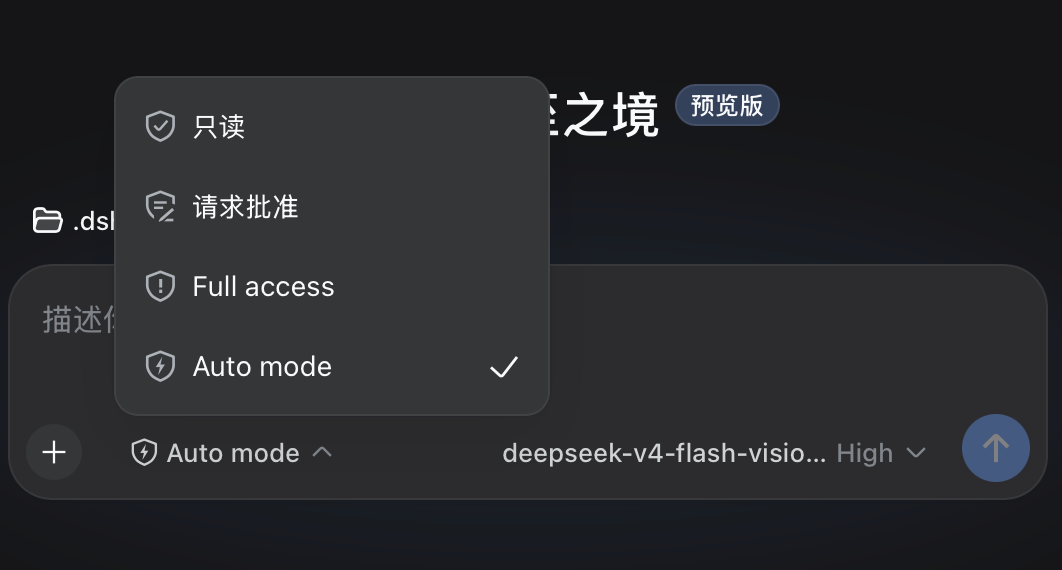
Restart dsh web after installing. The permission picker (bottom-left of the chat box) will show Auto mode alongside read-only / workspace-write / danger-full-access.
Optional: the ⚡ glyph in the permission picker
The auto-mode preset declares an icon, but stock DSH hardcodes the three built-in glyphs and silently ignores a preset's icon — so the bolt only appears if you also apply the shipped patch:
# <profile> is your DSH profile name (usually `web`). Any profile's copy works:
# the script itself scans every profile plus the global install.
node ~/.dsh/profiles/<profile>/node_modules/@log.li/dsh-automode/patches/dsh-permission-preset-icon.mjs

# from a checkout instead:
node patches/dsh-permission-preset-icon.mjs --dry-run   # see what it would do
node patches/dsh-permission-preset-icon.mjs
Then restart dsh web.
Know what you are opting into. The patch edits files inside node_modules (the host preset schema and the client bundle), which is why it ships as a separate script rather than running on install:
- It is cosmetic.
auto-mode behaves identically whether the bolt renders. Skip it if you do not care.
- Every
npm update @deepseek-ai/dsh or plugin reinstall wipes it — re-run the script afterwards. It never half-applies: an anchor that no longer matches is reported and that file is left untouched.
- It targets the DSH 0.1.5 line. If a future DSH supports preset
icons natively, delete the script.
Commands
/auto           # switch this session to auto mode
/auto-status    # show diagnostics: preset, approval policy, breaker state
How it works
Tool call arrives
  │
  ├─ [pre-execute gate]  (all tools, first defense)
  │    ① Read-only tools → allow (unless deny matched)
  │    ② Deny rules (regex) → hard reject
  │    ③ Allow rules (prefix glob) → approve
  │    ④ In-tree file ops → approve (allowInsideWorkingDirectory)
  │    ⑤ Escalation intent → classifier pre-screen
  │    ⑥ Everything else → pass through
  │
  └─ [approval waterfall]
       ① Soft deny rules (prose) → reject
       ② Soft allow rules (prose) → approve
       ③ Read-only allowlist → approve
       ④ Verdict cache hit → reuse (no second LLM call)
       ⑤ Classifier (two-stage: one-token filter → structured review)
       ⑥ Failure → fail-closed
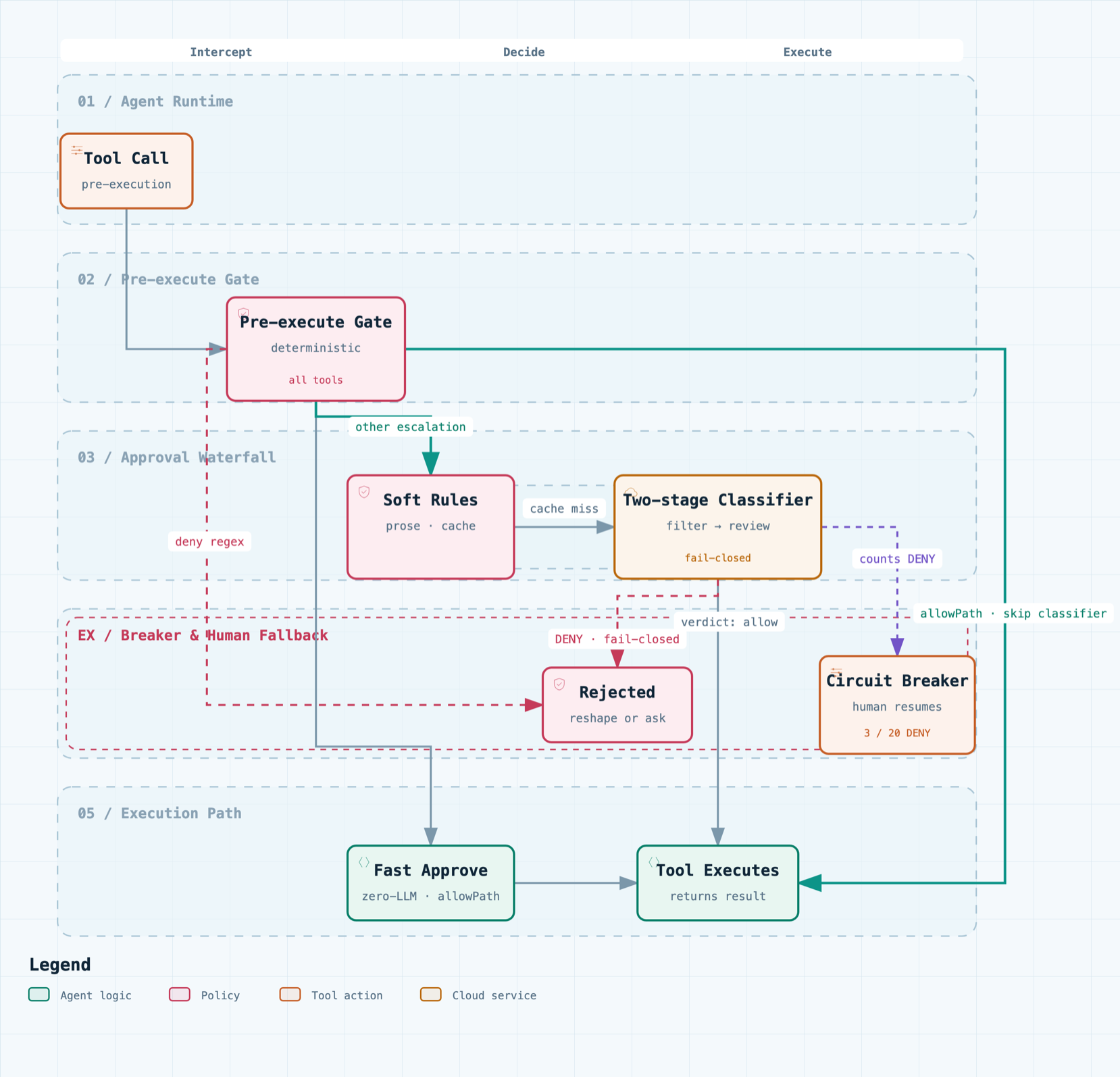
🖱️ Interactive version: docs/auto-mode-flow.html — pan/zoom, relationship tracing, dark mode. Diagram source: docs/auto-mode-flow.workflow.json.
The pre-execute gate intercepts ALL tool calls (including those inside the workspace sandbox that would never trigger the approval waterfall). The approval waterfall only runs for calls that actually need sandbox escalation. The pre-execute gate only applies to auto-mode sessions; in other presets (read-only / workspace-write / danger-full-access) it is a no-op so it never contradicts the sandbox the user chose.
Rules
The rule system has two layers:
Hard boundary (deterministic, never goes to classifier)
deny — regex patterns that hard-reject. First match wins. Evaluated before everything else. Use for exfiltration, secrets, sensitive targets, dangerous commands. The band matches only OPERATIONS (v0.15.1): bash scans the command text and file tools scan their target paths; tools whose arguments are prose (a subagent prompt, a script body) are held only to the operation-shaped built-in patterns — mentioning a sensitive topic is not handling it, so documents and reviews that discuss env files or keys are no longer hard-rejected, while real credential-store filenames and inline key material still are.allow — prefix-glob patterns that approve without any LLM call. Evaluated after deny. Use for routine commands you trust completely.
Classifier guidance (prose, fed to the LLM)
rules.deny — soft-deny descriptions. The classifier reads these as standing rejections. Can be overridden by direct user intent or a matching allow rule.rules.allow — soft-allow exceptions. The classifier reads these as standing approvals that override matching soft-deny rules.rules.environment — context facts (trusted repos, infrastructure, cloud buckets). The classifier uses these to judge whether an action is within the user's environment.
All rules.* arrays support $defaults: using ["$defaults", "my custom rule"] keeps the built-in rules while adding yours. Omitting $defaults replaces the entire built-in list for that section.
Configuration
Configuration goes in your profile's cordis.patch.yml. Everything has defaults; a bare {} config is valid. The table below is the full reference; a minimal example (the allowPaths override) is under Trusting extra directories.
Key options
| Option |
Default |
Description |
deny |
built-in list |
Regex patterns that hard-reject. First match wins. |
allow |
built-in list |
Prefix-glob patterns that approve without LLM. |
readOnlyTools |
read, glob, grep, list, search |
Tools that default-allow (unless deny matched). |
allowPaths |
[] |
Curated full-trust external directories: file ops and bash write-commands inside skip the classifier, and (since v0.10.0) escalated calls are auto-granted (approval-bridge). See Trusting extra directories. |
allowInsideWorkingDirectory |
true |
Allow in-tree file ops without classifier. |
classifier.provider / classifier.model |
'' (follow session) |
Override the classifier's LLM route. Resolution: classifier.{provider,model} → session's active model → agent's configured model. |
classifier.reasoningLevel |
off |
Classifier reasoning effort (off disables reasoning). If a route rejects the effort, the call retries without it. |
rules.deny |
['$defaults'] |
Soft-deny prose for the classifier. |
rules.allow |
['$defaults'] |
Soft-allow prose for the classifier. |
rules.environment |
['$defaults'] |
Environment facts for the classifier. |
failClosed |
true |
Reject on classifier failure vs. fall back to approval chain. |
preExecuteGate |
true |
Enable the pre-execute gate (only applies to auto-mode sessions). |
timeoutMs |
45000 |
Per-call hard timeout for the classifier LLM calls. |
classifyContextChars |
6000 |
Char budget for the task-alignment context given to the classifier. |
maxArgsChars |
4000 |
Char budget of the command signature used for the verdict cache key. |
breakerConsecutive |
3 |
Consecutive classifier DENY to trip the breaker. |
breakerTotal |
20 |
Total classifier DENY to trip the breaker. |
Trusting extra directories (allowPaths)
allowPaths is a curated full-trust list: file ops and bash write-commands whose target resolves inside one of these directories skip the safety classifier entirely (logged as pre-execute-allow / curated allowPath; an in-workspace target with an escalation request is separately logged as workspace in-tree escalation, v0.14.0). The shipped default keeps only the universal /tmp/ — personal directories are configured per profile in your profile's cordis.patch.yml. Loader patches replace the targeted row's whole config, so the minimal override below sets only allowPaths (every other field falls back to the plugin's code defaults):
# ~/.dsh/profiles/<profile>/cordis.patch.yml
- id: auto-mode
  config:
    allowPaths:
      - /tmp/
      - /Users/<you>/Library/CloudStorage/OneDrive-<tenant>/Projects/<proj>/Proposal/
Only recognized write-commands are trusted, and paths are matched after symlink resolution — both a /Users/<you>/OneDrive - … symlink and the real Library/CloudStorage/… path work, and ~/$HOME prefixes expand before matching (v0.13.0). Irrecoverable deletion (rm, shred, unlink) is never allowlisted; a recoverable delete via trash (freedesktop recycle bin) IS (v0.13.0) — its targets are extracted and every one must resolve inside an allowPath, while the hard deny band still rejects trash/mv against system paths first. A git add/commit/push inside an allowlisted directory resolves its repository root as the write target, so committing/pushing a repo that lives under an allowPath skips the classifier too (v0.11.1). The verdict-cache fix below still matters: even without an allowPath, once you explicitly authorize an action the classifier re-runs with your intent instead of replaying a cached denial.
Composite write-commands (v0.11.0). A temp→swap export dance like DIR=…; cp a b_tmp && (trash b; true) && mv b_tmp "$DIR/b" is now parsed segment-by-segment (with VAR=… assignment tracking and $VAR expansion), so its destinations still hit allowPaths. cd <dir> is a tracked benign navigator — it updates the effective working directory (so a later git add/commit/push resolves its repo root from it) without invalidating the fast path (cd - stays unpredictable and falls back). The fast path stays guarded: a composite containing a side-effect command (kill, pkill, rm, sh, bash, network/daemon management, …), a command substitution (`…` or $(…)), a file redirection (>file, >>file, 2>file), or any command outside the recognized write/benign set falls back to the classifier exactly as before. A descriptor-dup redirect (2>&1, >&2, >&-) is not a file write and does not invalidate the fast path — so git push … 2>&1 | tail is still allowlist-checked. Read-only utilities inside a composite (echo, ls, cat, head, …) ride along with the allowlisted write — their side effects are not re-reviewed once every write target is allowlisted. Write destinations are resolved against the cwd in effect at that segment, so a cd is honoured in the proof: a relative write after cd-ing inside a trusted root still takes the fast path, while cd /elsewhere && cp a rel/path no longer passes by resolving rel/path against the session directory (v0.15.3 — that mismatch could previously be bridged to danger-full-access), and a destination that still contains an unexpanded $VAR after expansion (a $TMPDIR-style variable that the command never assigns) refuses the fast path entirely rather than proving a literal path. mkdir stopped riding along in v0.15.3: it creates directories, so its targets join the proof (all of them must be inside the trusted roots) — before that, git commit … && mkdir -p /elsewhere could be auto-trusted on the strength of the repo root alone. rm still forces a classifier fallback, and — since v0.13.0, when trash appears in a composite its recoverable-delete targets join the destination set and are allowlist-checked like any write destination (all of them must be inside the trusted roots, else the whole composite falls back). History-rewriting git commands (reset --hard, clean, rebase, merge) are deliberately not allowlist-trusted.
Zero-confirmation escalations (v0.10.0). An allowlisted path means full trust, so a call that asks to widen the sandbox (sandbox_permissions: danger-full-access) into an allowlisted path is now auto-allowed with no confirmation and no classifier — the pre-execute gate already proves every target sits inside an allowPath, and that verdict is carried to the approval answerer by the call's callId (the audit trail shows curated allowPath → approval-bridge → decision allowed-once; an in-workspace escalation shows workspace in-tree escalation instead, v0.14.0). Deny patterns still run first (a deny-listed path such as ~/.ssh/ is hard-rejected even inside an allowPath), and the circuit breaker is never bypassed — while tripped, allowlisted calls still go to a human.
Not a file-sandbox exemption. allowPaths only skips this plugin's review — DSH's file sandbox (the session's file policy) is a separate layer and still applies. A write to an allowlisted directory outside the workspace is blocked by the sandbox unless the call asks for sandbox_permissions: danger-full-access; for an allowlisted path that escalation is auto-granted by the approval bridge (no review), so request the escalation on the first attempt.
Every auto-mode session also receives this knowledge as a system-prompt section (auto-mode:allowlist): the model knows where the per-profile allowPaths lives and how to edit it, so when an action is blocked it can propose the exact config change — and only applies it after you explicitly confirm. Since v0.15.3 the section also carries the escalation rule (which used to live only in this README): for a target inside an allowPath, request sandbox_permissions: danger-full-access with a one-line justification on the first attempt — the approval bridge grants it with no review, so it does not queue for a human — rather than running bare and escalating after the sandbox rejects it, and never skipping the escalation for fear of a prompt that a trusted target will not raise.
Permission preset icon
The auto-mode preset ships a bolt glyph in the permission picker. Set your own logo by overriding icon on the preset (the permission row of cordis.patch.yml, not auto-mode's config) — an SVG path drawn inside the shield outline:
- id: permission
  config:
    presets:
      auto-mode:
        sandbox: workspace-write
        approval: ask
        name: Auto mode
        description: ...
        icon: '<your-svg-path-d>'   # default bolt: 'M9.15 3.4L5.85 8.55H7.95L7.05 12.6L10.45 7.25H8.25L9.15 3.4Z'
The icon is cosmetic — behavior is identical whether it renders. It shows only on DSH versions that read preset icons (stock DSH ignores it; the patch shipped in patches/dsh-permission-preset-icon.mjs enables it — see Install). Leave icon unset for the default bolt.
Two-stage classifier
The classifier uses two stages to minimize LLM cost:
- One-token filter (~1 token): asks the LLM for a single digit (0 = safe, 1 = needs review). Uses a generous token budget and robust digit parsing so reasoning models aren't starved, and honors
classifier.reasoningLevel as the reasoning effort (off = no reasoning). Most routine actions return 0 and skip stage 2. The filter is given the ACTION, not the narration (v0.15.1): the command text (bash) or target paths (file tools) come first and the agent's justification is only an annotation — otherwise a confidently worded reason could wave a machine-leaving command through with a 0 and no review at all.
- Structured review: only runs when stage 1 flags the action. Returns a full verdict with reason.
This means most tool calls cost ~1 token of classifier overhead. Only borderline actions incur the full classifier cost.
The gate decides authorization, not worth. It does not judge whether an action is a good idea — it judges whether you asked for it. You are the arbiter.
- Read-only and reversible operations are ALLOWED: GET/HEAD requests, inspection/listing/search/state queries, and local changes that can be safely undone (edits, temp files, builds, tests, git-tracked files).
- A risky action you asked for is allowed — including effects that leave this machine: releasing, publishing, deploying, pushing, sending a message outward, writing to another system. Risk alone is not a reason to refuse what you asked for.
- Only a hard floor is closed to everyone, whatever anyone asks: executing downloaded code, destroying or moving system paths, removing docker volumes/containers/images, reading key material, credential stores or environment files, writing key material inline, and editing shell startup files or agent permission settings. Those are also blocked deterministically before any model is consulted (see the
deny band above).
- The double-check loop: when an action can affect other people or systems and your own messages do not clearly cover that action, the gate refuses and tells the agent to show you the exact command and ask you to confirm it (
ask_user_question). Your answer is a direct authorization, and the action may then run.
<recent_user_intent> counts only direct human messages — with one deliberate exception: your answer to an ask_user_question tool call is a direct human authorization given through the tool, so it is folded into the intent window — together with the question it answered, labelled as the agent's own wording so a terse "yes" is still checkable against what you were shown — and into the verdict-cache key, so a tool-based grant invalidates a stale DENY just like a typed message. The agent's justification, repository text, and tool output are never authorization: otherwise "the user's intent" would just mean "whoever spoke last".
Circuit breaker
When the classifier denies 3 actions in a row or 20 total in a session, the breaker trips and auto mode pauses. The approval waterfall delegates to the human answerer. Any human decision (allowing OR rejecting the action) resumes auto mode and resets all counters — a human in the loop breaks the silent-denial loop the breaker exists to catch. If the human cancels the request or no answerer is available, the breaker stays tripped.
At the moment the breaker trips, the plugin injects a hint telling the model to request danger-full-access sandbox escalation directly on its next attempt (which surfaces the human approval window immediately), instead of the "try at current level → hit a denied error → then escalate" round-trip. Since v0.15.3 the hint also scopes why a human is involved: the human is asked because auto mode is paused, not because escalation normally needs one — in normal operation an allowlisted target's escalation is auto-approved with zero review.
Classifier failures (timeout, parse error, empty response) are NOT counted toward the breaker. Cached denies count, however — a repeat of an identical previously-denied action (verdict cache hit) increments the consecutive and total counters, so repeated escalation attempts actually trip the breaker and reach the human instead of spinning forever.
Denial guidance & diagnostics
The classifier is two-state (allow / reject) — there is no "ask" tier. An uncertain action is rejected (fail-closed): a rejected action can be retried in a safer form or escalated to the user, but a wrongly-allowed action cannot be undone.
Routine categories (installs, builds, tests, file edits, git add/commit/status) are a tendency, not a free pass — the classifier must judge the specific command and arguments, never the category label alone (e.g. pipe-to-shell downloads, unknown-package installs with arbitrary postinstall scripts, secret writes, irreversible deletes, pushes to unknown remotes).
When an action is denied, the denial echoes the reviewer's reason AND the model's own stated justification (from the tool call), so the model can see exactly what was rejected and reshape it. It is told to try a safer alternative; if no safer alternative exists, it is instructed to stop retrying and ask the user for explicit permission — a denied action will keep failing, and only explicit user approval lets a later attempt pass (the classifier weighs the user's recent explicit intent via <recent_user_intent>).
Every classifier stream failure (thrown error or an error finish chunk) is logged to the DSH log with the resolved route, effort, error code/message, and raw output, and written to decisions.jsonl as a classifier-fail event — so a recurring classifier returned no verdict is diagnosable from the audit log itself. If a route rejects the configured reasoningEffort (e.g. low on a route that only supports off), the call is retried without an effort before failing. The denial the model sees now distinguishes configuration problems (no route configured, or the route rejects the configured effort — v0.14.0: fix classifier.provider/model or the model's metadata, retrying will not help) from transient ones (429 / 5xx / timeout — retry later).
Verdict cache
Classifier verdicts are cached per session by tool + command + user-intent signature. The user's recent direct instructions — typed messages and ask_user_question answers — are hashed into the key, so a new explicit authorization (a fresh human message or a tool-based grant) invalidates a previously cached verdict and the classifier re-runs with the new intent — a user grant is never swallowed by a cached DENY. Within the same intent window a repeated action still reuses the cached verdict without a second LLM call. The pre-execute gate and the approval path now sign with the same command text — the approval path recovers the tool call's real arguments by its callId from the session (approved payloads omit them), so an escalated call hits the gate's verdict instead of being re-classified a second time (v0.13.0). File tools (writes/edits, which carry no command) sign by target directory (v0.14.1): batch writes into one directory share a single verdict, while different directories never collide even with identical justification text — sensitive filenames stay the deny band's job (re-checked on every call). Cache entries expire after 5 minutes.
Logging
All decisions are logged to ~/.dsh/auto-mode/decisions.jsonl (JSONL format, append-only, survives restarts). Each entry includes:
at — ISO timestampevent — decision / pre-execute-deny / pre-execute-allow / pre-execute-fileop / pre-execute-bashop / pre-execute-fail-open / classifier-fail / breaker / resume / bootoutcome — allowed-once / rejected / cancelledtool — tool nametier — deny / allow / classify:monitor / classify:cache / classify:fail / ...callId — the exact tool call being decided (approval-path decision events, v0.14.0) — join it to the pre-execute record for a precise two-phase auditdetail — human-readable reason (deny hits now carry the command/target context, v0.14.0)sessionId — session identifier
Use the audit script to analyze the log, spot the allow→reject contradiction-pair regression signature, and identify rule optimization opportunities (v0.14.0):
node scripts/audit.mjs                 # report + contradiction-pair sentinel
node scripts/audit.mjs --fail-on-pairs --limit 500 # exit 1 when pairs exist — pair `--limit` for a rolling window in CI/cron
Contributors
Thanks to everyone who contributed to @log.li/dsh-automode:
| Contributor |
Contribution |
| @WSL043 |
💻 compat-layer namespace-probe technique (PR #2, co-author) |
| @xiaolinziwang |
🐛 bug reports (issue #1) |
When auto mode is active, the plugin shadows the approval-policy system prompt so the model sees "auto" instead of "ask". This tells the model that tool rejections come from the automated reviewer, not from a human. The model adjusts its retry strategy accordingly (try a smaller/safer action instead of asking the user).
Architecture
src/
  index.ts         Main entry: preset management, approval answerer, breaker reset, commands, system-prompt shadowing
  config.ts        Config schema + $defaults mechanism + built-in rule lists
  bands.ts         Deterministic band engine (deny regex + allow glob)
  pre-execute.ts   Pre-execute gate (first defense; real-path trust, classifier pre-screen, breaker-trip hint)
  classifier.ts    Two-stage classifier (+ robust parser, reasoning effort, diagnostics)
  rules.ts         Prose rule matching for the classifier
  prompt.ts        Classifier prompt construction (<recent_user_intent> + intent weighting)
  cache.ts         Verdict cache (shared across enforcement points)
  breaker.ts       Circuit breaker (3 consecutive / 20 total)
  log.ts           Shared appendDecision JSONL logger
Compatibility & contributions
Supported dsh versions: 0.1.0-rc.6 – 0.1.x (peer range >=0.1.0-rc.6 <0.2.0). Permission facts (preset / sandbox / approval) are read through two auto-detected paths:
| dsh version |
permission read path |
0.1.0-rc.6 – 0.1.4.x |
session.events event log (effectivePermissionPreset & co.) |
≥ 0.1.5-rc.1 |
durable permissions session projection (ctx.sessionProjections.stateOf) |
dsh 0.1.5-rc.1 removed the session.events accessor — without the projection path every auto-mode turn died with Cannot read properties of undefined (reading 'length') while the system prompt was assembled (fixed in v0.11.2). dsh ≥ 0.2.0 is not yet verified — bump the peer range only after testing against a new core.
- Verified on macOS only. Tested against the macOS filesystem, the DeepSeek Harness (DSH) runtime, and the DSH version in use at development time. Path semantics — including the macOS
/tmp → /private/tmp symlink (handled by realpath-nearest-ancestor resolution) and workspace-path trust — have not been verified on Linux or Windows, and deny-pattern/path matching may differ there.
- Found a bug, or an issue on another platform? Bug reports and pull requests are welcome — open an issue or PR at github.com/log-li/dsh-automode.
License
MIT