

模型与 MCP
待识别

rea
morluto
Reverse engineer anything with agents, from app behavior down to native binaries.
PROJECT TOPICS
PROJECT README
English · Русский



A DeepSeek Harness plugin that puts an MCP button in the chat header. One click and you see which MCP servers are connected — and which of them answer right now, with the number of tools each one actually exposes.
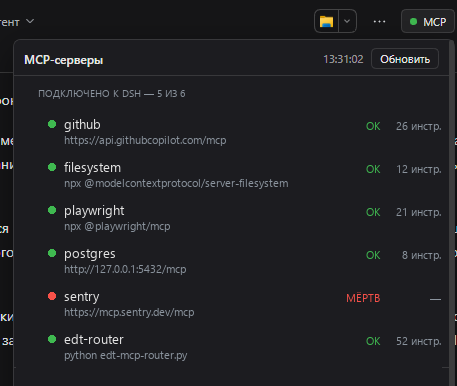
Example servers, addresses and names in the screenshot are placeholders.
DSH connects MCP servers once, at startup. When one of them is down, the symptoms are indirect: a tool that used to be in the model's toolset is simply not there, or a call fails with a transport error. The configuration file only tells you what should be connected, not what is.
An endpoint that holds a TCP port but never completes the MCP handshake looks
"up" to any port checker. This plugin answers a stricter question: does the
server complete initialize + tools/list right now, and how many tools does
it return? That is the same thing the Harness itself needs in order to give
the model those tools.
| Element | Where | What it shows |
|---|---|---|
| Status pill | chat header, conversation.session.header.utilities |
a dot: green when everything answers, red when something is dead |
| Server list | inside the popover | name, endpoint, state, response time, tool count |
| EDT block | inside the popover | which 1C:EDT projects are currently serving MCP, discovered from each project's .mcp.json |
| Refresh button | popover header | forces a probe; the timestamp changes when the new result lands |
The answer is cached, so opening the panel is instant even though a full probe takes ~15 seconds.
Two halves in one package — the usual shape for a DSH plugin with a UI.
flowchart LR
    subgraph host["Host · Node"]
        A["apply(ctx)"] --> B["webServer.register<br/>GET /plugin/mcp-status"]
        A --> C["refresh()<br/>startup + every 5 min"]
        C --> D["spawn python<br/>mcp_status.py --json --out file"]
        D --> E[("cache<br/>data · fetchedAt")]
        E --> B
    end
    subgraph client["Client · browser"]
        F["McpStatusButton"] -->|"fetch, every 20 s"| B
        F --> G["popover<br/>servers + EDT"]
endindex.jsDeclares export const inject = ['webServer'], registers the route inside
ctx.effect, and runs the probe at startup and then every five minutes. The
probe is a child process: it writes JSON to a file, the plugin reads that file,
caches it and serves it.
client.jsA classic script that registers itself through window.__ModuleLoader__.load
and exports { inject: ['slots'], apply(ctx) }. It places a React component
into the conversation.session.header.utilities slot — the same band as the
locale and Markdown controls. The component polls the route on mount, then
every 20 seconds; while the host reports refreshing: true it polls every
1.5 seconds, so the timestamp changes the moment the result is ready instead of
half a minute later.
For every configured server the probe performs a real MCP handshake:
POST initialize with Accept: application/json, text/event-stream, following
the 307 redirect some servers answer on /mcp before /mcp/.Mcp-Session-Id and send notifications/initialized — several
FastMCP-based servers reject tools/list with "Invalid request parameters"
without it.POST tools/list with that session header; parse either a plain JSON body or
an SSE stream (data: {...} blocks).stdio servers: spawn the configured command, speak newline-delimited
JSON-RPC over stdin/stdout, with separate timeouts per stage — a router can
take 12 seconds on tools/list because it rescans its port range first.That logic already exists as a tested Python script (scripts/mcp_status.py,
standard library only). Re-implementing the transport edge cases in JavaScript
would create a second source of truth, so the host half simply runs the script
and caches its JSON. The script ships inside the package — no external
dependency.
One consequence worth knowing: the child's stdout is not captured through a
pipe. The script writes its result to a file (--out), the plugin reads and
deletes it. Pipes are fragile under sandboxed shells; a file handoff works
everywhere.
GET /plugin/mcp-status returns the cache envelope:
{
  "ok": true,
  "fetchedAt": 1793269934399,
  "durationMs": 14984,
  "refreshing": false,
  "error": null,
  "data": {
    "generatedAt": "2026-10-29T13:32:14",
    "config": "C:\\Users\\me\\.dsh\\profiles\\desktop\\cordis.patch.yml",
    "servers": [
      {
        "name": "edt-router",
        "transport": "stdio",
        "endpoint": "python edt-mcp-router.py",
        "state": "ok",
        "ms": 12293,
        "tools": 52,
        "detail": ""
      },
      {
        "name": "postgres",
        "transport": "http",
        "endpoint": "http://10.20.30.40:8000/mcp",
        "state": "dead",
        "ms": 2041,
        "tools": null,
        "detail": "порт закрыт (connection refused)"
      }
    ],
    "commentedOut": ["mcp-metadata"],
    "edt": [
      {
        "project": "My project",
        "url": "http://10.20.30.41:8765/mcp",
        "state": "ok",
        "tools": 50,
        "detail": ""
      }
    ],
    "orphanPorts": []
  }
}
Addresses above are examples and do not belong to any real network.
?refresh=1 starts a background probe and immediately returns the previous
cache with refreshing: true. The UI keeps polling until refreshing flips
back.
| State | Meaning |
|---|---|
ok |
Handshake succeeded; tools is what the server returned. |
warn |
initialize succeeded, tools/list failed: alive but broken. detail carries the reason. |
dead |
Connection refused, timeout, HTTP error, or a non-MCP response. |
off |
The config row has disabled: true. |
skipped |
Not probed (for example an EDT project without a URL). |
All keys are optional and live in the loader row:
| Key | Default | Meaning |
|---|---|---|
pythonPath |
the DSH runtime Python | Interpreter for the probe script. |
scriptPath |
scripts/mcp_status.py in the package |
Your own copy if you change the probe. |
intervalMs |
300000 (5 min) |
Background refresh period; minimum 15 s. |
- insert:
    - id: mcp-status
      name: '@local/dsh-mcp-status'
      config:
intervalMs: 60000The package is a bundle: it ships a dsh.bundle.patch that inserts its own
loader row. Being a profile dependency is not enough on its own — the plugin is
enabled only while its name is in dsh.profile.bundles. Until then DSH never
creates the loader row: no route, no button, and .activation.log records only
import.
Link it into the profile:
cd ~\.dsh\profiles\desktop
pnpm add "link:<absolute path to this package>"
Enable the bundle. The supported path is the DSH plugin manager
(Settings → Plugins: enable @local/dsh-mcp-status); it edits the profile
manifest for you. By hand it is the same bundle list:
"dsh": {
  "profile": {
    "bundles": ["@deepseek-ai/dsh-base", "@deepseek-ai/dsh-web-app", "@local/dsh-mcp-status"]
  }
}
Restart DSH. The host half activates with the profile; the client half appears on the next page load.
To check the host half is alive (use the port of your running DSH):
Invoke-WebRequest 'http://127.0.0.1:62082/plugin/mcp-status' -UseBasicParsing |
  Select-Object -ExpandProperty Content
To remove it, drop the name from bundles (or disable the bundle in the plugin
manager) and run pnpm install again.
[!WARNING] The desktop app's fatal recovery calls
sanitizeProfile: the currentcordis.patch.ymlis moved tocordis.patch.yml.bak-<timestamp>and the bundle list is reset to the base set. The plugin ends up disabled and the MCP servers described in that patch are not connected. After such a recovery, restore theinsert:blocks from the backup and enable the bundle again.
[!NOTE] The name
@local/dsh-mcp-statusis arbitrary: a private package that is never published to npm. Rename it inpackage.jsonand incordis.patch.yml, plus the profile's dependency key and bundle list.
scripts/mcp_status.py runs without the UI:
python scripts/mcp_status.py                            # human-readable table
python scripts/mcp_status.py --json                     # machine-readable
python scripts/mcp_status.py --json --out result.json   # write to a file
python scripts/mcp_status.py --no-edt                   # skip the 1C:EDT block
python scripts/mcp_status.py --edt-roots 'D:\projects'  # EDT roots, when the router row carries none
Exit code 1 means at least one server is dead, 0 means all answered — handy
for cron.
| Symptom | Cause / fix |
|---|---|
| No button after install | The client half is registered on page load. Reload the page (F5), not just the app. |
No button, route answers 404, .activation.log shows only import |
The plugin is not enabled as a bundle: its name is missing from dsh.profile.bundles. A dependency alone enables nothing — enable the bundle (Settings → Plugins) and restart DSH. |
It worked, then vanished and cordis.patch.yml is empty |
The profile's fatal recovery rolled the patch file and the bundle list back. The previous file sits next to it as cordis.patch.yml.bak-<timestamp>; restore its insert: blocks and enable the bundle again. |
| Route answers 404 | The host half did not activate. Look for [mcp-status] warnings in the DSH stderr; check the loader row and that the package resolves from the profile. |
cannot get property "webServer" without inject |
Cordis forbids reading a service without declaring it. The plugin declares inject = ['webServer']. |
| "Checking…" for ~15 s | Expected: the stdio router rescans its port range on every tools/list. HTTP servers alone answer in ~200 ms. |
dead for EDT projects |
That EDT instance is not running. .mcp.json keeps the port from its last run — not an error. |
Everything is dead |
Nothing is reachable: check the MCP processes/containers, then press Refresh. |
| Grey dot, "no MCP servers in the profile" | The host half runs, but cordis.patch.yml has no insert: block with dsh-mcp-client. |
.activation.log next to the package records import (module loaded),
apply-start (loader row mounted), route-registered, and effect-error (what
threw). It is git-ignored.
webServer route, not an authenticated /api route. It
exposes only names, endpoints and states on loopback, but if you bind DSH to a
non-loopback address, this route is reachable too.CLASSIFICATION EVIDENCE
系统优先读取 GitHub Topics,再与站内分类词典和词根规则比对。当前命中: mcp、model-context-protocol、deepseek-harness。
morluto
Reverse engineer anything with agents, from app behavior down to native binaries.

deepseek-ai
DeepSeek Harness: Everything is a Plugin.

nexu-io
The 1st Collaborative AI Design Agent Workspace. Local-first and open source. Create motion, prototypes, websites, apps, dashboards, presentations, images, and videos with your team and AI agents. Share work, exchange feedback, and iterate together in one workspace.