
其他
完整应用

deepseek-harness
deepseek-ai
DeepSeek Harness: Everything is a Plugin.
PROJECT TOPICS
INSTALL REFERENCE
dsh plugin --profile web add github:lo2589/deepseek-harness-provider
该命令指向仓库当前默认分支;尚无绑定当前 commit 的完整验证结果。
PROJECT README
中文版 | English
Plugin source lives in this repo:
plugin/holds the dynamic-plugin form (host.js= Host half,client.js= Client half,manifest.json= restorable definition);dsh-provider-quick-config/is the formally installable npm package (Host viadsh.bundle, Web UI viadsh.client) — zero changes to deepseek-harness source (the repo's tracked files show no modifications; it is byte-identical to the cloudorigin/master).
| Dynamic plugin (quick/dev) | Formal install (recommended, permanent) | |
|---|---|---|
| Install | cordis_define in a session + approve the Run card |
npm package installed into the web profile |
| Lifetime | current harness process only — lost on restart | survives restarts, permanent |
| Communication | harness.handle / host.call (sandbox RPC) |
standard wire (connection.api: settings / credentials / llm) |
| Source | plugin/ |
dsh-provider-quick-config/ |
The package was built, packed (dsh-provider-quick-config-0.5.4.tgz) and installed into the web profile:
cd /path/to/deepseek-harness
# pack the package (in dsh-provider-quick-config/): npm pack
node --import tsx/esm apps/cli/src/bin.ts plugin --profile web add \
  file:/path/to/dsh-provider-quick-config/dsh-provider-quick-config-0.5.4.tgz
cd ~/.dsh/profiles/web && pnpm install   # only needed when the tarball path changed
dsh plugin add runs pnpm add in the profile and appends the package to dsh.profile.bundles when it declares dsh.bundle.patch. Verify:
cat ~/.dsh/profiles/web/package.json
# dsh.profile.bundles should include "dsh-provider-quick-config"
Then restart dsh web (e.g. deepseek.sh restart) — the Host half mounts from the profile bundle, and dsh-client-modules serves the Web half at /plugins/dsh-provider-quick-config/client.js. After restart: the + button appears next to Send (no per-session approval needed anymore).
Update after code changes: bump the version, re-pack, dsh plugin --profile web add file:…<new>.tgz (or update the dependency spec + pnpm install), restart.
Uninstall: dsh plugin --profile web remove dsh-provider-quick-config, restart.
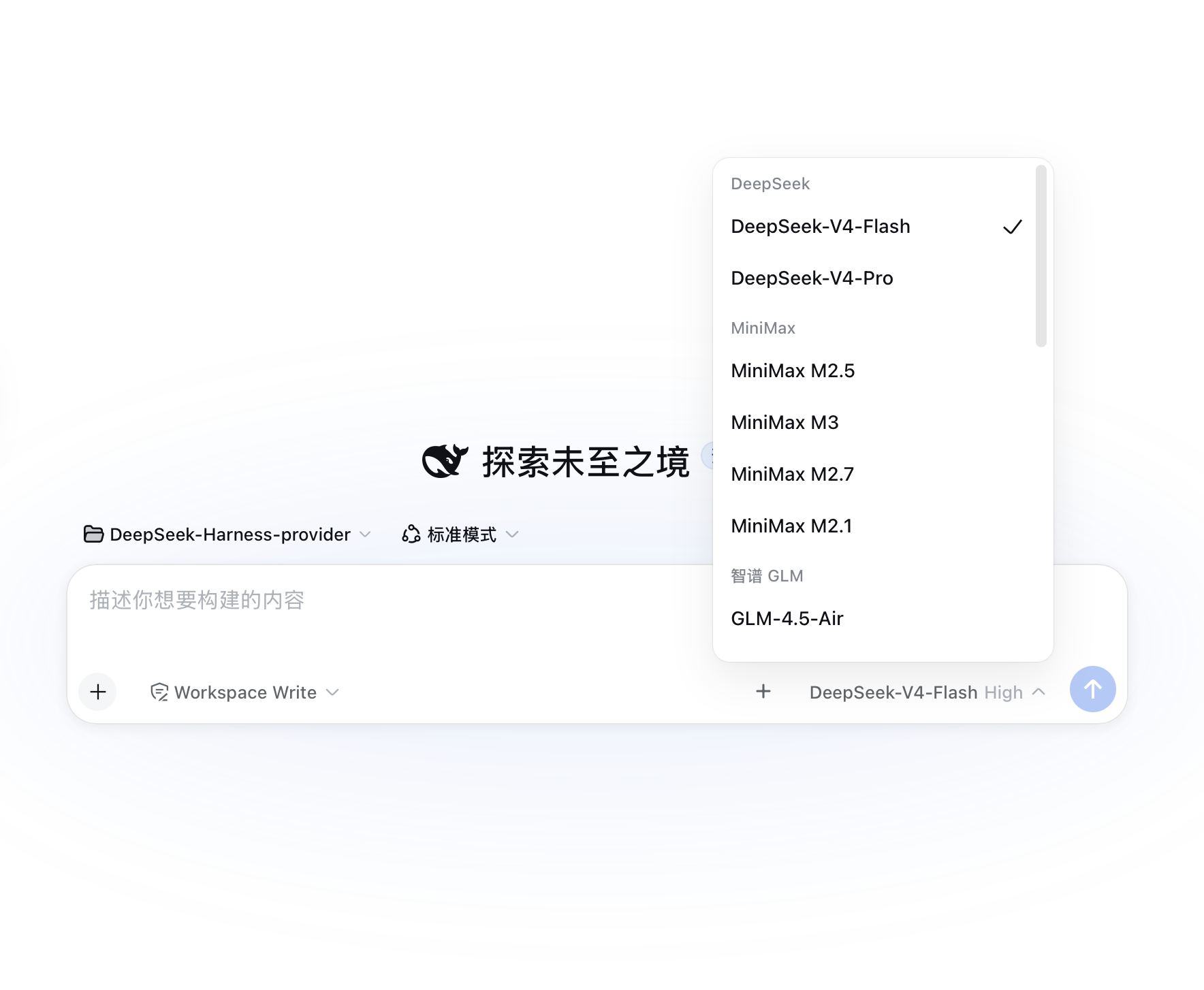
A + button next to the Send button in the DeepSeek Harness Web GUI. Click it to configure model providers without touching config files by hand:
llm-pi-ai.providers.*) with credential status and the models each one serves.MiniMax-M3 chip, no JSON editing.GET /models and compares (case/dash-insensitive). A model that does not exist (e.g. typing glm4.6v instead of GLM-4.6) fails with a red error and blocks the save. Endpoints that do not support listing are skipped and saved normally.GET /models and fills the form (a "Fetch models" button exists on every custom route too).syncModels: true (Ollama preset on by default, toggle in the form, badge in the list) are compared against their endpoint's GET /models every 60s in the background; when the endpoint list changes (e.g. you ollama pull a new model) the plugin writes the new list back to settings.yaml automatically and the dropdown follows — no manual editing. Endpoint order wins, capacities of already-configured models are preserved. Verified end-to-end.glm → glm2 → glm3…), display name gets · 号N.<img>. Files are resolved from the session's working directory, with a filename search fallback (a file whose text reference is missing a path prefix, e.g. tiile-20260815/x.mp4 actually under outputs/tiile-20260815/, is still found). Items are grouped by conversation turn ("第 1 轮", "第 2 轮"…). Media data never enters the model context — display only. Each item can insert its path into the composer (inputActions.setDraft), and raster images can additionally be inserted as an attachment. The panel also auto-scans <cwd>/.uploads/ (SVG/通用上传) and <cwd>/.screenshots/ (截图库) so files written there appear automatically, grouped into separate "upload library" and "screenshot library" turns..svg (PNG/JPEG/WebP/GIF still go through as image attachments). SVG files are saved to <session cwd>/.uploads/<name> via the new save-media endpoint, and the path is appended to the composer as  — visible inline once sent, and the SVG appears in the media showcase (it can also be dragged or pasted from the file system into <cwd>/.uploads/ to land in the showcase).getDisplayMedia, saves the PNG into <session cwd>/.screenshots/ (the media-showcase library folder, gitignored) and writes the returned path into the composer — you decide whether to send it. The saved screenshot automatically appears in the showcase.api, baseURL, thinkingFormat, and model list.The plugin does not invent its own config store; it drives the two seams the harness already ships:
| Action | Written to | Effect |
|---|---|---|
| Add / edit / delete routes | llm-pi-ai.providers in $DSH_HOME/settings.yaml |
settings mutate → file persisted → the llm-pi-ai adapter's watcher re-registers — live on the next request |
| Save / update API keys | $DSH_HOME/.credentials.yaml (0600) |
credentials set → file is watched, hot-reloads |
Only credential references (environment-variable names) are stored by the plugin; key values go straight into .credentials.yaml and never come back to the GUI.
Route writes go through settings.mutate, which validates against the llm-pi-ai namespace schema + assertServiceable: a wrong protocol, empty baseURL, or invalid model is rejected at write time — a broken route can never be stored.
The official Settings → Models page still works alongside; this plugin is the quick entry point beside the input box.
Dynamic plugins live only in process memory: restarting dsh web removes pprov-1. Restore from this repo (the source never goes away):
code.host ← full content of plugin/host.jscode.client ← full content of plugin/client.jscordis_define (kind: "new", idPrefix: "pprov"; copy name / purpose from plugin/manifest.json), then cordis_run.Your configuration (~/.dsh/settings.yaml + .credentials.yaml) is untouched, so routes reappear immediately.
| Field | Notes |
|---|---|
| Route key | Unique id (the providers dict key); arbitrary, immutable after save. Multiple keys per vendor (glm1 / glm2 …) |
| Display name | Shown in the model picker; defaults to the key |
| Credential ref | Environment-variable name, e.g. GLM_API_KEY; resolved per request through credentials |
| API key | Optional. Filled → written to .credentials.yaml; empty → keep existing / rely on env |
| API protocol | Custom routes pick one: openai-completions / openai-responses / anthropic-messages |
| BaseURL | Required for custom routes |
| thinkingFormat | Reasoning-field dialect for openai-completions: openai / deepseek / openrouter / together / zai / qwen / string-thinking / ant-ling. Hand-write when the endpoint URL is unrecognized (MiniMax → deepseek, Zhipu → zai) |
| Models | Custom routes need ≥1: [{ "id": "…", "contextWindow": 131072, "maxTokens": 32768 }] |
Authorization header, so give it any non-empty placeholder (e.g. local)..credentials.yaml is strict: a flat name: value map; the root must be a mapping, values must be non-empty strings, and duplicate keys fail the whole file at startup.&anchor / `anchor) in settings.yaml**: the settings service saves with node-preserving merges; once a save replaces the anchor's owner (e.g.glm'smodels: &glm_models), remaining*glm_modelsaliases dangle and the whole document fails to serialize withUnresolved alias (the anchor must be set before the alias)` — both this plugin and the official Settings → Models page hit it. Write shared model lists explicitly (or ask the plugin/me to flatten the file first).export after launch does nothing until restart; use this plugin's key field (writes .credentials.yaml) instead.apiKeyEnv set but unresolvable → MISSING_CREDENTIAL; it will not fall back to some other key that happens to be in the environment.127.0.0.1:<port> or the domain you use) → change it from Deny to Ask (or Allow) → completely quit Safari (⌘Q) and reopen (a plain refresh is not enough — WebKit bug 253024 keeps the failure sticky across reloads). Also confirm System Settings → Privacy & Security → Screen Recording has Safari checked. If you once clicked "Don't Allow" and it never asks again: that decision is remembered per-site — go back to Safari → Settings → Websites → Screen Sharing, find the site, and delete the row entirely (remove, don't just switch the state), or set it to Ask; then quit Safari (⌘Q) and reopen — the picker prompt comes back. If it still fails, use the system screenshot instead: ⌘⇧4 then paste (⌘V) into the input box (the composer natively accepts pasted images).harness.handle RPC, all through ctx.settings / ctx.credentials / ctx.llm):providers.list → configured routes + credential state + pi-ai directory + protocol/dialect enumsproviders.save / providers.remove → ops are built Client-side and arrive over the wire; the Host only forwards them to settings.mutate('llm-pi-ai', ops, revision)providers.discover → ctx.llm.discoverModels('llm-pi-ai', { baseURL, api, apiKey })providers.ping → same discovery, then validates each model id (normalized) against the listingcredentials.set / credentials.unsetnode:vm realm, so any object literal is not a host-realm plain object — passing one to a service that checks isPlainObject (like settings.mutate / settings.update) throws ops must be {op:'set'|'unset', path}. Any structured data for such services must be constructed Client-side and passed through the host.call JSON wire (wire-decoded values are host-realm); the Host only forwards. Return values are fine — the guard re-materializes them.+ button registers in conversation.input.right (tool row before the send button); the panel registers in conversation.input.overlay (the composer's floating anchor); all colors use --dsw-* theme variables.expectedRevision; a concurrent edit raises SETTINGS_CONFLICT and the client re-reads and retries once.DeepSeek-Harness-provider/
├── README.md # this file (English)
├── README.zh.md # 中文版
├── plugin/
│ ├── host.js # Host half source (code.host body)
│ ├── client.js # Client half source (code.client body)
│ └── manifest.json # restorable definition (name/purpose/code)
└── .gitignoreCLASSIFICATION EVIDENCE
系统优先读取 GitHub Topics,再与站内分类词典和词根规则比对。当前命中: 无有效分类标签。
deepseek-ai
DeepSeek Harness: Everything is a Plugin.

walkinglabs
Harness engineering beginner tutorial, from 0 to 1

anywhere-labs
为 DeepSeek Harness (DSH) 插件生态打造的现代化桌面端解决方案。万物皆「插件」,桌面本身也是「插件」。