
其他
完整应用

deepseek-harness
deepseek-ai
DeepSeek Harness: Everything is a Plugin.
PROJECT TOPICS
INSTALL REFERENCE
dsh plugin --profile web add github:lninghaha/dsh-coding-remote-kit
该命令指向仓库当前默认分支;尚无绑定当前 commit 的完整验证结果。
PROJECT README
v0.3.0 · DeepSeek Harness 0.1.0-rc.7 · GitHub dsh-coding-remote-kit
Remote phone access for DeepSeek Harness. Pair a phone to the desktop that already runs dsh web, then observe sessions and perform a narrow set of writes — without exposing the full Web API.


English · 中文版 · 日本語 · 한국어 · Português (BR) · Español · Français · Deutsch · Русский
Community plugin. Not affiliated with, and not endorsed by, DeepSeek. Product intent is closer to Orca Mobile Companion than to a second copy of the desktop IDE.
Read AGENTS.md before changing this repo: do not restart production dsh-web yourself. Prepare the tarball; the operator restarts.
Developed first as GitHub dsh-mobile-remote. The npm name dsh-mobile-remote is a different project (a WeChat remote-control plugin). This plugin publishes as dsh-coding-remote-kit.
| Use this | Notes | |
|---|---|---|
| npm | dsh-coding-remote-kit@0.3.0 |
dsh plugin --profile web add dsh-coding-remote-kit@0.3.0 |
| GitHub | lninghaha/dsh-coding-remote-kit |
previous checkout name dsh-mobile-remote |
| Cordis plugin id | mobile-remote |
unchanged |
| Settings HTTP | /api/mobile-remote/* |
unchanged |
| Storage | $DSH_HOME/storages/mobile-remote/ |
unchanged |
Do not dsh plugin add dsh-mobile-remote — that installs the unrelated WeChat plugin.
| Milestone | Status |
|---|---|
| Research (Orca / DSH ecosystem) | done — docs/research/ |
| M1 plugin skeleton + ADR / threat model | done |
| M2 pairing / LAN data plane | done |
| M3 narrow RPC / approvals | done |
| M4 signed HTTPS / native app | not started |
| M5 self-hosted rendezvous Worker | done — docs/05-cloud-relay.md |
?lang= / in-app switch; defaults from navigator.language).deviceToken (server stores SHA-256 only).dsh web; the mobile data plane is a dedicated port (default 6879) with an RPC allowlist./m/ws; unauthenticated sockets never see session content.3080. Optional self-hosted rendezvous Worker: desktop and phone both outbound; business frames stay E2EE.dsh plugin --profile web add a file tarball, never a link: working tree.
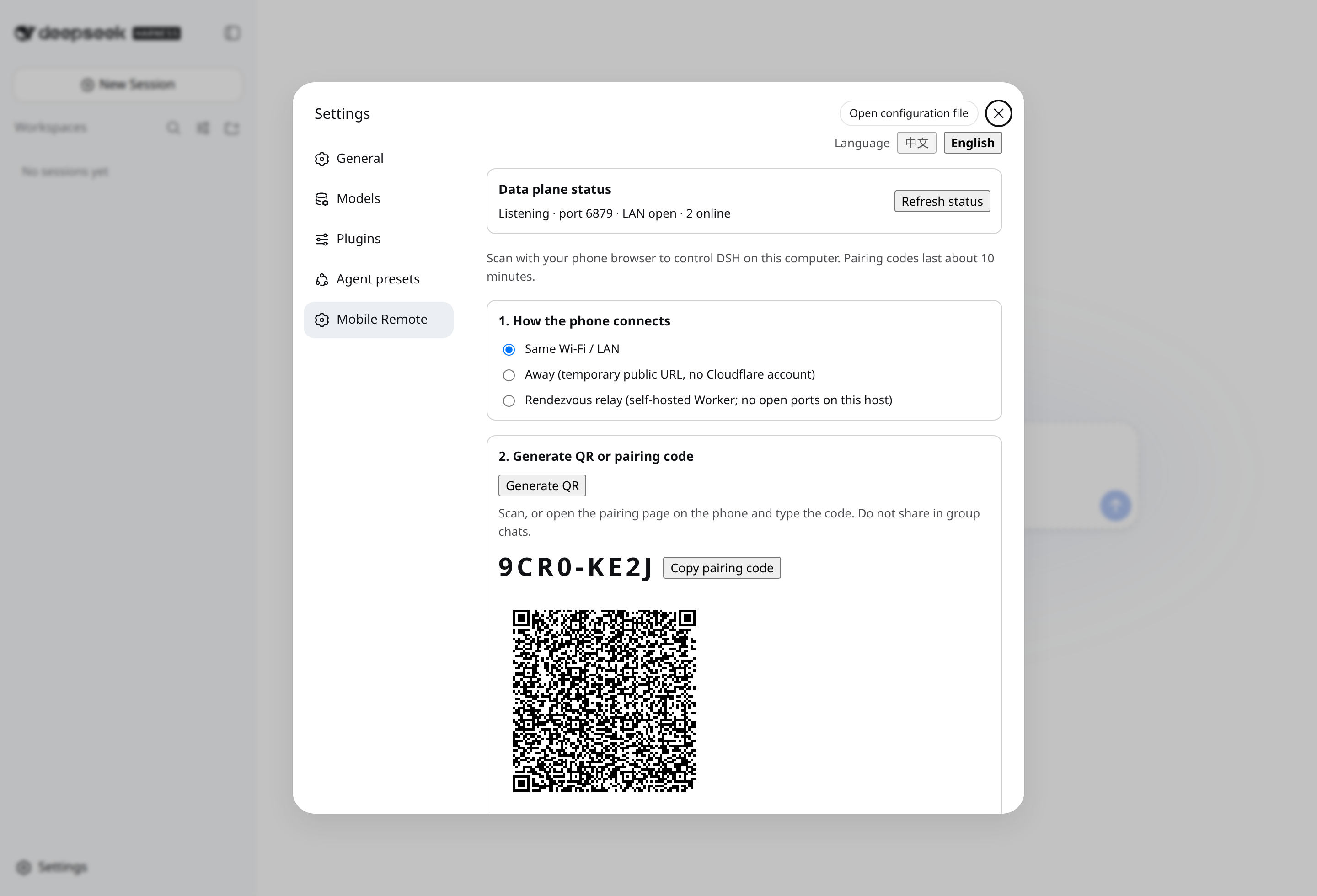
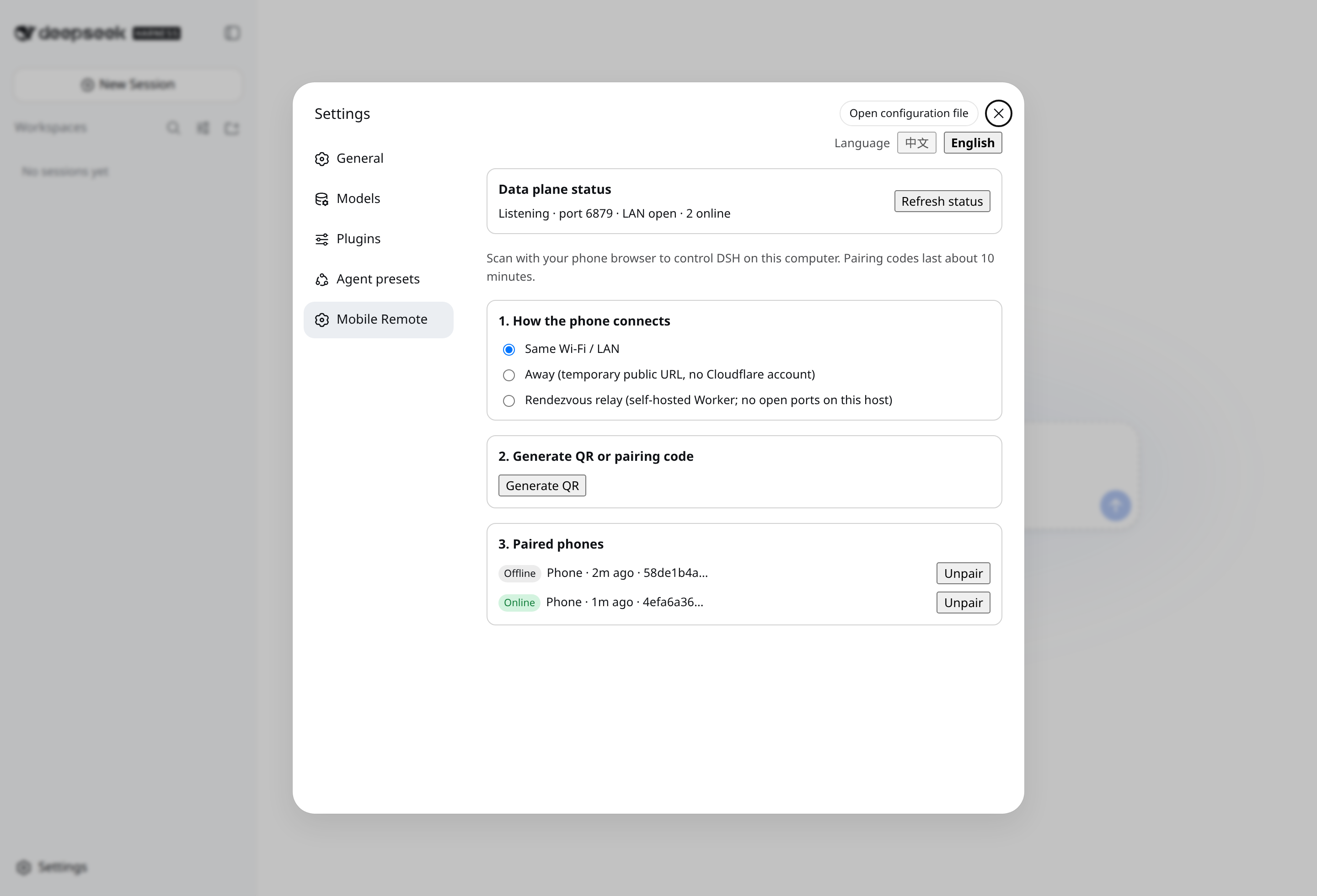
Desktop Settings → Mobile Remote: create a pairing offer (left) · channel status & devices (right)
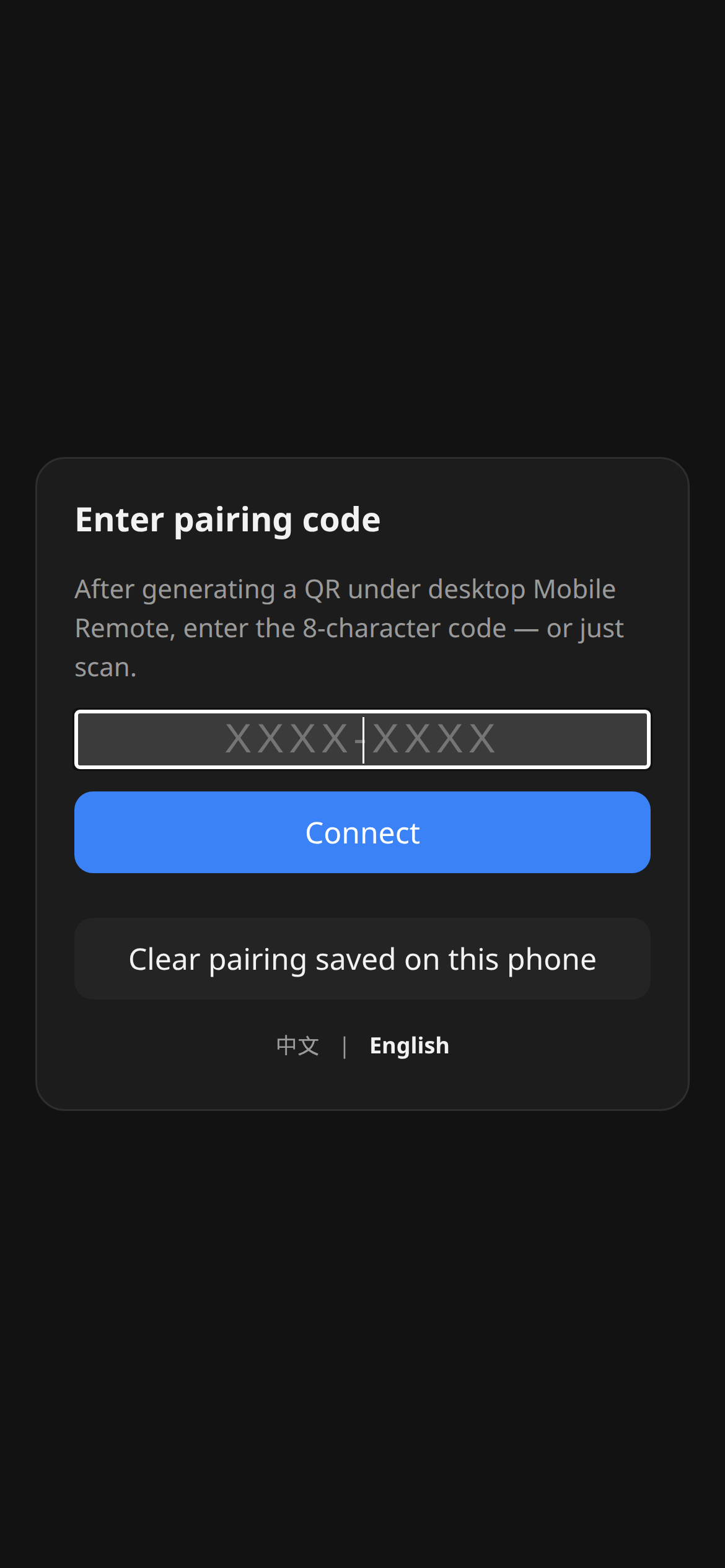
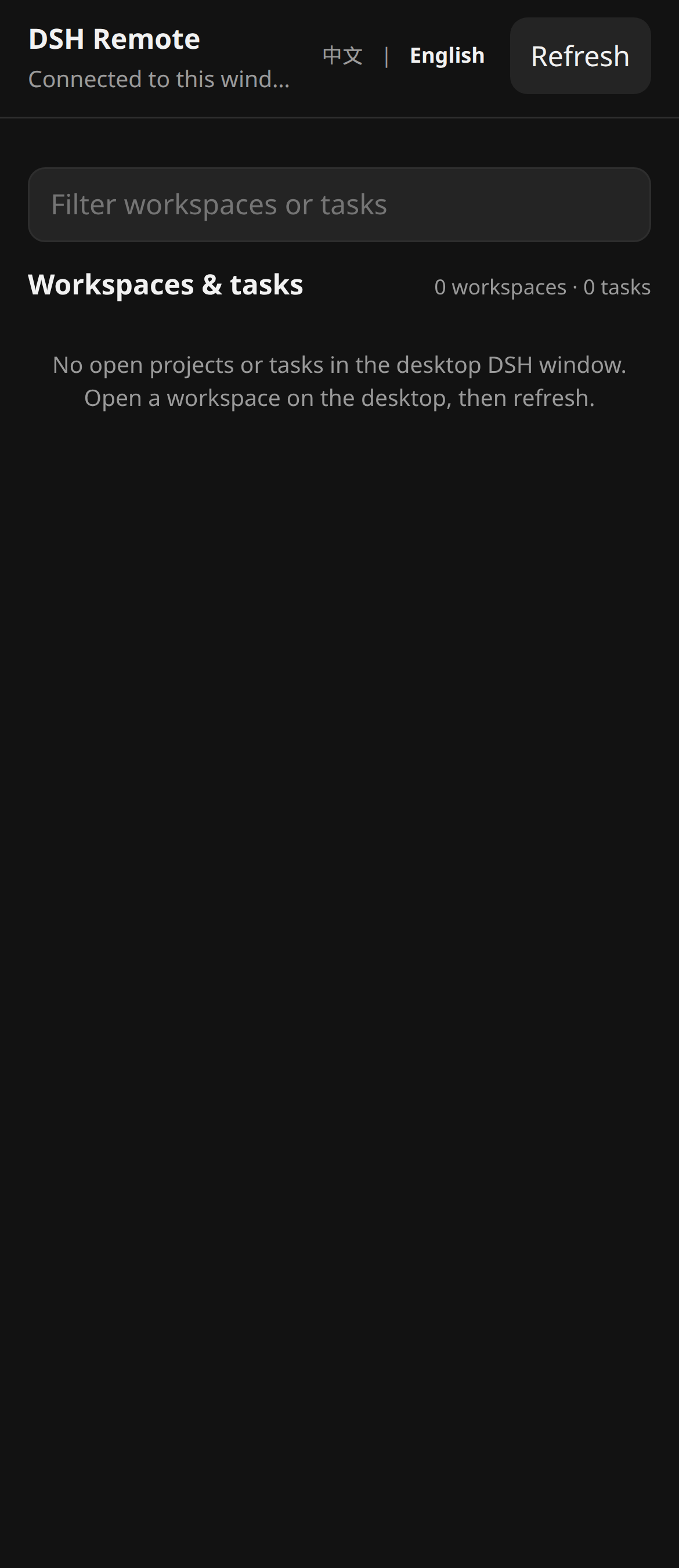
Phone companion: enter PIN / scan (left) · session list after pairing (right)
| You searched / saw | What was actually broken | What this plugin does |
|---|---|---|
| “Orca-style phone companion for DSH” | Official DSH has no first-class paired mobile app | Semantic companion: pair + E2EE + allowlisted RPC |
dsh-pocket / dsh-web-remote on a phone |
Full dsh web surface on LAN/public |
Dual plane; unknown RPC methods are forbidden |
| Phone on cellular, desktop on LAN | Raw LAN HTTP page can be MITM’d | Prefer Tailscale; optional Quick Tunnel (TLS at the edge, localhost origin) |
Plugin import failed and port 3080 died |
DSH fail-fasts the whole plugin tree | Sandbox gate + packed tarball copied outside the repo; no link: |
dsh plugin --profile web add dsh-coding-remote-kit@0.3.0Then the operator restarts the existing dsh web process in their own window. Open Settings → Mobile Remote, create a pairing offer, scan the QR (or type the PIN) on the phone.
From a source checkout (development):
pnpm test:sandbox
pnpm pack
mkdir -p "$HOME/.dsh/packages"
cp dsh-coding-remote-kit-0.3.0.tgz "$HOME/.dsh/packages/"
dsh plugin --profile web add "$HOME/.dsh/packages/dsh-coding-remote-kit-0.3.0.tgz"
Do not dsh plugin add ./ from this working tree. pnpm 11 treats some file: tarball paths as link: source, and a bad entry import takes down the whole GUI.
Requires DeepSeek Harness 0.1.0-rc.7 (pinned) and Node.js 22.19+. Full steps, pairing, and tunnel notes: INSTALL.md.
Development:
pnpm install && pnpm build && pnpm test   # inside the Docker sandbox, not on a live GUI host
pnpm test:sandbox                         # Dockerfile targets check / isolated-install / verify
Build outputs:
lib/server/index.js — Cordis entry (name / inject / Config / apply)lib/client.js — Settings classic-scriptlib/mobile/ — phone page served at /mSettings (loopback) Phone browser
│ │
│ QR / PIN ────────────────┤
▼ ▼
/api/mobile-remote/* GET /m + WS /m/ws
(dsh web, :3080) (data plane, :6879, E2EE)Management stays behind the host Web loopback fence. The data plane is a separate node:http + ws server. Pairing may rebind it from 127.0.0.1 to 0.0.0.0 so LAN clients can connect; an active Quick Tunnel advertises its HTTPS origin instead of widening.
Open Settings → Mobile Remote:
cloudflared install (never runs at plugin apply())Allowlisted methods (everything else is forbidden):
status.get · session.list · session.history · session.subscribe · session.unsubscribe · host.subscribe · session.prompt · session.cancel · session.create · respond
Pushes include session events plus approval.requested / question.requested (with rpcId for respond). Wire format: docs/03-protocol.md.
Default off. When started from Settings, cloudflared Quick Tunnel points only at 127.0.0.1:<data-plane-port>. /m becomes reachable on a https://<random>.trycloudflare.com URL; pairing still needs the fragment token (or PIN) and E2EE. The child process is killed on plugin unload / Stop.
Never tunnel port 3080 / dsh web. A self-hosted rendezvous Worker (desktop and phone both outbound, business frames still E2EE) is optional; see docs/05-cloud-relay.md. It needs a Cloudflare Workers Paid plan and is not a public relay operated by this project.
Invariants (full model: docs/04-threat-model.md):
deviceToken is stored as SHA-256; keys and registry files are 0600.deviceId.dsh web /api and does not take over api-proxy providers.Honest v0 boundary: the first HTTP download of /m on a raw LAN can be MITM’d. Prefer an overlay VPN.
Prohibitions:
0.0.0.0 to the public Internet (Quick Tunnel is an explicit, user-started exception).Examples in docs use example.com, 127.0.0.1, and YOUR_TOKEN only.
Dual plane, module map, storage, and handshake: docs/02-architecture.md · 中文.
MVP decision (route B): docs/01-mvp-scope.md.
| Doc | Purpose |
|---|---|
| INSTALL.md | Install, pair, tunnel |
| CHANGELOG.md | Release history |
| docs/00-project-rules.md | Versioning, publish vs local-only, host DSH boundary |
| docs/01-mvp-scope.md | ADR: MVP scope (Chinese) |
| docs/02-architecture.md | Internal architecture · 中文 |
| docs/03-protocol.md | RPC allowlist and push envelopes (Chinese) |
| docs/04-threat-model.md | Assets, attackers, invariants (Chinese) |
| docs/05-cloud-relay.md | Self-hosted rendezvous Worker (M5) |
| CONTRIBUTING.md | Contribution guide |
| AGENTS.md | Agent/operator rules (no production restart) |
lninghaha/dsh-coding-remote-kit.dsh-hub-oauth-gateway.@deepseek-ai/dsh.Issues and PRs welcome. See CONTRIBUTING.md for the Docker sandbox, commit conventions, and the document layers.
MIT.
CLASSIFICATION EVIDENCE
系统优先读取 GitHub Topics,再与站内分类词典和词根规则比对。当前命中: 无有效分类标签。
deepseek-ai
DeepSeek Harness: Everything is a Plugin.

anywhere-labs
为 DeepSeek Harness (DSH) 插件生态打造的现代化桌面端解决方案。万物皆「插件」,桌面本身也是「插件」。

walkinglabs
Harness engineering beginner tutorial, from 0 to 1