
Agent 与会话
插件

nuwa-skill
alchaincyf
你想蒸馏的下一个员工,何必是同事。蒸馏任何人的思维方式——心智模型、决策启发式、表达DNA。Distill how anyone thinks.

lizhuoyuan41-droid/dsh-session-tree-extension
Append-only, multi-branch conversation trees for DeepSeek Harness — fork any historical prompt, clone sessions, focus a subtree, and browse the whole lineage as one live graph. /tree, /fork, /clone.
PROJECT TOPICS
INSTALL REFERENCE
dsh plugin --profile web add github:lizhuoyuan41-droid/dsh-session-tree-extension
该命令指向仓库当前默认分支;尚无绑定当前 commit 的完整验证结果。
PROJECT README


Append-only, multi-branch conversation trees for DeepSeek-Harness — fork the latest user turn into an editable child session, clone the current conversation, and browse the whole lineage as one merged WebUI graph. Old history is never edited or deleted.
This is the v0.1.4 release of this repository. The 0.1.1 line was the first
registry release under the independent @ryanlee2007 npm scope. It is based on the upstream
robiteame/dsh-session-tree-extension
project; the original copyright notice and the full MIT license text are
retained in LICENSE.
Three commands:
| Command | What it does |
|---|---|
/tree |
Open the merged lineage graph: every non-subagent session and node, clickable and bindable |
/fork |
Fork the latest user turn into an editable child session — it appears in the graph and as an inline menu under its source session |
/clone |
Duplicate the current conversation into an independent new session under the same project |
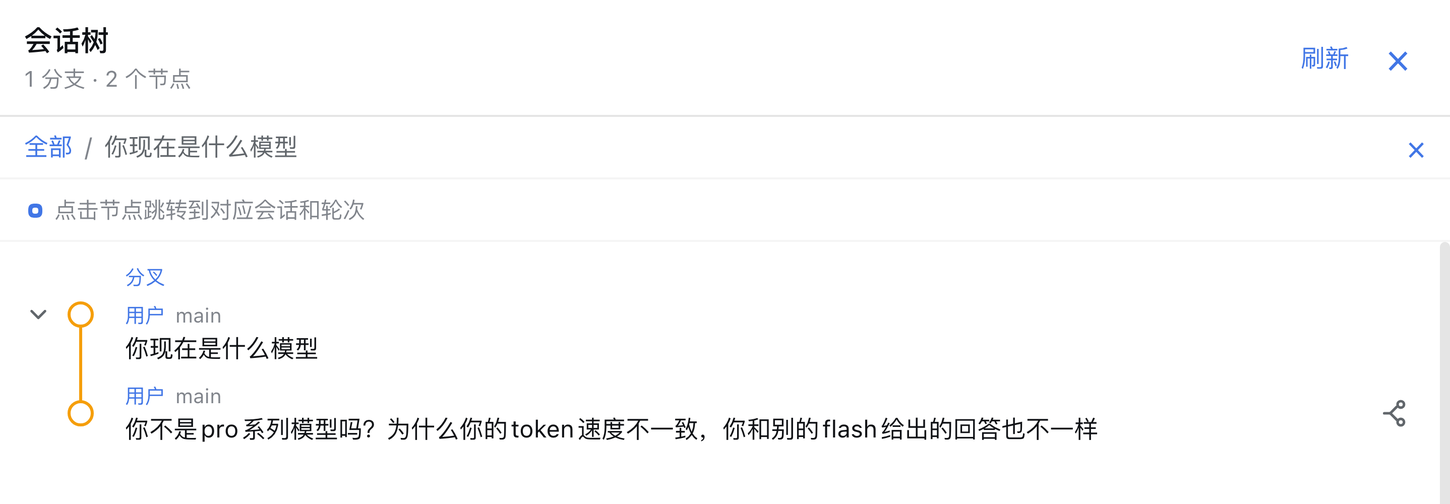
分叉 / 克隆 badge) to show only that
branch and its nested forks. The branch row pins to the top, the view is
remembered across Session switches/sidebar remounts, and navigating inside
the focused branch keeps the focus. 全部 / Esc returns to the whole lineage.parent · fork N.parent lane + 1.Tree panel (light and dark) with the sidebar's inline fork-branch menu:
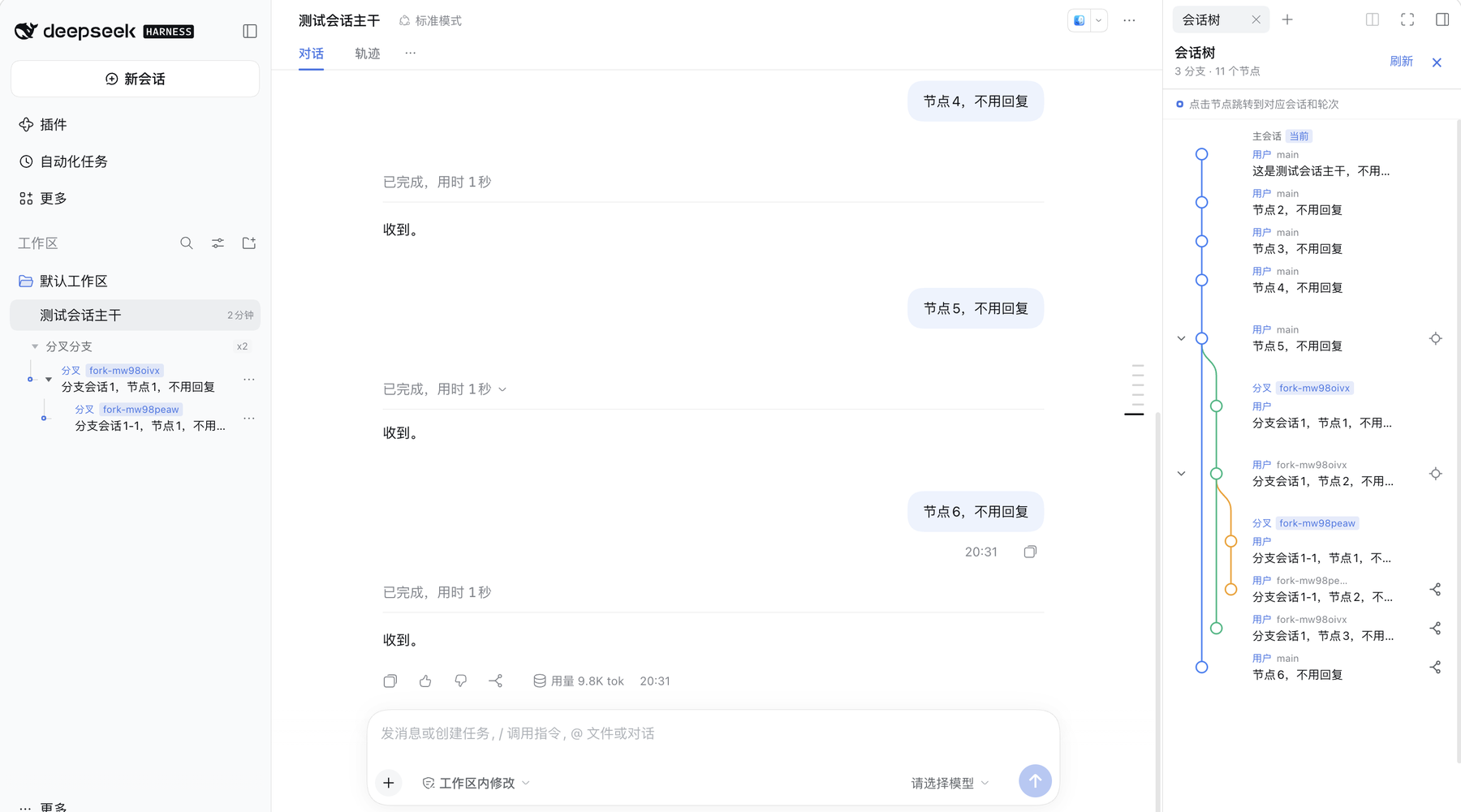
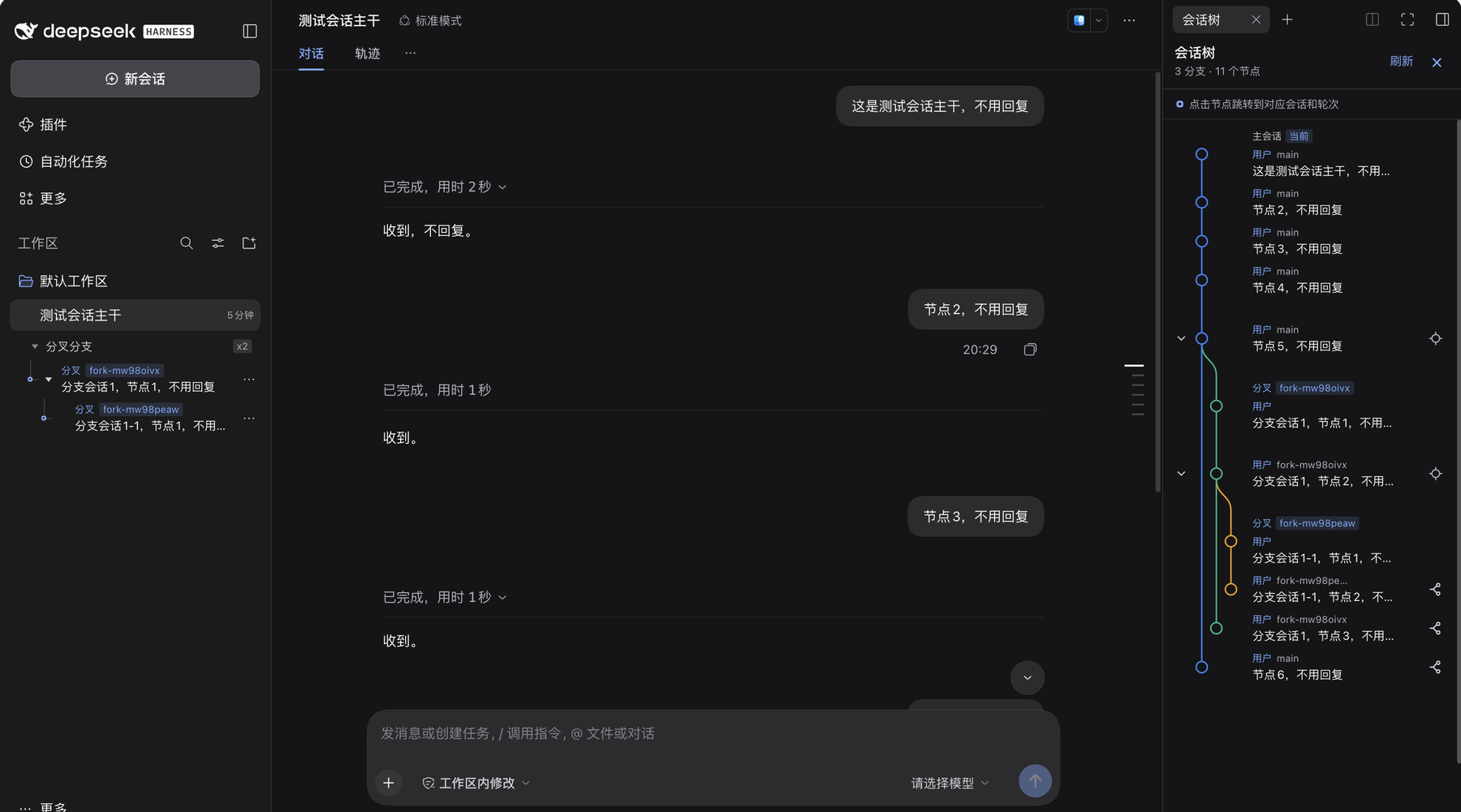
The inline /fork branch menu beneath its source session:
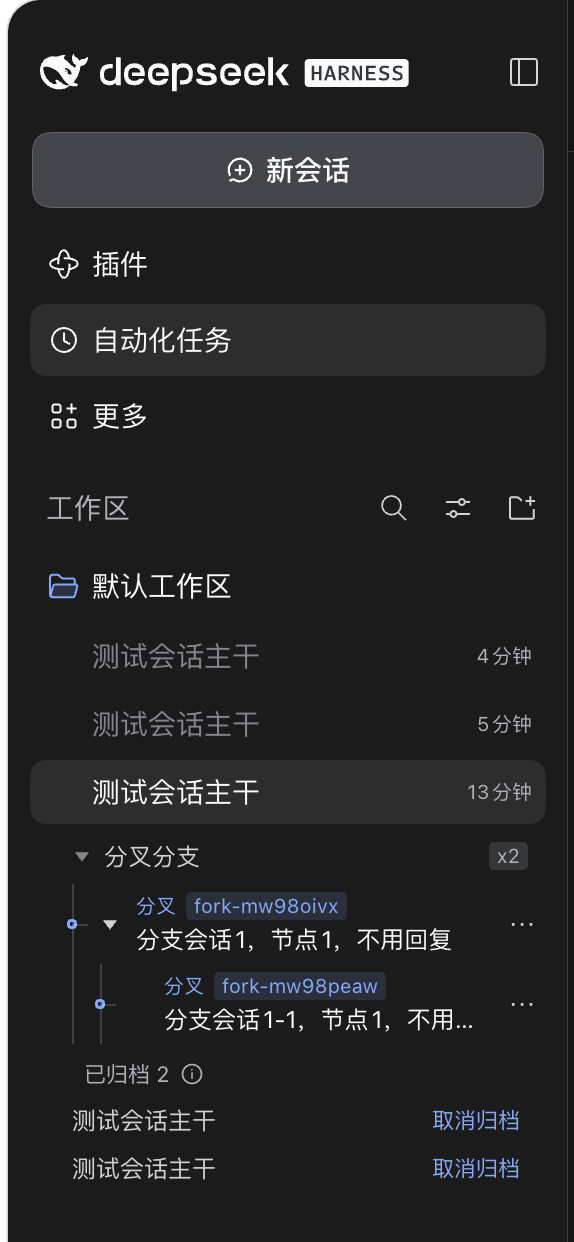
Branch focus with the 全部 / branch breadcrumb and the focused branch row
pinned to the top:
A fork of a fork sits at parent lane + 1 instead of jumping inward:
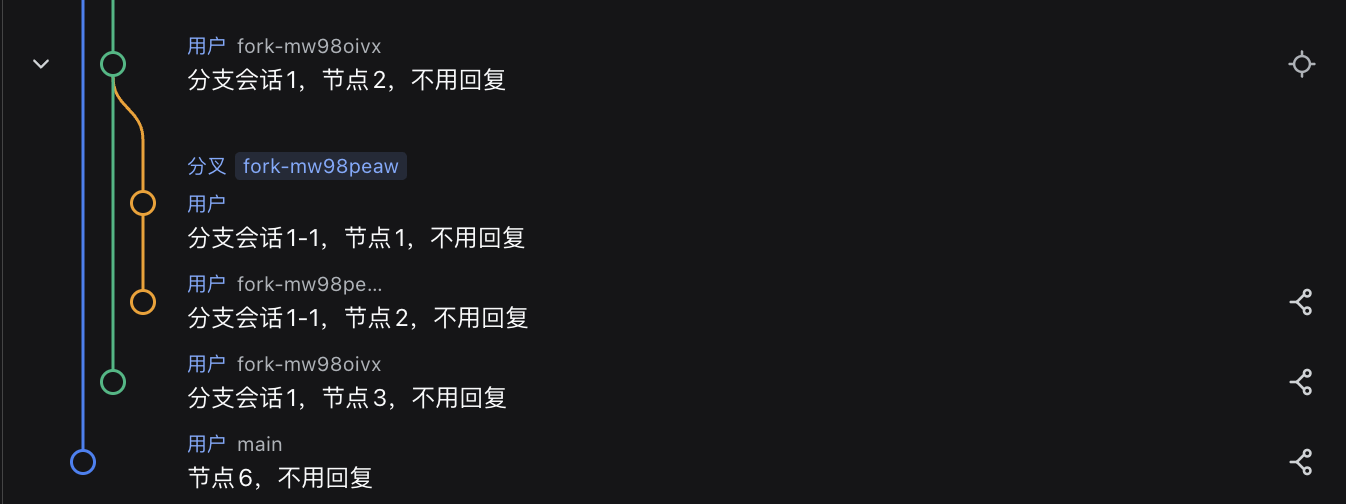
Archived nested branches stay under the top-level session's menu and are named after their immediate parent Session:
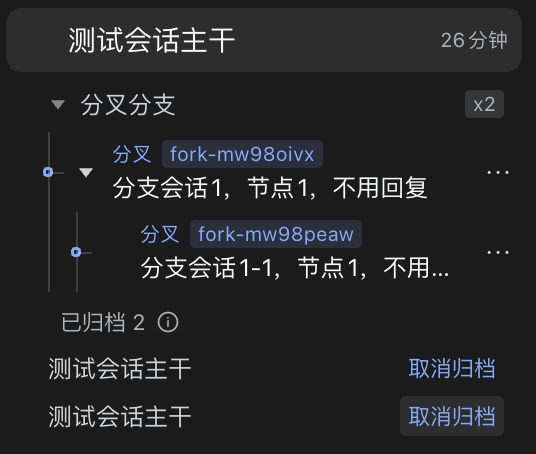
Distributed as four npm-format packages under the @ryanlee2007 scope:
| Package | Role |
|---|---|
@ryanlee2007/dsh-session-tree |
Carrier Bundle: one install mounts everything below through its composition layer |
@ryanlee2007/dsh-pi-agent-session-tree |
Host domain service: the SessionTree/SessionTreeStore domain model and the sessionTree Remote |
@ryanlee2007/dsh-tool-session-tree |
Command surface: the /tree /fork /clone commands |
@ryanlee2007/dsh-client-ui-session-tree |
WebUI tree panel: a native tab in the Harness 0.2 right Sidebar, with an additive overlay fallback for older stock builds |
Open Settings → Plugins → Market, search for
@ryanlee2007/dsh-session-tree, install it, and restart the desktop app. The
desktop plugin manager activates the carrier bundle, so the next boot composes
the three rows (pi-agent-session-tree, tool-session-tree,
ui-session-tree) that load the Host service, the commands, and the browser
panel.
On desktop builds whose dsh plugin command only forwards to pnpm, install
through the in-app market; current builds activate a newly installed bundle
directly. After the restart, /tree opens the panel.
0.2.2-rc.1 and newer)On a CLI that ships the 0.2.2-rc.1 plugin manager, one command installs and
activates the bundle:
dsh plugin --profile <profile> add @ryanlee2007/dsh-session-treePrebuilt tarballs install the same way and need no build scripts:
dsh plugin --profile <profile> add ryanlee2007-dsh-session-tree-0.1.4.tgzAfter installing, restart the profile. Verify the composed layer:
dsh --profile <profile> --dump-config # should list the three session-tree rowsRequires DeepSeek-Harness ^0.2.2-rc.1 and Cordis ~4.1.0; the target
installation provides those peers. The current development and verification
baseline is 0.2.2-rc.1. No install
scripts run — the tarballs ship prebuilt lib/ artifacts.
/tree — open the tree panel/tree opens the right-side panel as one merged graph for the current
session's lineage: ancestors, forks, and clones appear in a single git-style
view, with user messages, assistant replies, tool calls, and model switches
shown as connected nodes. Shared copied prefixes are deduplicated, fork points
carry session badges, and the current session's path stays highlighted. Click
a node to bind it; clicking a node owned by another session opens that session
first. Collapse individual subtrees or whole session branches; use the focus target
on a branch row to isolate that branch.
/fork — branch from any historical node/fork picks an earlier user prompt and grows a new branch from there: the
conversation continues along the new path while the original one stays intact.
The fork is created through the official native fork API, so it appears in the
session list with real parent linkage. The plugin adds the new branch to the
merged graph and also renders it as an inline collapsible menu directly beneath
its source session's row. Both views follow the official reactive session list,
so new branches appear without a refresh.
/clone — duplicate into a new session/clone copies the current conversation — through its root path — into an
independent Session under the same project. The source history stays
read-only; the clone is yours to continue separately.
The plugin never modifies Harness core files. It capability-detects the optional branch-selection engine API at runtime:
dev/session-branch-surface.patch
(Session.selectMessageSurface()), jump/fork switch the model-visible
history directly: the next turn genuinely starts from the new branch.replace surface event) plus a
plugin-owned sidecar under $DSH_HOME/storages/session-tree/ for durable
branch state. The log stays resume-valid.Every mode is honest about itself: the Host log prints a one-time notice when
a session runs in a non-native mode. Move the raw session.jsonl.zstd between
machines together with the matching sidecar file.
nodeId and a parentId (root is null). A node may have multiple
children — that is the fork.messages array
for the root→cursor path only.The repository is a pnpm workspace building the three implementation packages standalone (no Harness checkout needed):
pnpm install
pnpm verify      # build + typecheck (host & client) + pack dry-run + vitest
pnpm pack:all    # produce the four tarballs
Tests run against the published Harness packages (0.2.2-rc.1) — the
stock-mode paths — with vitest from the repository root. The
browser spec in packages/client/ui-session-tree exercises both the 0.2 native
right-Sidebar registration and the older overlay fallback in the standalone
suite.
For debugging against a Harness source checkout (native branch switching and source integration):
dev/install.sh /path/to/deepseek-harness     # applies both dev patches + copies packages
cd /path/to/deepseek-harness && pnpm install && pnpm run build
See dev/README.md for what each patch does. This flow is
for contributors only and is not required for normal installs. User installs
never touch a Harness checkout.
MIT.
CLASSIFICATION EVIDENCE
系统优先读取 GitHub Topics,再与站内分类词典和词根规则比对。当前命中: session、sessions、prompt。
alchaincyf
你想蒸馏的下一个员工,何必是同事。蒸馏任何人的思维方式——心智模型、决策启发式、表达DNA。Distill how anyone thinks.

freestylefly
Prompt as Code | GPT Image 2 / 2.5 提示词与案例库,530+ 个案例、20+ 套工业级模板与可复用 Skills,新增 2.5 同提示词对比专区,附完整提示词与生成记录,持续更新。

titanwings
Distilly — Distill how they think into reusable Skills for any Agent or Bot. Formerly Colleague Skill(原同事 Skill).