

安全与治理
插件

dsh-redteam-model
SeaOf0
基于dsh web实现的多种模式,目的是服务于redteam进行授权的安全研究,覆盖渗透测试、红队评估、代码审计等范围领域,请勿用于非法行为。(允许二开,赋予模块各位自己的业务逻辑,方法论只有自己熟练的才好用,好的方法论=好的生态)
PROJECT TOPICS
INSTALL REFERENCE
dsh plugin --profile web add github:lizhijie429/dsh-root-temp-guard
该命令指向仓库当前默认分支;尚无绑定当前 commit 的完整验证结果。
PROJECT README


DSH Host 插件:在工具调用层拦截"在工作区根目录创建临时目录 / 临时文件",把"临时产物统一放临时目录"的项目约定从文字规则升级为执行期拦截。
⚠️ 定位说明:这是一个卫生/约定守卫,不是安全边界。文件类工具走参数层(提前拒绝 + 单调守卫)与已解析目标层,命令类只做启发式文本匹配。不要依赖它防御恶意行为——真正的边界是 DSH 沙箱。
.npmignore。.volatile() 配置实时生效,无需重启。apply_patch 解析对齐等工作管线修复。tools/pre-execute 在审批之前运行,命中临时项时直接返回 deny,不会先弹审批再拒绝;warn 模式下只记 stage=pre 日志并继续。ctx.tools.guard() 在审批之后、执行之前运行,用工具参数 + 会话当前工作目录(workingDirectory.get(session))判定。它是 owner policy,其它插件无法把拒绝改回允许。模型执行 working_directory { cd: "tmp" } 后再写 ../_tmp_x,也会按真实 cwd 解析并拦截。fs/write-intent / fs/edit-intent waterfall(write / edit / str_replace_editor / apply_patch 都会触发),在 DSH 完成路径解析后、真正写盘前判定。这一层拿到 realpath 身份,因此 tmp/link 这类 junction/symlink 也无法把根目录临时项藏进允许的 tmp/ 里。session/event 的 turn/start / turn/end,把"本轮新出现、且名字像临时项"的根目录条目移动(不删除)到 tmp/_quarantine/<timestamp>-<name>,可人工恢复。这是对命令类绕过的兜底:即使某条 shell 命令绕过了启发式,回合结束后根目录也不会留下临时项。turn/start 之前已存在的条目不会被动。quarantine.deferred),避免把其它会话正在用的文件移走;单会话时行为不变。rename 失败的条目会记入 pending,由后续回合继续清扫(日志 quarantine.truncated / quarantine.move-failed)。四层都 fail-open:插件内部异常一律放行并写日志,不会卡死工具调用。
兼容性:已在 DSH 0.2.2-rc.1 上验证;engines.dsh 保持 >=0.2.1-0 <0.3.0,0.2.2 新增的 apply_patch 工具自动纳入覆盖,0.2.1 及更早版本缺少该工具时不受影响。
ctx.sandboxPolicy.resolve({session}).workspaceRoot),换项目自动生效;只有显式配置 workspaceRoot 时才固定根目录;tmpDirName,默认 tmp),额外放行名用 allowRootNames;config.warning 日志,而不是静默失效。DSH 工具执行管线:
tools/pre-execute 提前拒绝 → ctx.tools.guard() 单调守卫 → 执行工具
write/edit/str_replace_editor/apply_patch: fs.resolve → fs/write-intent | fs/edit-intent waterfall → ctx.fs 写盘ctx.effect() 注册,插件卸载/热重载时自动注销;ctx.on(..., { prepend: true }) 注册,拒绝时抛错并短路后续监听器;run_code 的内部工具调用走同一注册表(未做端到端集成验证,见"已知限制")。| 类别 | 例子 | 结果 |
|---|---|---|
| 根目录临时目录(含其下层路径) | _tmp_probe/x.txt、tmp_lead/log.txt、.tmp/、.._tmp/、scratch/、test-out/ |
拒绝 |
| 根目录临时文件 | _tmp_notes.md、build.log、x.tmp、x.bak、.log |
拒绝 |
apply_patch 补丁目标 |
*** Add File: _tmp_probe/a.txt、*** Move to: tmp_lead/b.md |
拒绝 |
apply_patch 删除 |
*** Delete File: build.log |
允许(删除不是创建) |
| 配置的统一临时目录 | tmp/20261103-dialog-design/a.txt(tmpDirName: tmp) |
允许 |
| 正常仓库路径 | AGENTS.md、docs/01-x.md、backend/pom.xml |
允许 |
| 工作区外路径 | ../other/...、其他盘符 |
不干预(交给沙箱策略) |
覆盖工具:
write、edit、str_replace_editor(view 只读命令放行)、apply_patch(解析 *** Add File: / *** Update File: / *** Move to: 的路径;*** Delete File: 是删除而非创建,放行),参数层 + fs-intent 层;pwsh、bash、terminal_send(command / text;workdir 按当前 cwd 解析,"cd/Set-Location 后的相对名"按新目录解析)。命令类启发式:命令中出现创建动词(New-Item/mkdir/md/ni/touch/Set-Content/Add-Content/Out-File/Tee-Object/Copy-Item/Move-Item/xcopy/robocopy/cp/mv/tee/install/ln/> 重定向),且某个路径操作数解析到根目录下的临时名时拒绝;-Value/-Content 等自由文本参数会被跳过(避免 Set-Content -Value "console.log" 之类误报);-FilePath:_tmp/a、--target-directory=_tmp 这类"参数内嵌值"也会作为路径检查。
默认拒绝文案(可用 reasonTemplate 覆盖):
禁止在仓库根目录创建临时项 "_tmp_probe"。临时产物请写入 tmp/<任务名>/ 下;
具体约定见项目约定文件(如 AGENTS.md)中的临时文件规则。config: 块全部可选:
| 字段 | 默认 | 说明 |
|---|---|---|
enabled |
true |
总开关(false 关闭) |
mode |
deny |
deny 拒绝;warn 只记 would-deny 日志并放行(灰度上线用) |
tmpDirName |
tmp |
统一临时目录名;必须是单个路径段,非法值回退 tmp |
allowRootNames |
[] |
额外放行的根目录名(在默认规则之上追加) |
denyNamePatterns |
['^(?:\.*_?tmp\|\.*temp\|\.*scratch\|\.*test[-_]?out)(?=$|[._-]\|\d)'] |
根目录临时名正则数组;整体替换默认值;[] 表示保留默认;非数组值会告警并回退默认 |
denyFileExtensions |
['.log','.tmp','.bak','.orig','.rej'] |
根目录临时文件扩展名;[] 表示关闭扩展名规则 |
extraWriteTools |
[] |
额外的"文件路径类"工具名(追加到 write/edit/str_replace_editor) |
extraShellTools |
[] |
额外的"命令类"工具名(追加到 pwsh/bash/terminal_send) |
quarantine |
strict |
strict = 回合结束清扫本轮新增的根目录临时项;off = 关闭清扫 |
quarantineDirName |
_quarantine |
清扫目标目录(位于 tmpDirName 下),移动而非删除 |
reasonTemplate |
见上 | 拒绝文案,支持 {name}、{tmpDir} |
workspaceRoot |
空 | 非空时优先于会话解析(固定根/多工作区部署);建议绝对路径 |
logFile |
<插件目录>/state/root-temp-guard.log |
安装/拒绝/配置告警日志;挂载时超过 5MB 自动轮转一次为 .1 |
示例:临时目录统一叫 scratchpad、先灰度观察再拦截:
- insert:
    - id: root-temp-guard
      name: 'C:\Users\<你>\.dsh\plugins\dsh-root-temp-guard\index.mjs'
      config:
        mode: warn
        tmpDirName: scratchpad
reasonTemplate: '临时产物请写入 {tmpDir}/<任务名>/,不要污染仓库根目录:{name}'本插件是一个 DSH profile 组合包(bundle):package.json 的 dsh.bundle.patch 指向 cordis.patch.yml,安装后 DSH 会自动插入 root-temp-guard 行(默认 tmpDirName: tmp、quarantine: strict),无需手工改 patch。
npm 发布后(https://www.npmjs.com/package/dsh-root-temp-guard):
dsh plugin --profile web add dsh-root-temp-guard发布前(本地目录安装;本插件无构建步骤):
dsh plugin --profile web add "file:$env:USERPROFILE\.dsh\plugins\dsh-root-temp-guard"dsh plugin add 会安装依赖并把包加入 profile 的 dsh.profile.bundles,包自带的 cordis.patch.yml 随即被加载。验证:
dsh --profile web --dump-config | Select-String -Context 0,6 'dsh-root-temp-guard'(已实测:file: 安装后 dump 中出现 - id: root-temp-guard、tmpDirName: tmp、quarantine: strict。)
覆盖默认配置:在 profile 自己的 cordis.patch.yml 里按 id 覆盖(会整体替换该行的 config):
- id: root-temp-guard
  config:
tmpDirName: scratchpaddesktop profile 由 Electron 独占管理,dsh plugin 不直接管理它,仍需在 %USERPROFILE%\.dsh\profiles\desktop\cordis.patch.yml 末尾按绝对路径插入:
- insert:
    - id: root-temp-guard
      name: 'C:\Users\<你>\.dsh\plugins\dsh-root-temp-guard\index.mjs'
      config:
        tmpDirName: tmp
<你> 替换为实际用户名。desktop profile 的 patchReload 默认 live:纯 config 改动会重新挂载生效;index.mjs/lib/guard.mjs 的代码改动受 Node ESM 模块缓存影响,需要重启 DeepSeek Harness。
dsh headless --patch <含 root-temp-guard insert 的 yaml> "hello"安装后 DSH Web 界面会加载本包的浏览器半侧(dsh.client),有两个入口:
plugins.item 提供,不要求把包安装为组合包,按绝对路径手动插入的桌面 profile 也会出现;dsh-root-temp-guard → 行 root-temp-guard 的「配置」:仅以组合包安装时出现,和上面的卡片打开同一个表单。桌面端内嵌的 Web UI 同样可用。

插件页「内置插件配置」入口(绝对路径插入的桌面 profile 也会出现)
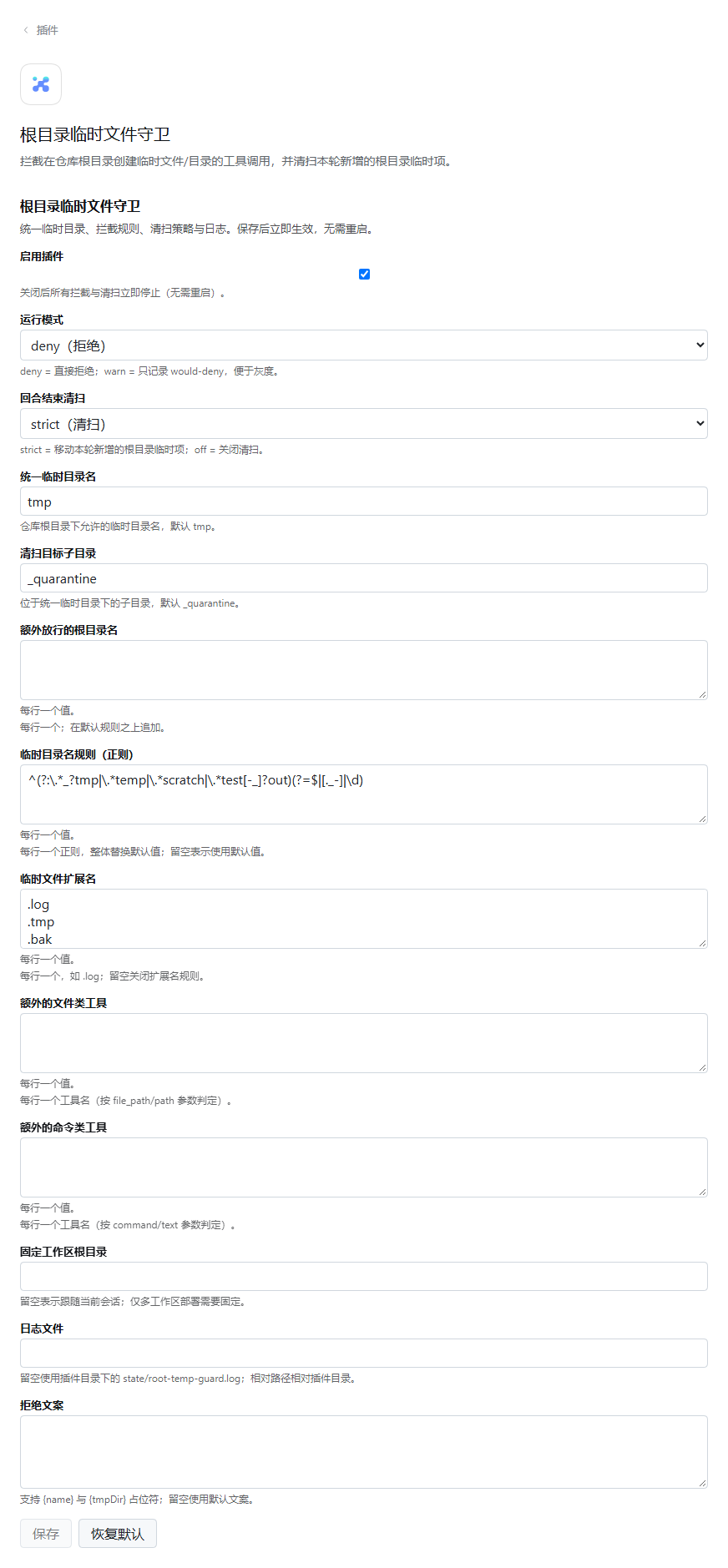
图形化设置页:13 项配置,保存即生效,「恢复默认」清除 profile 覆盖
deny/warn、统一临时目录、清扫策略与目标目录、额外放行名、名称正则、扩展名、额外文件/命令工具、固定根目录、日志与拒绝文案;ctx.configForms)写入 profile 的 Cordis patch;Host Config schema 根节点是 .volatile(),保存后立即生效,无需重启或重挂载;cordis.patch.yml 编辑;vendor/ 内置了 @deepseek-ai/schemastery 与 @deepseek-ai/cosmokit(MIT,见 vendor/README.md),因此按绝对路径插入、没有 node_modules 的桌面 profile 也能提供 schema,无需额外 npm 依赖。浏览器半侧是手写 bundle(
lib/client.js,遵循 DSH__ModuleLoader__格式,无需构建步骤);dsh.client.platform仅声明web,纯 CLI 宿主不会加载它。
包内自带显示元数据,Plugin Manager 与插件详情页无需激活插件即可读取:
package.json 顶层 icon → assets/icon.png(同时导出 ./icon),插件行与详情页显示插件自己的图标;locale/en.json、locale/zh.json 的 meta.title / meta.description,按 DSH 界面语言选择中英文标题与描述;字段缺失时回退到包名与 package.json 的 description;meta.detail,因此插件详情页按 DSH 约定回退到本 README;reasonTemplate 决定(默认中文,见上文)。cd "$env:USERPROFILE\.dsh\plugins\dsh-root-temp-guard"
npm test # 76 个用例,含真实文件系统 quarantine、Config schema、客户端 bundle、显示元数据、发布门禁与推广资产测试
npm run pack:check # 直接问 npm 要真实打包清单:应为 20 个文件,含 cordis.patch.yml 与 locale/,不含 test/、docs/、state/
npm run verify # 上面两步的合集;npm publish 前的 prepublishOnly 会自动执行它
Get-Content state\root-temp-guard.log日志示例:
2026-11-03T... plugin.mounted pid=... mode=deny
2026-11-03T... deny source=tool tool=pwsh reason=禁止在仓库根目录创建临时项 "_tmp_probe"...
2026-11-03T... deny source=fs tool=write target=...\tmp\link\_tmp_x\a.txt reason=...
2026-11-03T... quarantine.moved name=_tmp_sneaky -> ...\tmp\_quarantine\2026-11-03T...-_tmp_sneaky
2026-11-03T... quarantine.done moved=1 dir=...\tmp\_quarantine
2026-11-03T... plugin.disposed
mode: warn 时两层守卫的同一行前缀是 would-deny(只记录、不拦截),清扫层对应 quarantine.would-move。
工作区干净时按顺序执行:
npm run verify                                    # 1) 门禁:测试 + 真实打包清单
npm run market:index                              # 2) 把 docs/index.json 固定到当前 HEAD
git add docs && git commit -m "chore: refresh market index"
git tag v<版本> && git push origin main --tags     # 3) 打 tag(必须与 package.json 的 version 一致)
npm run pack:check(scripts/check-pack.mjs)不重复 files 白名单,而是直接问 npm 要真实清单(npm pack --dry-run --json),断言三件事:运行时文件齐全(index.mjs、cordis.patch.yml、lib/client.js、两份 locale、图标、vendored schema、README/LICENSE);开发与本地文件未被打包(state/、docs/、test/、scripts/、.github/、点文件、*.log、*.tgz);files 里没有已经匹配不到任何文件的失效条目;prepublishOnly 已设为 npm run verify:npm publish 之前测试与打包清单必然通过,不依赖人工记得跑;本地发布时 token 来自 ~/.npmrc;v* tag 触发 .github/workflows/publish.yml,先校验 tag 与 package.json 版本一致,再以 --provenance --access public 发布。认证二选一:npmjs.com 上配置 Trusted Publishing(推荐,无需密钥),或把 granular token 存成 NPM_TOKEN secret 并取消工作流里对应注释;.npmrc:它已被 .gitignore 忽略,避免发布 token 被提交进公开仓库。npm run market:index(固定当前 HEAD 的 commit 与提交时间,并把图标复制到 docs/icons/);提交 docs/ 后 Pages 自动刷新@deepseek-ai/dsh-plugin-market-index 的 parseMarketIndex + marketInstallTarget 校验通过data/plugins/lizhijie429__dsh-root-temp-guard.yml 已收录(PR #11726,已合并)dsh plugin --profile web add dsh-root-temp-guardpackage.json 的 files 决定(20 个运行时文件);根 .npmignore 作为后备,一旦 files 被移除或放宽即接管打包规则| 版本 | 主要内容 |
|---|---|
0.9.1 |
新增 plugins.item 设置卡片,绝对路径手动插入的桌面 profile 也能打开设置页;新增 Plugin Manager 显示元数据(顶层 icon + locale/*.json);补齐打包白名单与根 .npmignore;mode: warn 审计文案改为 would-deny;denyNamePatterns 非数组时告警并回退默认;文档补充双入口与显示元数据说明 |
0.9.0 |
Host Config schema(根 .volatile())+ Web 图形化设置页;内置 vendored schemastery/cosmokit;实时保存 |
0.8.0 |
并发会话清扫延迟、pending 重试、shell 内联参数、apply_patch 解析对齐 |
0.7.0 |
适配 DSH 0.2.2 的 fs/delete-intent 等新管线变化 |
node -e "fs.mkdirSync(...)"、shell 变量/函数/别名、PowerShell 管道拼接、脚本内部间接建目录均可绕过;上文列出的创建动词(含 xcopy/robocopy)只匹配字面命令文本,改用变量或间接调用即失效。cd/Set-Location:pushd 栈、变量展开($DIR、%TEMP%、~)按"未知目标 → 回到根目录基准"处理(deny-biased,可能误伤);管道子命令里的 cd 不跟踪。tmp/link 藏根目录临时项会被拒绝;但命令类(shell 文本)仍按字面判定,无法感知 junction。普通 UNC 路径(\\server\share)被视为工作区外,不干预。fs/write-intent、fs/edit-intent 覆盖 write/edit/str_replace_editor/apply_patch;0.2.2 新增的 fs/delete-intent 与 fs/observed 不在本插件监听范围(删除不是创建,观测不是变更)。其它插件直接调用 ctx.fs 服务(不触发 intent)不在覆盖范围。write/edit/str_replace_editor/apply_patch/pwsh/bash/terminal_send 默认覆盖;apply_patch 已内置;其它新文件工具可通过 extraWriteTools(file_path/path 参数)或 extraShellTools 追加,补丁型工具需在代码中按 input 解析。dsh-mcp-client 或其它插件注册的任意工具名(如 filesystem MCP 的 write_file/create_directory)不在默认工具集内;它们通常也不走 ctx.fs intent,只能靠回合结束清扫(名称匹配时)或沙箱兜底。需要时用 extraWriteTools/extraShellTools 显式追加。run_code 内的直接文件系统调用:嵌套工具调用会经过同一策略流水线(守卫生效),但程序代码若直接调用 fs(如 require('fs').mkdirSync)不经过 ctx.tools/ctx.fs,插件看不到,只有清扫/沙箱兜底。lib/client.js;这些部署仍用 cordis.patch.yml 编辑。设置页还要求 DSH 自带的 settings/config-editor 服务(0.2.2 基础组合包已提供)。.volatile() + 字段 any 让旧配置不会因类型不符而加载失败,也保证设置页可编辑;非法值仍由运行时 normalizeConfig 告警并按默认值回退,因此表单里填错不会"存不进去",但运行时行为按回退值执行。tmp/_quarantine/ 可恢复);单次最多移动 50 个,超出/失败项进入 pending 由后续回合重试(最多记 500 个/root);mode: warn 下只记 would-move 不移动。若某后台进程仍在写该目录,重命名可能失败并记录 quarantine.move-failed(同样进入 pending)。.1),运行期间不轮转;写失败被吞。guard.error / pre-execute.error / fs-intent.error。删除 cordis.patch.yml 中对应 insert 段,或把 config.enabled 设为 false 后重启。
MIT,见 LICENSE。
CLASSIFICATION EVIDENCE
系统优先读取 GitHub Topics,再与站内分类词典和词根规则比对。当前命中: guard。
SeaOf0
基于dsh web实现的多种模式,目的是服务于redteam进行授权的安全研究,覆盖渗透测试、红队评估、代码审计等范围领域,请勿用于非法行为。(允许二开,赋予模块各位自己的业务逻辑,方法论只有自己熟练的才好用,好的方法论=好的生态)

dhicoc
Complete reverse-skill (88 SKILL.md) as a DeepSeek Harness (dsh) Cordis plugin — reverse engineering, authorized pentesting and security research skill pack.

delta-box
Lightweight, agent-native sandboxing with diff, commit and abort