

开发工具
待识别

treg
superdesigndev
OpenRouter for agent tools. Join community here: https://discord.gg/6mQYYfFMAn
PROJECT TOPICS
INSTALL REFERENCE
dsh plugin --profile web add github:lixian292/dsh-plugcraft
该命令指向仓库当前默认分支;尚无绑定当前 commit 的完整验证结果。
PROJECT README


中文说明 · Changelog · Market entry
Plugcraft is a reuse-first plugin authoring workbench for DeepSeek Harness (DSH).
Instead of letting the agent start writing plugin code immediately, the workbench first asks "does this need a new plugin at all?" — it clarifies the requirement, searches installed plugins, the DSH market catalog and GitHub for something reusable, asks you how to proceed, and only then builds the remaining gaps in an isolated sub-agent. Every step stays visible in a page in the DSH sidebar, and verification happens before anything is installed.
Search first, build last. Find a reusable implementation, let you decide how to reuse it, and verify anything generated before it reaches your profile.
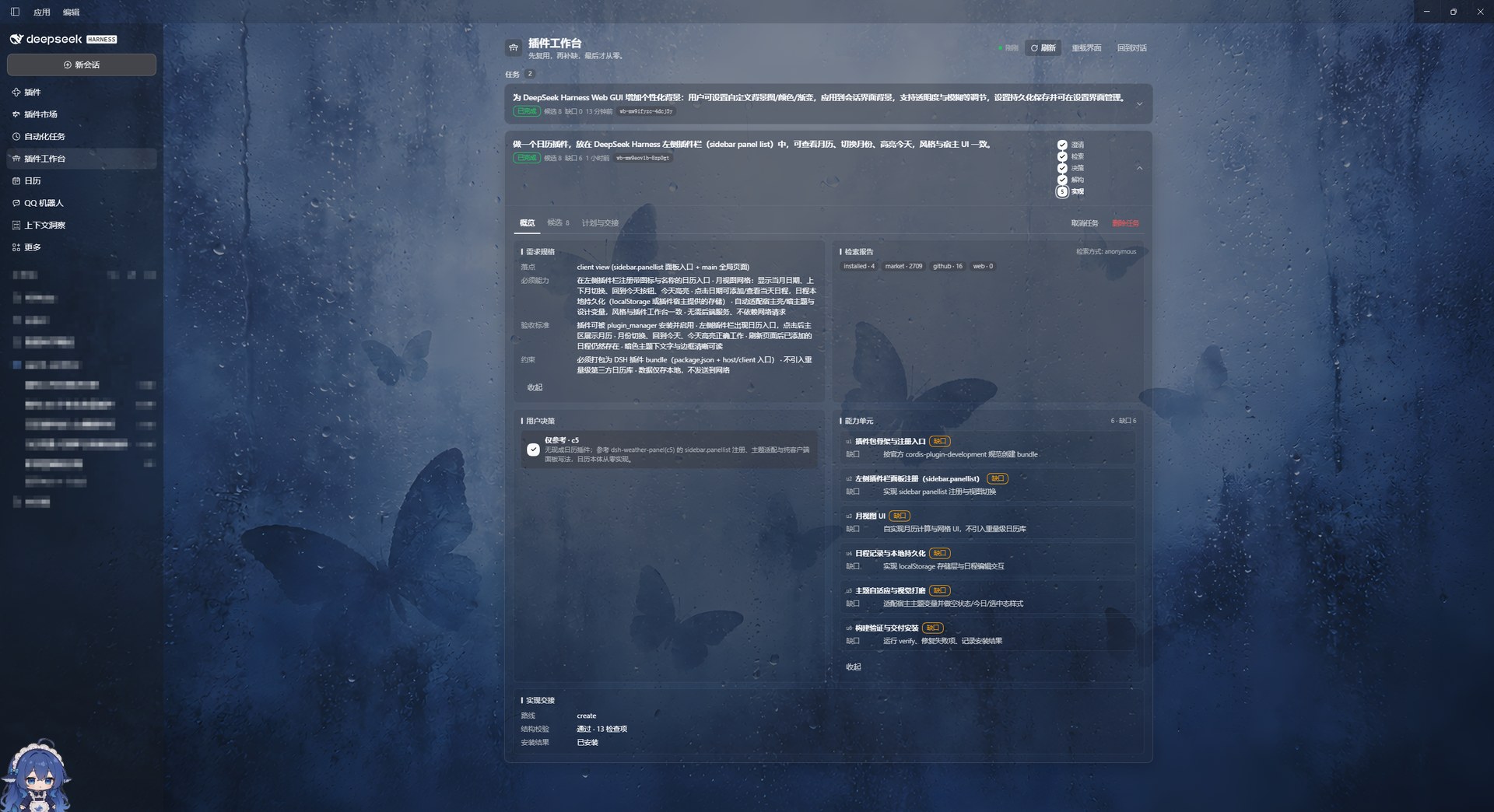
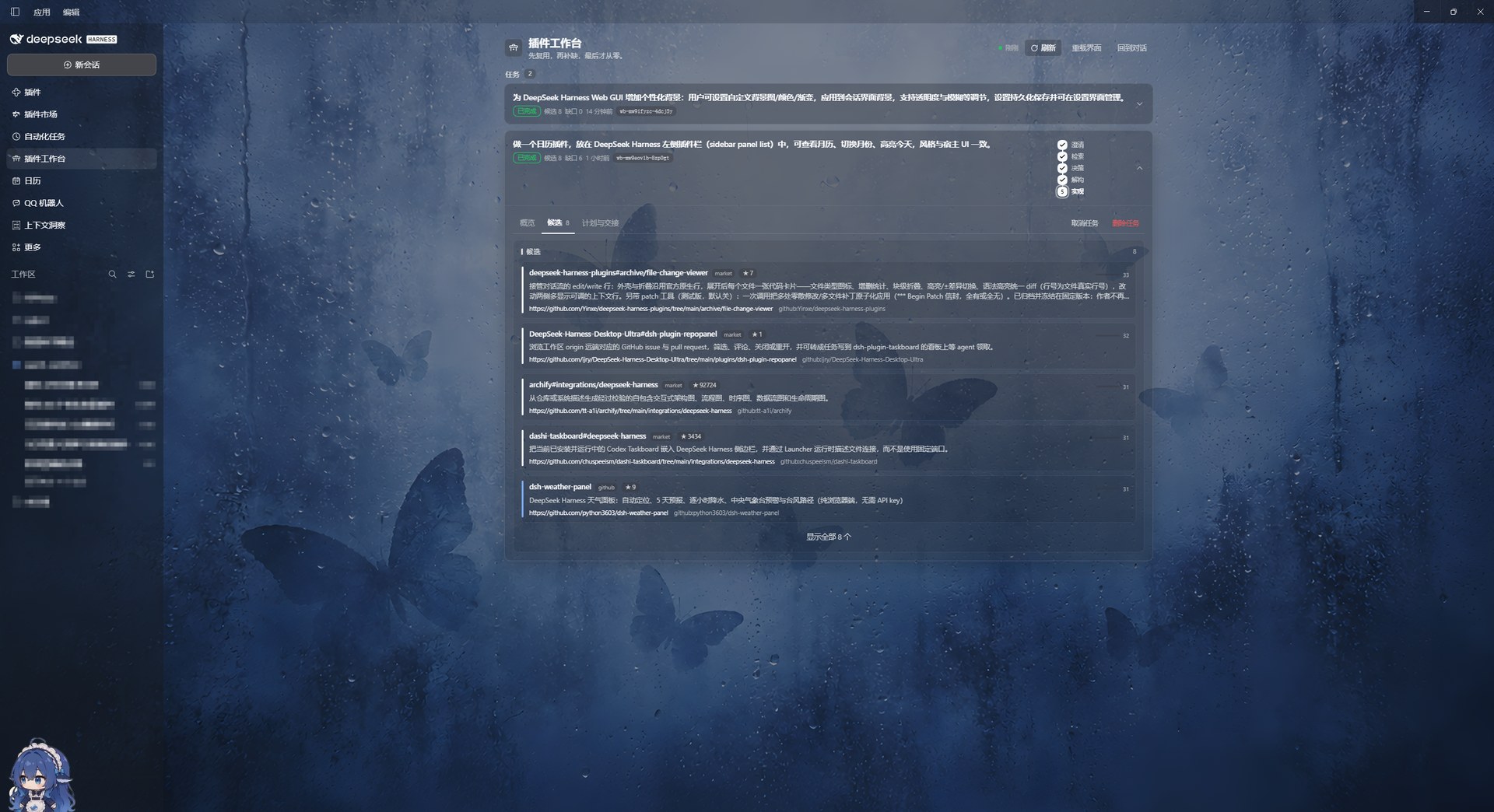
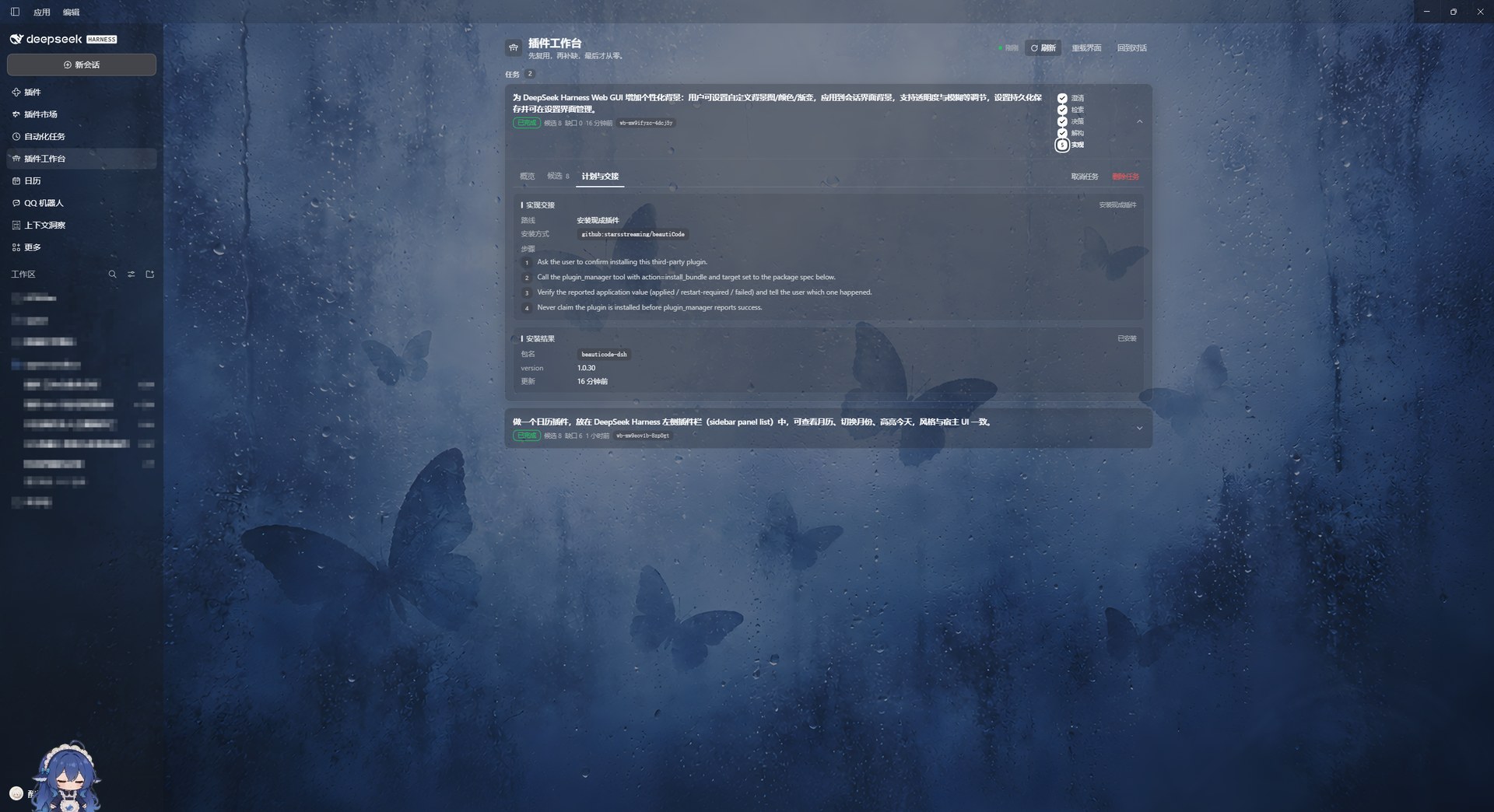
| Candidates | Plan & handoff | The plugin it produced |
|---|---|---|
 |
 |
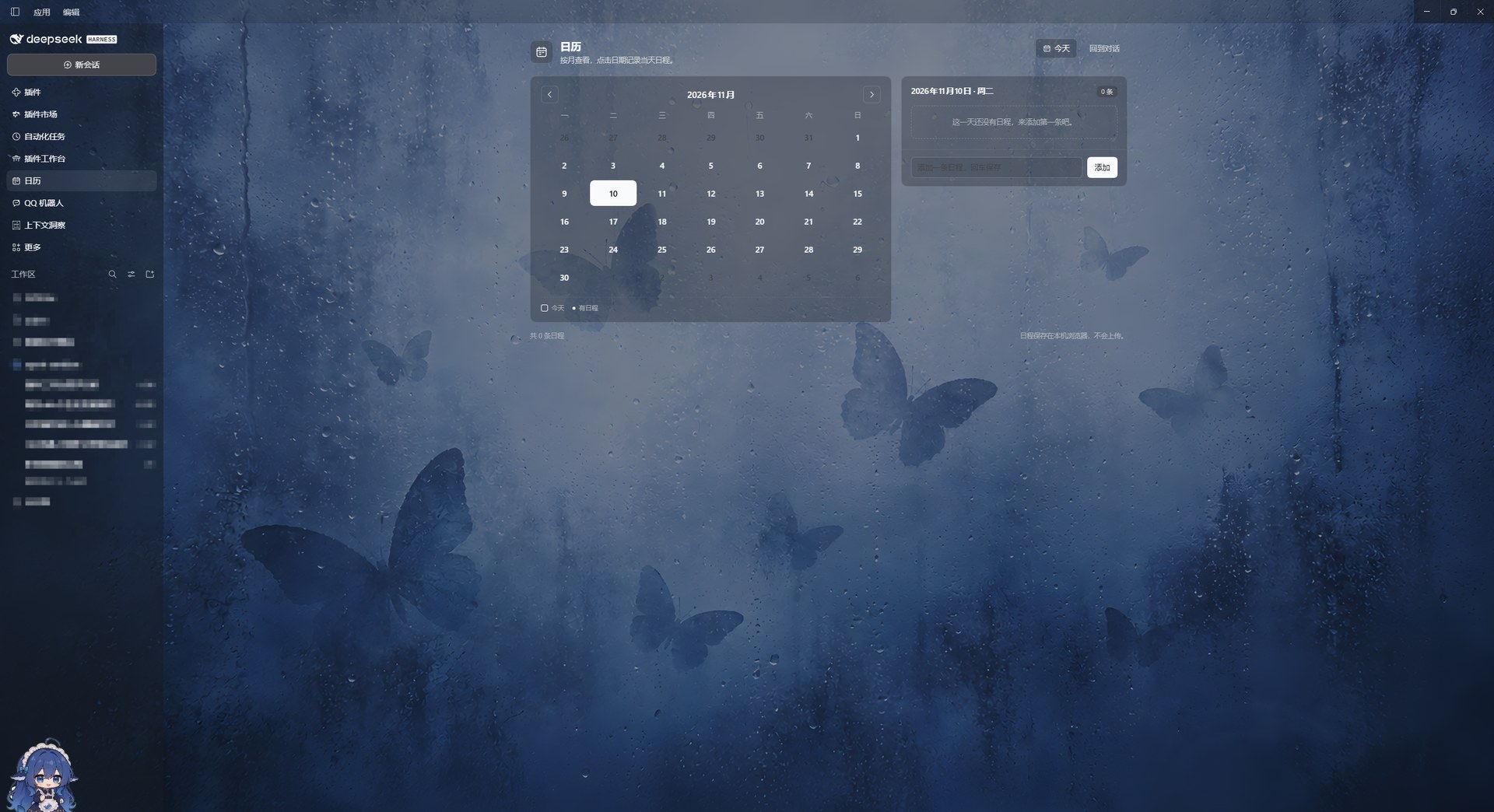 |
The screenshots follow one task end to end: a calendar-plugin request, eight reusable candidates found across the market and GitHub, the decomposition into capability units, the verification checks, and the installed calendar plugin.
Everything refreshes automatically every few seconds; there is no submit button to forget.
Most "make me a plugin" requests end up recreating something that already exists. Plugcraft makes checking for an existing implementation the default path, and keeps the expensive model work out of your main conversation:
cordis preset) in its own context.done / install_failed state.Requirements: a DSH profile with the Web UI (dsh >= 0.2.1-rc.2, tested on 0.2.2-rc.1), Node.js 22.19+ or 24+.
From GitHub (recommended until the first npm release):
dsh plugin --profile <profile> add github:lixian292/dsh-plugcraftFrom a release tarball (no registry account needed): download the .tgz from the latest release and install it:
dsh plugin --profile <profile> add <path-or-url-to>/dsh-plugcraft-<version>.tgzFrom a local checkout (development): in the DSH Plugins page, install the local bundle by absolute path, e.g. through the plugin_manager tool with install_bundle.
After installing, open the sidebar and click Plugcraft (Chinese UI: 插件工作台). It sits next to Plugins, Market and Context insights.
An npm package (
dsh-plugcraft) is planned but not published yet, so GitHub and release tarballs are the supported channels for now.
Build a plugin that adds a calendar panel to the DSH sidebar: month view, switch months, highlight today, and keep events locally.
plugin-workbench skill and calls plugin_workbench — the page fills in with the spec, search results and stage.Useful prompts:
flowchart LR
    A[Clarify need] --> B[Search: installed / market / GitHub]
    B --> C{Match?}
    C -- full --> D[Ask: use as-is / DIY / reference / scratch]
    C -- partial --> E[Decompose into capability units]
    C -- none --> E
    D --> F[Plan]
    E --> F
    F --> G[Creator sub-agent builds the gaps]
    G --> H[Structural verification]
    H --> I[You confirm install]
I --> J[Done / install failed]| Stage | What the Host does |
|---|---|
| Clarify | stores a structured spec on the task |
| Search | queries installed plugins, the cached market catalog and GitHub, ranks candidates locally |
| Decide | records your four-way choice |
| Decompose | stores capability units (reuse or gap) |
| Handoff | install returns an exact package spec; fork/create start a Creator sub-agent |
| Verify | checks bundle structure and runs node --check; never executes generated code |
| Record install | stores the application value from plugin_manager and finishes the task |
Anonymous GitHub search is limited to about 10 requests per minute. A read-only token raises the quota to 30 requests per minute. Resolution order:
DSH_GITHUB_TOKEN, DSH_PLUGIN_WORKBENCH_GITHUB_TOKEN, or GITHUB_TOKEN;$DSH_HOME/plugin-workbench/github-token.txt or github_token.txt;github-token.txt or github_token.txt.The first line of the file is the token. Never commit it — both file names are in .gitignore. The token is only attached to GitHub API requests from the Host; it never appears in task state, the page API, logs or the model context. Tool results report githubAuth: "token" | "anonymous".
$DSH_HOME/plugin-workbench/state.json$DSH_HOME/plugin-workbench/cache/market.json (refreshed daily)POST /workbench/api; cross-origin requests are rejected| Command | Purpose |
|---|---|
/workbench |
show the latest task and stage |
/workbench list |
list tasks |
The agent-facing tool is plugin_workbench with actions: start, update_spec, search, get_report, record_decision, set_decomposition, handoff, verify, record_install, status, cancel. The matching skill is plugin-workbench and is loaded on demand.
| Symptom | Fix |
|---|---|
| The page says “failed to load / HTTP 405” | The page is talking to an older Host generation. Use Reload UI in the page header, or hard-reload the window (Ctrl+Shift+R). Restart DSH if it persists. |
| No Plugcraft entry in the sidebar | Reinstall the bundle (see Install), then reload the page. The entry is registered by the browser half. |
| The page is empty but the chat already created a plugin | The agent must call plugin_workbench to create a task. Ask it to use the workbench explicitly: “Use the plugin workbench for this.” |
| Search returns no candidates | Add a GitHub token (see below); anonymous search is rate-limited. Installed plugins and the cached market catalog are still searched without a token. |
| The skill refuses to load | Reinstall the bundle; a stale client or Host generation is the usual cause. |
Does it install plugins without asking me?
No. handoff either returns an install spec for the approval-gated plugin_manager tool, or starts a Creator sub-agent. Installation always needs your explicit confirmation, and the result is recorded on the task.
Why plain JavaScript instead of TypeScript?
The shipped artifact is readable, dependency-free JavaScript: no build step, no bundled toolchain, easy to audit in the marketplace review. The trade-off is no compile-time type checking of Harness APIs, so the repo relies on node --check, the test suite and structural verification. If the UI grows much further, moving the browser half to TypeScript with a bundler would be the natural next step; the Host half is small enough to stay plain JS.
Where is the data stored?
$DSH_HOME/plugin-workbench/. See Configuration above.
Plain JavaScript, no build step. The browser half is loaded through window.__ModuleLoader__.load({ id, factory }); styles use --dsw-alias-* theme tokens only.
npm run check   # node --check every JS file + validate JSON
npm test        # zero-dependency test suite (node --test)
Repository layout:
index.js            host entry (re-exports host/index.js)
host/               host half: store, search adapters, market cache, handoff, verify, page API
client.js           browser half: sidebar entry + workbench page
locale/             plugin metadata (zh/en)
assets/             icon and screenshots
scripts/            repository checks + market submission helper
test/               node:test suite
CI runs check and test on Node 22 and 24 (.github/workflows/ci.yml).
verify action checks structure only; it is not a security review of generated code.Issues and pull requests are welcome. For a new plugin submission to the DSH ecosystem, see market-entry.yml and scripts/submit-market.mjs.
MIT — see LICENSE.
CLASSIFICATION EVIDENCE
系统优先读取 GitHub Topics,再与站内分类词典和词根规则比对。当前命中: plugin-development。
superdesigndev
OpenRouter for agent tools. Join community here: https://discord.gg/6mQYYfFMAn

T-Auto
A toolkit for low-level operations in DSH, designed to reduce token usage and task execution time / DSH 底层操作工具插件,旨在减少 Token 消耗与任务耗时

crafter-station
A public gallery of animated pets for Codex, Claude Code, DeepSeek Harness, Hermes, OpenCode, Gemini CLI, and more.