

模型与 MCP
待识别

rea
morluto
Reverse engineer anything with agents, from app behavior down to native binaries.
PROJECT TOPICS
INSTALL REFERENCE
dsh plugin --profile web add github:liuhusk/dsh-status-card
该命令指向仓库当前默认分支;尚无绑定当前 commit 的完整验证结果。
PROJECT README
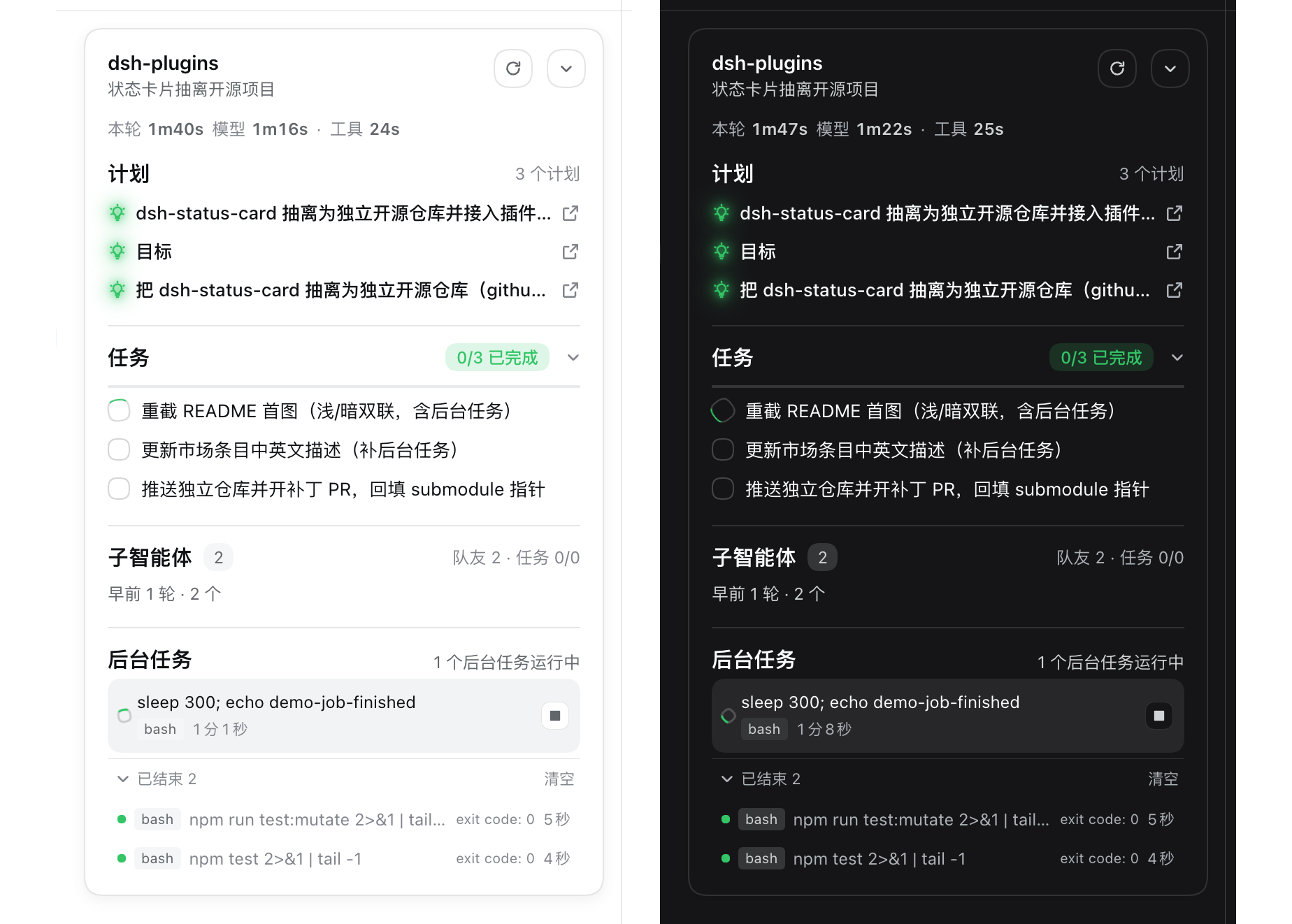
A permanent card floating at the top-right corner of the content area in DSH Web. It gathers the to-do list, the goal, the plans you submitted, the files this session changed, the mode badge, the subagents and the background jobs into one place — plus one line that says where this turn's time went.
The to-do list is collapsible and carries a progress bar; the goal can be edited / paused / resumed / cleared right inside the card; a submitted plan opens in the right-hand preview pane; a subagent row jumps to that sub-session. The card follows content-area resizes and right-panel open/close, and can be collapsed. When the content area gets narrow, the card pushes the text column to the left; at the limit it shrinks into a single round button and expands again when the window grows back. It hides itself while you are looking at a global panel (plugins, schedules, …).
| Block | Content | Interaction |
|---|---|---|
| Header | Project name (directory name of the session cwd, full path on hover) + subtitle (session title, falls back to "Agent workspace") |
Two host-style round buttons (28px, 1px hairline, white fill, 16px icon inside): ⟳ re-fetch changes, ⌄ collapse the card |
| Accent color (theme) | Every accent in the card — to-do check ring, 2px progress bar, progress pill, plan bulb and its glow, status dots, goal action buttons, focus ring — reads one color family. Four presets: green (default), blue (#4176e6), amber, red, values taken from the host's static 500 scale (same value in light and dark) |
Color dots in the plugin detail page (Plugins → this package → "Accent color"); the card re-colors on the spot. The choice is stored in browser local storage and survives a refresh. Error/warning colors and file-type icons deliberately do not follow the theme |
| Collapsed form | The whole card collapses into a 34px round button (1px hairline, white fill + shadow, same as the host's "back to bottom" button) showing a < chevron |
Click the button to expand. Both forms are always in the DOM and animate into each other (~220ms, slight overshoot), sharing the same center point as the header's collapse button; prefers-reduced-motion switches instantly. The collapsed form takes no width. When there is no room for the card it auto-collapses into this button and expands back on resize |
| Turn timing | One bare line under the header (no background, no radius, no padding, left edge aligned with every other row): the total This turn 25m32s, then the breakdown model 2m44s · tools 3m04s · waiting 1m12s, all at the same 12px/600 with tabular digits and muted separators |
Read-only. Parallel calls count their combined elapsed interval once. Overlapping intervals belong to waiting first, then tools, then model, so the total never exceeds elapsed wall-clock. Open model, tool and human-wait intervals tick every second between host samples (refetched every 2s). After turn/end all numbers freeze; idle time between turns is excluded. Waiting covers questions, plan approval and approval prompts |
| To-dos | The official current todos projection, with check rings, a progress pill and a 2px progress bar. A separate, read-only history group retains the most recent earlier turn's last list and labels its actual turn number |
Current tasks keep their fold / Show all controls (hard cap 200). The historical list is collapsed by default and stays separate from the current turn. It is reconstructed from the session log; an explicitly cleared list is not revived |
| Goal | Official goal text, phase, round and blocked reason, plus the host's live activation. An active goal that is disarmed reads Ready to continue and offers Resume | Edit (Enter saves / Esc cancels), pause, resume, clear, through the official remote and CAS reference. Drafts and pending requests are bound to the session and goal identity; switching either closes the editor and ignores late responses |
| Plans | Plans submitted in this session, served by the plugin's host route (exit_plan_mode titles, newest first, up to 20). A bare row (no fill, same width as the content above) with a self-drawn "bulb + sparks" glyph in the accent color and an external-link icon at the right end |
Click a row to open that plan in the right-hand preview pane using the official plan preview type |
| Changed files | Session-wide list of changed paths de-duplicated by path (the same file icons and classification as DSH Workspace Files) with +added / -deleted totals. With several turns the list splits into "This turn · n files" and "Earlier changes · n files" |
Click a row to open that file in the official change-review pane |
| Subagents | Sub-sessions whose parentId points at this session; the row mirrors the official directory row: status dot + two-line text (spawn label; session title · mode · activity) + token usage and elapsed time on separate right-aligned lines + chevron. Rows are grouped by delegation turn: the current turn is expanded, older turns fold into "Earlier N turns · m". agentTeam teammates are not shown as a second row — a teammate already is a sub-session |
Click a row to switch the whole workspace to that sub-session through ctx.uiWorkspace.openSession(...). A teammate row without a session yet (still provisioning) is a fallback and is not clickable |
| Background jobs | Jobs the agent started in the background, mirroring the host's own background-task panel: status dot, bash kind pill, the command in mono, the settled reason (exit code: 0) and the duration — or the live 2/10 progress while it runs. Running jobs are always listed; finished ones fold into a "n finished" group — collapsed by default, even when nothing is running — with a Clear button on the right |
Stop on running rows (two-step: the 20×20 square turns into a red-outlined "Confirm stop" label; a second click sends it; 3s without confirmation disarms). A pending request stays disabled until it settles, and a stopping row cannot be stopped again. Read-only otherwise. Clear only hides finished rows in this browser session — the host keeps its records. Live output is still opened from the host's panel, not here |
When to show: permanent on a session page (rendered whenever a main session exists). Blocks render when they have content; when everything is empty the body shows "No tasks or changes yet" — the card itself stays. A turn's timing alone counts as content.
| Block | Source | Notes |
|---|---|---|
| Session / project name / subagents | useSessions from the slot props (sessions projection) |
Main session = the generation with retainedBy.mainView > 0 |
| To-dos / goal / teammates | SessionSummary.projectionValues[key] |
Official, already-folded projection values; the client only reads them, a missing value hides the block |
| Subagent delegation turn | subagentTurns: { [childId]: turn } from the same host route |
The host records the turn in effect when it sees subagent/catalog; rows without an attribution are counted as the current turn |
| Background jobs | ctx.jobs — the client service of @deepseek-ai/dsh-api-job-controller, obtained lazily with ctx.inject(['jobs'], …): state (getSnapshot() / subscribe) for this session's rows, watchRows(sessionId) for the subscription lifetime, kill(sessionId, jobId) for the stop button |
Rows are the host's own JobView (id / kind / label / status / progress / detail / startedAt / finishedAt / output); live = running or stopping; ordering matches the host panel (live by start time ascending, finished by finish time descending). The whole block disappears when the service is absent |
| Changed files | Plugin host route GET /api/status-card.changes?sessionId=… |
See "How it works" |
| Submitted plans | plans: [{ callId, title, seq }] from the same route |
Plan mode writes no file, the body only lives in the exit_plan_mode tool arguments; the host scans the session log for the index |
| Goal actions / activation | ctx.remote.goals.get / edit / pause / resume / clear, plus goal/activation-changed (obtained lazily with ctx.inject) |
Same host remote as the official goal bar, { id, revision } CAS. Activation is process-local and read separately from the durable projection; stale reads and responses cannot overwrite a newer session or goal |
| Historical to-dos | previousTodos: { turn, todos } from the host route, or null |
Last todo/write of the most recent earlier turn with a list; explicit empty writes remain empty. Derived from the log without changing the current todos projection |
| Text column width | CSS variable --dsh-chat-content-width on the content element (exported by the host layout) |
The host writes a clamp(…), so it is landed into pixels with a temporary probe element (removed right after); unparsable → 820px fallback |
| Turn timing | timing: { turn, modelMs, toolMs, waitMs, waitSince, sampledAt, active } from the same route |
Host samples merged, mutually exclusive model / tool / wait intervals. Counts include open intervals through sampledAt; the client adds only the active bucket's elapsed time since that sample. active is model, tool, wait or null; turn/end freezes the values. Older hosts without the new fields keep their legacy display |
shell.overlay (declared by dsh-client-ui-layout, kind = list, scope = root). The card is
position:absolute and measured against the main content element ([data-conversation-content]);
anchor.offsetParent is the overlay coordinate system. ResizeObserver follows content area and right
panel, window.resize as fallback, and the fallback position (top:78 / right:20) is used until the
first successful measurement.padding-right on the content element
(= 2 × push amount) with a PUSH_TEXT_GAP of 16px. When pushing further would leave less than
PUSH_MIN_LEFT = 12px on the left, the card auto-collapses into the 34px button (PUSH_FAB = 54px) and
goes back to the card form once the extra FIT_HYSTERESIS = 24px of hysteresis says it fits again.
A manual expand applies to the current width; any width change (signature = content width : column width) drops the manual choice back to automatic logic. If the width cannot be measured the card is
never hidden.pointer-events:none, zero size); only the card body is
toggled by a gate — otherwise offsetParent disappears, the width reads back as "unknown" and the card
flickers in and out.data-status-card-hide-todo, and one CSS rule hides the display-only official to-do panel above the
composer ([data-testid="todo-panel"]). The official goal bar stays (it has actions). The marker is
removed whenever a gate hides the card, so you never lose both views.PanelInfo.activePanelId === null means the center
panel shows the session; any other value means a global panel is open, and the card stays out of the
way. Missing hook → treat it as a session page (never silently disappear).--dsw-* theme tokens only, injected with ctx.effect and removed on unload. No color
literals in Client styles. Card width 372px (CARD_WIDTH must match .sc_card), --sc-pad 16px,
28px row height, 1px separators between blocks + 12px gaps (no separator before the first block), three
text levels (--sc-fg-strong / --sc-fg / --sc-fg-weak), font sizes 14 / 13 / 12 / 11. No grey
surfaces anywhere: plan rows, goal body and subagent rows are bare content and only get a hover pill.--sc-theme on the card root, --sc-accent follows it, --sc-accent-weak is
derived with color-mix. The preset is written to data-sc-theme and stored in
localStorage['dsh-status-card:theme'] (validated against a whitelist; anything illegal falls back to
green). The color picker lives in plugins.bundle.config (key = package name), rendered only on the
bundle detail page.Row component and a grid-template-columns: 16px minmax(0,1fr) auto
grid; the subagent row is the same grid plus a trailing 12px chevron column. Numbers use
tabular-nums and a fixed min-width.data-state switch, not a second tree: both forms stay mounted, the anchor flips to
fab, CSS transitions both sides (transform:scale(.16) + fade for the card, the reverse for the
button), and visibility is delayed to the end of the animation.classifyFileType(name) and
FileTypeIcon({ kind, size: 16 }) exports from @deepseek-ai/dsh-client-ui-primitives as the workspace
file browser. The plugin contains no file artwork, language labels, extension map or file-color overrides.
Names such as package.json, .gitignore, .tsx and .env.* follow the installed DSH version's rules.
Only the existing monochrome action icons remain self-drawn.index.js): scans the session log for workspace/changes and exit_plan_mode plans,
keeps an incremental per-session index, folds the turn timing described above, and serves everything
from GET /api/status-card.changes (no-store, lastSeq / lastTurn / plans / timing /
subagentTurns / previousTodos). The host scan adds no session event types and writes no official state.npm test # smoke suite + deterministic host/client state regressions
npm run test:state # state regressions only (Node built-in test runner)
npm run test:mutate # each mutation must turn a named assertion from PASS to FAILNode 22+ is enough; there is no build step and no dependency. See docs/VERIFICATION.md for what has actually been checked on a live host, and what has not.
Requires DSH 0.2.1-rc.3 or newer (the card is built against the shell.overlay seat and the session
controller of that line).
# from npm — what the plugin market installs
dsh plugin --profile web add @liuhusk/dsh-status-card

# straight from GitHub (tracks main)
dsh plugin --profile web add github:liuhusk/dsh-status-card

# or pin a release tag (see Releases)
dsh plugin --profile web add github:liuhusk/dsh-status-card#v0.23.3
Or from a local checkout, through the in-app plugin manager (Creator mode / Full access):
install_bundle with the absolute path of this directory, and remove_bundle with
@liuhusk/dsh-status-card to uninstall. This update changes both the client and the host timing/history scanner.
Upgrade through the plugin manager and check its result: applied means refresh the page;
restart-required means restart dsh web and then refresh. A page refresh alone cannot replace the running
host module. Until the new host is active, the client keeps its legacy timing display and omits the
history group when that field is absent.
Both paths install identical files — no build step, no dependencies; the npm tarball is packed from the same tree as the tagged release.
Full-height captures of the card (the wide image at the top is the two of them side by side, which is what the plugin marketplace displays):
| Light | Dark |
|---|---|
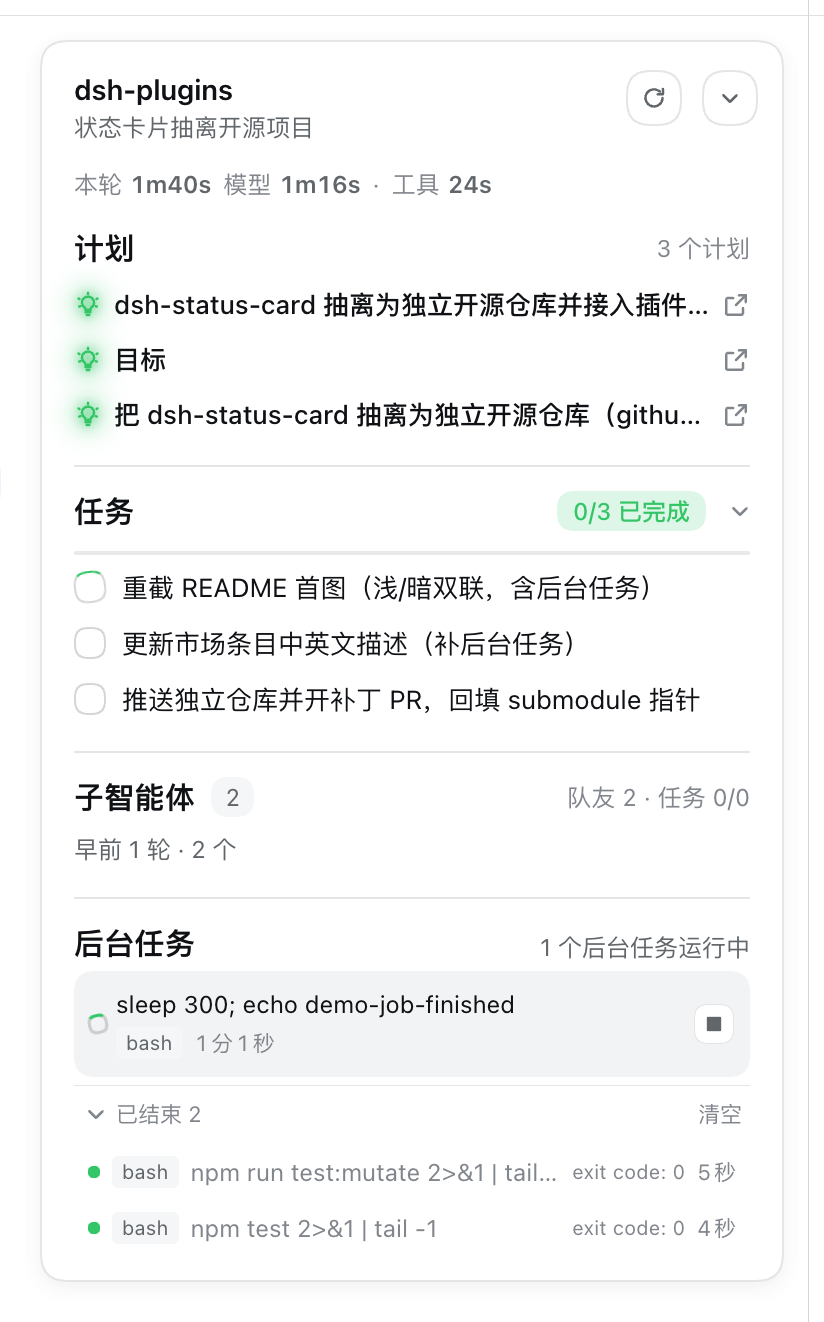 |
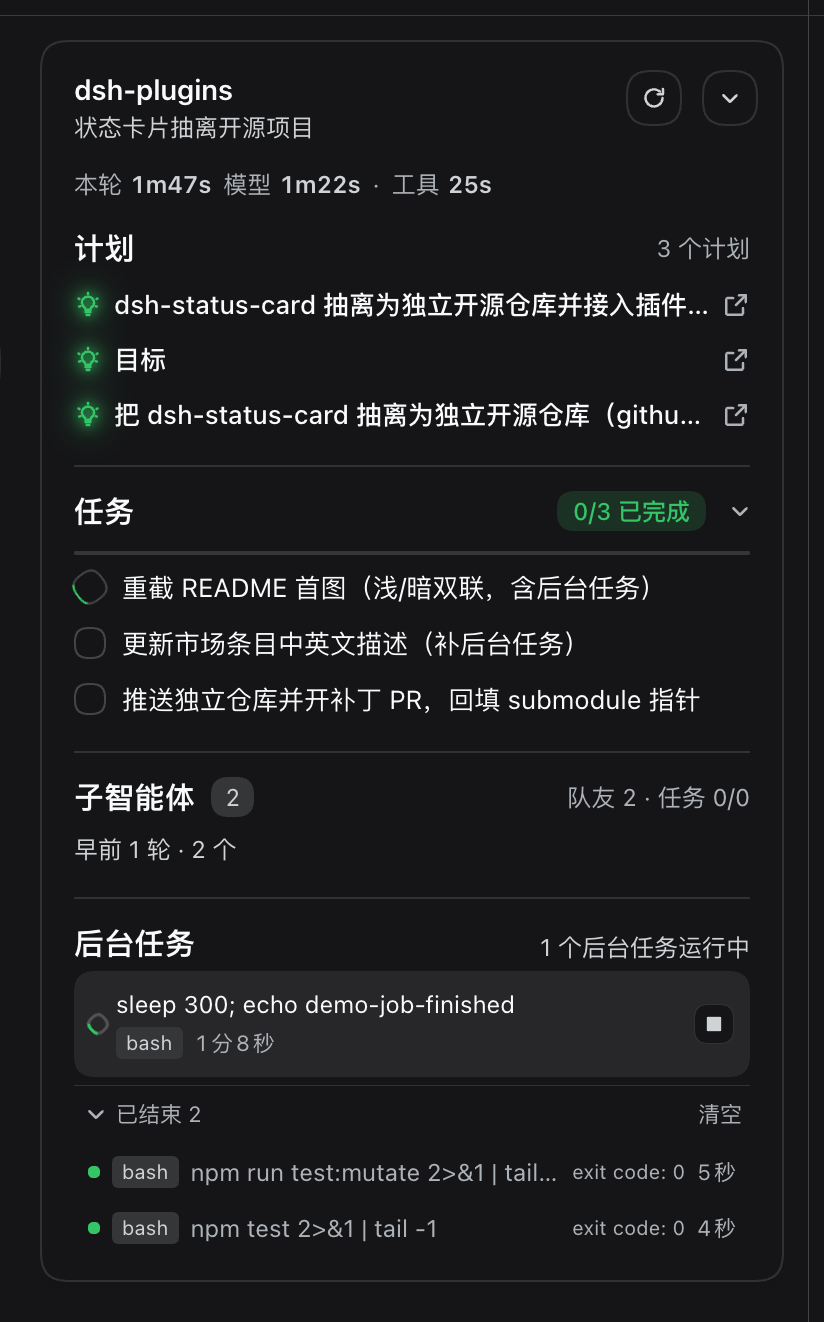 |
| File | Purpose |
|---|---|
| client.js | Card UI + the accent-color block in the plugin detail page: seat registration, projection reads, change fetching, style injection, locale dictionary, theme storage |
| index.js | Host half: session-wide change summary, plan index, turn timing, authenticated route /api/status-card.changes |
| cordis.patch.yml | Inserts the dsh-status-card row |
| package.json | Package name, dsh.bundle, dsh.client (platform / immediately / inject), icon |
| locale/en.json, locale/zh.json | Title and description shown in the plugin manager |
| icon.png | Plugin icon from the supplied artwork (256 × 256 PNG) |
| screenshots.json | Screenshot list consumed by the plugin marketplace |
| docs/VERIFICATION.md | What was verified on a real host, and what was not |
| test/smoke.mjs | Component-level smoke assertions, run by npm test |
| test/host-state.mjs | Deterministic timing and historical to-do regressions, npm run test:state |
| test/client-state.mjs | Deterministic session-switch, goal, stop-request and live-timing regressions |
| test/mutate.mjs | Mutations proving named smoke assertions detect regressions, npm run test:mutate (targeted cases, up to 8 workers) |
+added / -deleted totals are sums over a de-duplicated list, not a git diff.MIN_CONTENT_WIDTH = 360px.padding-right); it
restores the original inline style when the element changes or the plugin unloads.ask_user_question. A question asked by some other MCP tool,
or you simply walking away, is not counted.FileTypeIcon and classifyFileType exports. This narrow direct
reuse follows the requested Workspace Files behavior and was verified on DSH 0.2.1-rc.5; it adds no npm
icon dependency or copied assets. Classification and appearance follow the installed host version.GOAL_STALE_REVISION and shows it.workspaceChanges.summary is in-process.MIT © 2026 liuhusk
CLASSIFICATION EVIDENCE
系统优先读取 GitHub Topics,再与站内分类词典和词根规则比对。当前命中: deepseek-harness。
morluto
Reverse engineer anything with agents, from app behavior down to native binaries.

deepseek-ai
DeepSeek Harness: Everything is a Plugin.

nexu-io
The 1st Collaborative AI Design Agent Workspace. Local-first and open source. Create motion, prototypes, websites, apps, dashboards, presentations, images, and videos with your team and AI agents. Share work, exchange feedback, and iterate together in one workspace.