
模型与 MCP
待识别

rea
morluto
Reverse engineer anything with agents, from app behavior down to native binaries.
PROJECT TOPICS
INSTALL REFERENCE
dsh plugin --profile web add github:litterbit/dsh-plugin-moss-tts
该命令指向仓库当前默认分支;尚无绑定当前 commit 的完整验证结果。
PROJECT README
简体中文 · Version 0.2.3 · Apache-2.0 · Engine repo
Local text-to-speech for DeepSeek Harness, powered by the MOSS-TTS-Nano-100M C++ CPU engine. Everything is synthesized on this machine; text never leaves it, and the weights are installed once and shared with the CLI and the web playground.
Harness assistant reply ──► auto-read / per-message read button
                                 │
                     POST /moss-tts/stream (same origin, no CORS)
                                 │
        host plugin: engine lifecycle + verified download + paced proxy
                                 │  stdin/stdout JSON
                 moss_tts.exe --stdio (resident, weights loaded once)
                                 │
            browser AudioWorklet ring buffer ──► speakers

agent calls moss_tts_say ──► host writes one event (GET /moss-tts/events, SSE) ──► browser
the tool returns at once; the browser pulls /stream itself| Item | Requirement |
|---|---|
| DeepSeek Harness | 0.2.1-rc or newer (client slot contract) |
| OS | Windows x64 (the engine ships for that platform only) |
| Disk | ~170 MB (engine + weights), installed once |
Desktop app: sidebar Plugins → Add plugin → paste
github:litterbit/dsh-plugin-moss-tts#mainCLI profile (a profile the desktop app does not own):
dsh plugin --profile <name> add github:litterbit/dsh-plugin-moss-tts#mainRestart DSH afterwards. You get a "Moss Speech" settings page, a speaker toggle at the left
of the composer, a read button on every assistant reply, and five moss_tts_* tools.
Installing from a local checkout:
dsh plugin --profile <name> add D:\path\to\dsh-plugin-moss-tts(an absolute path is required).
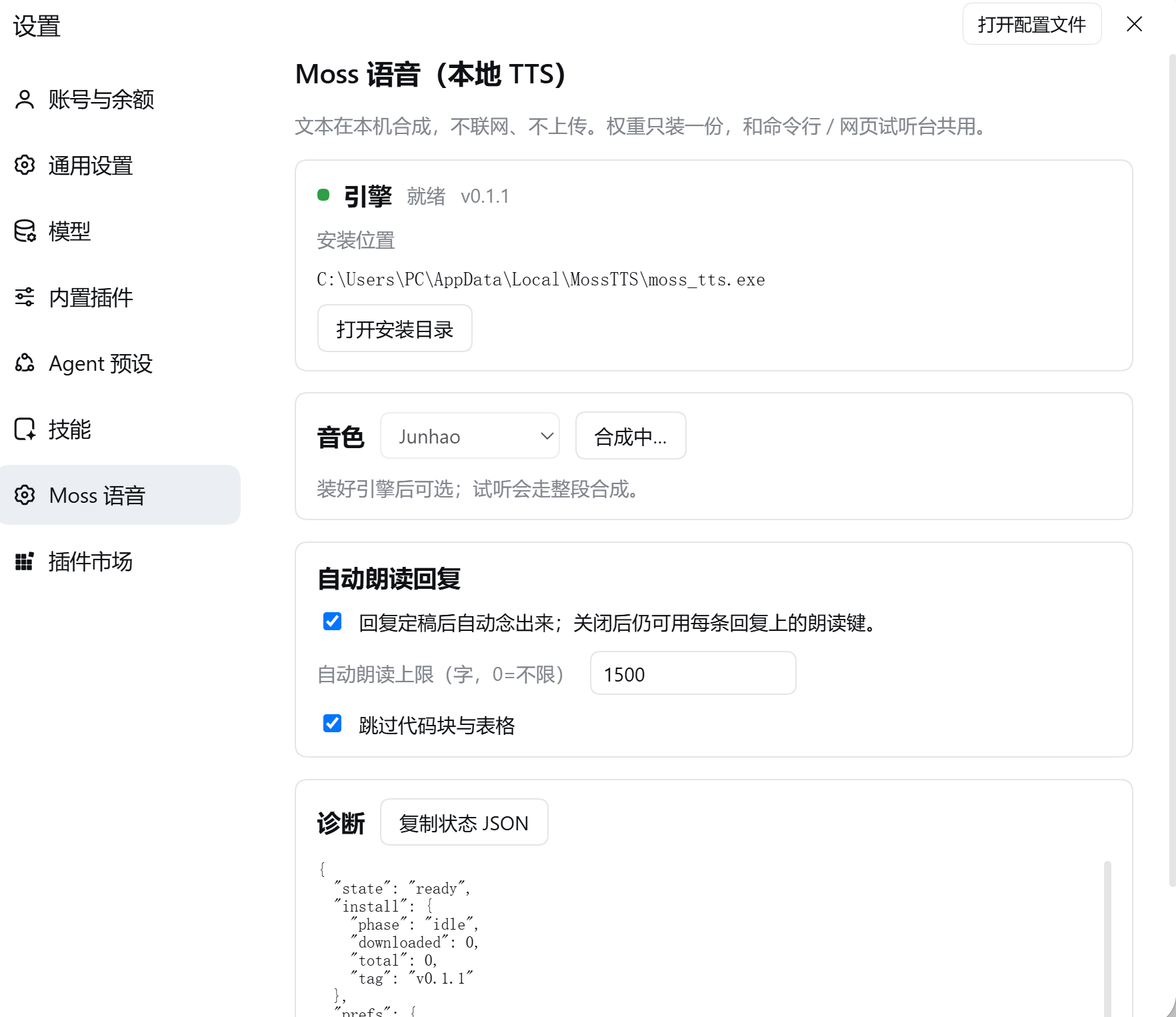
Open Settings → Moss Speech → Download engine. The plugin fetches
MossTTS-win-x64-full.zip (~160 MB) from the
engine releases, verifies it against the
release's sha256sums.txt, and extracts it into %LOCALAPPDATA%\MossTTS.
HTTPS_PROXY / HTTP_PROXY first, then the Windows Internet
settings (ProxyEnable + ProxyServer, via a CONNECT tunnel). A machine whose browser can open
GitHub needs no extra configuration; set NO_PROXY=* to force direct connections.engineUrl + engineSha256 at a mirror in the plugin config,
or set autoDownload: false and manage the install yourself.| Entry point | What it does |
|---|---|
| 🔊 left of the composer | Auto-read. Reads each reply when it settles, using the selected mode; as soon as anything is audible it becomes ⏹ and stops it |
| 🔊 on a reply | Reads that reply only (whole text, ignores the auto-read limit) |
| Player bar above the composer | Appears while there is sound: pause/resume, ↻ replay, ⏹ stop, progress and elapsed time. Hides itself when playback ends |
| Settings → Moss Speech | Engine state/threads/restart, default voice, voice lab (type text, preview any voice), drag-and-drop clone, three read modes, volume, diagnostics |
moss_tts_say |
Agent-initiated speech: with a browser attached it just hands the text over and returns in milliseconds; the UI synthesizes as it plays (first audio in ~0.2–0.4 s). wait: true waits for the end; save_to only writes the WAV |
moss_tts_voices / moss_tts_stop / moss_tts_clone / moss_tts_engine |
Voices (labels + default marker) / stop (including UI playback) / clone (trims >20 s) / status, install, restart, unload |
Markdown is cleaned before speaking: fenced code and tables are skipped, links keep their text, heading and list markers are stripped, and long replies are cut on a sentence boundary at the auto-read limit (default 1500 characters, 0 = unlimited).
Tools, auto-read and the per-reply button all share one player, so the controls are the same everywhere:
moss_tts_stop tool also stops UI
playback.| Mode | What is spoken | Cost |
|---|---|---|
| Smart summary (default) | A DSH subagent condenses the turn into one sentence (≤60 chars); only 200 chars of the question and 600 chars of the answer are sent | A few k tokens per turn (the child's own system prompt); replies under 80 chars are read as-is |
| Full text | The whole reply after cleaning (v0.1 behaviour) | Local compute only |
| Fixed line | One editable sentence, e.g. "Task complete." | Almost free |
If the summary fails (no subagent service, parent offline, timeout, error) it falls back to a
local extract (first sentence, zero tokens) and then to the fixed line — so you always hear
something. The child shows up in the subagent list as moss-tts-summary.
The "Clone a voice" card is a drop zone: drop a WAV/MP3/M4A, the browser decodes it to 48 kHz with
OfflineAudioContext, draws the waveform, lets you drag a 1–20 second window, preview it, name it,
and create the voice. The file never leaves the machine — only the trimmed PCM WAV goes to the
local engine.
moss_tts.exe starts on the first synthesis / voice list / clone (~1–2 s to load weights,
~250 MB resident afterwards).preload: true warms it at start-up, idleUnloadMinutes: 0 never unloads.dsh-plugin-moss-tts off on the sidebar Plugins page
(writes disabled: true into the profile patch); after a restart even the settings page is gone.The "Performance" card edits the two thread pools (LLM and decoder; 0 = auto, default 2+3) and
applies them with Save and restart engine. Thread counts change speed and heat, never the
audio, and land in the engine's own %LOCALAPPDATA%\MossTTS\userdata\settings.json so the CLI and
the web playground see the same values.
%LOCALAPPDATA%\MossTTS\userdata\voices\user\.All three run the same moss_tts.exe, the same weights and the same data directory:
moss_tts.exe --text "hello" --out hello.wavmoss_tts.exe → http://127.0.0.1:8759/--stdioEngine and plugin version independently: engine.json pins a release, falls back to the latest
one when that tag is gone, and always verifies the release's sha256sums.txt.
In the desktop app, remove it from the sidebar Plugins page. For a CLI-managed profile:
dsh plugin --profile <name> remove dsh-plugin-moss-tts.
The weights are left in place (the CLI and the web playground still use them). Delete
%LOCALAPPDATA%\MossTTS to remove them too.
| Symptom | Fix |
|---|---|
| Settings keeps showing "not installed" | Press "Re-check"; verify %LOCALAPPDATA%\MossTTS\moss_tts.exe and models\ exist |
| Download fails / hash mismatch | Usually a proxy rewriting the body. Retry once; if it persists, set engineUrl + engineSha256 in the plugin config |
| "Ready" but silent | The tab is muted, or the output device is wrong; click anywhere in the page once so the browser allows playback |
| Long replies are cut short | The auto-read limit (1500 chars) — raise it in settings, or use the reply's own read button |
| It keeps ~250 MB resident | The engine is a resident child; it unloads after 10 idle minutes, or press "Stop (free memory)", or lower idleUnloadMinutes |
| Smart summary is not used | Check the diagnostics JSON or [summary] in plugin.log; without the subagent service it degrades to extract |
| Louder than other apps | Lower the "Volume" slider to 50–70% (default 60%); it applies to browser playback and tool playback |
| A tool call never returns | 0.2.1 fixes the engine stdout stall after an aborted stream; update and restart DSH |
| Thread changes do nothing | Press "Save and restart engine"; a stale value in settings.json is read back into the page first |
| Plugin does not appear | DSH must be restarted; dsh --profile desktop --dump-config should contain a row id: moss-tts |
node tools/build-client.mjs          # regenerate lib/client.js (committed; installs run no build)
node tools/build-client.mjs --check  # what CI uses to catch a stale bundle
node tools/ci.mjs                    # the same gate GitHub Actions runs
node --test tests/*.test.mjs         # no DSH required; engine tests skip without an engine
Host contract (verified against DSH 0.2.1-rc.2 on the development machine): dsh.bundle.patch
inserts one loader row for the host half; dsh.client.platform = "web" plus
exports["./client"] load the browser half; the host registers routes through
ctx.get('webServer').register and the client registers slots through ctx.slots.inject.
Nothing is imported from the host packages — tool definitions are plain objects with standard
JSON Schema.
Apache-2.0. Model weights come from MOSS-TTS-Nano-100M (Apache-2.0) and are converted to the engine's container format by the engine repo; this package ships no weights or binaries and downloads them at runtime. See NOTICE.
CLASSIFICATION EVIDENCE
系统优先读取 GitHub Topics,再与站内分类词典和词根规则比对。当前命中: 模型、推理。
morluto
Reverse engineer anything with agents, from app behavior down to native binaries.

deepseek-ai
DeepSeek Harness: Everything is a Plugin.

nexu-io
The 1st Collaborative AI Design Agent Workspace. Local-first and open source. Create motion, prototypes, websites, apps, dashboards, presentations, images, and videos with your team and AI agents. Share work, exchange feedback, and iterate together in one workspace.