
Agent 与会话
插件

nuwa-skill
alchaincyf
你想蒸馏的下一个员工,何必是同事。蒸馏任何人的思维方式——心智模型、决策启发式、表达DNA。Distill how anyone thinks.
PROJECT TOPICS
INSTALL REFERENCE
dsh plugin --profile web add github:lingyingaojue/dsh-dev-mode
该命令指向仓库当前默认分支;尚无绑定当前 commit 的完整验证结果。
PROJECT README
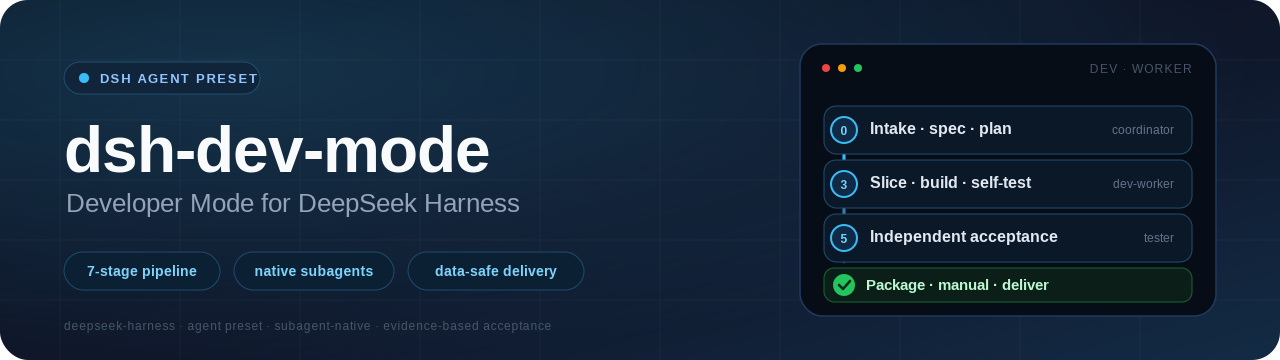




Describe the program you want in plain language. Get back something that actually runs, was tested independently, and comes with a manual and an acceptance table.
Why · How it works · Quick start · What you get · Docs · Contributing
Most "make me an app" experiences stop at a plausible-looking code block. Developer Mode is built around a different question: can the result be installed, run, and trusted by someone who does not write code?
subagent activations with a lean executor preset. No local HTTP, cookies, ports, or side scripts.BLOCKED, not silently passed.[!NOTE] Developer Mode is a DSH agent preset, not a separate app. It requires DeepSeek Harness 0.2.2+ and runs inside a normal DSH session.
| What it is | A developer-mode agent preset for DeepSeek Harness |
| Requires | DSH 0.2.2+ (tested with 0.2.2-rc.3) |
| Tested on | Windows 10/11 |
| Modes | dev (coordinator) · dev-worker (executor) |
| Pipeline | 7 stages · 3 lanes · 7 quality gates (G0–G6) |
| Install | github:lingyingaojue/dsh-dev-mode |
| Status | Active · Windows-tested · no runtime dependencies for the plugin itself |
flowchart TD
    U[User] --> C[dev coordinator]
    C --> S[dev-pipeline skill]
    C --> B[builder / dev-worker]
    C --> T[tester / dev-worker]
    C --> R[reviewer / dev]
    B --> P[project files + build reports]
    T --> Q[QA report + evidence]
    P --> C
    Q --> C
C --> D[deliverable + manual + acceptance table]| Role | Preset | Responsibility |
|---|---|---|
| Coordinator | dev |
Intake, scope, stack choice, delegation, review, packaging, delivery, user communication |
| Executor | dev-worker |
Implements one task at a time, builds, self-tests, writes a report; never talks to the user |
| Pipeline skill | dev-pipeline |
Seven-stage SOP, task templates, artifact contracts, quality gates, failure exits |
| Reviewer | dev fork |
Independent plan review for L2 work |
| Tester | dev-worker |
Independent acceptance; runs the program, collects evidence, writes QA report |
| Stage | Outcome | Gate |
|---|---|---|
| 0 · Intake & classify | Restated request, at most one question round, lane chosen | G0 request understood |
| 1 · Recon & stack choice | Workspace/runtime check, existing-project read, backup, stack decision | G1 environment feasible |
| 2 · Spec & plan | MVP, non-goals, acceptance criteria, commands, risks, packaging target | G2 criteria verifiable |
| 3 · Vertical slice | Smallest end-to-end path: launch + one core action + persistence | G3 slice runs |
| 4 · Incremental build | Small batches, self-tests, coordinator verifies builds and diffs | G4 features complete |
| 5 · Independent acceptance | Fresh tester runs the artifact, evidence per criterion, regression | G5 acceptance passes |
| 6 · Package & deliver | Final artifact, clean-state launch, shortcut, manual, acceptance table | G6 deliverable usable |
| Lane | When | What changes |
|---|---|---|
| L0 · Quick fix | One file, no new dependency, no data/packaging change, ≤3 criteria | Coordinator implements directly; smoke check; no full plan or independent QA |
| L1 · Standard | New small program or moderate change | Brief plan + executor + independent tester; max 2 fix rounds |
| L2 · Full | Multi-file, persistent data, packaging, existing program, external dependency | Full plan + independent review + vertical slice + clean-state install test; max 3 fix rounds |
A result is deliverable only when:
BLOCKED with a reason.Install the plugin (see Install), then start a new session and choose Developer Mode.
Describe the outcome, not the technology. For example:
Build me a small bookkeeping tool in this folder. I need to add an entry, see the list, see the balance, and keep the data after closing and reopening. I don't know programming — choose the approach yourself.
Answer at most one round of questions (often none). The coordinator chooses the stack, writes the plan, delegates implementation, runs independent acceptance, and packages the result.
You receive the artifact, a plain-language manual, an acceptance table, and a short self-check list.
[!NOTE] The mode list also shows Developer Mode · Executor (
dev-worker). It is the internal background role and is selected automatically — you do not need to choose it.
[!TIP] If you already have a program, say "change
<program>to<requirement>". The mode backs up the original first, then runs a regression check.
Desktop app (recommended)
github:lingyingaojue/dsh-dev-mode.CLI (profiles you manage yourself)
dsh plugin --profile <your-profile> add github:lingyingaojue/dsh-dev-mode[!IMPORTANT] A profile managed exclusively by the desktop app (named
desktop) cannot be installed or removed from the CLI. Use the in-app plugin settings instead.
Upgrade
Reinstall the plugin using the same method. For local-directory installs, remove it first and then add it again to avoid ambiguous-install. Existing sessions keep their original composition; only new sessions use the new version.
Uninstall
dsh plugin --profile <your-profile> remove dsh-dev-mode.dsh-dev/ process record: plan, status, build reports, QA reports, evidence, delivery notes, backups.<workspace>/
├─ 程序/<name>/ # new projects; existing programs are edited in place
│ ├─ source, build script, README.md, AGENTS.md, dist/…
│ └─ (Python desktop) core.py / ui.py / app.py / build.ps1 / 启动.bat
└─ .dsh-dev/ # process record; safe to delete after delivery
├─ plan.md
├─ status.md
├─ review-1.md # L2 only
├─ reports/build-N.md
├─ qa/qa-N.md
├─ qa/evidence/
├─ delivery.md
└─ backup-<timestamp>/程序 is the default project folder created by the mode ("programs"); existing projects are edited in place.
| Requirement | Notes |
|---|---|
| DeepSeek Harness | 0.2.2+; tested with 0.2.2-rc.3 |
| Operating system | Windows 10/11 tested; other platforms are untested |
| Plugin runtime | None beyond DSH itself — no Node, Python, or .NET required by the plugin |
| Generated program | Chosen from what the machine has: Python 3.10+, Node 18+, or a local web page |
| Permissions | The deployment decides; the mode never silently escalates privileges |
See docs/COMPATIBILITY.md for the full matrix, preset-id conflicts, and the DSH standard preset sync procedure.
v2 removes the local HTTP background-session driver and its coder.mjs/lib.mjs commands. The dev preset id and the "Developer Mode" name are unchanged. Old sessions keep their composition; start a new session. Existing .dsh-dev/plan.md and QA records remain readable. See CHANGELOG.md.
| Document | What it covers |
|---|---|
| docs/README.md | Documentation index and audience/language notes |
| docs/ARCHITECTURE.md | Presets, native-subagent data flow, stages, gates, artifacts, failure recovery |
| docs/COMPATIBILITY.md | DSH versions, platforms, preset ids, runtime selection, v1 migration |
| docs/FAQ.md | Install, permissions, data, SmartScreen, uninstall, missing mode, costs |
| docs/MAINTAINING.md | Local install, activation checks, smoke tests, releases, CI, rollback |
| docs/TRANSLATIONS.md | Language policy, status, and how to add a translation |
| docs/DETAIL.en.md | Plugin-manager detail page (English) |
| skills/dev-pipeline/SKILL.md | The seven-stage SOP used by the agent (Chinese) |
Status: active · v2.0.1 · Windows-tested · DSH 0.2.2+.
Bug reports, docs fixes, translations, templates, and preset improvements are welcome.
| Language | File | Status |
|---|---|---|
| English | README.md | Canonical |
| 简体中文 | README.zh-CN.md | Up to date |
| 繁體中文 | README.zh-TW.md | Up to date |
| Other languages | — | Contributions welcome — see docs/TRANSLATIONS.md |
The plugin's display metadata and the agent's replies are primarily Chinese/English today. Other-language READMEs are introductions; the translation policy in docs/TRANSLATIONS.md explains the limits.
MIT © 2026 LingYingAoJue. See LICENSE.
Built for DeepSeek Harness · MIT
CLASSIFICATION EVIDENCE
系统优先读取 GitHub Topics,再与站内分类词典和词根规则比对。当前命中: ai-agent。
alchaincyf
你想蒸馏的下一个员工,何必是同事。蒸馏任何人的思维方式——心智模型、决策启发式、表达DNA。Distill how anyone thinks.

freestylefly
Prompt as Code | GPT Image 2 / 2.5 提示词与案例库,530+ 个案例、20+ 套工业级模板与可复用 Skills,新增 2.5 同提示词对比专区,附完整提示词与生成记录,持续更新。

titanwings
Distilly — Distill how they think into reusable Skills for any Agent or Bot. Formerly Colleague Skill(原同事 Skill).