
其他
完整应用

deepseek-harness
deepseek-ai
DeepSeek Harness: Everything is a Plugin.
PROJECT TOPICS
INSTALL REFERENCE
dsh plugin --profile web add github:limuyang2/agent-team
该命令指向仓库当前默认分支;尚无绑定当前 commit 的完整验证结果。
PROJECT README
English | 简体中文


Current release: 0.1.4
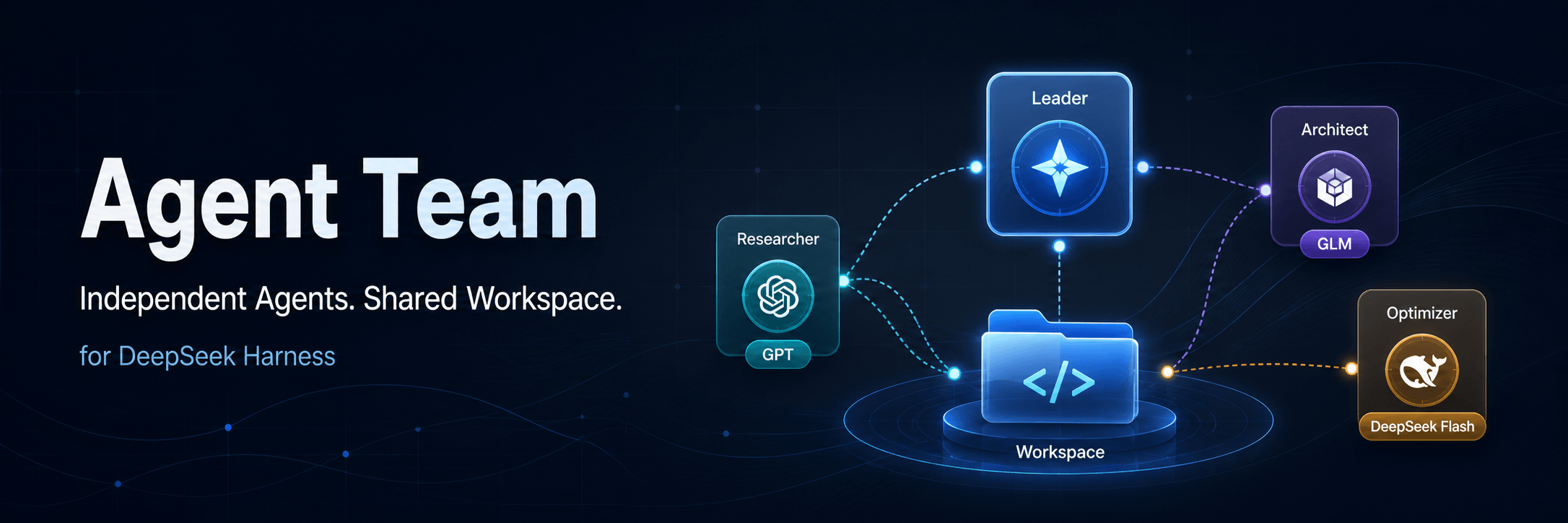
Build teams of independent AI agents inside DeepSeek Harness. Mix models and providers, assign one Leader, and let every member work in its own conversation while sharing the same Workspace.
Agent Team does not turn members into subagents. Every member is an independent root agent with its own model, session, context, permissions, reasoning mode, and tool activity. Team tasks, messages, and the shared Workspace provide the collaboration layer.
Agent Team is designed around a simple idea: give specialized work to a specialized agent.
A common parent/subagent workflow reuses or inherits much of the parent runtime configuration. That is convenient, but it can make every task carry the same expensive model, broad tool catalog, and growing context. A small commit-message task, for example, may still run through the same high-capability model used for architecture and implementation.
Agent Team lets every member have an explicit, focused configuration:
| Concern | Common parent/subagent setup | Agent Team |
|---|---|---|
| Model | Often reuses the parent model or one shared model policy | Choose a different provider and model for every member |
| Skills and MCP | A broad catalog may be inherited or exposed everywhere | Give each role only the Skills and MCP Servers it needs |
| Context | Planning, execution, tool output, and results accumulate together | Every member has an isolated Session and context window |
| Cost | Simple work may still consume an expensive general model | Route routine work to smaller or specialized models |
| Permissions | One broad permission policy can spread across the workflow | Set least-privilege defaults and runtime permissions per member |
This separation keeps the Leader focused on planning and verification, keeps specialists focused on execution, reduces irrelevant tool choices, and prevents one agent's context from growing with every detail produced by the whole team. Members send tasks, progress, and results explicitly instead of sharing an ever-expanding conversation.
Subagent behavior varies by framework. The comparison above describes the common parent-inherited pattern; Agent Team's advantage is that model, tools, permissions, and context isolation are explicit product-level choices for every member.
Consider a software development team with three specialized members:
| Role | Model | Focused configuration |
|---|---|---|
| Architecture Leader | GPT | Understand the requirement, design the solution, split work, coordinate members, and verify results |
| Coding Agent | GLM | Load coding Skills and development MCP tools, modify the Workspace, and run tests |
| Commit Assistant | DeepSeek Flash | Read Git status and diffs, then generate a Conventional Commit message with read-only permission |
The GPT Leader spends its context on decisions and verification instead of every implementation detail. GLM receives the codebase context and tools required for execution. DeepSeek Flash handles the narrow commit task quickly without paying for the Leader's higher-capability model or loading the coding agent's large tool catalog.
The collaboration flow is explicit:
User goal → GPT Leader plans and assigns work
          → GLM Coding Agent implements and reports test results
          → GPT Leader verifies the result
→ DeepSeek Flash Commit Assistant summarizes the Git diffDescribe the role you need. The built-in assistant collects missing settings, prepares the long-term instructions, and creates the assistant only after your confirmation.
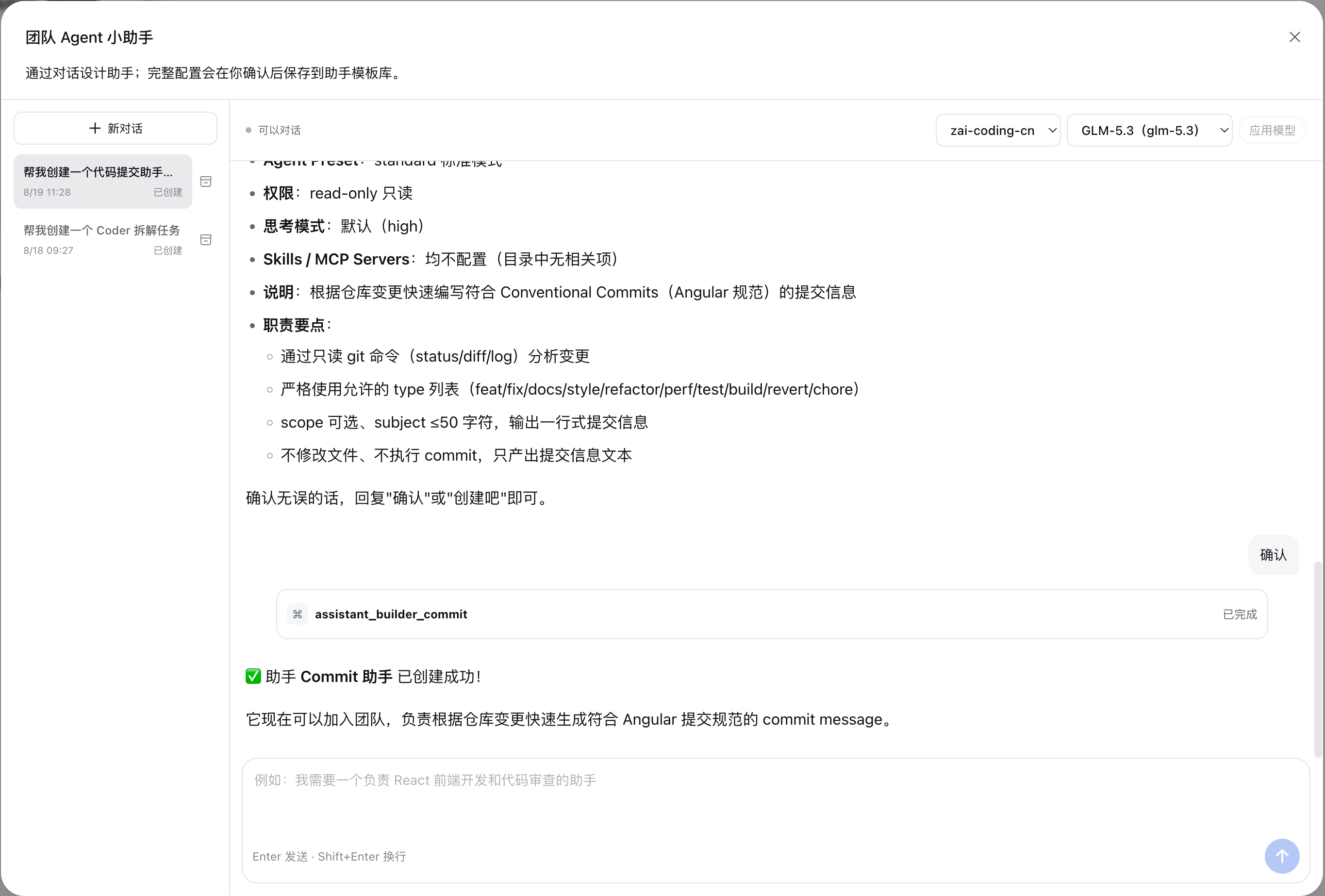
Manage assistants under Settings → Agent Team. Each assistant can use a different provider, model, preset, default permission, reasoning mode, Skills, MCP Servers, and role instructions.
Skills and MCP scope: Agent Team uses Skills and MCP Servers exposed through the standard DeepSeek Harness interfaces. This plugin does not provide installation, updates, or lifecycle management for Skills or MCP Servers. Install the appropriate Harness plugins to manage those resources first; Agent Team only lets an assistant select and use the resources already available in the active Profile.
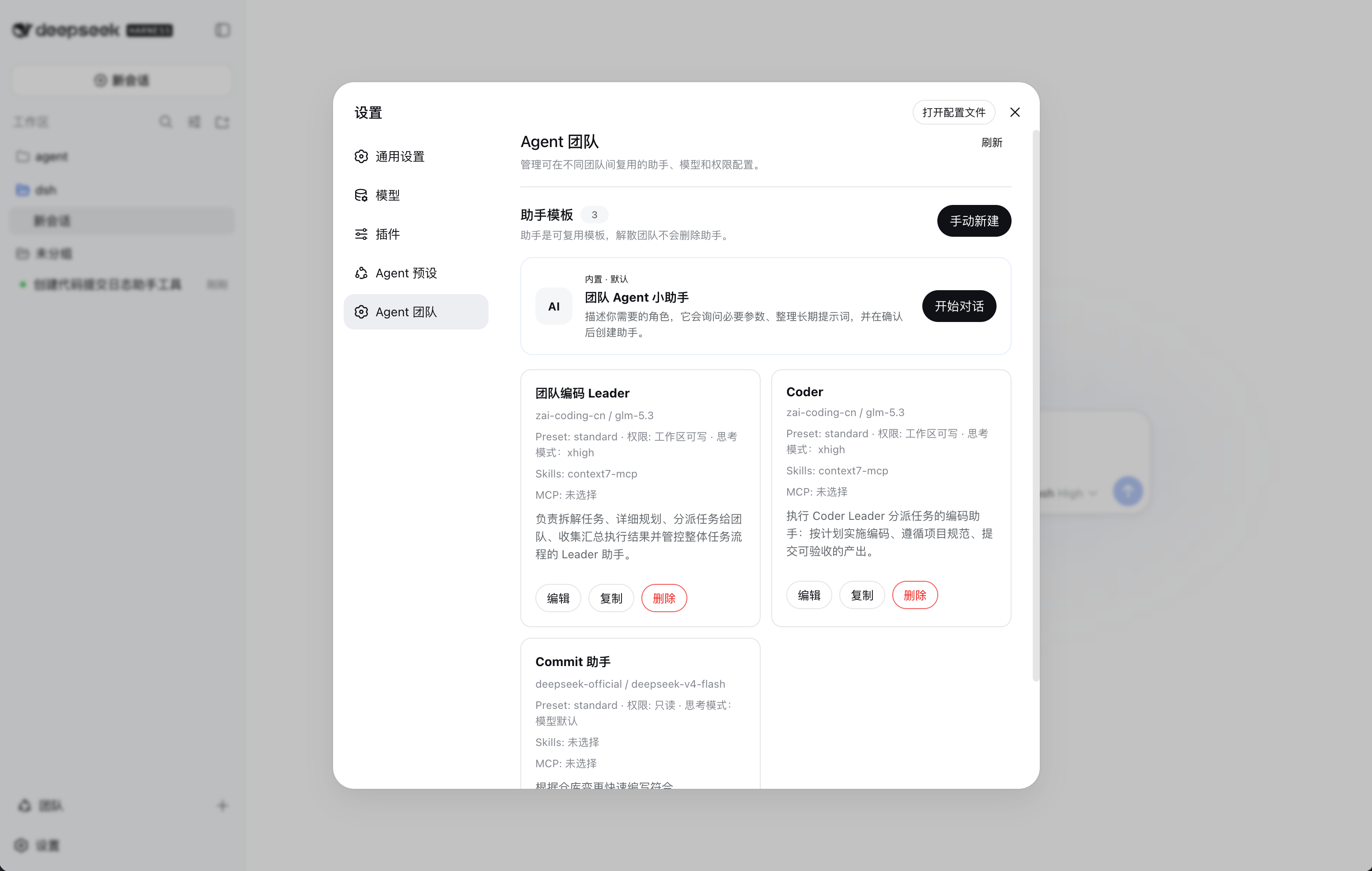
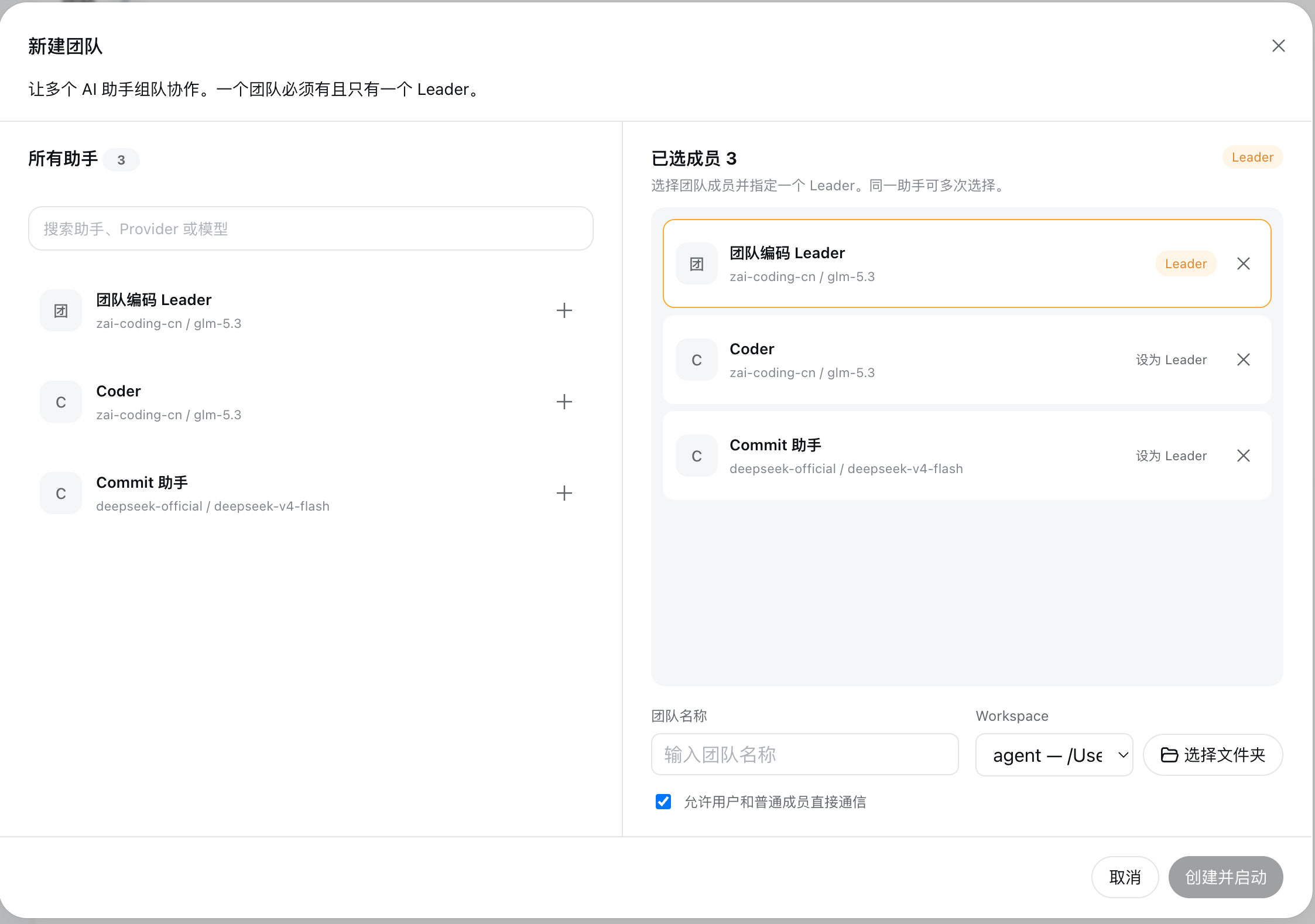
Select members, assign exactly one Leader, choose a Workspace, and decide whether direct communication with regular members is allowed.
A compact floating button opens the full-screen Team workbench without competing with sidebar extensions from other Harness clients. Hover over it or drag it to reveal the label. Drop it at either screen edge to collapse it toward that edge; the last position is remembered locally. Create teams and switch between them from the workbench navigator.

22.19.0+ or 24.0.0+0.1.1-rc.2pnpm available on PATH (Harness uses it to manage Profile plugins)Install pnpm if necessary:
npm install -g pnpmInstall Agent Team into the Harness web Profile:
npx @deepseek-ai/dsh plugin --profile web add @limuyang2/dsh-agent-teamStart Harness:
npx @deepseek-ai/dsh webOpen the URL printed by Harness, normally http://127.0.0.1:3080/. Restart Harness after installing or replacing the plugin.
Install the exact Agent Team release into the Profile managed by DeepSeek Harness Desktop:
dsh plugin add --save-exact @limuyang2/dsh-agent-team@0.1.4Quit and reopen DeepSeek Harness Desktop after the command completes. --save-exact keeps the Desktop Profile pinned to the tested plugin version instead of automatically moving to a newer release.
Stop Harness with Ctrl+C, then remove Agent Team from the web Profile:
npx @deepseek-ai/dsh plugin --profile web remove @limuyang2/dsh-agent-teamRestart Harness after the command completes. Removing the plugin does not modify DeepSeek Harness source code or delete files from your team Workspaces.
Configure the providers, models, and credentials you want to use in Harness first. Agent Team reads the model catalog from the active Profile and never stores provider API keys.
Tip: enable Thinking Mode for GLM-5.3
Add the following configuration to
~/.dsh/settings.yaml. It exposes the available reasoning levels for GLM-5.3 and setshighas the Provider default:llm-pi-ai: providers: zai-coding-cn: reasoning: high modelOverrides: glm-5.3: reasoningEfforts: off: minimal: minimal low: low medium: medium high: high xhigh: xhigh max: max compat: thinkingFormat: zai supportsReasoningEffort: trueMerge this block into an existing
llm-pi-aisection instead of adding a second one. If your ZAI Provider uses a different ID, replacezai-coding-cn. Restart Harness, then select the desired Thinking Mode from the assistant conversation toolbar; that runtime selection overrides the Provider default for the conversation.
Open Settings → Agent Team and choose one of the following:
A practical first team usually contains:
Click the floating Team button, then click + in the workbench navigator:
The team starts automatically and opens in the full-screen workbench.
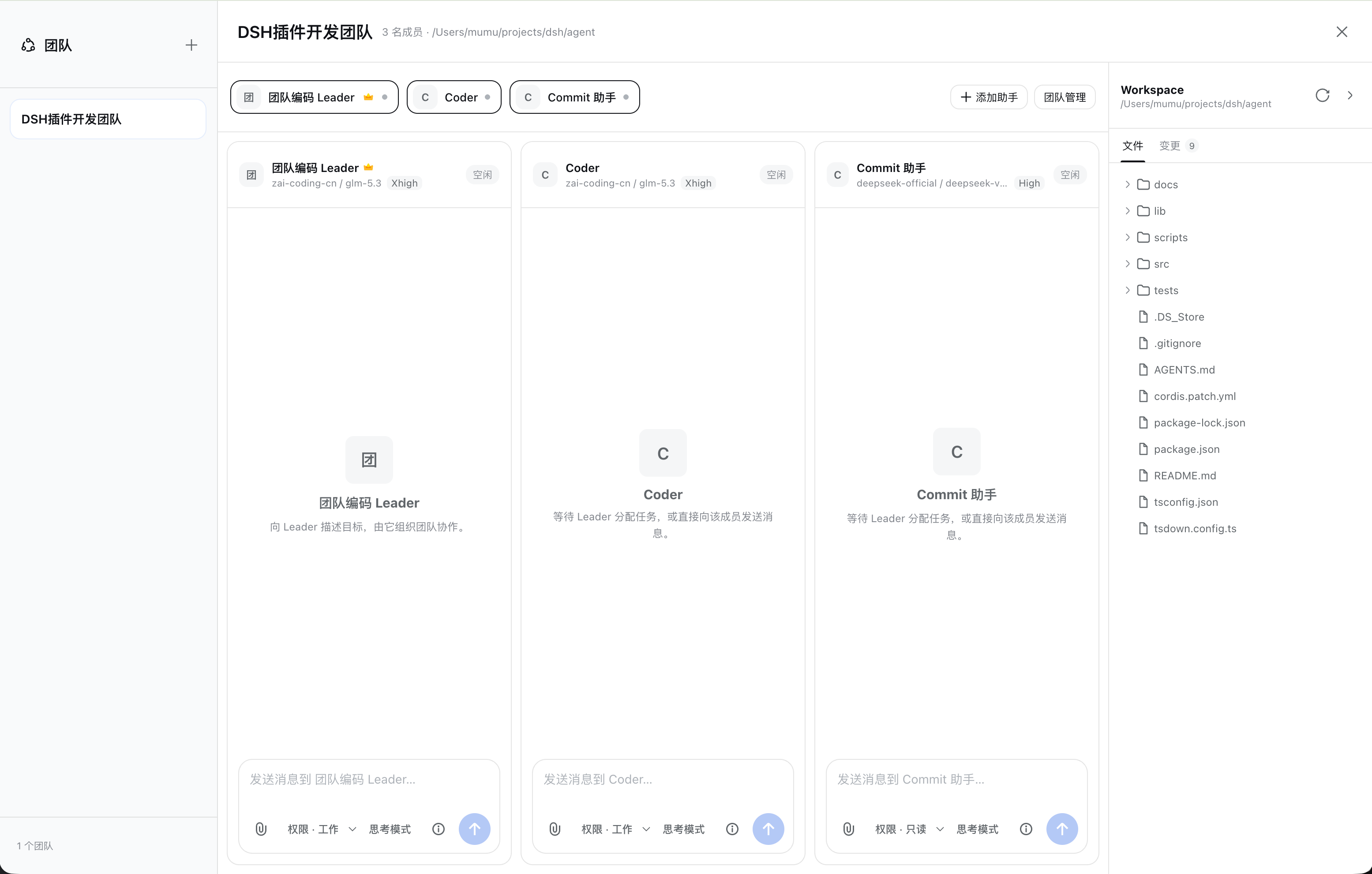
Send the complete objective to the Leader. The Leader can split it into tasks, assign members, receive progress updates, and verify the final output. You can also talk to an individual member directly when the team policy allows it.
Each visible column is a real, independent Harness session.
/ to invoke an allowed Skill; type @ to search and mention Workspace files; attach local files, stop generation, and change runtime settings.The Leader and members communicate through explicit team tools and messages:
Members share a Workspace, but they do not share conversation history. This keeps roles and model contexts isolated while allowing them to work on the same files.
Assistant settings are snapshotted when a member joins a team. Editing an assistant later does not hot-update existing members; remove and add the member again to apply the new configuration.
.agent-team/uploads/ so agents can access them reliably.pnpm not found on PATHRun npm install -g pnpm, verify pnpm --version, and install the plugin again.
3080 is already in useAnother Harness process is already running. Stop the old process with Ctrl+C, then run npx @deepseek-ai/dsh web again.
Refresh the assistant catalog and verify the model configuration in Harness. Reasoning modes only appear when the provider reports that capability.
The assistant is still referenced by a team member. Remove those members or dissolve the related teams first.
Confirm that the selected Workspace itself is a Git repository. A repository nested inside a non-Git Workspace is not treated as the Workspace repository.
The detailed user guide is available in Chinese:
MIT
CLASSIFICATION EVIDENCE
系统优先读取 GitHub Topics,再与站内分类词典和词根规则比对。当前命中: 无有效分类标签。
deepseek-ai
DeepSeek Harness: Everything is a Plugin.

anywhere-labs
为 DeepSeek Harness (DSH) 插件生态打造的现代化桌面端解决方案。万物皆「插件」,桌面本身也是「插件」。

walkinglabs
Harness engineering beginner tutorial, from 0 to 1