
其他
插件

dsh-bili-scroll
c1overzz
DSH 插件:每天替你刷一轮 B站,读字幕挑出值得的、写一份日报,值得的 @ 你
PROJECT TOPICS
INSTALL REFERENCE
dsh plugin --profile web add github:lhf6623/dsh-usage-heatmap
该命令指向仓库当前默认分支;尚无绑定当前 commit 的完整验证结果。
PROJECT README
A DeepSeek Harness (DSH) Web UI plugin: one left-sidebar entry that opens a full-panel calendar heatmap of daily session and message counts, computed from the session logs this machine already stores.
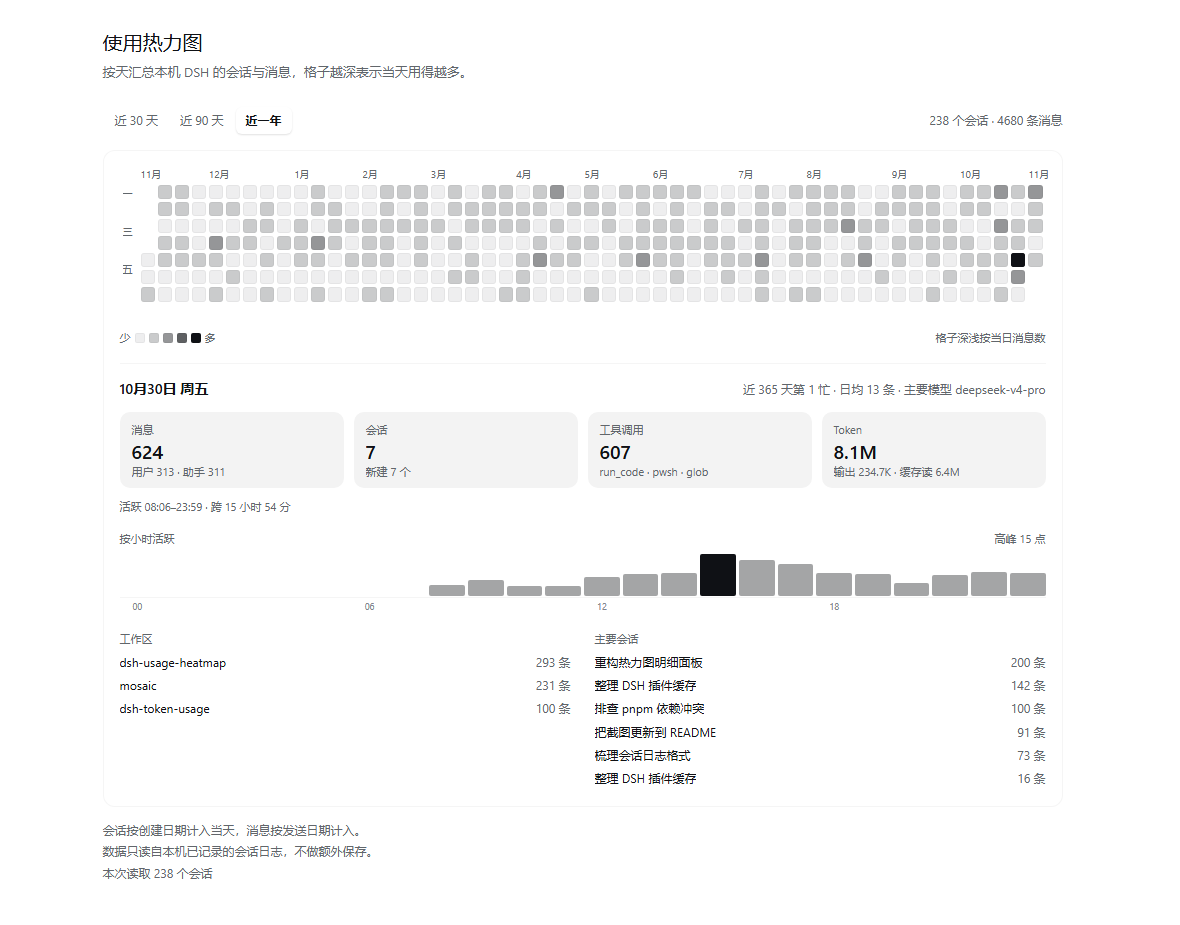
--dsw-alias-* theme tokens, so light and dark
themes both work.| Field | Meaning |
|---|---|
sessions |
logical sessions whose header createdAt falls on that day |
messages |
user/message + assistant/message events whose own time falls on that day, across every session on the machine |
detail |
for one selected day: user/assistant messages, active vs newly created sessions, tool calls, token usage, hourly activity, workspaces, busiest sessions |
Events before a forked/subagent session's inheritedEventCount are skipped, so
an inherited log prefix is not counted twice.
This package is a DSH profile bundle (dsh.bundle.patch + dsh.client).
From a local checkout:
Quit DSH.
In the profile's package.json (for example
~/.dsh/profiles/desktop/package.json) add the dependency and list the
bundle:
{
  "dependencies": {
    "dsh-usage-heatmap": "link:D:/dsh-usage-heatmap"
  },
  "dsh": {
    "profile": {
      "bundles": ["...existing bundles...", "dsh-usage-heatmap"]
    }
  }
}
A git checkout works the same way — point the dependency at the cloned directory.
Start DSH. The left sidebar gets the 使用热力图 / Usage heatmap entry.
The checked-in client.js is already built, so a fresh checkout needs no
package install and no build to run. Only plugin development needs pnpm
(see Development).
If you previously installed an auto-generated local version of this plugin, disable or remove that entry first so the sidebar only shows one heatmap.
The Host half reads sessions through ctx.sessionQuery and serves two JSON
routes:
GET /_dsh/dsh-usage-heatmap/heatmap?from=<ms>&to=<ms>&tz=<minutes east>&refresh=1
GET /_dsh/dsh-usage-heatmap/detail?date=<YYYY-MM-DD>&tz=<minutes east>
Cache files live under $DSH_HOME/dsh-usage-heatmap/:
cache-<account>.json stores, per session, its message counts by day plus the
log file identity (mtime:size) they came from.refresh=1 rebuilds once.Selecting a day asks the second route for that day's breakdown. It reuses the same rolling cache to decide which sessions were
active on that date, so a click re-reads only those logs — normally a handful —
instead of replaying the whole corpus. One response is bounded to the 150 most
active sessions of the day, plus the top tools, workspaces, sessions and models.
Titles and workspaces come from the session log itself (the latest
session/title event and the header cwd), and the client remembers each
day's answer for the rest of the page session. A day detail request after the
calendar has loaded does not rebuild the whole cache: it uses the same fresh
dataset the calendar request just wrote.
.
├── index.js                  # Host entry: re-exports the plugin from src/host/
├── client.js                 # Client entry, GENERATED from src/client/ by the build
├── src/
│   ├── client/               # Web half sources (bundled into client.js)
│   │   ├── index.js          #   loader registration root (default export = plugin)
│   │   ├── plugin.js         #   Cordis plugin: locale, stylesheet, main + sidebar slots
│   │   ├── constants.js      #   ids, routes, ranges, cell sizing
│   │   ├── time.js           #   local-day keys, calendar dates, day formatting
│   │   ├── format.js         #   number, clock and duration formatting
│   │   ├── calendar.js       #   week-column layout, skeleton days, heat levels, cell geometry
│   │   ├── data.js           #   fetch + React hooks for the calendar and one day's detail
│   │   ├── styles.css        #   panel CSS (inlined into the bundle by the build)
│   │   ├── i18n/{zh,en}.js   #   UI copy dictionaries
│   │   └── components/       #   PanelIcon, StatTile, DayDetail, HeatmapBody, UsageHeatmapPage
│   └── host/                 # Host half sources (run directly by Node, no build)
│       ├── plugin.js         #   Cordis plugin: route registration, locking, cache warm-up
│       ├── routes.js         #   request parsing + JSON responses for both routes
│       ├── dataset.js        #   calendar payload aggregation
│       ├── detail.js         #   one-day breakdown aggregation
│       ├── sessions.js       #   session listing, log freshness probe, message counting
│       ├── cache.js          #   per-account cache file read/write
│       ├── time.js           #   day keys, day enumeration, local-day parsing
│       └── constants.js      #   routes, limits, cache paths
├── scripts/build-client.mjs  # esbuild bundle -> client.js (lazy-CJS loader wrapper)
├── test/                     # node:test suites for the Host routes and the client bundle
├── cordis.patch.yml          # Bundle patch that inserts the plugin row
├── package.json              # DSH package metadata (bundle + client halves)
├── locale/                   # Sidebar label / description (zh, en)
├── icon.svg                  # Sidebar glyph
└── docs/                     # README preview images (sample data)
The DSH Web client loads one lazy-CJS bundle per package (the ./client
export), so src/client/ is bundled ahead of time into the committed
client.js. The bundle only registers a factory with
window.__ModuleLoader__, exactly like a compiled DSH client plugin. The Host
half is plain Node ESM and runs straight from src/host/.
Requirements: Node.js (20+) and pnpm.
pnpm install          # once: installs esbuild (dev-only)
pnpm run build        # bundle src/client/ -> client.js
pnpm test # node:test suites (build first: they load client.js)src/client/**, run pnpm run build, restart DSH.
client.js is generated — never edit it by hand.src/host/** and restart DSH; no build involved.node scripts/build-client.mjs --sourcemap keeps function names readable and
emits client.js.map for debugging (not committed).The Host half writes its cache on the first request, so the first open after a cold cache rebuild may take a few seconds; later opens are incremental.
No license has been chosen yet. Add one before publishing if you want others to reuse this code.
CLASSIFICATION EVIDENCE
系统优先读取 GitHub Topics,再与站内分类词典和词根规则比对。当前命中: 无有效分类标签。
c1overzz
DSH 插件:每天替你刷一轮 B站,读字幕挑出值得的、写一份日报,值得的 @ 你

hellowind777
一个自主的高级智能伙伴,不仅分析问题,更持续工作直到完成实现和验证。

xing-shuyin
Just open your browser — get all your work done.