
模型与 MCP
待识别

rea
morluto
Reverse engineer anything with agents, from app behavior down to native binaries.
PROJECT TOPICS
INSTALL REFERENCE
dsh plugin --profile web add github:lewisyoung0914/dsh-better-todo
该命令指向仓库当前默认分支;尚无绑定当前 commit 的完整验证结果。
PROJECT README


English | 中文
A todo panel for the DeepSeek Harness Web UI. It floats above the right side of the window, snaps to whichever edge you drag it near, and carries a pomodoro timer in its header.
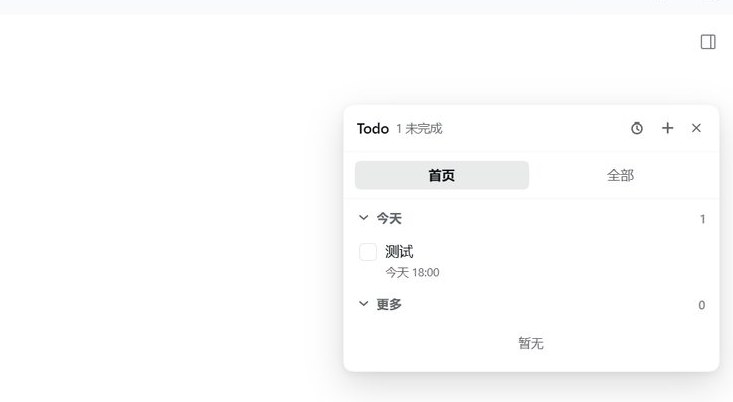
Todo row sits beside Settings and shows how many items are still open. The panel remembers whether it was open.Home groups items into Today (due today) and More (everything else, including items with no due date), both collapsible. All splits unfinished and finished; the finished list shows 10 at a time and loads 20 more per click.+ opens a form for the title, details, due time and one attachment. Clicking an item opens a read-only page first; nothing can be changed until Edit in the top right switches it to the form.todo_list, todo_add, todo_update, todo_remove and todo_attach, so "tick that one off", "add a note", "attach this screenshot" all work by asking; the panel syncs a few seconds later./todo in the composer — for fast entry: /todo lists, /todo add Write the report, /todo finish 3. Parsed by fixed rules, so it costs no model call.~/.dsh/todo-panel/, written by the plugin's Host half. Nothing is uploaded anywhere.| The list | A new item | The pomodoro |
|---|---|---|
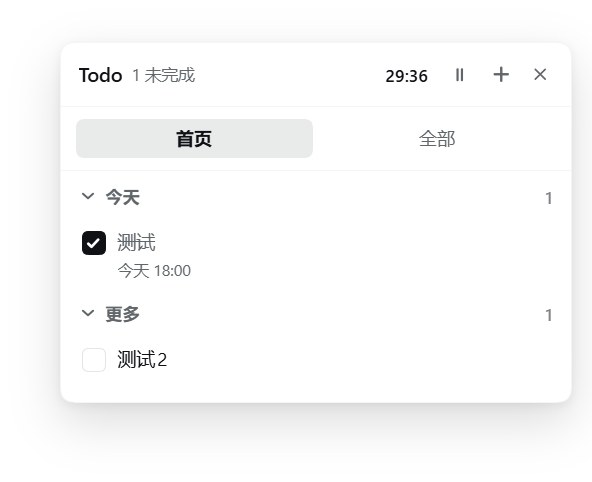 |
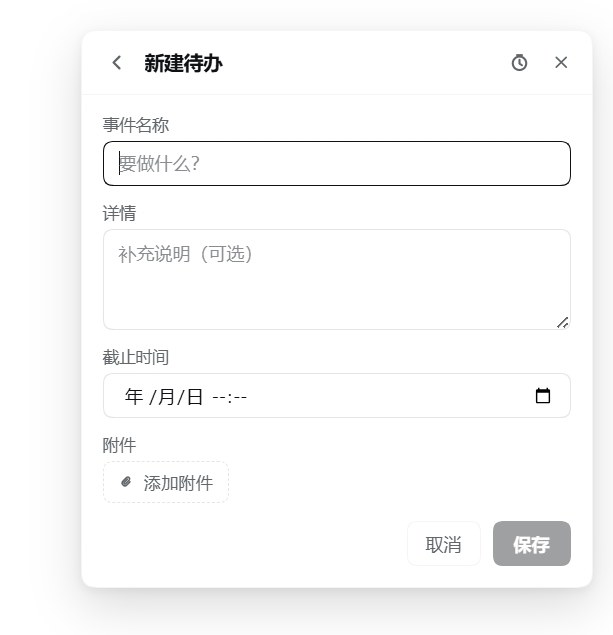 |
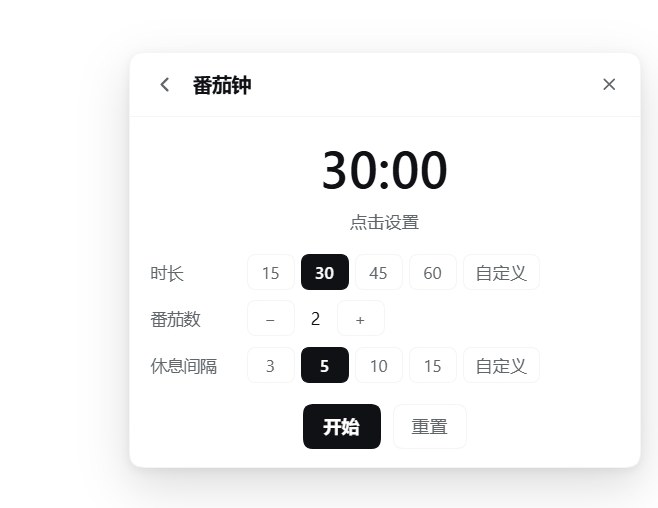 |
dsh plugin --profile web add https://github.com/lewisyoung0914/dsh-better-todoThen restart dsh web (or the desktop app) and refresh the page. Once the plugin is listed in the market you can install it by name instead:
dsh plugin --profile web add dsh-better-todoRequires a DSH build that provides the web client slots shell.overlay and sidebar.footer.action. The package declares its host requirement in engines.dsh:
>=0.2.1-rc.1 <0.2.2-0 || >=0.2.2-rc.1 <0.3.0-0Two branches, because of how node-semver treats prereleases: a prerelease version only satisfies a range when some comparator on its exact major.minor.patch tuple also carries a prerelease tag. A single >=0.2.1-rc.1 <0.3.0 would silently reject 0.2.2-rc.1, the build this is developed against.
| Action | Where |
|---|---|
| Open / close the panel | the Todo row at the sidebar foot |
| Move the panel | drag the header; edges snap on release |
| Reset the position | double-click the header |
| Create an item | + in the panel header |
| Edit an item | click its text |
| Complete an item | the checkbox on its left |
| Open the timer | the clock (or the running countdown) in the panel header |
| Pause / resume the countdown | the ⏸ / ▶ beside it |
| Manage the list without touching the mouse | type /todo in the composer |
Inside the timer page, Start / Pause control the current phase and Reset returns to idle with the counter cleared. Settings can only be changed while the timer is idle, so a running countdown never jumps.
A phase end does two things so you cannot miss it:
The toast goes through the page's Notification API first; when that is unavailable — no permission, or a host that cannot show one — the plugin's Host half falls back to a toast from PowerShell. Permission is requested the first time you press Start.
Known limits:
The Host half registers one set of tools, available in every conversation once the plugin is installed.
Read:
| Tool | Parameters | Returns |
|---|---|---|
todo_list |
status: all (default) / open / done; limit: 1-200, default 100 |
title, details, due time, completion state, attachment names |
Write (each one changes your list; the panel picks the change up within seconds):
| Tool | Parameters |
|---|---|
todo_add |
title (required), detail, due |
todo_update |
id (required) plus any of title / detail / due / done — done ticks or unticks it |
todo_remove |
id (required) |
todo_attach |
id (required), path (a local file, at most 32 MB) — a screenshot is just an image file |
So "tick off the workbench test", "add a note to that one: waiting on the API", "attach this screenshot to item 4" all work.
Synchronisation uses the document's rev counter: the panel saves with the revision it last saw, the Host answers 409 when someone else moved on, and the panel merges and saves again. An idle panel polls every four seconds, so an agent's change shows up on its own.
The tools register when the plugin loads, so after installing it or editing index.js, reload the plugin (turn it off and on again in the plugin list) or restart DSH.
The todo_* entries above are agent tools; the / menu in the composer lists commands, a separate registry, so tools never show up there. For typing at the list directly, the plugin registers /todo:
| Input | Effect |
|---|---|
/todo |
unfinished items, with a position and an id |
/todo all |
every item |
/todo done |
finished items |
/todo add Write the report |
add one; /todo add Write the report \| after lunch \| 2026-11-07T18:00 also sets details and a due time |
/todo finish 3 |
tick item 3 (an id or id prefix works too) |
/todo undo 3 |
untick it |
/todo remove 3 |
delete it, attachment included |
Everyday wording works too: /todo 完成 3, /todo 删掉 2, /todo 已完成, or a whole sentence — /todo 今天新增一条任务,把gzcode放到内网测试 drops the leading filler and stores 「把gzcode放到内网测试」.
The command is parsed by fixed rules, not understood: for anything that needs a real reading ("move item 3 to tomorrow afternoon and add a note"), send a normal message instead and let the agent use the todo_* tools — no slash.
Command changes travel through the same rev counter, so the panel syncs within seconds, and the result is printed in the conversation without spending a model call.
Everything lives in one JSON document that the plugin's Host half owns:
<DSH_HOME>/todo-panel/state.json # ~/.dsh/todo-panel/state.json by defaultThe page reads and writes it through /todo-panel/state on its own origin. That indirection is deliberate: the desktop picks a fresh web port on every launch, and localStorage/IndexedDB are partitioned by origin, so a browser-stored list would be a different — empty — database after each restart.
| Field | Contents |
|---|---|
rev |
revision counter, bumped by every write; the page watches it to notice other writers |
savedAt |
timestamp of the last write |
items |
title, details, due time, completion state, attachment metadata |
open |
whether the panel is open |
position |
panel position and the snapped edge |
pomodoro |
timer settings and the running phase |
attachments |
one data URL per item id |
The file is plain JSON: back it up, read it, or delete it. It is per profile, not per DSH account, and nothing leaves the machine. A browser session that still holds data from an earlier version migrates it on first load and then clears the old keys.
The Host half also serves two endpoints the page uses: /todo-panel/state for the document and /todo-panel/notify for the Windows toast. Both accept same-origin requests only.
No build step — the plugin is plain JavaScript loaded as an ES module.
| File | Role |
|---|---|
index.js |
Host half: the JSON document and its rev protocol, /todo-panel/state and /todo-panel/notify, the five agent tools, the /todo command |
client.js |
the whole UI: stores, the panel, the detail and edit pages, the pomodoro engine, notifications, CSS |
cordis.patch.yml |
the one row this bundle inserts into the profile |
locale/zh.json, locale/en.json |
market metadata (title, description) |
icon.svg |
plugin icon |
There is no JSX: components are built with React.createElement (aliased to h). Edits to client.js are picked up by the running app through hot reload; a change to index.js needs the plugin reloaded (turn it off and on in the plugin list), and a change to cordis.patch.yml or package.json needs the bundle reinstalled.
1.6.8 — declares engines.dsh, so the installer and the market card can check the host requirement instead of showing it as undeclared.1.6.7 — every write keeps the previous document as state.json.bak, so one bad save costs one generation instead of the whole list.1.6.6 — the panel's routes, /todo and the five agent tools now register through ctx.inject, so a profile that mounts this plugin before the Host's web server and registries no longer loses them.1.6.5 — screenshots of the panel, the item form and the timer, plus a screenshots.json for market listings.1.6.4 — releases are published to npm by GitHub Actions through Trusted Publishing, with a provenance attestation attached to each tarball.1.6.3 — the timer page no longer carries a test-notification button.1.6.2 — both READMEs rewritten around the agent tools, /todo and the timer.1.6.1 — /todo accepts everyday wording (完成 / 删掉 / 已完成 …) and turns a whole sentence into a task.1.6.0 — the /todo slash command.1.5.0 — agent writes (add / update / remove / attach), the rev protocol, a pomodoro phase that waits for a click, the header pause button, Host toasts through PowerShell.1.4.0 — the read-only todo_list tool.1.3.0 — clicking an item opens a read-only detail page; Edit switches to the form; images open full-screen.1.2.0 — the document moved to the Host half (it used to live in the browser and vanished with each port change).1.1.1 — fixed the client module id, which crashed the boot with a duplicate registration.MIT
CLASSIFICATION EVIDENCE
系统优先读取 GitHub Topics,再与站内分类词典和词根规则比对。当前命中: deepseek-harness。
morluto
Reverse engineer anything with agents, from app behavior down to native binaries.

deepseek-ai
DeepSeek Harness: Everything is a Plugin.

nexu-io
The 1st Collaborative AI Design Agent Workspace. Local-first and open source. Create motion, prototypes, websites, apps, dashboards, presentations, images, and videos with your team and AI agents. Share work, exchange feedback, and iterate together in one workspace.