

模型与 MCP
待识别

rea
morluto
Reverse engineer anything with agents, from app behavior down to native binaries.
PROJECT TOPICS
INSTALL REFERENCE
dsh plugin --profile web add github:leobasic/dsh-doc-panel
该命令指向仓库当前默认分支;尚无绑定当前 commit 的完整验证结果。
PROJECT README
A conversation-scoped document browser for DeepSeek Harness: every document your conversations produce — organized by the conversation that produced it, searchable and previewable, without leaving the app.


English · 简体中文
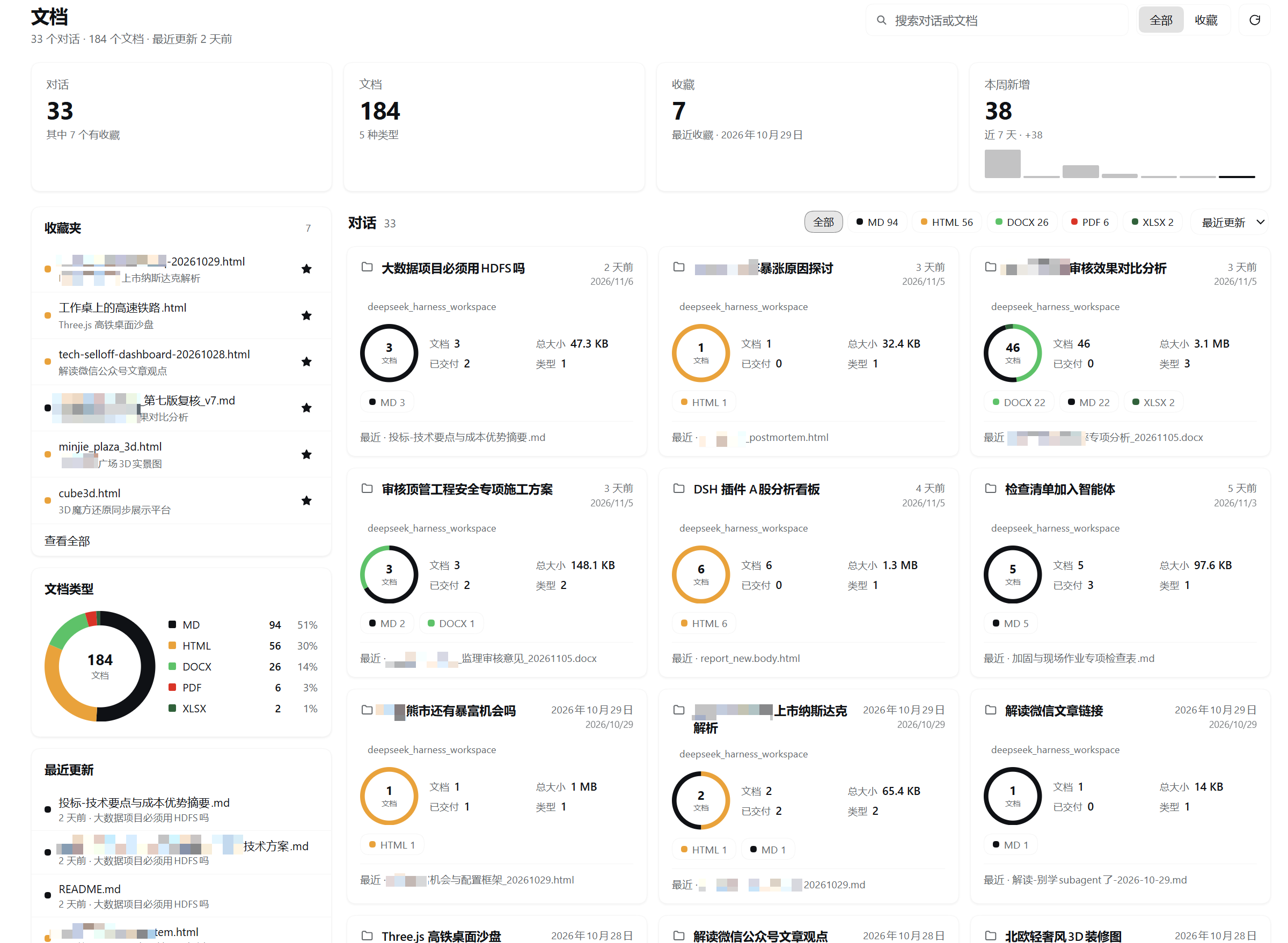
Agent conversations produce real deliverables: Markdown reports, single-file HTML dashboards, PDFs, spreadsheets, Word documents. They pile up in one workspace (or a few), and there is no built-in place to see what a particular conversation created, find last week's report, or keep the files you care about within reach.
dsh-doc-panel adds one Documents panel to the Harness sidebar. It indexes the documents each conversation produced, groups them under that conversation, and gives you the same three things a file manager gives you: a place to browse, a way to search, and a short list of favorites.
write, edit, present, write-capable tool arguments) plus a filtered workspace
scan. Subagent sessions are folded into their root conversation.Prerequisites: a DSH installation with the plugin_manager tool. Tested on DSH Desktop
0.2.2-rc.1 with Node 24; Node.js 22+ in general. plugin_manager actions may require
Full access or an approval prompt.
git clone https://github.com/leobasic/dsh-doc-panel.gitThen install the bundle from its absolute path:
plugin_manager({ action: 'install_bundle', target: '/absolute/path/to/dsh-doc-panel' })No build step is involved — the files are used as written. Uninstall with
plugin_manager({ action: 'remove_bundle', target: 'dsh-doc-panel' }).
If your DSH build supports installing from a git spec:
plugin_manager({ action: 'install_bundle', target: 'https://github.com/leobasic/dsh-doc-panel' })Otherwise use Option 1 and point target at the checkout directory.
Once the package is published to npm, install it by package name:
plugin_manager({ action: 'install_bundle', target: 'dsh-doc-panel' })The npm package contains only the Harness bundle files; DSH is still required to run it.
The very first scan reads the session corpus and can take a little while; later loads use the cache and are fast.
The plugin row accepts an optional config object. All keys are optional.
| Key | Default | Purpose |
|---|---|---|
extensions |
.md .markdown .html .htm .pdf .docx .doc .xlsx .xls .pptx .ppt |
Document types listed, scanned and previewed. .csv/.txt are opt-in: add them here if you want them. |
maxFiles |
5000 |
Total cap on files collected per scan. |
maxDepth |
6 |
Maximum directory depth walked below each conversation workspace. |
cacheTtlMs |
60000 |
How long the in-memory/persisted index is considered fresh. |
cachePath |
null |
Index cache override. null = <defaultDirectory>/.dsh-doc-panel/index.json. |
favoritesPath |
null |
Favorites store override. null = <defaultDirectory>/.dsh-doc-panel/favorites.json. |
timeoutMs |
180000 |
Hard deadline for one scan; on expiry a partial index is returned with diag.complete: false. |
warmOnStartup |
true |
Warm the index in the background shortly after activation. |
- id: dsh-doc-panel
  name: dsh-doc-panel
  config:
    extensions: ['.md', '.markdown', '.html', '.htm', '.pdf', '.docx', '.doc', '.xlsx', '.xls', '.pptx', '.ppt']
    maxFiles: 5000
    maxDepth: 6
    cacheTtlMs: 60000
    cachePath: null       # null = <defaultDirectory>/.dsh-doc-panel/index.json
    favoritesPath: null   # null = <defaultDirectory>/.dsh-doc-panel/favorites.json
    timeoutMs: 180000
    warmOnStartup: true
<defaultDirectory> is the Harness default working directory (the profile directory on
a normal install; ~/.dsh as a fallback). Full reference and file formats:
docs/configuration.md.
The plugin has a Host half (index.js, Node) and a Client half (client.js, React in the
Harness Web app), wired by cordis.patch.yml — no build step, no bundler.
sessionQuery service and reduces each
session log to compact signals: title, first/last time, turn windows and document path
references.node_modules, .git, .asar trees, dot
directories and scratch files).POST api/dsh-doc-panel/list serves it, while read/file serve previews
from an allow-listed set of indexed paths.sandbox="allow-scripts allow-downloads" iframe
(no same-origin access).Details and the data-flow diagram: docs/architecture.md.
<defaultDirectory>/.dsh-doc-panel/ (both overridable, both safe to delete).read and file only serve paths present in the
current index; they cannot be used to read arbitrary files.allow-scripts but without
allow-same-origin, so a document cannot touch the Harness DOM, cookies, storage or
authenticated API. Scripts inside a previewed HTML file can still make their own
network requests under normal browser rules — preview only documents you trust.Full threat model and the exact read/write surfaces: docs/privacy.md.
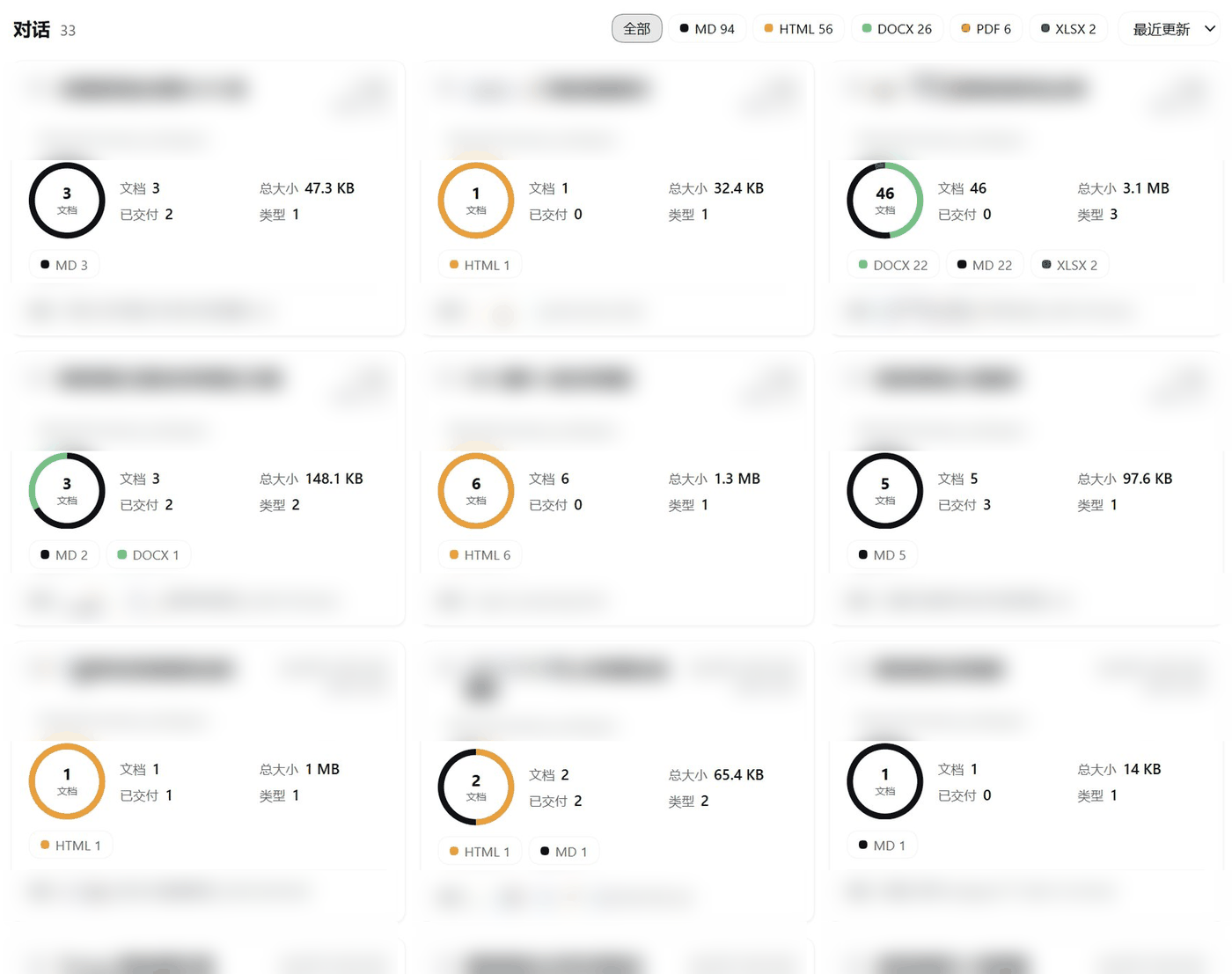
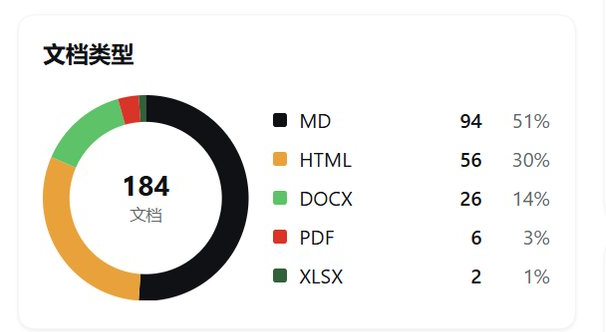
The hero above is the full dashboard: KPI tiles, the favorites card, the document-type donut and the conversation folders. Below: the conversation card grid and the document-type breakdown. Conversation titles, workspace names and file names in the card grid are intentionally blurred — the screenshots come from a real library and are redacted before publication.
| Conversation card grid | Document types |
|---|---|
 |
 |
The repository is a DSH plugin bundle: plain ESM, no build step, no runtime dependencies.
index.js is the Host half, client.js the Web half, cordis.patch.yml wires the plugin
row.
node --check index.js      # Host syntax
node --check client.js     # client syntax
node scripts/test-all.mjs  # all test suites + static checks
Tests run fully offline against synthetic fixtures and do not need a running Harness. Developer-only real-corpus helpers, when present locally, are excluded from the published package and are not required for development. Layout, test descriptions, adding a document kind and debugging tips: docs/development.md.
http(s)/data: URLs).diag.complete: false..csv and .txt are not indexed by default (they are usually intermediate files); add
them through extensions if you want them.MIT — Copyright (c) 2026 leobasic. See LICENSE.
dsh-doc-panel is an unofficial community plugin. It is not affiliated with, or endorsed by, DeepSeek.
CLASSIFICATION EVIDENCE
系统优先读取 GitHub Topics,再与站内分类词典和词根规则比对。当前命中: deepseek、deepseek-harness。
morluto
Reverse engineer anything with agents, from app behavior down to native binaries.

deepseek-ai
DeepSeek Harness: Everything is a Plugin.

nexu-io
The 1st Collaborative AI Design Agent Workspace. Local-first and open source. Create motion, prototypes, websites, apps, dashboards, presentations, images, and videos with your team and AI agents. Share work, exchange feedback, and iterate together in one workspace.