

文件与数据
渠道适配

WeKnora
Tencent
Open-source LLM knowledge platform: turn raw documents into a queryable RAG, an autonomous reasoning agent, and a self-maintaining Wiki.
PROJECT TOPICS
INSTALL REFERENCE
dsh plugin --profile web add github:lee259/dsh-workbench
该命令指向仓库当前默认分支;尚无绑定当前 commit 的完整验证结果。
PROJECT README




中文文档 · Changelog · Issues · npm
Codex-style Review inside DeepSeek Harness Web. Review Harness turn changes and native diffs.
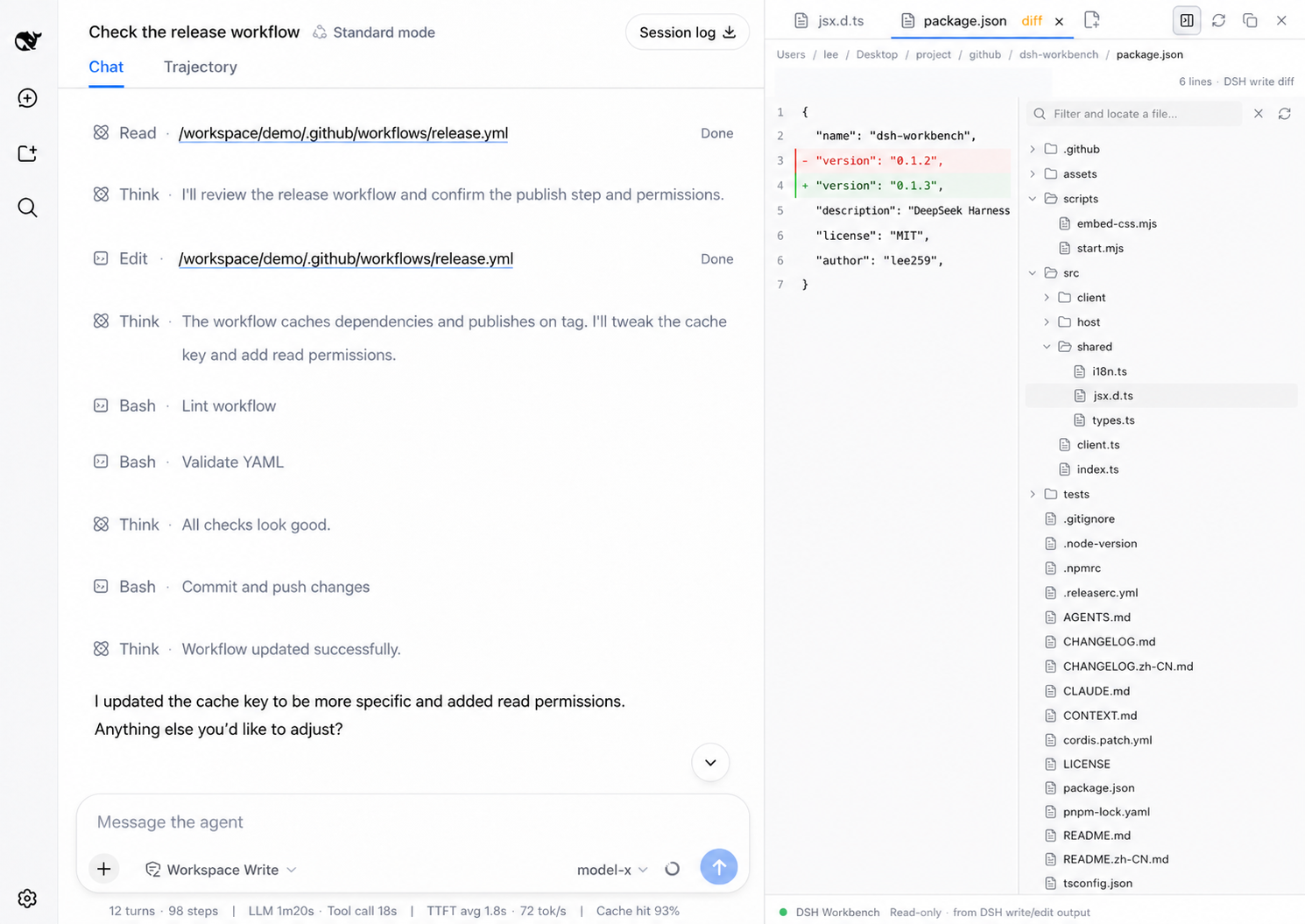
read       → source
write/edit → captured DSH diffThe panel is persistent and resizable. It has preview and pinned tabs, Quick Open, tree search, in-file find/go-to-line, image and Markdown previews, and workspace editing with external-change protection. UI language follows DSH.
dsh plugin --profile web add dsh-workbench
dsh web
If dsh is not on your PATH:
pnpm dlx @deepseek-ai/dsh plugin --profile web add dsh-workbench
pnpm dlx @deepseek-ai/dsh web
Local checkout:
git clone https://github.com/lee259/dsh-workbench.git
cd dsh-workbench
pnpm install
pnpm run build
dsh plugin --profile web add "$(pwd)"
dsh web
Rebuild and restart dsh web after plugin changes.
pnpm start -- /absolute/path/to/your/projectBuilds the plugin, registers it on the target project, and starts DSH Web. Without a path, uses the current directory.
| DSH operation | View |
|---|---|
read |
Source; images and Markdown render |
write / edit |
Captured DSH diff |
| File mention | Source; images and Markdown render |
Host listens to tool/call, tool/result, and tool/code-dispatch. Prefers dsh-tool-fs meta.diffs.
pnpm install
pnpm test
pnpm start -- /absolute/path/to/your/project
To mount the packed plugin in an isolated DSH Web instance:
pnpm test:mount
DSH_VERSION=0.2.0-rc.2 pnpm test:mount
The first command uses the installable dsh@0.1.7-rc.2; set DSH_VERSION to
mount against another release. dsh@0.2.0-rc.2 currently references an
unpublished dsh-client-ui-settings-account@0.2.0-rc.2 package on npm, which
can prevent a fresh CLI install until that dependency is published.
name, inject, apply(ctx) from src/index.tsdsh.client, exports["./client"], window.__ModuleLoader__.loadsrc/client/styles.cssreact-dom, need unbridged React APIs, or inject global CSS need an adapter; see src/client/react-bridge.ts and tsdown.config.ts.src/shared/i18n.tsReview the agent's changes inside DeepSeek Harness. The change list and hunk diffs use DSH's native workspaceChanges API.
read and file mentionswrite / edit:line / #Lline targets⌘/Ctrl+P) and tree search that locates without opening.m), R, Julia, Lua, C#, Kotlin, Scala, Swift, Dart, XML, and Python stubs (.pyi). Vue / Svelte use basic HTML highlighting. MATLAB uses Octave syntax highlighting; .m defaults to MATLAB, while .mat and .mlx are not supported.+/− counts⌘/Ctrl+⇧+F) with line-focused resultsThe target is a Codex-like Review experience inside DeepSeek Harness, using Harness turn changes as the review source and keeping the conversation, changed files, and diff in one review flow.
The existing DSH event capture, meta.diffs, session review, operation summaries, and
incremental review updates remain the differentiating foundation.
CLASSIFICATION EVIDENCE
系统优先读取 GitHub Topics,再与站内分类词典和词根规则比对。当前命中: file-preview、file-tree。
Tencent
Open-source LLM knowledge platform: turn raw documents into a queryable RAG, an autonomous reasoning agent, and a self-maintaining Wiki.

liustack
The first vision plugin for DeepSeek Harness, and the vision bridge for every text-only coding agent. Paste an image, get structured JSON evidence (OCR, layout, semantics). | 全网最强 DeepSeek Harness 外挂视觉插件,为 DeepSeek、GLM 等纯文本模型外挂视觉能力,粘贴图片即得结构化 JSON 证据(OCR、版面、语义)。

dream-num
An open-source Office workspace where people and AI agents create, collaborate, and review together.