

其他
完整应用

deepseek-harness
deepseek-ai
DeepSeek Harness: Everything is a Plugin.
PROJECT TOPICS
PROJECT README


把常用指令做成输入框上方的一排胶囊,点一下就填好、就能发。 少打字,少重复复述需求。
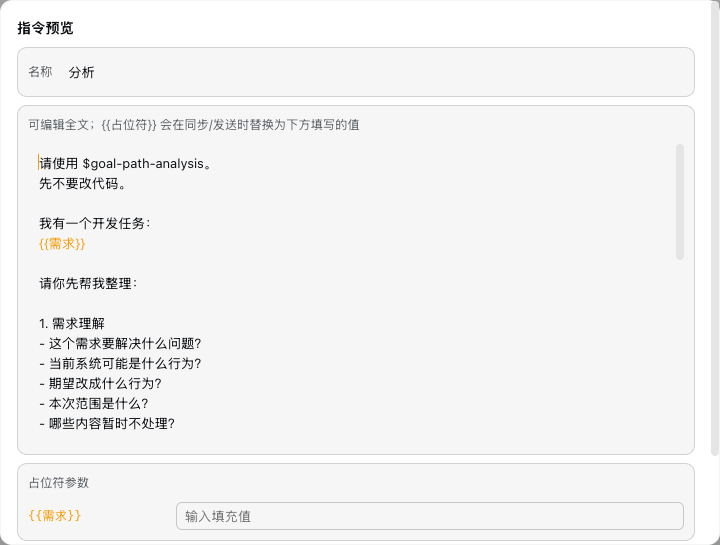
快捷指令面板 —— DSH Web GUI 输入区上方的一排指令胶囊。点击胶囊预览并编辑指令(支持 {{占位符}}),同步到输入框或直接发送。指令存储在官方 settings 文档(ctx.settingsScope),清除浏览器缓存不会丢失。
A row of user-defined prompt chips above the composer. Click a chip to preview/edit its template (with {{placeholder}} fields), then sync it into the input or send directly. Prompts live in the official settings document — browser cache clears never touch them.
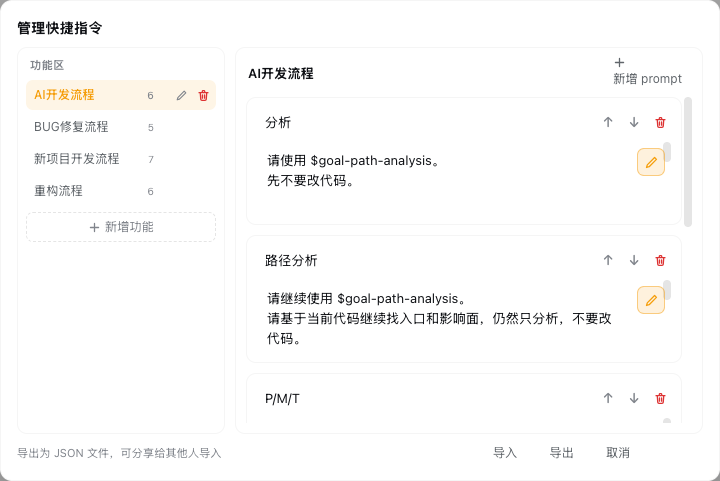
| 输入框上方的指令行 | 预览弹窗(占位符橙色高亮) | 两栏管理弹窗 |
|---|---|---|
 |
 |
 |
{{占位符}}、同步到输入框或直接发送ctx.settingsScope)+ 导入/导出 JSON,清浏览器缓存不丢失在已初始化的 DSH profile 中执行(把 web 换成你的 profile 名):
# 方式一:npm(推荐,一条命令)
dsh plugin --profile web add @max1997/dsh-quick-prompts

# 方式二:Git
dsh plugin --profile web add git@github.com:lcsdg/dsh-quick-prompts.git安装后刷新 Web GUI 页面即可看到输入区上方的指令行(host 半区需要重启 dsh 进程才会完整加载)。
指令列表保存在 settings namespace quick-prompts(schema 驱动,官方设置页同样可见)。结构:
{
  "categories": [
    { "id": "review", "name": "代码审查" }
  ],
  "prompts": [
    { "id": "review-changes", "label": "审查当前改动", "text": "审查当前 git 改动…", "categoryId": "review" }
  ]
}
text 中的 {{任意名字}} 会成为预览弹窗里的填写字段(橙色高亮),同步/发送时替换为填写值;未填写的占位符原样保留。
pnpm watch          # 增量构建 lib/client.js
pnpm typecheck
结构:
src/index.ts — host 半区:注册 quick-prompts settings namespace(schemastery schema + 示例指令作为 base 层)src/client/ — 浏览器半区:conversation.input.dock slot(order 100)QuickPromptsDock.tsx — dock 行(胶囊 + 悬停发送 + 齿轮)PreviewModal.tsx — 预览/编辑弹窗(占位符填写、追加/覆盖、同步/发送)ManagerModal.tsx — 管理弹窗(增删改排序、导入导出)placeholder.ts — {{name}} 解析与替换MIT
CLASSIFICATION EVIDENCE
系统优先读取 GitHub Topics,再与站内分类词典和词根规则比对。当前命中: 无有效分类标签。
deepseek-ai
DeepSeek Harness: Everything is a Plugin.

anywhere-labs
为 DeepSeek Harness (DSH) 插件生态打造的现代化桌面端解决方案。万物皆「插件」,桌面本身也是「插件」。

awesome-dsh-plugin
A curated list of plugins for DeepSeek Harness (dsh) · DeepSeek Harness 插件精选列表