
学习研究
技能

last30days-skill-cn
Jesseovo
last30days-cn 是一个 AI Agent 技能(Skill),能够自动搜索中国互联网 8 大主流平台最近 30 天的内容,综合分析后生成有据可查的研究报告。
PROJECT TOPICS
INSTALL REFERENCE
dsh plugin --profile web add github:lanqi677/dsh-learning-mode
该命令指向仓库当前默认分支;尚无绑定当前 commit 的完整验证结果。
PROJECT README
给 DSH(DeepSeek Harness)用的 agent 插件: 一棵由 AI 维护、可无限下钻的学习树。
它解决一个很具体的痛点:学习时钻进支线,回头找不到原来的位置。
复习链表时看到「跳表」就去研究跳表,研究完要翻很久聊天记录才能回到链表; 要复习十个知识点,每学完一个都得回去找下一个。
它把「我在哪、学到哪、还剩什么」变成一棵持久的树:树由 AI 直接维护, 节点带自动摘要,每轮对话自动带上上下文,点一下就能跳回讲它的那一轮。
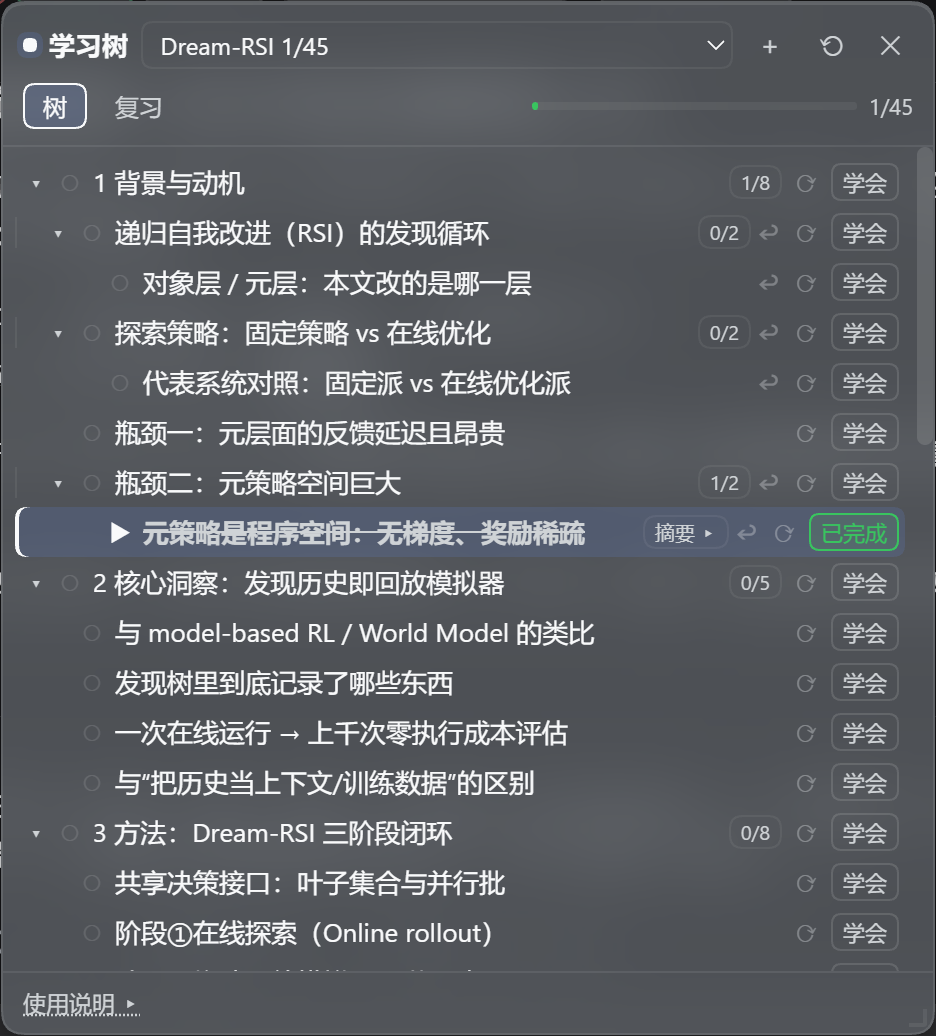
面板浮层:可拖动 / 可调大小 / 记住你上次调的样子。右上角下拉框切树或新建;顶部一行是整棵树的进度
(这里 1/45);每行右侧是「这一支的进度」角标与 [摘要] / [⟳ 重写摘要] / [✓ 学会];加粗高亮那一行=
当前聚焦(▶),它右边的 [↩] 能跳回讲它的那一轮对话。
下面全部是真实数据,不是示意。树文件在
$DSH_HOME/learning-mode/trees/dream-rsi.json(树名 Dream-RSI,45 个节点、9 个顶层分支)。
| 轮 | 你说 | 插件做了什么 |
|---|---|---|
| 1 | 我要学习一下这篇论文 |
AI 把论文骨架挂成一棵树:8 个章节 + 附录,共 9 个顶层分支 |
| 2 | 先介绍下递归自我改进(RSI)的发现循环 |
你点一下节点=聚焦;AI 只讲这一个节点,讲完静默把顺带引入的子概念挂到它下面(outline_capture)——你不用说「帮我记一下」 |
| 3 | 介绍 |
你没指明对象。每轮自动注入的上下文块里已经写着「▶ 当前聚焦(用户正在看的):递归自我改进(RSI)的发现循环」,所以 AI 接着讲的就是那个节点 —— 不用复述上下文,也不会讲错 |
| 4 | 介绍一下 |
继续顺着你的思路往下长 |
4 轮之后:45 个节点。它记录的是你当时的思路:你是从「瓶颈二:元策略空间巨大」往下追问的, 所以「元策略是程序空间:无梯度、奖励稀疏」就挂在瓶颈二下面 —— 而不是被挪到某个"教科书上更该待" 的位置。(这也是上面那条摘要的节点。)
插件自己调模型写一句摘要 —— 不进聊天记录,不占你的上下文。 下面这条就是树里真实躺着的内容:
元策略是程序空间:无梯度、奖励稀疏(路径:
1 背景与动机/瓶颈二:元策略空间巨大/…)元策略空间是「任意代码」构成的程序空间而非少数超参数:候选策略可选的自由度包括 选点规则、并行度、批构造、停止准则、失败处理、历史利用等,每个维度都可能是一段代码。 该空间无梯度(两个策略间无连续过渡,无法沿梯度上升)且奖励极度稀疏(随手改一版大概率 变差,好策略是孤岛而非缓坡),因此只能靠大量独立试错来搜索……(原文 225 字,此处截断)
摘要不对可以点 [⟳] 让模型重写。
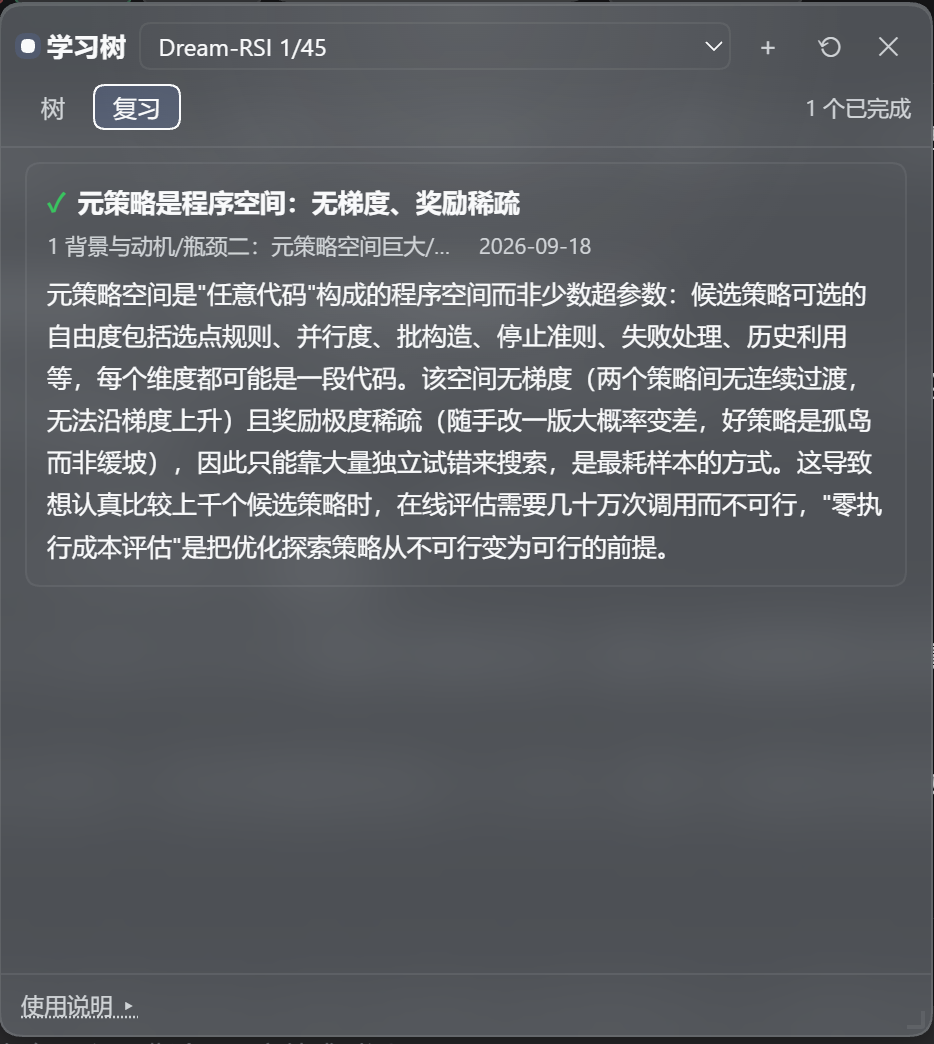
[复习] 页签:所有已完成知识点 + 摘要集中一处,不用翻聊天记录。
这棵树里有 6 个节点带着来源坐标;点行上的 [↩] 就切回那次会话、滚到那一轮并高亮 —— 钻进去学完,一键回到原位。
| 路径 | 内容 |
|---|---|
dsh-learning-mode/ |
插件本体:宿主半边 + 浏览器半边 + 测试 + 安装脚本 |
继续开发说明.md |
开发台账:每轮做了什么 + 19 个真实踩过的坑(含根因与判据) |
设计文档/ |
方案 v1/v2、插件全貌与运行时对齐、调研报告 |
预设参考/ |
生成的 agent 预设(agent.cordis.yml),可对照 |
数据备份(可选)/ |
教程树的数据备份(示例数据) |
想直接看实现细节和每个坑,读 dsh-learning-mode/README.md 与 继续开发说明.md。
前置:DSH 已装好能跑(dsh web),Node 18+。
cd dsh-learning-mode

# 1. 建依赖 junction:把 harness 的 @deepseek-ai 包「借」给本插件
node scripts/link-harness-deps.mjs

# 2. 自检(七套,含探针;全绿再往下走)
npm test

# 3. 生成 agent 预设(复制底预设 + 追加插件行 + 逐行校验)
node install.mjs standard

# 4. 注册进 profile(dependencies + bundles + junction,幂等)
node scripts/setup-profile.mjs

# 5. 重启 dsh web,刷新页面,新建会话时选「学习模式」
⚠️
node_modules/故意没有进仓库:它是指向本机 harness 安装目录的软链 (node_modules/@deepseek-ai→ dsh 的包目录),换了机器必须重新跑第 1 步。 脚本会自动探测 DSH 安装位置;探测不到时用环境变量指定:DSH_HOME(默认~/.dsh)、DSH_PROFILE(默认web)、DSH_CHECKOUT(dsh 包目录)。
| 命令 | 作用 |
|---|---|
npm test |
七套断言:数据层 / 宿主集成 / 摘要管道 / 浏览器渲染 / i18n 完整性 / 英文行为 / 探针 |
npm run verify:live [会话id前缀] |
真机核查:直接解多帧 zstd 会话日志,核对「每轮注入真的在不在」「开发向工具是否已屏蔽」(中英文注入都认) |
npm run backfill:origins |
回填来源坐标(扫会话日志里的 outline_capture/outline_add 调用;默认 dry-run,--write 才写盘并备份) |
npm run validate:preset |
逐行校验预设里每个 specifier 能否解析 |
继续开发说明.md 坑 13)。
所以关键步骤都往 $DSH_HOME/learning-mode/rpc.log 留判据
(inject diag / origin diag / jump … / env … / locale …)。个人项目,跟着本机 DSH 版本走(peer dependency:@deepseek-ai/cordis ^4.0.1)。
lib/ 是手写的普通 JavaScript(没有构建步骤、没有 TypeScript)。
MIT,见 LICENSE。
An agent plugin for DSH (DeepSeek Harness): a learning tree that the AI maintains for you and that you can drill into without limit.
It solves one very concrete pain: while studying you wander into a side branch, and afterwards you cannot find your way back.
You are reviewing linked lists, you see "skip list", you go study skip lists — and when you are done you have to scroll a long way through the chat to get back to linked lists. Or you want to review ten topics, and after each one you have to go hunting for the next.
The plugin turns "where am I, what have I learned, what is left" into a persistent tree: the AI writes into it directly, every node carries an auto-generated summary, each turn is automatically given the right context, and one click takes you back to the turn that taught a node.
A frosted-glass panel: drag it, resize it, and it remembers your last layout. The dropdown in the
top right switches or creates trees; the row under the tabs is the whole tree's progress
(1/45 here); each row carries a "this branch's progress" badge plus
[摘要] / [⟳ rewrite] / [✓ 学会]; the highlighted row is the current focus (▶), and the [↩] next to
it jumps back to the conversation turn that taught it.
The screenshots on this page show the UI in Chinese because DSH is set to Chinese on this machine. Every string in the panel — and in the model-facing instructions — is localised and follows DSH's language setting (see "Follows DSH's language" below).
Everything below is real data, not an illustration. The tree file is
$DSH_HOME/learning-mode/trees/dream-rsi.json(tree "Dream-RSI": 45 nodes, 9 top-level branches).
| Turn | You said | What the plugin did |
|---|---|---|
| 1 | 我要学习一下这篇论文 ("I want to study this paper") |
The AI attached the paper's skeleton as a tree: 8 sections + appendix, 9 top-level branches |
| 2 | 先介绍下递归自我改进(RSI)的发现循环 ("first explain the RSI discovery loop") |
Clicking a node focuses it; the AI explained only that node and then silently attached the sub-concepts it introduced under it (outline_capture) — you never have to say "please take a note" |
| 3 | 介绍 ("explain it") |
You named nothing. The context block that is injected every turn already said ▶ 当前聚焦(用户正在看的):递归自我改进(RSI)的发现循环, so the AI explained that node — no restating of context, no drift |
| 4 | 介绍一下 |
The tree kept growing along your train of thought |
After 4 turns: 45 nodes. It records the path your thinking actually took: because you dug down from "瓶颈二:元策略空间巨大" (bottleneck two: the meta-policy space is huge), the sub-topic "元策略是程序空间:无梯度、奖励稀疏" (the meta-policy is a program space) hangs under bottleneck two rather than wherever a textbook outline "should" put it. (That is the node whose summary is quoted below.)
The plugin calls the model itself to write a one-line summary — it never enters the chat history, so it does not consume your context. This one is really sitting in the tree:
元策略是程序空间:无梯度、奖励稀疏 (the meta-policy is a program space: no gradient, sparse reward)
The meta-policy space is a program space made of arbitrary code rather than a handful of hyper-parameters: the degrees of freedom include the point-selection rule, parallelism, batch construction, stopping criteria, failure handling and history use — each of them can be a piece of code. That space has no gradient (no continuous transition between two policies) and extremely sparse reward (a random edit most likely makes things worse; good policies are islands, not gentle slopes), so it can only be searched by massive independent trial and error… (225 characters in the original; truncated here.)
If a summary is wrong, click [⟳] to have the model rewrite it.
The [复习] (Review) tab: every learned topic and its summary in one place — no scrolling the chat.
Six nodes in this tree carry an origin coordinate; clicking [↩] on the row switches back to that conversation, scrolls to that turn, and highlights it — drill in, then return in one click.
| Path | Contents |
|---|---|
dsh-learning-mode/ |
The plugin itself: host half + browser half + tests + install scripts |
继续开发说明.md |
Development log: what each round did + 19 real pitfalls (root cause and evidence) |
设计文档/ |
Design docs v1/v2, plugin overview & runtime alignment, research report |
预设参考/ |
The generated agent preset (agent.cordis.yml) for reference |
数据备份(可选)/ |
A data backup of the tutorial tree (sample data) |
For implementation details and every pitfall, read dsh-learning-mode/README.md and
继续开发说明.md (both in Chinese).
Prerequisites: DSH installed and runnable (dsh web), Node 18+.
cd dsh-learning-mode

# 1. Create the dependency junction: "borrow" the harness's @deepseek-ai packages
node scripts/link-harness-deps.mjs

# 2. Self-check (seven suites, probe included; all green before you continue)
npm test

# 3. Generate the agent preset (copy the base preset + append the plugin row + validate every row)
node install.mjs standard

# 4. Register into the profile (dependencies + bundles + junction; idempotent)
node scripts/setup-profile.mjs

# 5. Restart dsh web, refresh the page, and pick "学习模式" when creating a session
⚠️
node_modules/is deliberately not committed: it is a link to the harness installation on this machine (node_modules/@deepseek-ai→ dsh's package directory), so on a new machine you must re-run step 1. The scripts auto-detect the DSH install; if detection fails, setDSH_HOME(default~/.dsh),DSH_PROFILE(defaultweb) orDSH_CHECKOUT(the dsh package directory).
| Command | Purpose |
|---|---|
npm test |
Seven suites: data layer / host integration / summary pipeline / browser rendering / i18n completeness / English behaviour / probe |
npm run verify:live [sessionIdPrefix] |
Live verification: decodes the multi-frame zstd session log and checks that the per-turn injection really happened and that developer-facing tools are hidden (recognises both Chinese and English injections) |
npm run backfill:origins |
Backfill origin coordinates (scans the session log for outline_capture/outline_add calls; dry-run by default, --write to persist with a backup) |
npm run validate:preset |
Validate that every specifier in the preset resolves |
继续开发说明.md).
So the critical steps leave evidence in $DSH_HOME/learning-mode/rpc.log
(inject diag / origin diag / jump … / env … / locale …).A personal project, tracking the local DSH version (peer dependency: @deepseek-ai/cordis ^4.0.1).
lib/ is hand-written plain JavaScript — no build step, no TypeScript.
MIT, see LICENSE.
CLASSIFICATION EVIDENCE
系统优先读取 GitHub Topics,再与站内分类词典和词根规则比对。当前命中: learning、learning-tree。
Jesseovo
last30days-cn 是一个 AI Agent 技能(Skill),能够自动搜索中国互联网 8 大主流平台最近 30 天的内容,综合分析后生成有据可查的研究报告。

Tiger3807861189
GLM-5.3-Flash × J-Space capability realization — benchmark presentation of the J-Space Cognition Suite

Electricitysheep
DeepSeek Harness (dsh) 从 0 到 1 深度手册:安装/插件开发/性能调优/实测案例/同模型多 Agent 实测对比(中文 + 英文 PDF)