Agent 与会话
插件

nuwa-skill
alchaincyf
你想蒸馏的下一个员工,何必是同事。蒸馏任何人的思维方式——心智模型、决策启发式、表达DNA。Distill how anyone thinks.

lanechenhku/dsh-post-draft-auto
本地出稿工作台 + DSH 插件:模型用 post_facts 抓带 source_url 的真实事实(bioRxiv DOI / 2HAI 版本 / npm 包 / URL),自己写中英双语推文与卡片图,你手动复制到 X。不发推、不调 X API、零依赖。 | A local draft desk for DeepSeek Harness: sourced facts in, EN + ZH posts and a card out — you paste it into X yourself. No X API, no credentials, zero dependencies.
PROJECT TOPICS
INSTALL REFERENCE
dsh plugin --profile web add github:lanechenhku/dsh-post-draft-auto
该命令指向仓库当前默认分支;尚无绑定当前 commit 的完整验证结果。
PROJECT README
简体中文 · English
你说一句「我做了 YYY,想发条推特」——YYY 可以是论文、插件、版本、任何链接——它就变成两条能直接粘进 X 的稿子 + 一张卡片图。 模型先用工具抓带来源的真实事实,再自己写中英双语;发布永远是你手动复制粘贴。
怎么用:在 DSH 里跟 agent 说一句「我刚发了 …」就行 —— 不用打开任何界面。它抓完事实、写完中英双语 会直接贴回会话;你复制去发,发完回来说一声,它把台账记上。
一句话:这不是发帖机器人。没有 X API、没有 token、没有定时发布—— 它只做「发了什么 → 能直接粘的稿子 + 能点回源头的事实表」这一段,最后那一下留给你。
| 常见的自动发帖 bot | 本工具 dsh-post-draft-auto |
|
|---|---|---|
| 发布 | 调 X API 或浏览器自动化 | 零发布能力:你自己复制粘贴,工具不碰登录态 |
| 凭据 | API key / token / cookie | 一个都不存,代码里没有凭据读写 |
| 文案 | 模板套壳,或让模型自由发挥 | 先抓事实(每条带 sourceUrl),正文只能引用事实 |
| 出错 | 已经发出去了 | 抽不到就写 ⟨待补:…⟩,闸门会拦下「已发」 |
| 成本 | 按调用计费,还要维护 token | 零依赖(只用 Node 内置模块)、只读公开接口 |
主要方式是「对话」:不用打开任何界面,入口就是你在会话里说一句话。
① 跟 agent 说一句话(主要方式,推荐) —— 装好插件后,agent 自己按 post_facts → 写稿 → post_save 走完,
把英文主推 + 中文回复贴回会话;你复制走、发完回来说一声,它用 post_mark_posted 把台账记上。
一次典型的输入输出长这样(DOI / 链接用占位符):
| 谁 | 发生了什么 |
|---|---|
| 你说 | 我做了 ⟨YYY⟩,想发条推特 —— 例如 我刚发了 bioRxiv,DOI 是 ⟨你的 DOI⟩,或 我做了个 DSH 插件,想发条推 |
| agent 做 | post_facts 抓标题 / 日期 / 版本 / 作者 / 单位 / 摘要,每条带 sourceUrl → 自己写英文主推 + 中文回复 + 卡片文案 → post_save 落盘 |
| 你拿到 | 英文主推 + 中文回复(各自标计权字数,超 280 会被拦)+ 卡片图 + 能点回源头的事实表 |
| 你发完 | 回来说一声 → post_mark_posted 写进 state/posted.jsonl 台账 |
面板和网页工作台是同一个仓库的两个视图,不是必须的:只对话也能完整走完(出稿 → 复制 → 发 → 记台账)。
② 侧栏「✍ 出稿」面板(装插件 + 重启 DSH 后出现):右侧栏页签,列草稿、每行复制 EN/ZH、标已发; 细节见下文「工作台与侧栏面板」。
③ 网页工作台 / CLI(不装插件也能用)—— 同一套实现:
npm start        # = node bin/serve.mjs → http://127.0.0.1:4789
node bin/post-tool.mjs post_facts --json '{"doi":"<your-doi>"}'
node bin/post-tool.mjs post_save  --file /tmp/draft.json     # {en, zh, card, facts, sourceKey}
node bin/post-tool.mjs post_list
node bin/post-tool.mjs post_mark_posted --json '{"id":"<draft-id>"}'
不需要 npm install:没有任何依赖,Node ≥ 18 即可。
post_facts 抓什么| 你给的东西 | 调用 | 抓到的事实 |
|---|---|---|
| bioRxiv / medRxiv DOI | {"doi":"<your-doi>"} |
标题、DOI、日期、版本、全部作者、通讯作者、单位、分类、摘要全文 |
| 产品版本 | {"version":"v1.2.3"} |
线上版本、本地版本、releases.md 里这一版的要点(没有就退到 CHANGELOG 原话) |
| npm 包 | {"pkg":"@deepseek-ai/dsh"} |
版本、发布时间、包描述 |
| 任意 URL | {"url":"https://…"} |
页面标题、meta description、URL 本身 |
| 只有一句话 | {"text":"我刚发了 Acme v1.1.0 和一篇 preprint"} |
你口述的原话 + 抽出来的版本号 |
两个实测踩出来的细节:
sourceUrl:post_facts 回来的 facts[] 里逐条能点回源头;作者名要用 meta.authorInPaper 里的写法,不要自己拼。插件(lib/plugin.mjs)和 CLI(bin/post-tool.mjs)共用 lib/tools.mjs 一份实现:
| 工具 | 作用 | 关键参数 | 返回 |
|---|---|---|---|
post_facts |
抓事实,写稿前必须先调 | doi / version / pkg / url / text,可选 server、author |
kind、sourceKey、title、facts[](带 sourceUrl)、hints[]、guard |
post_save |
把模型写好的稿落盘(generatedBy: model) |
必填 en、zh、facts;可选 sourceKey、card{title,subtitle,version,bullets}、pending、notes |
draftId、enWeight、zhWeight、pending、blockers、file |
post_list |
列草稿 | 可选 status |
total、drafts[](含 generatedBy / 计权 / 待补 / guard) |
post_mark_posted |
你在 X 发完回来登记 | id,可选 note(比如 X 链接) |
ok、status、publishedAt;被 guard 挡住时 ok:false |
两处硬拦截:post_save 没带 facts 直接拒(防凭空写);正文里的数字不在 facts 里就进 blockers(防编)。
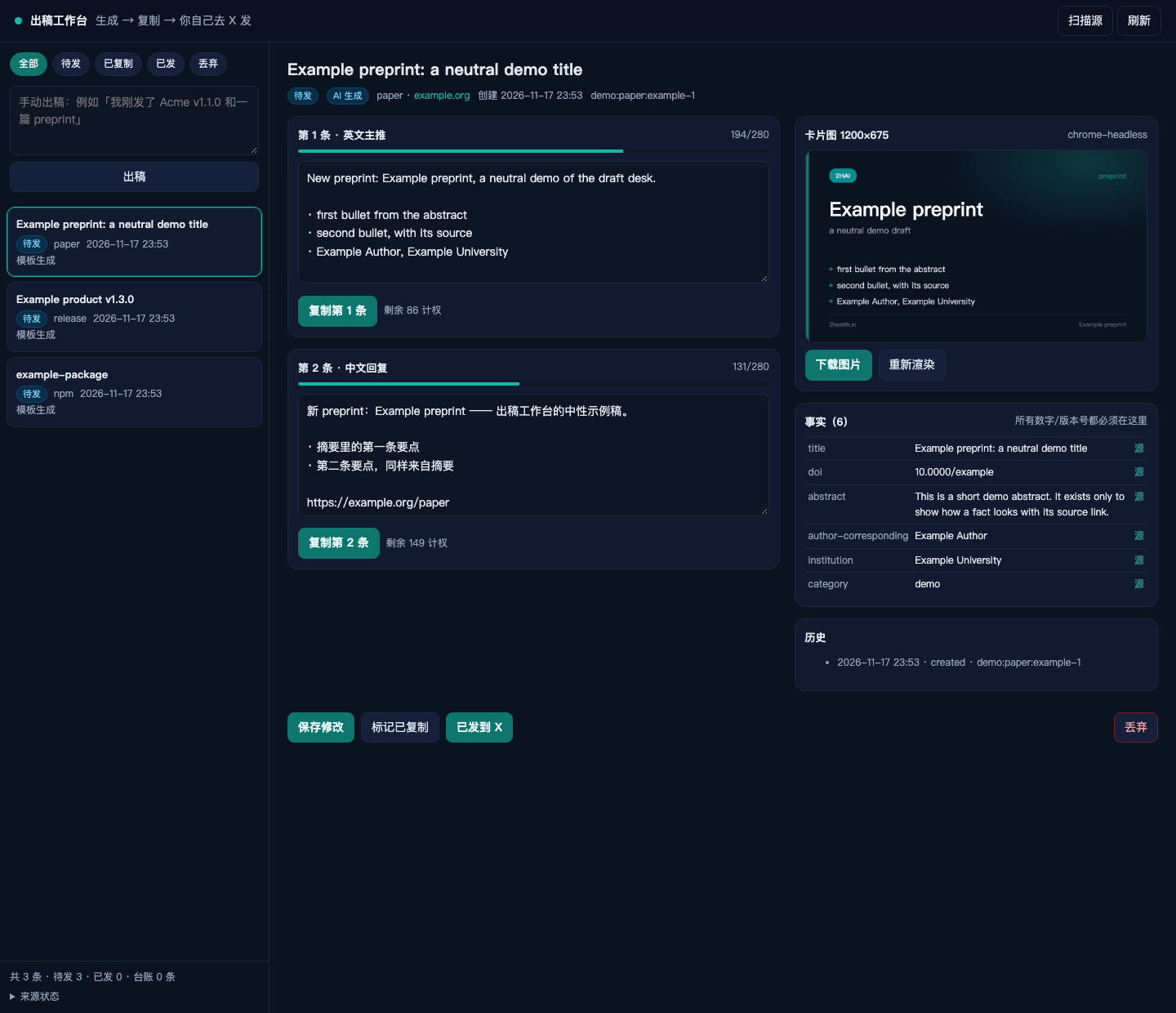
上图是真实截图(一条 preprint 的草稿打在工作台里;草稿内容是演示用的中性示例,下同):
chrome-headless),可下载/重新渲染;没有 Chrome 只出 SVGsourceUrl;待补清单单列,抽不到的信息显示成 ⟨待补:…⟩侧栏「✍ 出稿」面板(v0.3.0 起随插件提供)—— 不开网页工作台也能看草稿:
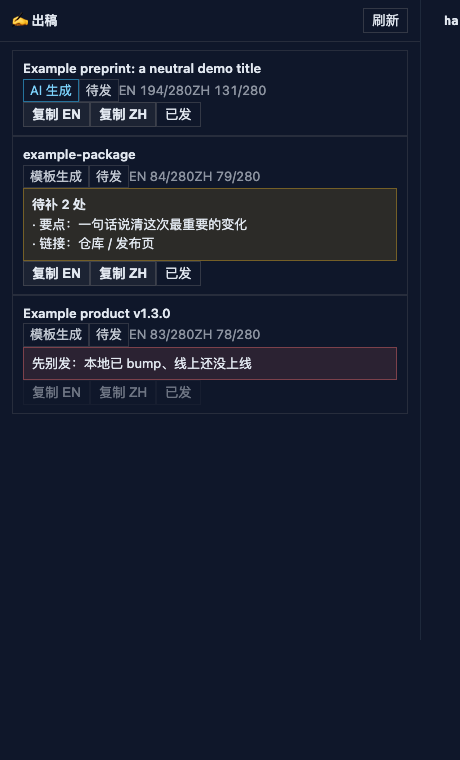
(面板要重启 DSH 才出现在侧栏里;上面这张是用同一份 lib/client.js 在 harness 页里渲染的,见 docs/侧栏面板.md。)
AI 生成 / 模板生成、状态、EN n/280 · ZH n/280(超了变红)、guard 红条、待补前 4 条GET /post-draft/list、GET /post-draft/copy、POST /post-draft/mark-posted,不依赖 4789 那个进程(网页工作台不开也能用)post_facts 返回的 facts(每条带 sourceUrl)⟨待补:…⟩ 并进 pending,不会替你猜blockers 非空,网页顶部标红| 字符 | 权重 |
|---|---|
| 基本拉丁、数字、标点 | 1 |
| 中文 / 日文 / 韩文 / emoji | 2 |
| URL(不管多长) | 固定 23 |
所以一条纯中文最多约 140 字。工作台实时算,超了变红;post_save 也会把 enWeight / zhWeight 一起返回。
voice.md 是写稿时的语气约定,禁用词在 config.json.voice.banned
本机私有覆盖层:把真实端点、本地仓库路径这类不该公开的值写进 config.local.json(已在 .gitignore 里),
它会被深合并到 config.json 之上;仓库里只保留占位符版本。键名与合并规则见 config.local.example.json:
对象深合并;对象数组按 index 深合并(所以只写要改的字段就行);含原始值的数组整体替换;想换掉整个对象数组用 {"$replace": [...]}。
(excited to announce、game-changer、revolutionary、震撼发布… 以及中文的「重磅」「颠覆」「史上最强」)。
voice.md 现在还是默认的「零形容词」风格——你贴 3–5 条旧推,它就会变成你的语气。
Acme 双源守卫:线上 https://example.com/version.json 和本地 <path-to-your-product-repo>/version.json(只读)必须相等,否则:
| 情况 | guard | 后果 |
|---|---|---|
| 本地新、线上旧 | pending-rollout |
部署还没上线,先别发 |
| 线上新、本地旧 | online-newer |
查错了仓库/分支 |
| 本地读不到 | local-missing |
本地文件路径不对 |
被 guard 的草稿:复制和「已发」都是 409,界面顶部红字、按钮禁用;下次扫描两侧相等时自动解除。
状态机(一个 source_key 只允许一份草稿):
discovered → drafted → copied → published
                  ↘ discarded
published 和 discarded 是终态;「已发」会把正文、计权、文本哈希追加进 state/posted.jsonl,重复点不会写第二条。
drafts/ media/ state/,没有云端、没有账号、没有同步.env 读取逻辑——「自动发布」这件事在代码层面不成立post_facts 才会去 npm registry、api.biorxiv.org、example.com/version.json 或你给的 url 取一次;GitHub Releases 源默认关闭(私有仓库未认证会 404,要开得加 token,本工具不当凭据容器)127.0.0.1,但没有鉴权:网页工作台自己起在 4789;侧栏面板的三个接口挂在 DSH 宿主自己的 webServer 上
(和 GUI 同源,不新开端口)。两处都没有登录校验——能碰到 DSH GUI 或 4789 的人都能读草稿、点「已发」,别把它们暴露到公网drafts/、media/、state/ 都在 .gitignore 里(里面有未发布内容)desktop profile 由 Electron 独占,不能用 dsh plugin --profile desktop ...(命令行会被无条件拒绝)。手工装:
~/.dsh/profiles/desktop/package.json 的 dependencies 加
"dsh-post-draft-auto": "link:<你 clone 的路径>"dsh.profile.bundles 数组追加 "dsh-post-draft-auto"~/.dsh/profiles/desktop/node_modules/dsh-post-draft-auto 建符号链接指向仓库只加依赖、不加 dsh.profile.bundles 不会加载——DSH 只从 bundles 层挂载插件。
插件做三件事:注册四个工具、往系统提示里加一段「怎么用这些工具写稿」的公告、给右侧栏加「✍ 出稿」页签
(数据来自宿主上的三个 /post-draft/* 同源接口)。装或更新后必须完全退出 DSH 再启动,否则浏览器半部分不会加载。
装法就是把本仓库以 link: 依赖加进 DSH profile 的 package.json,再把这个包名写进 dsh.profile.bundles,重启 DSH 即生效(回滚:还原那份 package.json 备份后再重启)。
npm i -g dsh-post-draft-auto   # 也可以 npx dsh-post-draft-auto
post-draft-auto                # 启动网页工作台 → http://127.0.0.1:4789
post-draft-tool post_list      # 四个工具的 CLI(post_facts / post_save / post_list / post_mark_posted)
post-draft --help              # 出稿 CLI(--manual / --source / --collect / --mock)
在仓库里跑则等价于 npm start、node bin/post-tool.mjs ...、node bin/draft.mjs ...。
技能:把 skills/post-draft/SKILL.md 拷到 ~/.dsh/skills/,任何会话都能按同一流程出稿。
config.json 关键字段:
| 字段 | 现在是什么 | 说明 |
|---|---|---|
port |
4789 | 工作台端口,只绑 127.0.0.1 |
brand |
Acme,#0d8b8f |
卡片图配色;主色是从 example.com 的 CSS 变量抽出来的 |
limits |
tweet: 280、urlWeight: 23 |
计权规则 |
authorName |
<你的英文署名> |
占位符:不填就跳过作者匹配并提示「待补 author」,不会拉全量再猜 |
sources |
npm / github / jsonapi / rss / arxiv / site | 采集器的源开关;只有 npm 默认开。site(线上端点 + 本地版本文件双源)要你填好 url 与 local.file 再打开 |
releaseNotesFiles |
docs/releases.md → <path-to-your-product-repo>/docs/releases.md |
按顺序找这一版的要点 |
voice |
7 个禁用词、hashtag ≤ 2 | 语气检查 |
voice.md 是语气正文:结构固定为「发布体 → 2–3 条要点 → 入口」,外加一条「不承诺路线图」。
drafts/<id>.json     一条草稿(正文、计权、facts、pending、blockers、history)
media/<id>.svg|.png  卡片图(1200×675)
state/events.json    幂等状态机(source_key → 状态)
state/posted.jsonl   已发台账(只追加,不改不删)
普通 JSON,原子写入;drafts/ media/ state/ 都不进版本库。
npm test # = node --test tests/当前 66/66 通过,覆盖:计权(CJK / URL / emoji / 截断 / 切分)、溯源拦截、占位符、禁用词、
同 source_key 幂等、状态机终态、台账只写一次、复制文本无 markdown、发布闸门 409、
插件契约(name / inject / apply 真注册四个工具),以及侧栏面板(client 模块契约、
宿主接口 list / copy / mark-posted 与 guard 409)。
一次真实端到端(本机):
| 环节 | 结果 |
|---|---|
| 输入 | 一句话:我刚发了一篇 preprint,DOI 是 ⟨你的 DOI⟩ |
post_facts |
返回标题 / 日期 / 版本 / 作者 / 单位 / 摘要等十余条 facts,每条带 sourceUrl;旧 DOI 前缀查不到时会自动换前缀重试一次 |
post_save |
落盘一条草稿,EN / ZH 都落在 280 计权以内,blockers 0、pending 0 |
| 复制文本 | GET /api/drafts/<draft-id>/copy?part=en 返回的就是正文,markdown 符号 0 个 |
| 核对 | 正文里出现的每个数字 / 日期 / 作者名都能指回 facts |
voice.md 没贴过旧推,现在偏「零形容词」;给它 3–5 条旧推才会像你说话⟨待补:中文要点一句话⟩releases.md:那一版没有条目就退到 CHANGELOG 原话,两处都没有 → 待补,不编127.0.0.1,同机进程能读草稿,别把端口暴露到公网MIT © 2026 Lane Guolan Chen
零依赖、不发推、不存凭据;修改、商用、再分发都按 MIT 来,保留版权与许可声明即可。 仓库根目录的 LICENSE 是纯文本 MIT,GitHub 会据此显示许可证。
Say "I built YYY, want to post it on X" — a paper, a plugin, a release, any link — and it turns into two posts you can paste straight into X, plus a card image. The model first pulls real facts with sources, then writes EN + ZH itself — you still publish by hand.
How to use it: open DSH and tell the agent "I just shipped …" — no UI to open. It pulls the facts, writes both posts and hands them back in the conversation; you copy them into X, say so afterwards, and it records the ledger entry.
In one line: this is not a posting bot. No X API, no tokens, no scheduling. It covers exactly one stretch — "what shipped → paste-ready drafts + a fact table you can click back to the source" — and leaves the publish button to you.
| A typical posting bot | dsh-post-draft-auto |
|
|---|---|---|
| Publishing | Calls the X API or automates a browser | Zero publishing capability: you copy and paste; it never touches a session |
| Credentials | API key / token / cookie | None stored; there is no credential handling in the code |
| Copy | Template shells, or the model free-styling | Facts first (each with a sourceUrl); the body may only quote them |
| Failure mode | Already posted | Writes ⟨todo: …⟩ instead, and the gate blocks "posted" |
| Cost | Per-call billing plus token upkeep | Zero dependencies (Node built-ins only), read-only public endpoints |
The main way is the conversation: there is no UI to open — you say one sentence in the session.
① Talk to the agent (main way, recommended) — with the plugin installed the agent runs
post_facts → write → post_save on its own and hands the English post and the Chinese reply back in the
conversation. You copy, publish, come back and say so, and it records the ledger through post_mark_posted.
A typical input and output looks like this (DOI / link are placeholders):
| Who | What happened |
|---|---|
| You | 我刚发了一篇 preprint,DOI 是 ⟨your DOI⟩ (or: 链接 https://…) |
| The agent | post_facts pulls title / date / version / authors / institution / abstract, each with a sourceUrl → writes the English post, the Chinese reply and the card copy → post_save saves the draft |
| You got | English post + Chinese reply (each with its weighted count, over 280 is blocked) + the card image + a fact table that links back to the source |
| After posting | you say so → post_mark_posted appends to state/posted.jsonl |
The panel and the web workbench are two views of the same repository, not a requirement: the conversation alone covers the whole loop (draft → copy → publish → ledger).
② Sidebar "✍ 出稿" panel (appears after installing the plugin and restarting DSH): a right-sidebar tab that lists drafts with per-row copy EN / copy ZH and a posted button — see "Workbench and sidebar panel" below.
③ Web workbench and CLI (both work without the plugin):
npm start        # = node bin/serve.mjs → http://127.0.0.1:4789
node bin/post-tool.mjs post_facts --json '{"doi":"<your-doi>"}'
node bin/post-tool.mjs post_save  --file /tmp/draft.json     # {en, zh, card, facts, sourceKey}
node bin/post-tool.mjs post_list
node bin/post-tool.mjs post_mark_posted --json '{"id":"<draft-id>"}'
No npm install needed: there are no dependencies. Node ≥ 18 is enough.
post_facts pulls| You give | Call | Facts you get back |
|---|---|---|
| bioRxiv / medRxiv DOI | {"doi":"<your-doi>"} |
Title, DOI, date, version, authors, corresponding author, institution, category, full abstract |
| A product version | {"version":"v1.2.3"} |
Online version, local version, this version's notes from releases.md (falls back to CHANGELOG quotes) |
| An npm package | {"pkg":"@deepseek-ai/dsh"} |
Version, publish date, package description |
| Any URL | {"url":"https://…"} |
Page title, meta description, the URL itself |
| Just one sentence | {"text":"I just shipped Acme v1.1.0 and a preprint"} |
Your sentence plus any version numbers in it |
Two details learned the hard way:
sourceUrl: each entry in facts[] links back to its origin; use the spelling from
meta.authorInPaper when you print an author name.The plugin (lib/plugin.mjs) and the CLI (bin/post-tool.mjs) share one implementation, lib/tools.mjs:
| Tool | Purpose | Key arguments | Returns |
|---|---|---|---|
post_facts |
Gather facts; always call before writing | doi / version / pkg / url / text, optional server, author |
kind, sourceKey, title, facts[] (with sourceUrl), hints[], guard |
post_save |
Save the model-written draft (generatedBy: model) |
required en, zh, facts; optional sourceKey, card{title,subtitle,version,bullets}, pending, notes |
draftId, enWeight, zhWeight, pending, blockers, file |
post_list |
List drafts | optional status |
total, drafts[] (generatedBy / weights / pending / guard) |
post_mark_posted |
Record it after you posted on X | id, optional note (e.g. the X URL) |
ok, status, publishedAt; ok:false when a guard blocks it |
Two hard stops: post_save rejects a call without facts (no writing from thin air), and any number in the
body that is not in the facts lands in blockers (no invented figures).
The screenshot above is real (a preprint draft open in the workbench; the draft content is a neutral demo, same below):
chrome-headless), downloadable and re-renderable;
without Chrome you only get the SVGsourceUrl; a separate
to-fill list shows anything that could not be sourced as ⟨todo: …⟩Sidebar "✍ 出稿" panel (shipped with the plugin since v0.3.0) — the draft list without opening the web workbench:
(The tab only appears after restarting DSH; the image above renders the same lib/client.js in a harness page — see docs/侧栏面板.md.)
AI generated / template, status, EN n/280 · ZH n/280 (red over the limit),
a red guard banner, and the first four to-fill itemsGET /post-draft/list,
GET /post-draft/copy, POST /post-draft/mark-posted — and does not depend on the 4789 process
(the panel works with the web workbench closed)facts returned by
post_facts (each with a sourceUrl)⟨todo: …⟩ plus a pending entry — never a guessblockers non-empty and marks the draft red| Characters | Weight |
|---|---|
| Basic Latin, digits, punctuation | 1 |
| CJK, emoji | 2 |
| URLs (however long) | a flat 23 |
So a purely Chinese post tops out around 140 characters. The workbench recomputes it live and turns red
when you go over; post_save returns enWeight / zhWeight too.
voice.md holds the tone contract; the banned phrases live in config.json.voice.banned
Local override: keep real endpoints and local repo paths in config.local.json (already in .gitignore). It is
deep-merged on top of config.json; the repository only carries the placeholder version. Key names and merge rules are in
config.local.example.json: objects merge deeply, arrays of objects merge by index (so you can
override just one field), arrays of primitives replace wholesale, and {"$replace": [...]} replaces an object array outright.
(excited to announce, game-changer, "重磅", "颠覆", "史上最强"…). It is still the conservative default —
hand it 3–5 of your old posts and it will sound like you.
Acme two-source guard: https://example.com/version.json and the local
<path-to-your-product-repo>/version.json (read-only) must agree, otherwise:
| Situation | Guard | Consequence |
|---|---|---|
| Local newer, online older | pending-rollout |
The deploy has not landed; hold the post |
| Online newer, local older | online-newer |
Wrong repo or branch |
| Local file unreadable | local-missing |
Wrong local path |
A guarded draft returns 409 for both copy and "posted", shows a red banner and disables the buttons; the next scan that finds both sides equal lifts it automatically.
State machine (one draft per source_key):
discovered → drafted → copied → published
                  ↘ discarded
published and discarded are terminal; "posted" appends the body, weight and text hash to
state/posted.jsonl, and clicking twice does not write a second row.
drafts/ media/ state/ on this machine — no cloud,
no account, no sync.env handling — "auto-posting" simply cannot be built out of this codepost_facts call reaches the npm registry,
api.biorxiv.org, example.com/version.json or the url you supplied. The GitHub Releases source is off by
default (a private repo 404s without a token, and this tool is not a credential store)127.0.0.1 only, and has no auth: the web workbench listens on 4789, and the panel's three routes
ride the DSH host's own server (same origin as the GUI, no extra port). Neither has a login: anyone who can
reach the GUI or 4789 can read drafts and mark them posted — keep both off the internetdrafts/, media/ and state/ are in .gitignore (they hold
unpublished content)The desktop profile belongs exclusively to Electron, so dsh plugin --profile desktop ... is refused
unconditionally. Install by hand:
"dsh-post-draft-auto": "link:<your clone path>" to dependencies in
~/.dsh/profiles/desktop/package.json"dsh-post-draft-auto" to the dsh.profile.bundles array in the same file~/.dsh/profiles/desktop/node_modules/dsh-post-draft-auto to the repositoryThe dependency alone does not load the plugin — DSH only mounts what is in the bundles layer. The plugin does
three things: registers the four tools, adds a short "how to use these tools when drafting" notice to the
system prompt, and adds the "✍ 出稿" tab to the right sidebar (fed by three same-origin /post-draft/*
routes on the host). Quit DSH completely after installing or updating, otherwise the client half will not load.
To install, add this repo as a link: dependency in the DSH profile package.json, add the package name to dsh.profile.bundles, and restart DSH (rollback: restore that package.json backup, then restart).
npm i -g dsh-post-draft-auto   # or: npx dsh-post-draft-auto
post-draft-auto                # start the web workbench → http://127.0.0.1:4789
post-draft-tool post_list      # CLI for the four tools (post_facts / post_save / post_list / post_mark_posted)
post-draft --help              # drafting CLI (--manual / --source / --collect / --mock)
From the repository the same things are npm start, node bin/post-tool.mjs ... and node bin/draft.mjs ....
Skill: copy skills/post-draft/SKILL.md into ~/.dsh/skills/ so any session
follows the same flow.
Key fields in config.json:
| Field | Current value | Meaning |
|---|---|---|
port |
4789 | Workbench port, bound to 127.0.0.1 only |
brand |
Acme, #0d8b8f |
Card colours; the primary was extracted from example.com's CSS variables |
limits |
tweet: 280, urlWeight: 23 |
Weighting rules |
authorName |
<your name as printed> |
A placeholder: left unset, author matching is skipped with a "needs author" note instead of guessing |
sources |
npm / github / jsonapi / rss / arxiv / site | Collector source switches; only npm is on by default. site (online endpoint + local version file) needs your url and local.file before you enable it |
releaseNotesFiles |
docs/releases.md → <path-to-your-product-repo>/docs/releases.md |
Where this version's notes are looked up, in order |
voice |
7 banned phrases, hashtags ≤ 2 | Tone checks |
voice.md is the tone body: "release line → 2–3 bullets → where to get it", plus "do not promise a roadmap".
drafts/<id>.json     one draft (body, weights, facts, pending, blockers, history)
media/<id>.svg|.png  the card (1200×675)
state/events.json    idempotent state machine (source_key → state)
state/posted.jsonl   posted ledger (append-only)
Plain JSON, written atomically; none of drafts/ media/ state/ is tracked by git.
npm test # = node --test tests/66/66 passing right now, covering: weighting (CJK / URL / emoji / truncation / splitting), source-gate
blocking, placeholders, banned phrases, idempotency per source_key, terminal states, append-only ledger,
markdown-free copy text, the 409 publish gate, the plugin contract (name / inject / apply really
registering the four tools), and the sidebar panel (client module contract, host routes list / copy /
mark-posted, guard 409).
A real end-to-end run (on this machine):
| Step | Result |
|---|---|
| Input | One sentence: 我刚发了一篇 preprint,DOI 是 ⟨your DOI⟩ |
post_facts |
Returns title / date / version / authors / institution / abstract as a dozen facts, each with a sourceUrl; an old DOI prefix that finds nothing is retried with the current one |
post_save |
Saves one draft with both EN and ZH under the 280 weighted limit, 0 blockers, 0 pending |
| Copy text | GET /api/drafts/<draft-id>/copy?part=en returns the body verbatim with zero markdown characters |
| Audit | Every number, date and author name in the body traces back to facts |
voice.md has no sample posts yet, so it is deliberately adjective-free⟨todo: one-line Chinese summary⟩releases.md: without an entry it falls back to CHANGELOG quotes; with neither it
stays "to fill" rather than invented127.0.0.1, so same-machine processes can read drafts — keep the port
off the internetMIT © 2026 Lane Guolan Chen
Use, modify and redistribute it under the MIT terms; keep the copyright and permission notice. The plain-text LICENSE in the repository root is what GitHub reads for the licence badge.
CLASSIFICATION EVIDENCE
系统优先读取 GitHub Topics,再与站内分类词典和词根规则比对。当前命中: ai-agent。
alchaincyf
你想蒸馏的下一个员工,何必是同事。蒸馏任何人的思维方式——心智模型、决策启发式、表达DNA。Distill how anyone thinks.

freestylefly
Prompt as Code | GPT Image 2 / 2.5 提示词与案例库,530+ 个案例、20+ 套工业级模板与可复用 Skills,新增 2.5 同提示词对比专区,附完整提示词与生成记录,持续更新。

titanwings
Distilly — Distill how they think into reusable Skills for any Agent or Bot. Formerly Colleague Skill(原同事 Skill).